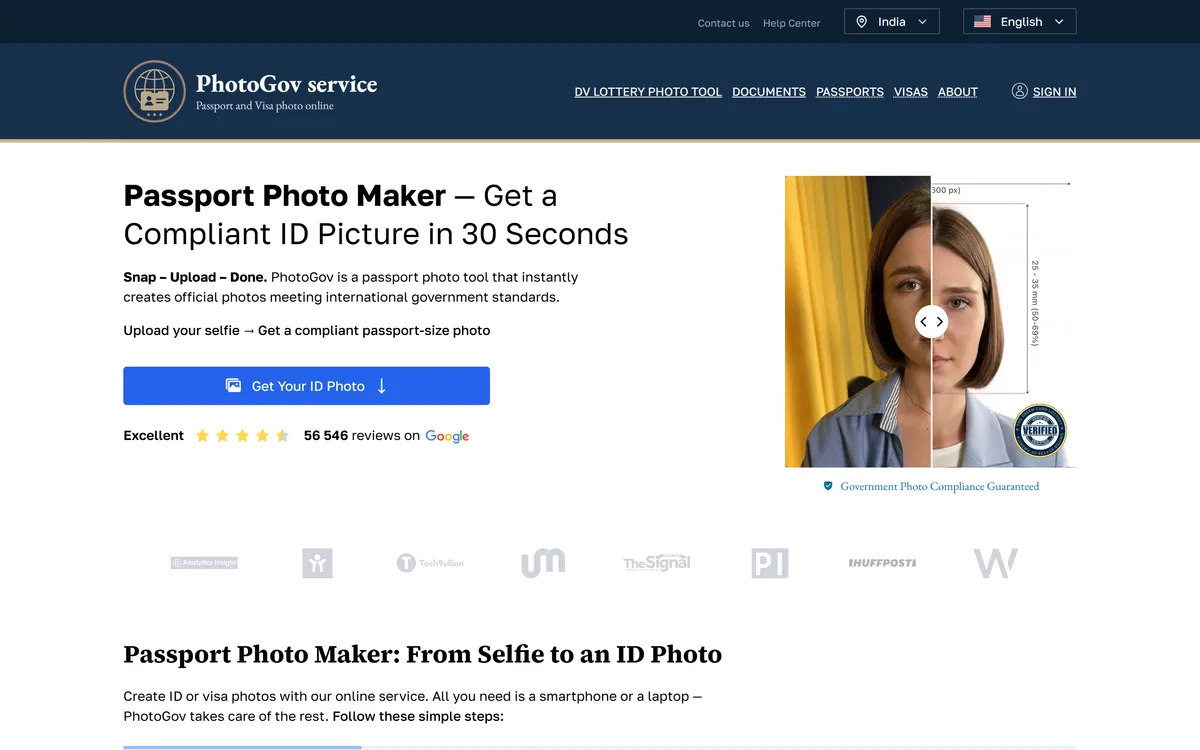
PhotoGov converts an uploaded selfie into a passport, visa or ID photo meeting official requirements, covering 900+ document types across 200 countries in about 30 seconds. It states it is independent of any government and that final acceptance rests with the issuing authority.
photogov.net5 viewsAdded October 5, 2025191K visitors
Almost nobody gets a passport photo right on the first attempt without help, and it is not carelessness. The rules are absurdly precise — head height in millimetres, background shade, expression, glasses, shadow, ear visibility — and they differ by country and by document.
The traditional answer was a booth or a photographer who knew the local specification. That works and it means travelling somewhere to be photographed badly under fluorescent light.
PhotoGov's proposition is that the specification is data, and applying it to a photograph you already have is something software can do in half a minute.
PhotoGov's homepage, captured 9 September 2026, showing the country and document type selector.
What Makes A Passport Photo Non-Compliant?
PhotoGov states that it takes an uploaded selfie and automatically adjusts it to official requirements, delivering a ready-to-download ID picture, and that the portrait does not have to be perfect.
The reason automation helps so much here is that the requirements are geometric rather than aesthetic, and geometry is precisely measurable.
Head height as a proportion of the image, the position of the eyes within the frame, the distance from the top of the head to the border, the exact dimensions in millimetres — these are numbers, and getting them wrong is why photos are rejected.
Background is the second most common failure. Requirements specify a shade, not just a colour, and an off-white wall photographed in warm light is a different shade from the one required.
What software cannot fix is what the photograph does not contain. A closed eye, a shadow across the face, a head turned slightly, glasses reflecting, or hair obscuring the eyebrows are content problems rather than geometry problems — which is why the input still matters even when the tool handles the maths.
Requirements are geometric rather than aesthetic, and geometry is measurable. That is exactly why software is good at this and a mirror is not.
Who Actually Decides If A Photo Is Accepted?
PhotoGov states directly that it is an independent service, not affiliated with any government, embassy or consulate, that its information is based on official requirements and verified primary sources, and that final acceptance is determined solely by the issuing authority.
That paragraph is more valuable than any feature on the page, and it is worth understanding why.
No photo service can guarantee acceptance, because acceptance is a decision made by a person or system at an embassy, passport office or licensing authority applying their own judgement to their own rules.
A tool can apply the published specification correctly and still produce a photo somebody rejects — for a reason that is discretionary, or because a local office interprets a rule more strictly than the published version suggests.
Stating that plainly on the homepage rather than burying it is the behaviour of a service that expects to be trusted. Any competitor guaranteeing acceptance is making a promise about somebody else's decision, which is worth noticing.
Nine Hundred Document Types Across Two Hundred Countries
PhotoGov states it makes photos for 900+ types of ID documents across 200 countries, with a selector for country and document type.
The breadth is the product, and it addresses a specific and underappreciated problem: requirements do not just vary by country, they vary by document within a country.
A passport, a visa, a driving licence and a residence permit issued by the same government frequently require different dimensions and different head proportions, and a photo correct for one is rejected for another.
Visa requirements are the worst case, because the destination country sets them rather than your own — so somebody applying for three visas may need three different photos of themselves taken the same afternoon.
Holding nine hundred specifications is therefore not a vanity number, it is the entire value proposition. What matters when evaluating is whether *your* specific document is covered and how current the specification is, since governments revise these rules without announcement.
Check your specific document type, not just your country.
Photograph in even, natural light with a plain wall behind you.
Remove glasses unless your document explicitly permits them.
Keep a neutral expression with both eyes open and visible.
Treat any acceptance guarantee as a claim about somebody else's decision.
Expert Verification And The Medical Option
Two options on the site are worth singling out because they show the service understands its own limits.
The first is expert verification, offered at checkout. A human checking the output before you submit it is a sensible product for a situation where the cost of being wrong is a rejected application and a delayed trip.
It also handles the class of problem automation cannot see. Software can confirm the geometry is correct; it is much weaker at judging whether an expression reads as neutral, whether a shadow is disqualifying, or whether hair is obscuring something.
The second is a medical restriction checkbox, for cases where health issues affect the photo and a medical certificate is required. Most authorities have provisions for people who cannot meet standard requirements — a medical condition affecting eye position, head covering worn for religious reasons, or an inability to hold a neutral expression.
Building that into the flow rather than leaving people to discover it is a small thing that indicates the specifications have actually been read rather than scraped.
Where An Online Photo Tool Stops
There are situations where software cannot substitute for a photographer, and knowing them saves a rejected application.
Biometric enrolment is the clearest. Some documents require the photograph to be taken at a specific facility with specific equipment, and no uploaded selfie will do — the requirement is about the capture, not the image.
Poor input is the second. A tool adjusting a photograph cannot add detail that was never captured, so a low-resolution, badly lit or heavily compressed image produces a compliant-shaped photo of poor quality that may still be rejected.
Printing is the third and most avoidable. A digital photo meeting every specification printed at the wrong size on the wrong paper is non-compliant, and that step is entirely on you.
And a photo is one part of an application. Getting it right removes one failure mode from a process with several — the same narrow-but-real value that document tools like Clipping Magic provide in a completely different setting.
It is worth separating this from photo tools that adjust for appearance. Editors like Photoleap and commercial platforms such as Photoroom optimise how an image looks; an ID photo tool optimises whether it complies, and those are opposite objectives that happen to share an interface.
Getting An ID Photo Accepted First Time
Most rejected photos fail on things that were decided before the picture was taken, which is where the effort belongs.
This sequence gets the input right, since that is the part software cannot rescue.
Look up your exact document type, since requirements differ within a country.
Photograph against a plain, evenly lit wall in daylight, not under a ceiling light.
Face the camera squarely with a neutral expression and both eyes clearly visible.
Remove glasses unless your document explicitly permits them, and tie back hair.
Check the output against the published specification yourself before paying.
If printing, use the specified size and paper — a correct file printed wrongly still fails.
PhotoGov: Compliant ID Photos In Thirty Seconds
900+ document types across 200 countries, from passports to visas to driving licences.
About 30 seconds from an uploaded selfie to a ready ID photo, in digital or printable format.
Expert verification is an optional step at checkout, which is a sensible way to handle uncertainty.
It states it is independent of any government, embassy or consulate, and that acceptance is decided by the issuing authority.
A medical restriction option for cases where health issues affect the photo and a certificate is required.
ID Photo Requirement Terms
The vocabulary of ID photo specifications, and what each measurement controls.
undefined
undefined
undefined
undefined
undefined
undefined
PhotoGov: Coverage And Disclaimers
Product type
Online passport, visa and ID photo tool
Coverage
900+ document types across 200 countries
Speed
About 30 seconds from upload to finished photo
Flow
Select country and document, upload, process, checkout, download
Output
Digital and printable formats
Optional step
Expert verification available at checkout
Accessibility
A medical restriction option where health issues affect the photo
Independence
States it is not affiliated with any government, embassy or consulate
Acceptance
States final acceptance is determined solely by the issuing authority
Sources
Information stated as based on official government requirements and verified primary sources
Displayed rating
56,546 reviews referenced on the page
Key features of PhotoGov
Automatic adjustment of a selfie to official ID requirements
Coverage of 900+ document types across 200 countries
Country and document type selection
Optional expert verification before download
A medical restriction pathway
Digital and printable output
Processing in about 30 seconds
A DV lottery photo tool
Pros & cons
Pros
7
Holds specifications for 900+ documents, which is genuinely hard to do yourself
Geometry is measurable, making this the right kind of work to automate
States its independence and the limits of its authority plainly on the homepage
Expert verification handles the judgement automation cannot
A medical exception pathway indicates the specifications were actually read
Handles visa photos, where requirements are set by the destination country
Works from a phone with no trip to a booth
Cons
7
Cannot guarantee acceptance, because that is not its decision to make
Cannot fix content problems — shadows, closed eyes, obscured features
Useless where a document requires biometric enrolment at a facility
Output quality is capped by the quality of the photograph you supply
Correct printing is entirely your responsibility and a common failure
No operating company named on the pages we read
Photo retention and processing location are not described
Best For
Travellers applying for visas with differing photo requirements
Anyone renewing a passport without easy access to a photo booth
People applying for several documents at once
Applicants who want to check a specification before paying
Families producing several photos in one session
PhotoGov Against Other Photo Tools
Photo tools differ by whether they measure, remove, edit or generate.
You need a photo for a specific document and cannot easily reach a booth.
You are applying for several visas needing different specifications.
You have a decent camera and a plain wall available.
You want to check the specification for your document before spending anything.
You would pay a little extra for a human to verify the result.
Visit a photographer when
Your document requires photography at an official biometric enrolment facility.
You cannot produce a well-lit photograph against a plain background.
Your circumstances need a medical or religious exemption assessed in person.
The application is time-critical and a rejection would be costly.
You need printed photos and have no way to print at the required size and paper.
PhotoGov: What The Service Publishes
Last checked . Read from photogov.net in a browser session on the date above, with the screenshot captured alongside.
Positioned as a passport photo maker producing a compliant ID picture in 30 seconds
Flow described as snap, upload, done, from a smartphone or laptop
Coverage stated as 900+ types of ID documents across 200 countries
A country and document type selector shown, with passport, visa and driving licence options
A four-step process described: photo upload, processing, checkout, download
Expert verification offered as an option at checkout
A medical restriction checkbox shown, stating a medical certificate is required
Stated explicitly as an independent service, not affiliated with any government, embassy or consulate
Stated that information is based on official government requirements and verified primary sources
Stated that final acceptance is determined solely by the issuing authority
Digital and printable output formats stated
56,546 reviews referenced on the page
What we could not confirm: pricing, or what expert verification costs; the operating company, which the pages we read do not name; how frequently document specifications are updated as governments revise them; where uploaded photographs are processed and how long they are retained, which matters because they are identity documents; whether the review count corresponds to a named review platform; and what happens if a photo produced by the service is rejected. We did not upload a photo.
Editor's Verdict
4.0/5
Passport photo requirements are unusually strict, extremely specific to each country and document, and almost impossible to satisfy by accident. PhotoGov's value is holding those rules for 900+ document types and applying them automatically — which is exactly the kind of tedious, high-precision, low-judgement work software should do. The disclaimer on its own homepage is the mark of a serious service rather than a weakness: it states plainly that it is not affiliated with any government and that final acceptance rests with the issuing authority. Both of those are true of every photo tool, and most do not say so. AInexfinder Editor Score: 4.0/5.
PhotoGov pricing
AInexfinder does not list plan prices or billing details. For current pricing, plans, and trials, visit the official PhotoGov website.
Vendor pricing, credits, and billing policies change over time. Always confirm on the official site before you buy.
Frequently asked questions
What is PhotoGov?
PhotoGov converts an uploaded selfie into a passport, visa or ID photo meeting official requirements, covering 900+ document types across 200 countries in about 30 seconds. It states it is independent of any government and that acceptance is decided by the issuing authority.
Why are passport photos so often rejected?
Because the requirements are geometric and precise: head height as a proportion of the image, eye position within the frame, exact dimensions in millimetres. Background is the second most common failure, since specifications name a shade rather than just a colour.
Can any service guarantee my photo will be accepted?
No, and PhotoGov says so on its homepage. Acceptance is a decision made by a person or system at an embassy or passport office applying their own rules. A tool can apply the published specification correctly and still produce something somebody rejects.
Why does that disclaimer make the service more credible?
Because it is true of every photo tool and most do not say it. Any competitor guaranteeing acceptance is making a promise about somebody else's decision, which is worth noticing when comparing services.
Why does document type matter as much as country?
Because requirements vary within a country. A passport, visa, driving licence and residence permit from the same government frequently need different dimensions and head proportions, and a photo correct for one is rejected for another.
What about visa photos specifically?
Those are the hardest case, because the destination country sets the requirements rather than your own. Somebody applying for three visas may need three different photos of themselves taken the same afternoon, which is exactly what broad specification coverage solves.
What can the software not fix?
Anything that is a content problem rather than a geometry problem: a closed eye, a shadow across the face, a head turned slightly, glasses reflecting, or hair obscuring the eyebrows. It cannot add detail the photograph never captured.
Is expert verification worth it?
Probably, where a rejection would be costly. Software can confirm geometry; it is much weaker at judging whether an expression reads as neutral or whether a shadow is disqualifying — and those are the failures a human catches.
When do I need a photographer instead?
When your document requires photography at an official biometric enrolment facility, because the requirement is about the capture rather than the image. Also when you cannot produce a well-lit photograph against a plain background.
How should I take the photo?
Against a plain, evenly lit wall in daylight rather than under a ceiling light, facing the camera squarely with a neutral expression and both eyes visible. Remove glasses unless explicitly permitted, and tie back hair that could obscure your eyebrows.
Daniel reviews AI tools the slow way — by actually using them on real projects. His reviews cover what works, what breaks, and who each tool is genuinely a good fit for.
Daniel and the AInexfinder editorial team research PhotoGov using public product information, listing evidence, and (when available) hands-on checks. Scores reflect listing completeness and transparency — not paid placement.
Listings may include affiliate or sponsored placements, which are labeled when present. Editorial scores and cons are not sold. See our affiliate disclosure and review methodology.
Pet Pic Portraits turns a pet photo into styled artwork — Royal King, Pop Art, Watercolour, Viking, Wizard and more — with an instant preview before ordering. Output is a digital download, a canvas print or framed wall art, and it includes a pet memorial option.
krea2.org is a browser image-generation workspace that runs several third-party models side by side, including Krea 2 tiers, FLUX.2, GPT Image 2, Nano Banana and Seedream 5.0, with reference uploads, six aspect ratios and live model switching.
Canva AI is the Magic Studio suite built into Canva — Magic Write for copy, Dream Lab for images, Magic Edit, Expand and Eraser for photos, Magic Switch for reformatting, Magic Charts for data, and Canva Code for interactive widgets.
Pixlr is a browser-based photo editor from Pixlr Pte Ltd with two editors and a generative AI layer — Generative Fill, Expand and Transform, background and object removal, Super Scale upscaling, face swap, plus image, video, and audio generation.
GenApe is an all-in-one AI platform covering writing, chat, image and video generation, image editing, product photography, translation, and research — with 145 free credits on signup and commercial rights granted to paid users.
Magic Patterns is an AI design tool for product teams that turns prompts, requirements and ideas into high-fidelity UI, matching your existing design system so teams can prototype and test directions before committing engineering resources.