DreamSync is an iOS sleep app combining tracking and sleep-stage analysis with a 12-week CBT-I programme, an AI coach, smart alarm, snoring detection and behaviour correlation across caffeine, exercise, screen time, stress and alcohol. It works offline, requires no account, and stores all data locally.
SleepSpace
Verified
SleepSpace is a sleep app that tracks sleep with your phone's sensors, plays adaptive sounds meant to deepen sleep, wakes you with a smart alarm and offers CBT-I-based programs and an AI coach. It is a wellness tool, not medical care or a diagnosis.
3.7Editor Score
sleepspace.com6 viewsAdded June 28, 20251K visitors
Most sleep apps either track your night or play soothing sounds. SleepSpace tries to do both and act on what it measures, adjusting sounds through the night and waking you at a lighter point in your sleep.
It tracks sleep with your phone's sensors, plays adaptive pink-noise and delta-wave sounds, wakes you with a smart alarm, and offers CBT-I-based programs plus an AI coach, with optional wearable connections. It sits among wellbeing tools like Aura Health, with a tighter focus on sleep.
This review covers how SleepSpace tries to deepen sleep, who it suits, how its subscription works, and the health limits any sleep app has.
SleepSpace Sleep-Tool Facts
| What it is | A sleep tracking, sound and coaching app |
|---|---|
| Tracking | Phone sensors; optional Apple Watch, Oura, Whoop |
| Sounds | Adaptive pink-noise and delta-wave sounds |
| Alarm | Smart alarm aimed at a lighter sleep stage |
| Programs | CBT-I-based sleep programs |
| Coach | An AI coach persona ('Dr. Snooze') |
| Content | 50+ meditations and stories; snore tracking |
| Access | 7-day free trial, then subscription |
SleepSpace, The Sleep Brief
- SleepSpace is a sleep app, not a medical device: tracking, adaptive sounds, a smart alarm and coaching on your phone.
- No wearable is required: it uses phone sensors, and can optionally connect to Apple Watch, Oura or Whoop.
- It borrows from CBT-I: structured programs based on an evidence-based insomnia approach, plus an AI coach persona.
- Phone tracking is an estimate: persistent insomnia or loud snoring warrant a doctor, not just an app.
A Sleep Tracker, Smart Alarm And Coach, Without A Wearable
SleepSpace's appeal is doing several sleep jobs in one app without anything on your wrist. Your phone tracks movement and sound overnight, the app estimates your sleep stages, plays sounds intended to deepen sleep, and wakes you in a lighter phase so mornings feel less groggy.
It goes beyond passive tracking with structured programs based on CBT-I, cognitive behavioural therapy for insomnia, which is a well-established approach, plus wind-down meditations, stories, a snore tracker and a circadian chart.
For people who dislike wearables or want a single app to try before buying hardware, that combination is genuinely convenient, and optional connections to Apple Watch, Oura and Whoop can improve accuracy for those who already own one.
The honest framing is that SleepSpace is a wellness tool. Phone-based sleep staging is an estimate, not a clinical sleep study; an app version of CBT-I is not the same as a clinician-delivered course; and 'Dr. Snooze' is an AI persona, not a doctor. It can help many people's habits, but it is no substitute for medical care.
SleepSpace can help many people's sleep habits, but phone-based staging is an estimate and an AI coach is not a doctor.
How Does SleepSpace Try To Deepen Sleep?
The app combines overnight sensing and sound with daytime programs and coaching.
Tracking, Smart Alarm And Adaptive Sounds
SleepSpace uses your phone's sensors to estimate sleep stages, then adjusts what it plays: wind-down sounds and meditations to fall asleep, pink noise and delta-wave sounds it says help keep you in deep sleep, and a smart alarm that detects movement and sound to wake you in a lighter cycle. It describes its delta-wave approach as patented.
The science on acoustic stimulation for deep sleep is promising but still developing, so treat effects as individual rather than guaranteed. For guided breathing to calm down before bed, a device-and-app approach like Moonbird takes a different route.
CBT-I Programs And An AI Coach, Not Medical Care
SleepSpace offers curated programs based on CBT-I techniques and personalised guidance from an AI coach persona. CBT-I is a recommended first-line approach for chronic insomnia, and app-based versions can help some people build better habits.
But this is not medical care. Ongoing insomnia, loud snoring, gasping at night or heavy daytime sleepiness can signal conditions such as sleep apnoea that need a doctor. For emotional wellbeing support, a tool like Wysa is a different kind of app, and neither replaces professional help.
Who SleepSpace Suits Among Sleepers
SleepSpace suits people who want to improve everyday sleep habits, fall asleep faster, wake less groggy and understand their patterns, without buying or wearing a tracker.
It suits those curious about CBT-I-style programs and sound-based approaches, light sleepers who like sound masking, and people who already own an Apple Watch, Oura or Whoop and want a coaching layer on top.
It is not the right answer on its own for anyone with suspected sleep apnoea, chronic insomnia that has not responded to habits, or other sleep disorders, which need a clinician. Its user count and expert quotes are vendor-presented.
How SleepSpace's Subscription Works
SleepSpace offers a 7-day free trial and then a paid subscription, with an optional hardware add-on such as a phone charger with a smart light. We do not publish prices, which change; check the site.
The value question is whether your sleep measurably improves over a few weeks, since habit change takes time; a week of data is a starting point, not a verdict.
Because there is a free trial, the sensible approach is to use it consistently every night of the trial, note how you feel, and only subscribe if you see a trend worth continuing.
A Fair First Week With SleepSpace
Because sleep varies night to night, give SleepSpace a fair, consistent trial rather than judging one night.
- Use it every night of the free trial at roughly the same bedtime.
- Try the wind-down sounds and the smart alarm, and note how you feel each morning.
- Start a CBT-I-based program and follow it as written.
- Connect a wearable if you have one to compare readings.
- Treat sleep-stage graphs as estimates, not a diagnosis.
- Pass/fail: SleepSpace is worth it if your sleep and mornings improve over the trial.
- See a doctor for persistent insomnia, loud snoring or extreme daytime sleepiness.
Is SleepSpace Right For Your Sleep?
Sleepers SleepSpace May Help
- People improving everyday sleep habits
- Those who do not want to wear a tracker
- Light sleepers who like sound masking
- Anyone curious about CBT-I-style programs
- Wearable owners wanting a coaching layer
When SleepSpace Is Not The Help You Need
- Suspected sleep apnoea or loud snoring
- Chronic insomnia needing clinical treatment
- Anyone wanting a medical diagnosis
- People expecting lab-accurate sleep stages
- Those reading vendor quotes as clinical proof
Key features of SleepSpace
Phone-based sleep tracking
Adaptive deep-sleep sounds
Smart alarm
CBT-I-based programs
AI sleep coach
Meditations and sleep stories
Snore tracker and circadian chart
Wearable integrations
Pros & cons
Pros
5- No wearable needed
- Combines tracking, sounds and coaching
- Programs grounded in CBT-I
- Smart alarm for gentler wake-ups
- Free trial to test it
Cons
5- Phone sleep staging is an estimate
- Not medical care or a diagnosis
- Sound-based deep-sleep effects vary by person
- AI coach is a persona, not a clinician
- Subscription after the trial
Best For
- Everyday sleep habits
- Wearable-free tracking
- Sound masking
- CBT-I-style programs
- Gentler mornings
SleepSpace Beside Other Wellbeing Tools
The useful comparison is with other wellbeing apps, by what each focuses on.
| Tool | Tool | Focus | Best for |
|---|---|---|---|
| SleepSpace | Sleep tracking, sounds, coaching | Phone-based sleep improvement | Everyday sleep habits |
| Aura Health | Meditation and wellbeing | Mindfulness and relaxation content | Stress and calm |
| Wysa | AI wellbeing support | Emotional self-help conversations | Mood and stress |
| Moonbird | Breathing device and app | Guided breathing | Calming down before sleep |
What SleepSpace's Site Told Us
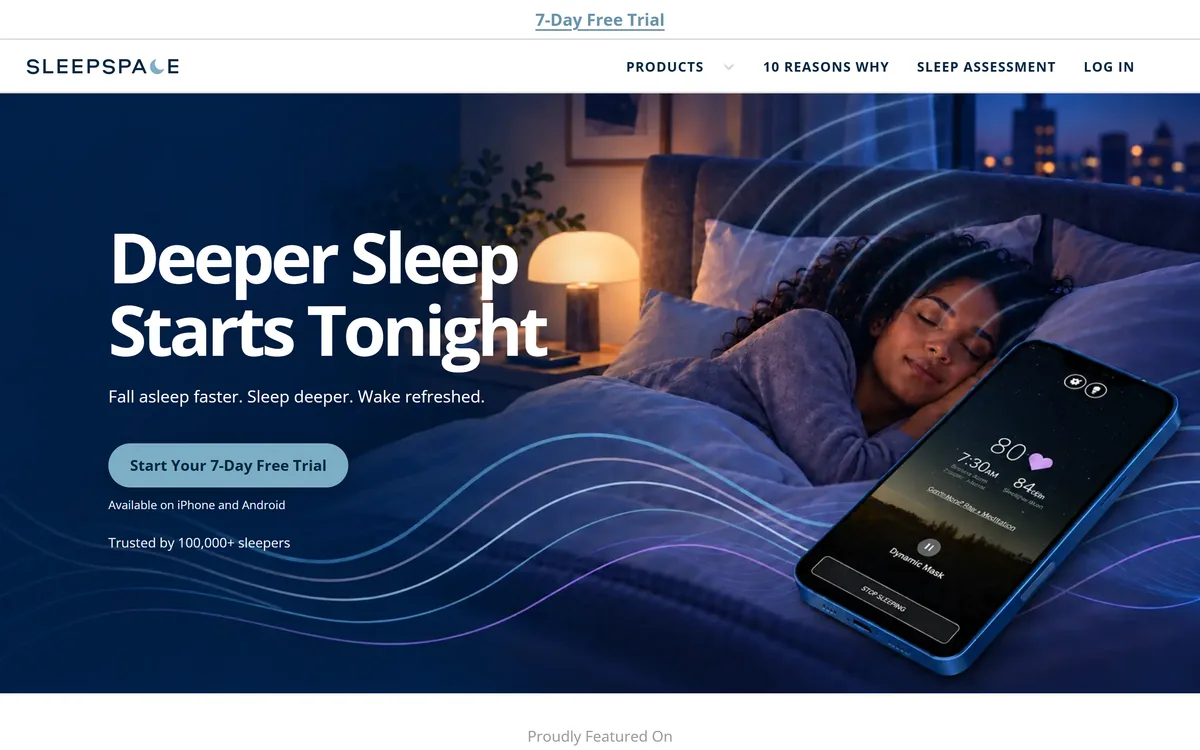
Last checked . Read from sleepspace.com during this check, with the screenshot above captured at the same time. We did not track our own sleep with the app for this review.
- A sleep tracking, sound and coaching app for iPhone and Android
- Phone-sensor tracking with no wearable required
- Optional support for Apple Watch, Oura and Whoop
- Adaptive pink-noise and delta-wave sounds, described as patented
- A smart alarm aimed at a lighter sleep stage
- CBT-I-based programs and an AI coach persona
- 50+ meditations and stories, a snore tracker and circadian chart
- A 7-day free trial, then a subscription
- Vendor-stated user count and expert quotes
- No prices reproduced here, in line with this site's pricing policy
SleepSpace is a wellness app, not a medical device or diagnosis. Phone-based sleep staging is an estimate, and its AI coach is not a doctor. Persistent insomnia, loud snoring or extreme daytime sleepiness should be discussed with a clinician.
Other Health And Wellbeing Tools
A meditation app, an AI wellbeing companion and a breathing tool to weigh alongside SleepSpace.
- Aura Health — meditation and relaxation
- Wysa — AI emotional wellbeing support
- Moonbird — guided breathing before sleep
Editor's Verdict
3.7/5SleepSpace earns 3.7 as a thoughtful sleep app that combines phone-based tracking, adaptive sounds, a smart alarm and CBT-I-based programs without requiring a wearable, with optional Apple Watch, Oura and Whoop support. It can genuinely help people working on everyday sleep habits. But it is a wellness tool: phone sleep staging is an estimate, sound-based effects vary, the AI coach is not a doctor, and persistent insomnia or loud snoring need a clinician. Use the free trial consistently and judge it on how your nights and mornings change. AInexfinder Editor Score: 3.7/5.
SleepSpace pricing
AInexfinder does not list plan prices or billing details. For current pricing, plans, and trials, visit the official SleepSpace website.
Visit official website for pricingVendor pricing, credits, and billing policies change over time. Always confirm on the official site before you buy.
Frequently asked questions
What is SleepSpace?
SleepSpace is a sleep app that tracks your sleep with your phone's sensors, plays adaptive sounds meant to deepen sleep, wakes you with a smart alarm and offers CBT-I-based programs and an AI coach.
Do I need a wearable for SleepSpace?
No. It tracks sleep using your phone's sensors, and can optionally connect to Apple Watch, Oura or Whoop for additional data if you already own one.
Is SleepSpace a medical device?
No. It is a wellness app, not a medical device or diagnosis. If you have persistent insomnia, loud snoring, gasping at night or extreme daytime sleepiness, see a doctor, as these can signal conditions like sleep apnoea.
How accurate is SleepSpace's sleep tracking?
Phone-based sleep staging is an estimate based on movement and sound, not a clinical sleep study. It is useful for spotting patterns and trends, but should not be treated as precise measurement.
What is CBT-I?
CBT-I is cognitive behavioural therapy for insomnia, a well-established, recommended approach for chronic insomnia. SleepSpace offers programs based on its techniques; an app version can help habits but is not the same as treatment from a clinician.
Who is Dr. Snooze?
Dr. Snooze is the name of SleepSpace's AI coach persona that provides personalised guidance. It is an AI feature, not a real doctor, so its suggestions are not medical advice.
Do the deep-sleep sounds work?
SleepSpace uses adaptive pink-noise and delta-wave sounds it describes as patented. Research on acoustic stimulation for deep sleep is promising but still developing, and effects vary from person to person.
How much does SleepSpace cost?
SleepSpace offers a 7-day free trial, then a paid subscription, with optional hardware add-ons. We do not publish prices, which change; check the site.
Who is SleepSpace best for?
People working on everyday sleep habits who want tracking, sounds, a gentle alarm and structured programs without wearing a tracker. It is not a substitute for medical care for sleep disorders.
Did this review test SleepSpace overnight?
No. This review is based on SleepSpace's public site at the time of checking. The trial steps above are a suggested way to give it a fair test on your own sleep.
Reviews
Log in to write a review.
User Reviews
No reviews yet. Be the first to share your experience with SleepSpace.
Reviewed by Daniel Reed
Assigned reviewer
Daniel ReedSenior AI Tools Reviewer
Daniel reviews AI tools the slow way — by actually using them on real projects. His reviews cover what works, what breaks, and who each tool is genuinely a good fit for.
Hands-on reviewsProduct testingAI software
Daniel and the AInexfinder editorial team research SleepSpace using public product information, listing evidence, and (when available) hands-on checks. Scores reflect listing completeness and transparency — not paid placement.
- Last verified
- Methodology
- How we review AI tools
- Sources used
- sleepspace.com
- AInexfinder listing fields (features, pros/cons, description)
- Public vendor pages when available
- Editorial policy
- Listings may include affiliate or sponsored placements, which are labeled when present. Editorial scores and cons are not sold. See our affiliate disclosure and review methodology.
Related tools
SleepQ is an iOS sleep coach that runs structured seven-night experiments across eight sleep elements — wind-down, screens, caffeine, light and others — measuring before and after via Apple Health, with an AI coach reachable by chat and voice.
FreemiumHealth & Lifestyle

RecipeScan is an Apple-only cooking app that builds a pantry from photos, suggests recipes against what you already have, and coordinates three dishes onto one timeline. It adds grocery lists, budget tracking, calorie estimates and a hands-free cooking mode.
FreemiumHealth & Lifestyle
RelaxFrens is a personalised meditation and sleep app that builds a plan around your goals, schedule and daily mood check-ins. Its companion, Fren, guides breathing exercises and conversations, and the app uses streaks, badges, nature sounds and adjustable voices and session lengths.
FreemiumHealth & Lifestyle
moonbird is a tactile, screen-free handheld breathing coach that expands and contracts in your palm to pace your breath, reads your pulse and HRV, and pairs with an app whose Aura AI coach personalises the rhythm, aimed at calm and sleep as a wellbeing tool.
FreemiumHealth & Lifestyle
Youper is an AI emotional-health assistant built around conversational check-ins, mood tracking and journaling. The company has announced it is shutting down on 30 September 2026, after which accounts, chat history and personal data are permanently deleted.
FreemiumHealth & Lifestyle
Explore More
Embed this listing on your site
Featured on AInexfinder