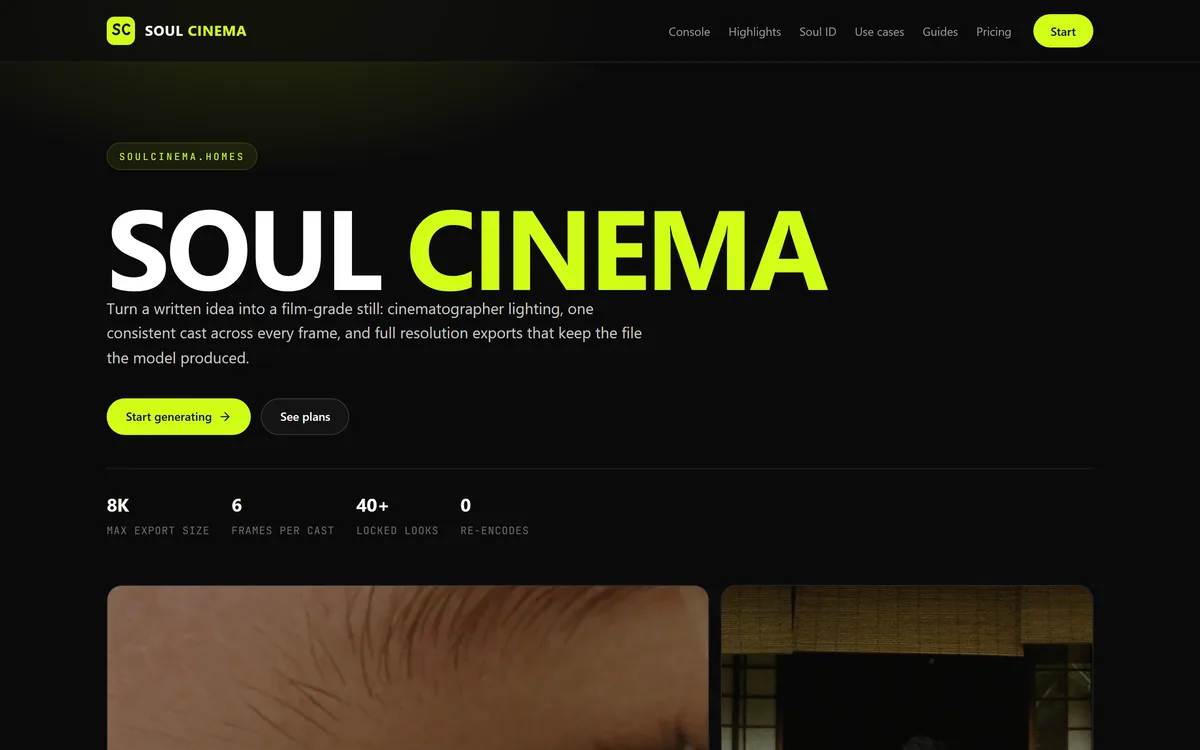
Soul Cinema at soulcinema.homes is an independent, paid-only web app that turns a written shot into a cinematic still, with Soul ID casts held across up to six frames, palette lock and 40+ look presets. It is not Higgsfield's own Soul Cinema.
What this site is, and who runs it: "Soul Cinema" is also the name of an image product from Higgsfield, published at higgsfield.ai/soul-cinema. The site reviewed here, soulcinema.homes, is a separate, independent web app: its own footer states it is not affiliated with, endorsed by or operated by any model provider it references, and its guide says it renders stills through the Soul model family. We found no operating company named on its pages. This review covers soulcinema.homes, not Higgsfield's product, and AInexfinder is not affiliated with either. If you want Higgsfield's own Soul Cinema, go to higgsfield.ai.
Search for Soul Cinema and you will find two things with the same name. Higgsfield publishes Soul Cinema as its own cinematic image product, alongside Soul ID for character consistency. The listing reviewed here is soulcinema.homes, a separate web app that uses the same name and states in its footer that it is not affiliated with, endorsed by or operated by any model provider it references.
That distinction is the first thing a buyer needs, because it decides who you pay, whose terms apply and who answers when a render fails. soulcinema.homes describes itself as an independent app that renders stills through the Soul model family, wrapped in its own console, presets and subscription plans.
This review explains what the console does, what Soul ID and palette lock promise, how the paid-only plans are structured, where the licence and credit wording needs clarifying, and when going direct to Higgsfield or choosing a broader generator such as Midjourney makes more sense.
soulcinema.homes markets cinematic stills, Soul ID casts and full-resolution exports on paid plans.
Soul Cinema In Five Lines, Before You Subscribe
Two products share the name: Higgsfield sells its own Soul Cinema at higgsfield.ai; soulcinema.homes is an independent app that says it renders through the Soul model family and is not affiliated with Higgsfield.
What it renders: cinematic stills only, from a written shot brief, with 40+ look presets, palette lock and Soul ID casts held across up to six frames.
How it charges: three paid subscription tiers billed through Stripe, with no free tier or trial and monthly credits that do not roll over.
Read the licence line: the plan table reserves a commercial licence for the top tier, while the terms say you keep your rights in what you generate. Get that resolved in writing before client work.
Score 3.3: a thoughtfully documented front-end held back by a borrowed name, an unnamed operator and no way to try it before paying.
Soul Cinema Stills-Console Facts
What it is
An independent web app for cinematic AI stills
Not to be confused with
Higgsfield's own Soul Cinema at higgsfield.ai
Model family
Soul, per the site's guide; providers unnamed in the terms
Output
Stills only, 2K to 8K depending on plan
Consistency tools
Soul ID casts up to six frames, palette lock, 40+ looks
Sign-in
Google sign-in only
Billing
Stripe subscriptions, monthly or annual
Free access
None: no free tier or trial
Operator
No company named on the site or in its terms
Policies
Terms, privacy and refund pages dated 15 September 2026
Is Soul Cinema Higgsfield's Own Product?
No. Higgsfield, the AI video and image company, runs a Soul Cinema page at higgsfield.ai/soul-cinema that describes cinematic image generation by Higgsfield, with Soul ID for keeping a character's face consistent. soulcinema.homes is a different website that has taken the same product name as its brand.
The site is open about the separation. Every page ends with a statement that it is an independent third-party website, not affiliated with, endorsed by, sponsored by or operated by any film studio, model provider or platform it references. Its Higgsfield guide goes further and says the site renders stills through the Soul model family while not being the model vendor.
What the site does not say is who operates it. The terms, privacy policy and refund policy, all dated 15 September 2026, name no company, address or governing jurisdiction, only a support email address. The terms say the console depends on third-party model providers without naming them, so the link to the Soul family rests on the guide page alone.
None of this means the product does not work. It does mean the brand name is the weakest guide to what you are buying: a third-party front-end, with its own pricing and policies, sitting between you and a model family you can also reach from its original vendor.
soulcinema.homes is not Higgsfield. It is an independent front-end that borrows the Soul Cinema name, says so in its footer, and names no operator.
What Does Soul Cinema's Console Actually Render?
The product is a single generation console on the homepage, built around stills rather than video.
Shot Briefs, Locked Looks And A Plan Readout
You describe the frame as a cinematographer's brief, optionally add a reference image, then choose a look such as cinematic still, neo-noir, golden hour or editorial, an aspect ratio of 16:9, 2.39:1, 4:5 or 1:1, and a resolution of 2K, 4K or 8K. Before anything renders, a readout lists the plan, cast, batch, reference, extras and credit cost.
That pre-render readout is the console's best design decision: you see what will be spent before a credit leaves your balance. The site's guides also give sound prompting advice, such as keeping one lighting setup per frame and changing a single line of the brief between re-renders, which applies to cinematic image work generally.
Soul ID Casts And Palette Lock Across Six Frames
Soul ID locks a face and wardrobe reference and reuses it across a sequence of up to six frames, so a close-up, a wide and a reverse angle read as the same person. Palette lock pins a requested hex value so a colour survives re-renders, and film grain is an optional extra.
The site is candid that consistency depends on the reference: a blurry or badly lit portrait produces a sequence that drifts between people. Treat the six-frame figure and the 8K ceiling as the vendor's specifications rather than results we measured, and judge them on your own references before committing to a plan.
Where A Stills-Only Soul Cinema Plan Pays Off
The console is built for look development, storyboards, key art, covers and campaign frames: work where a set of stills has to share one cast and one grade. Directors pitching a treatment, musicians needing cover art and small studios mocking up a campaign are the obvious users.
It is a poor fit for anything that moves. Soul Cinema renders stills only, and its own guide says that if the deliverable is a clip, a stills model is the wrong tool. It is also narrower by design than a general generator: fewer styles, more control over light and colour.
Commercial use needs care. The plan table marks the commercial licence as included only on the top Max tier, yet the terms say you keep the rights you hold in the images you generate. The two statements can coexist, but they leave a buyer on a lower tier unsure whether client work is allowed. For brand work where licensing certainty matters most, a studio positioned around commercial use, such as Adobe Firefly, removes that question.
Likeness is the other line to respect. Soul ID works from a face reference, and the terms forbid misleading or defamatory depictions of real people. Use only faces you have permission to use, and note that the privacy policy lists prompts, options and renders but does not separately describe how reference images are stored.
Soul Cinema's Paid-Only Credit Tiers
There is no free tier and no trial. Three subscription plans, Basic, Pro and Max, are billed monthly or annually through Stripe, with annual billing lowering the effective monthly rate. Each plan refreshes a credit balance every month, and unused credits do not roll over.
The tiers differ on volume and access rather than style. Basic caps output at 4K with one Soul ID cast and 12 looks; Pro opens 8K, unlimited casts, all 40-plus looks, palette lock and a priority queue; Max adds batch sequences, the commercial licence and the highest queue priority. We do not reproduce prices, which change, so check the pricing page.
The credit maths needs a careful read. The terms and guides say one credit renders one frame, while the console's own cost readout shows two credits for a 4K frame. Confirm the per-frame cost at each resolution on your plan before relying on a monthly credit figure.
The refund policy is specific: write within 14 days of a charge for double charges, charges after an evidenced cancellation, a plan bought by mistake and not rendered with, or sustained downtime on the service's side. Failed renders caused by the service return the credit, and cancelling stops renewal while keeping access to the end of the paid period.
Checking Soul Cinema Before A Client Job
Because you cannot try it free, treat the first paid month as a structured test.
Compare it with Higgsfield's own Soul Cinema page first, so you know which product you actually want.
Start on the lowest monthly plan rather than an annual one, so a poor fit costs one month.
Render one frame at each resolution you need and record the credits each one actually used.
Lock a clean, frontal, evenly lit reference in Soul ID and render a six-frame sequence across angles and lighting.
Re-render one frame with palette lock on and check the requested hex value holds.
Email support and ask for written confirmation of whether your tier permits client or commercial use.
Pass/fail: keep the plan only if faces hold across the sequence, credit use matches the readout and the licence answer covers your work.
Soul Cinema Console Vocabulary
Soul ID
A reference lock that reuses one face and wardrobe across a sequence so every frame shows the same person.
Palette lock
An option that pins a requested hex colour so it survives re-renders at other sizes or angles.
Look preset
A saved combination of lens, light direction, grain and palette applied to every frame in a sequence.
Re-encode
Re-compressing an image after generation; the site says its exports keep the file the model produced.
Front-end
A third-party app that puts its own interface, plans and billing on top of another company's model.
Key features of Soul Cinema
Cinematic stills from a written brief
Soul ID casts across up to six frames
Palette lock by hex value
40+ look presets
2K, 4K and 8K exports
Pre-render credit readout
Optional reference image
Batch sequences on the top tier
Pros & cons
Pros
5
Shows the credit cost before every render
Clear statement that it is independent
Dated terms, privacy and refund policies
Failed renders return the credit
Specific, useful prompting guides
Cons
5
No free tier or trial
Borrows Higgsfield's product name
No operating company named
Commercial licence only on the top tier
Credit-per-frame figures conflict
Best For
Look development
Storyboards
Cover and key art
Consistent-cast sequences
Campaign mock-ups
Soul Cinema Beside Higgsfield, Midjourney And Firefly
The real choice is between this front-end, the model family's own vendor and broader image tools.
Tool
Option
What it is
Main strength
Main limitation
Soul Cinema (soulcinema.homes)
Independent stills front-end
Cost readout before renders, Soul ID casts, palette lock
Output trails the strongest models on photorealism
Should You Render Your Stills Through Soul Cinema?
Storyboard Artists Soul Cinema's Casts Suit
Storyboard and look-development artists who need one cast across frames
Musicians and labels mocking up cover art
Small studios testing a campaign grade before a shoot
Users who value a cost readout before every render
Buyers who have already compared it with Higgsfield's own offer
When Going Direct Beats Soul Cinema
Anyone who wants to try before paying
Teams needing motion or video output
Agencies needing licence certainty on a lower tier
Buyers who need a named company behind the contract
Projects using faces without the person's permission
The Pages Behind Our Soul Cinema Verdict
Last checked . Read from soulcinema.homes during this check, with the screenshot above captured at the same time. We also read its terms, privacy and refund policies, its pricing page and its Higgsfield and What-is guides, and checked Higgsfield's own Soul Cinema page at higgsfield.ai.
Footer: independent third-party site, not affiliated with any model provider
Guide: renders stills through the Soul model family
Higgsfield publishes its own Soul Cinema page at higgsfield.ai
No free tier or trial; Stripe billing; Google sign-in
Commercial licence listed only on the Max tier
Credits: one per frame in the terms, two per 4K frame in the console readout
Refund policy: 14-day window and listed conditions
No operating company named in the terms, privacy or refund pages
Image quality, the 8K ceiling and six-frame consistency not tested by us
This is a research-based review: we read the site and its policies but did not buy a plan or render images. Output quality and consistency claims are the vendor's. The licence and credit questions above are unresolved on the site itself.
Image Studios To Price Against Soul Cinema
The model family's own vendor, a broad generator and a commercial-use studio to price against this front-end.
Higgsfield AI — the vendor behind the Soul models and its own Soul Cinema
Midjourney — a broader, aesthetic-led image generator
Adobe Firefly — image generation positioned for commercial use
Editor's Verdict
3.3/5
Soul Cinema at soulcinema.homes earns 3.3. Its console is thoughtfully built for consistent-cast cinematic stills, it shows the credit cost before every render, and its policies are unusually clear on refunds and failed renders. It is held back by a name borrowed from Higgsfield's own product, no named operator, no free way to try it, a commercial licence reserved for the top tier and conflicting credit figures. Compare it with Higgsfield directly before you subscribe. AInexfinder Editor Score: 3.3/5.
Soul Cinema pricing
AInexfinder does not list plan prices or billing details. For current pricing, plans, and trials, visit the official Soul Cinema website.
Vendor pricing, credits, and billing policies change over time. Always confirm on the official site before you buy.
Frequently asked questions
Is soulcinema.homes the official Higgsfield Soul Cinema?
No. Higgsfield publishes its own Soul Cinema at higgsfield.ai. soulcinema.homes is an independent web app that uses the same name and states in its footer that it is not affiliated with, endorsed by or operated by any model provider it references.
Does Soul Cinema have a free tier or trial?
No. Every plan is paid. The site offers three subscription tiers billed monthly or annually through Stripe, and a refund policy rather than a trial covers mistaken purchases.
What does Soul Cinema create?
Cinematic still images from a written shot brief, optionally starting from a reference image. It does not make video; its own guide suggests rendering the look first and animating elsewhere.
What is Soul ID on soulcinema.homes?
A reference lock that keeps one face and wardrobe across a sequence of up to six frames. The site says results depend on a clean, frontal, evenly lit reference.
Can I use Soul Cinema images commercially?
Confirm before you rely on it. The plan table lists a commercial licence only on the top Max tier, while the terms say you keep the rights you hold in your images. Ask support to confirm in writing what your tier allows.
How do Soul Cinema credits work?
Credits refresh monthly and do not roll over. The terms say one credit renders one frame, but the console's readout shows two credits for a 4K frame, so check the per-frame cost at the resolution you need.
Who operates soulcinema.homes?
The site does not say. Its terms, privacy and refund pages name no company or jurisdiction, only the support address support@soulcinema.homes.
Can I get a refund from Soul Cinema?
In listed cases, if you write within 14 days of a charge: double charges, charges after an evidenced cancellation, a plan bought by mistake and not rendered with, or sustained downtime on the service's side.
Is it safe to upload a face to Soul ID?
Upload only faces you have permission to use. The terms forbid misleading depictions of real people, and the privacy policy does not separately describe how reference images are stored, so ask support before uploading anything sensitive.
What is a good alternative to soulcinema.homes?
Higgsfield itself, if you want the Soul models from their vendor; Midjourney for a broader stylistic range; or Adobe Firefly where commercial-use clarity matters most.
Daniel reviews AI tools the slow way — by actually using them on real projects. His reviews cover what works, what breaks, and who each tool is genuinely a good fit for.
Daniel and the AInexfinder editorial team research Soul Cinema using public product information, listing evidence, and (when available) hands-on checks. Scores reflect listing completeness and transparency — not paid placement.
Listings may include affiliate or sponsored placements, which are labeled when present. Editorial scores and cons are not sold. See our affiliate disclosure and review methodology.
krea2.org is a browser image-generation workspace that runs several third-party models side by side, including Krea 2 tiers, FLUX.2, GPT Image 2, Nano Banana and Seedream 5.0, with reference uploads, six aspect ratios and live model switching.
Pet Pic Portraits turns a pet photo into styled artwork — Royal King, Pop Art, Watercolour, Viking, Wizard and more — with an instant preview before ordering. Output is a digital download, a canvas print or framed wall art, and it includes a pet memorial option.
VividManga colourises black-and-white manga while keeping recurring characters on a fixed palette and leaving speech bubbles untouched. It takes ZIP and CBZ archives, offers twelve-plus styles, and exports pages individually or as a packaged chapter.
Canva AI is the Magic Studio suite built into Canva — Magic Write for copy, Dream Lab for images, Magic Edit, Expand and Eraser for photos, Magic Switch for reformatting, Magic Charts for data, and Canva Code for interactive widgets.
Pixlr is a browser-based photo editor from Pixlr Pte Ltd with two editors and a generative AI layer — Generative Fill, Expand and Transform, background and object removal, Super Scale upscaling, face swap, plus image, video, and audio generation.
GenApe is an all-in-one AI platform covering writing, chat, image and video generation, image editing, product photography, translation, and research — with 145 free credits on signup and commercial rights granted to paid users.