

Descript is a video and audio editor that works by editing a transcript — delete a sentence and the footage goes with it — plus Studio Sound, Eye Contact, filler-word removal, AI voices, avatars, and the Underlord assistant.
FreemiumVideo & Audio
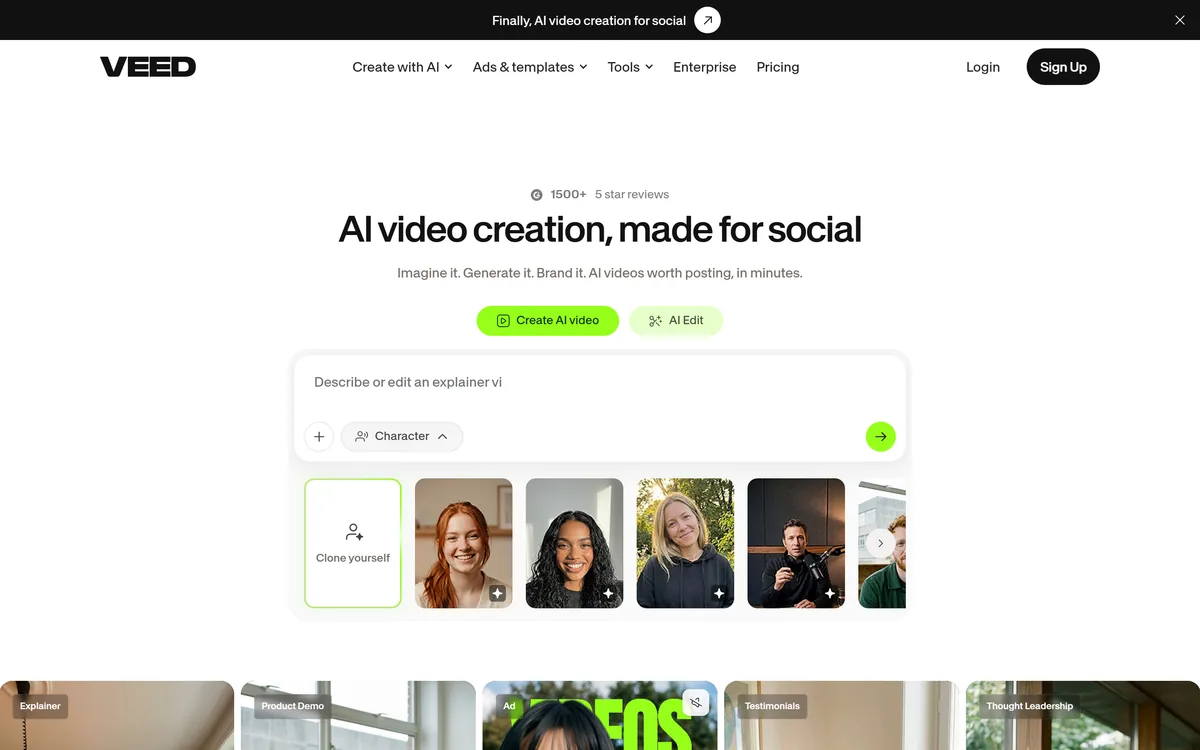
VEED is an AI video-creation platform that takes an idea to a finished social video in the browser, bundling generation, AI avatars, subtitles, dubbing, clean audio and a brand kit, plus access to frontier models like Sora 2, Veo and Kling.
Short-form video is the default marketing medium now, and the bottleneck is production: shooting, editing, captioning and branding each clip is slow. VEED's answer is to put the whole chain in one browser tab.
It is an AI video-creation platform that takes an idea to a finished social video, bundling generation, AI avatars, subtitles, dubbing, background-noise removal and a brand kit so the output looks like your brand rather than generic AI. For the generation itself it wraps frontier models, and for narration it overlaps with voice tools, much as a video avatar tool like HeyGen does.
This review covers what VEED bundles under one roof, where it fits a content team's day, how its plans are structured, and who will find it more than they need.
| What it is | An AI video-creation and editing platform |
|---|---|
| Runs in | The browser, with an API suite |
| Generation | Text-to-video plus AI avatars and clone |
| Audio | AI voices, dubbing, noise removal, Eye Contact AI |
| Captions | Auto subtitles, animated captions, translation |
| Wraps models | Sora 2, Veo, Kling plus its own Fabric |
| Branding | Brand kit for colours, fonts, logos, voice |
| Plans | Freemium with paid and Enterprise tiers |
VEED's framing is 'imagine it, generate it, brand it', and that sequence captures why it feels different from a plain editor. You can start from an idea or a script, generate a video, then apply a brand kit so colours, fonts, logos and voice are consistent across everything you make.
The emphasis on branding is the smart part. A lot of AI video looks like AI video; VEED's pitch is output that looks like yours, which is what actually matters for a business feed. Templates for explainers, product demos, ads and testimonials give each a sensible starting point.
Because it is browser-based, there is nothing to install and collaboration is straightforward, which suits the marketing and content teams it targets rather than solo film editors.
A lot of AI video looks like AI video. VEED's pitch is output that looks like yours, which is what actually matters for a business feed.
The breadth is the headline: VEED tries to cover the whole production chain rather than one step of it.
On the generation side there is text-to-video with no camera needed, AI avatars, and a 'clone yourself' option, plus access to frontier models including Sora 2, Veo and Kling alongside VEED's own Fabric model. Its clip and reel generators turn long footage into short, feed-ready cuts.
The brand kit ties it together, applying your identity to any output in a click. For raw generation alone a model-focused tool like Kling 3.0 covers that single step, but VEED's value is wrapping generation, branding and editing in one place.
The audio and caption suite is deep: auto subtitles and animated captions, a video translator, AI dubbing, AI voices, and quality fixes like Eye Contact AI and background-noise removal that lift rough footage toward ad-ready.
Clean audio is often what separates amateur from professional video, so pairing VEED's noise removal with a dedicated cleaner such as Cleanvoice AI is a reasonable workflow when audio quality is the priority for a given project.
VEED earns its place for teams producing a steady stream of social and marketing video: UGC-style ads, product demos, LinkedIn clips, explainer content. The combination of generation, captions and branding in one tab removes most of the repetitive production work.
It also suits people who are not video editors but need professional output, since the templates, auto-captions and brand kit do the heavy lifting. The API suite extends it to teams that want to generate video programmatically.
It is less suited to cinematic or highly bespoke editing, where a dedicated desktop editor still wins, and the sheer breadth can feel like more than a casual, occasional user needs.
VEED is freemium: you can sign up free, with paid subscription tiers adding resolution, length, features and removal of limits, and an Enterprise tier for larger teams. We do not reproduce prices, which change; check the site.
Because it bundles generation (which consumes model compute) with editing, the value question is whether one subscription replaces several point tools you would otherwise pay for separately, an editor, a captioner, a dubbing tool, an avatar generator.
For a team producing video regularly, consolidating into VEED usually comes out ahead; for occasional use, the free tier or a single-purpose tool may be enough.
Because VEED is broad, test it on the specific kind of video you actually need to ship, not a generic clip.
Text- and idea-to-video generation
AI avatars and clone-yourself
Auto and animated subtitles
AI dubbing and video translation
Noise removal and Eye Contact AI
Access to Sora 2, Veo, Kling and Fabric
Brand kit for consistent output
A full editor plus an API suite
The useful split is between an all-in-one platform and single-step generation or audio tools.
| Tool | Tool | Strength | Best for |
|---|---|---|---|
| VEED | All-in-one browser platform | Generate, brand, caption, edit | Steady social and marketing video |
| HeyGen | AI avatars and spokespeople | Talking-head video | Avatar-led content |
| Kling 3.0 | Frontier text-to-video | Raw generation quality | Single-step generation |
| Cleanvoice AI | Audio cleanup | Removing noise and filler | Audio-first polish |
An avatar tool, a frontier generator and an audio cleaner to weigh alongside VEED.
Last checked . Read from veed.io during this check, with the screenshot above captured at the same time.
VEED's avatar, clone and lip-sync features create likeness and voice considerations; use them only with the rights to the person depicted.
VEED earns 4.3 for covering the entire short-video production chain, generation, avatars, captions, dubbing, clean audio and branding, in one browser platform, with access to frontier models and an API, and a sharp focus on output that looks like your brand rather than obviously-AI. It is more than an occasional user needs and will not replace a cinematic editor, but for teams shipping regular social video it consolidates several tools into one. AInexfinder Editor Score: 4.3/5.
AInexfinder does not list plan prices or billing details. For current pricing, plans, and trials, visit the official VEED.IO website.
Visit official website for pricingVendor pricing, credits, and billing policies change over time. Always confirm on the official site before you buy.
Log in to write a review.
No reviews yet. Be the first to share your experience with VEED.IO.
Assigned reviewer
Daniel ReedSenior AI Tools Reviewer
Daniel reviews AI tools the slow way — by actually using them on real projects. His reviews cover what works, what breaks, and who each tool is genuinely a good fit for.
Daniel and the AInexfinder editorial team research VEED.IO using public product information, listing evidence, and (when available) hands-on checks. Scores reflect listing completeness and transparency — not paid placement.
Descript is a video and audio editor that works by editing a transcript — delete a sentence and the footage goes with it — plus Studio Sound, Eye Contact, filler-word removal, AI voices, avatars, and the Underlord assistant.
Vibrantsnap is an AI tool that turns a rough screen recording into a polished walkthrough: it rewrites your narration, reads it in a studio voice in any language, and auto-edits the video with zooms, chapters and captions.
Kapwing is a browser-based video studio combining a timeline editor, subtitler, audio editor and dubbing into 40+ languages with AI tools including Smart Cut, Trim with Transcript, B-Roll Generator, Clip Maker and Character Consistency. Made in San Francisco.
BlipCut translates and dubs video into more than 140 languages with AI lip synchronisation, so translated speech aligns with the speaker's mouth. It also clones voices in 29 languages, offers 600+ voices across 40+ languages, and generates, translates and edits subtitles from uploads or YouTube links.
BIGVU is an AI personal-branding video platform with a teleprompter, AI avatars and voice cloning, auto-editing (caption, filler removal, eye-contact correction), and one-click social posting, aimed at realtors, coaches and marketers, with synthetic-media features that carry likeness and consent considerations.
Zeemo from Bluepulse Inc. generates automatic captions and translates video, alongside basic editing — trim, crop, resize, reverse — plus emoji, GIF, and sticker overlays, on web, iOS, and Android.