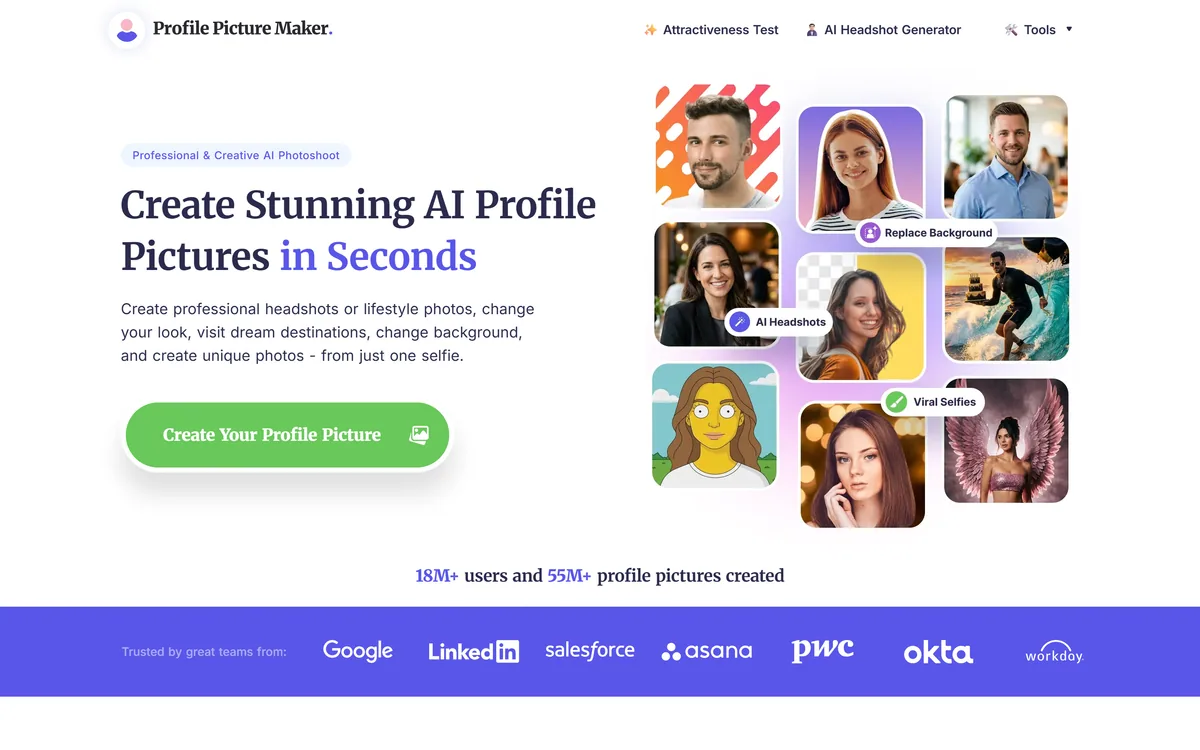
PFPMaker: One Selfie Into A Profile Picture
- A free forever tier covering template generation, background removal and background replacement.
- One selfie in, with hundreds of generated options out across styles and backgrounds.
- A premium studio adding AI headshots, an AI photoshoot and a chat-based portrait editor.
- 18 million users and 55 million pictures claimed, which are reach figures rather than active use.
- Engagement statistics with no source, and an attractiveness test in the main navigation.
PFPMaker's argument is that a profile picture creates the first impression of you online, and that a good one makes it easier to connect for networking or job opportunities.
The framing is right even if the numbers around it are not, and the reason is about constraints rather than importance.
A profile picture is a specific format with specific requirements: square or circular, legible at forty pixels, one face, no distracting background, and consistent across a dozen platforms that all crop differently. Almost no photograph you own satisfies those.
General photo editors treat that as a cropping exercise. A dedicated tool treats it as the whole problem, which means background replacement, framing for a circular crop, and generating variations rather than editing one image.
The free tier is what makes that reasoning land. Getting a usable profile picture without paying is genuinely useful, and it is the difference between this and the paid headshot services it sits beside — which do the professional version better and charge accordingly, as HeadshotPro does.
A profile picture must be legible at forty pixels, in a circle, on a dozen platforms that crop differently. Almost no photograph you own qualifies.
The free tier covers a profile picture generator producing hundreds of options from templates, background removal, background replacement, and six further tools, described as free forever.
That is a substantial giveaway, and it is worth asking how it is sustained — not suspiciously, but because the answer determines what you should expect.
The visible model here is a free-to-premium funnel: the free tools produce something usable, and the paid tier offers AI headshots, a photoshoot and appearance editing for anyone who wants more. That is a normal and honest arrangement.
The thing worth checking for any free image tool is what happens to your uploads — whether they are retained, used for training, or displayed anywhere. The site does not address this on the pages we read, and it is the standard question for a service you hand a photograph of your own face to.
It matters more here than for most free tools, because the input is always a picture of a person. A free background remover processes objects; this one processes faces, and the two are not equivalent.
The core free capabilities are background removal for a clean professional look, background replacement with simple backgrounds aimed at professional networks, and generation of many options from templates.
Background work is the highest-value part of profile picture editing and it is rarely explained why.
The background is what makes a casual photograph unusable professionally. A holiday snap with a good expression fails because there is a beach behind you, and the face itself is fine. Removing the context converts a photograph you already like into one you can use.
It also solves the consistency problem. A dozen platforms showing the same face against the same plain background reads as deliberate; the same face against twelve different holiday backgrounds reads as whatever photograph was nearest.
Generating hundreds of variations is the part to use sparingly. More options past about twenty makes choosing harder rather than better, and the most common outcome of a large batch is picking something less good than the third one you saw.
- Try the free tier fully before considering premium.
- Use one background everywhere for consistency.
- Check the result at the size it will actually display.
- Choose from the first twenty options rather than all of them.
- Ask what happens to your uploaded photograph.
Reading The Engagement Statistics
Two figures appear prominently: that a professional profile picture gets thirty-six times more interactions, and that it produces 146 percent more engagement and drives more leads.
Neither carries a source, a study, a definition or a comparison group, and both are the kind of number that deserves resistance.
Thirty-six times is an extraordinary multiple. For it to be meaningful you would need to know what counted as a professional picture, what it was compared against — no picture at all, a poor one, an average one — on which platform, and measured how.
The likeliest explanation for a figure of that size is a comparison against having no profile picture, which is a different claim entirely and one nobody needs convincing of.
The 146 percent figure has the same problem in a smaller package. Both are almost certainly borrowed from a platform's own marketing material rather than generated by this company, which is common practice and does not make them evidence. The underlying advice — have a decent profile picture — is sound and requires no statistic at all.
An Attractiveness Test In The Navigation
The first item in the main navigation is an attractiveness test, sitting alongside the headshot generator and the tools menu.
It is worth being direct about this rather than skipping past it.
A tool that scores a person's face on attractiveness is doing something categorically different from removing a background. It applies a numerical judgement to appearance, derived from training data reflecting whatever aesthetic conventions that data encoded, and returns it as though it were a measurement.
The harms are not hypothetical. Appearance scoring interacts badly with body image and self-esteem, disproportionately affects young users, and encodes narrow and culturally specific standards while presenting them as objective.
None of that is a claim about the company's intent, and such tools are common because they drive traffic. It is a reason to note the feature plainly, to suggest not using it, and to weigh it when deciding whether to hand a service a photograph of yourself or of anyone else. Training a model on your own face is a further step again, offered by Photo AI, and background work at catalogue scale is Photoroom's business.
Getting A Profile Picture That Works Everywhere
The common mistake is optimising a profile picture for how it looks full size, when nobody ever sees it that way.
This sequence produces something that works at the size it is actually displayed.
- Start with a selfie where your expression is right — everything else is fixable.
- Remove or replace the background before anything else.
- Check the crop as a circle, not just a square.
- Shrink it to forty pixels and see whether you are still recognisable.
- Use the same image everywhere for consistency.
- Exhaust the free tools before paying for the studio.
Is PFPMaker Enough For Your Profile?
- You have a selfie with a good expression and a bad background.
- You need the same picture consistent across a dozen platforms.
- A free result would be a clear improvement on what you have now.
- You want to try before committing money to a headshot service.
- A creative or stylised picture suits the platform you are on.
Pay for a headshot when
- The photograph represents you professionally at a senior level.
- A whole team needs consistent, coordinated portraits.
- You need explicit terms about how your photograph is handled.
- Print resolution or a specific format is required.
- You would be tempted by the appearance scoring feature.
PFPMaker: Output And Access
| Input | A single selfie |
|---|
| Free tier | Profile picture generator, background removal and replacement, plus six further tools |
|---|
| Free tier framing | Described as free forever |
|---|
| Premium tier | AI headshots, AI photoshoot, a chat-based AI editor and sixteen further tools |
|---|
| Appearance tools | Hair, makeup, clothing and cartoonising, on the premium tier |
|---|
| Editor | Described as chat-based, taking a written description of the change |
|---|
| Claimed users | 18 million-plus |
|---|
| Claimed output | 55 million-plus profile pictures created |
|---|
| Stated uses | Social media, teams, business cards, CV and resume, email signature |
|---|
| Displayed statistics | Thirty-six times more interactions and 146 percent more engagement, both unsourced |
|---|
| Navigation | An attractiveness test listed as the first main navigation item |
|---|
| Style range | Described as thousands of styles, prompts, filters and assets |
|---|