

Runway is an AI video platform built around generative world models — Gen-4.5, Aleph 2.0, and Act-Two for performance capture — split across Runway Creative for filmmakers, Runway Dev for builders, and Runway Robotics.
FreemiumVideo & Audio
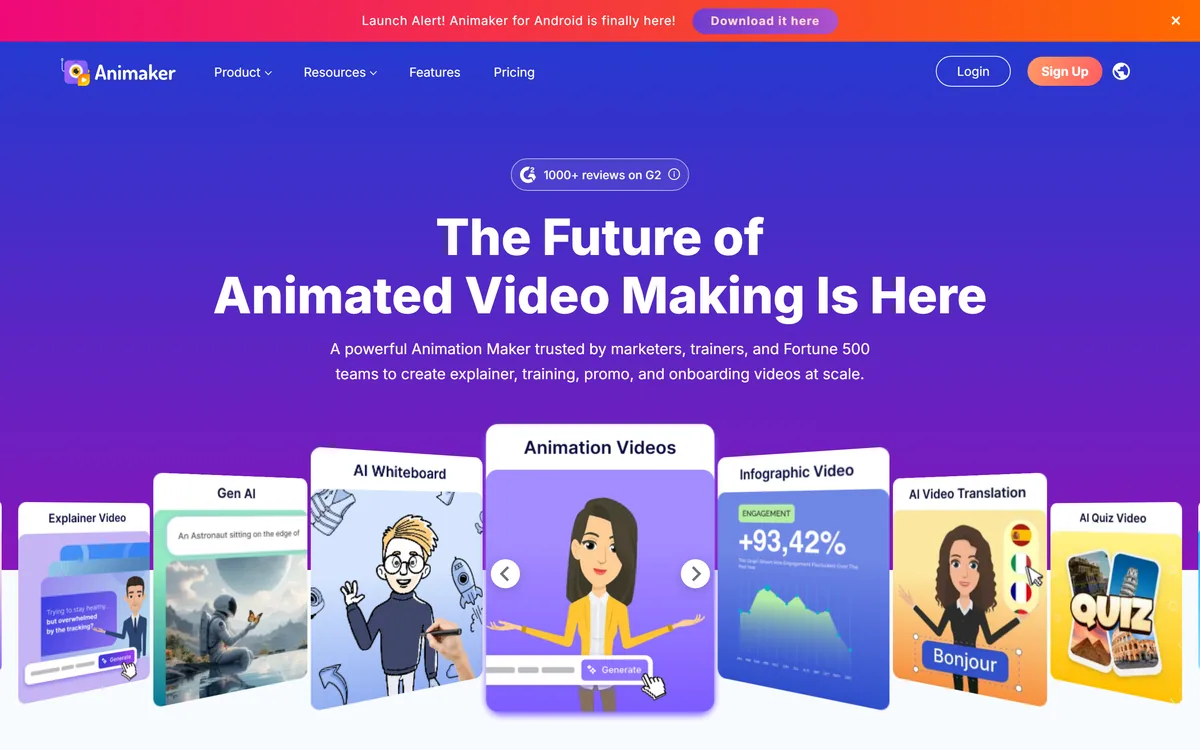
Animaker is an online animation and video maker that builds animated explainer, training, promo and onboarding videos from prompts or templates, with a character builder, a large stock and music library, AI voices and subtitles in many languages and one-click video translation.
Animated explainer and training videos are effective, but hiring animators is slow and expensive. Animaker is a long-running platform that lets non-animators produce them from templates, and now from a prompt.
You describe a video idea, refine it in a conversation with AI, then edit with a character builder, a large stock and music library, AI voices and subtitles, and translate with one click. It sits among video tools like Golpo AI, with broader animation styles and a big template catalogue.
This review covers how Animaker builds an animated video, where it fits in L&D and marketing, how its plans differ, and when its templates feel limiting.
| What it is | An online animation and video maker |
|---|---|
| Inputs | Prompts, templates or blank projects |
| Characters | A customisable character builder |
| Library | Large stock media, icons and music (vendor-stated) |
| Voices | AI voices across many languages (vendor-stated) |
| Subtitles | AI subtitles in many languages |
| Translation | One-click video translation |
| Access | Free plan, with paid tiers |
Animaker's purpose is to let marketers, trainers and small teams create studio-style animated videos without animation skills. It has been doing so for years, and the vendor cites a very large user base and enterprise customers, which signals a mature product.
Its newer prompt-to-video flow lowers the barrier further: choose a category such as explainer, education or product demo, type your idea, refine it in a conversation with AI, and then polish the animation before exporting.
Around that sit the assets that make animation practical: a character builder for brand mascots and presenters, a large library of stock media, icons and music, and templates for common video types that can be finished in minutes.
The honest framing is that Animaker is a fast, capable way to produce animated content at scale, but template-led animation can look generic. Teams that customise characters, colours and pacing to their brand get far more distinctive results than those who publish templates as-is.
For teams that publish regularly, consistency is the hidden benefit. Once characters, colours and voice settings are defined, every new training module or product explainer can reuse them, so a library of videos looks like one coherent series rather than a patchwork of one-off projects made by different people.
Template-led animation is fast but can look generic; customising characters, colours and pacing is what makes it yours.
An Animaker video can start from AI generation or from templates, and is finished with voice and localisation tools.
You can describe a video in plain language and have AI draft it, pick from thousands of templates, or start from scratch, then adjust scenes, timing and characters with the character builder and asset library.
For whiteboard-style explainers drawn from a document or prompt, Golpo AI specialises in that look; Animaker covers a wider range of animation styles.
Animaker adds AI voices and subtitles across many languages, claims highly accurate subtitles, and offers one-click translation of finished videos, which is valuable for training and onboarding content used across regions.
Accuracy claims for subtitles, voices and translation are the vendor's own, so have a native speaker review important videos before publishing, particularly where terminology or tone matters.
For editing live footage rather than animation, an online editor like VEED.IO is a better fit, and for screen-recorded demos, Canvid captures and edits quickly.
Animaker fits learning and development teams producing training and onboarding videos, marketers making explainers and promos, and HR and internal-communications teams who need clear, friendly videos without a production budget.
It fits small businesses and educators who want animated content they can update themselves, and global teams that need the same video in many languages.
It fits less well brands that require premium, fully custom animation with a distinctive art style, and projects that are mostly live-action footage rather than animation.
A good rule is to plan time for brand customisation: the platform makes a passable video fast, but a memorable one still needs deliberate choices about characters, colour, voice and script.
Teams that localise content will feel the difference most. Producing one master video and translating it with matching subtitles and voices is far cheaper than re-recording narration for each market, although important translations still deserve a human check.
Animaker offers a free plan with limits and paid tiers that unlock higher export quality, more assets, more AI features and team options. We do not publish prices, which change; check the site.
The value question is volume: for teams producing many training or marketing videos, a subscription is usually far cheaper than commissioning animation, while occasional users may manage on the free plan.
The sensible approach is to build one real video on the free plan, check export quality and branding options, and choose a tier based on how many videos you will actually make.
Check which features sit on which tier before committing, especially export resolution, watermark removal, premium characters and AI voice or translation allowances, since these are usually the limits that decide which plan a team really needs.
Because templates are fast but generic, trial Animaker on a real video with your own brand.
Prompt-to-video
Animation templates
Character builder
Stock media and music library
AI voices
AI subtitles
One-click translation
Team collaboration
The useful comparison is with other video tools, by the kind of video each makes best.
| Tool | Tool | Style | Best for |
|---|---|---|---|
| Animaker | Animated video maker | Explainers, training, promos | L&D and marketing teams |
| Golpo AI | Whiteboard explainer maker | Hand-drawn explainers | Concept and teaching videos |
| VEED.IO | Online video editor | Editing real footage | Live-action content |
| Canvid | Screen recorder-editor | Demos and tutorials | Product walkthroughs |
A whiteboard explainer maker, an online editor and a screen recorder to weigh alongside Animaker.
Last checked . Read from animaker.com during this check, with the screenshot above captured at the same time.
Animaker is fast and mature, but template-led videos can look generic without customisation. User counts and subtitle-accuracy claims are vendor-stated; check output on your own content.
Animaker earns 4.0 as a mature, practical animation platform: prompt-to-video and thousands of templates, a character builder, a large asset library, AI voices and subtitles, and one-click translation let L&D, marketing and HR teams produce animated videos at scale without animators. It is especially strong for multilingual training content. Templates can look generic without real brand customisation and premium bespoke animation still needs specialists, but for volume animated content it is an easy recommendation. AInexfinder Editor Score: 4.0/5.
AInexfinder does not list plan prices or billing details. For current pricing, plans, and trials, visit the official Animaker website.
Visit official website for pricingVendor pricing, credits, and billing policies change over time. Always confirm on the official site before you buy.
Log in to write a review.
No reviews yet. Be the first to share your experience with Animaker.
Assigned reviewer
Daniel ReedSenior AI Tools Reviewer
Daniel reviews AI tools the slow way — by actually using them on real projects. His reviews cover what works, what breaks, and who each tool is genuinely a good fit for.
Daniel and the AInexfinder editorial team research Animaker using public product information, listing evidence, and (when available) hands-on checks. Scores reflect listing completeness and transparency — not paid placement.
Runway is an AI video platform built around generative world models — Gen-4.5, Aleph 2.0, and Act-Two for performance capture — split across Runway Creative for filmmakers, Runway Dev for builders, and Runway Robotics.
LipSync.video generates lip-synchronised video from a face and an audio track. It offers two model tiers, accepts uploaded video, uploaded or recorded audio, or a typed script with generated speech, and provides over 300 prebuilt avatars. Credits can be earned through daily actions as well as bought.
Viggle animates characters from a still image driven by motion from a video, built on its Joint Space-Time model — described as a physics-native world model that generates characters, motion and scenes together in shared 4D space. It offers a Meme Maker, the PINOC motion-capture tool, games and an API, and states 50 million users.
BeatViz.ai turns music into video through three tools — Chat, Workflow and Editor. Chat 2.0 is positioned as an AI music video director, and the site names the models it draws on, including Veo, Sora, Kling, Seedance, Nano Banana and GPT Image 2.
Argil is an AI video platform built around three surfaces: a Playground for generating images and video model by model, a Director that takes an idea to a finished video, and Templates that turn a repeated video format into a reusable recipe with variables.

The workspace at www-flux3.com generates 5–20 second AI videos with native audio from text or a starting image, routing across FLUX 3, MiniMax H3, Seedance, Wan 3.0 and Kling 3.0 Pro, at 720p or 1080p with video extension.