Apaya is an AI social media management tool that writes captions and generates graphics from a stored Brand Framework, then posts to Facebook, Instagram, LinkedIn, X, TikTok, Pinterest and Google Business once you approve. It targets small businesses, agencies and enterprise teams.
Social media management software has historically solved the wrong half of the problem. Scheduling was never the hard part; writing five posts a week that sound like you was.
Apaya starts from the writing. You supply the idea, it produces the caption and the graphic from a stored brand framework, and it waits for you to approve before anything goes out.
That approval gate is a deliberate choice rather than a missing feature, and it is what makes the tool worth looking at. The question is whether the drafts are good enough that approving is faster than writing.
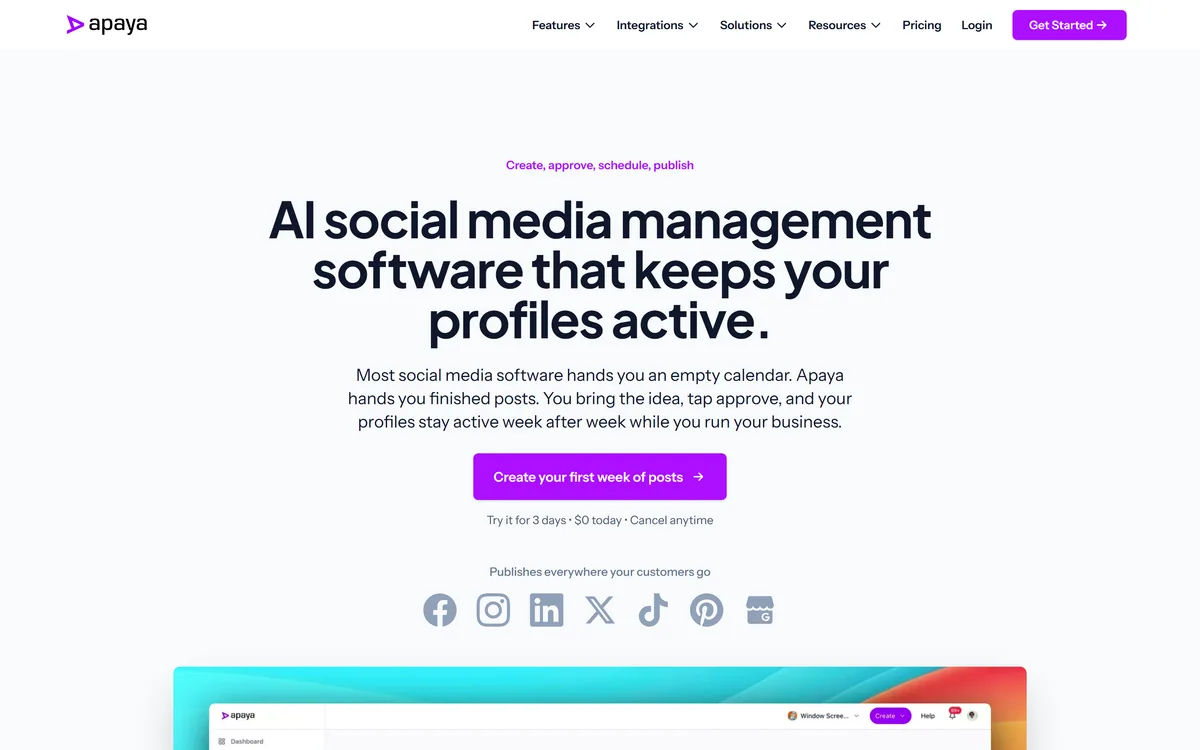
Apaya's homepage, captured 9 September 2026, showing the idea-to-approval posting flow.
Apaya: Posts Already Written
You bring the idea, it brings the post — caption and graphic generated, then held for your approval.
A Brand Framework stores your voice and visual rules so output is consistent rather than generic.
Seven destinations: Facebook, Instagram, LinkedIn, X, TikTok, Pinterest and Google Business.
Three stated audiences — small business, agencies and enterprise — which is a wide span for one product.
A three-day trial, which is short for a tool whose value only shows over a few weeks of posting.
Does Anyone Need Another Social Scheduler?
The honest answer is that most businesses do not need a scheduler. They already have one, or they post from their phone, and neither is the bottleneck.
What they need is the post itself. The recurring failure in small-business social media is not mistimed publishing but weeks of silence followed by a burst of three posts, because writing them keeps losing to more urgent work.
Apaya's framing — you bring the idea, tap approve — targets that gap rather than the scheduling one. The bet is that having an idea is easy and turning it into a finished caption and graphic is the part that does not happen.
That bet is mostly right, and it is why generation-first tools have displaced scheduling-first ones in this category. The distinction matters when you evaluate: judge the drafts, not the calendar view.
It also sets the bar clearly. If approving a draft takes as long as writing the post yourself, the tool has failed regardless of how many networks it connects to.
Judge the drafts, not the calendar view. If approving takes as long as writing, the tool has failed regardless of how many networks it connects to.
Why The Approval Gate Is The Right Default
Fully automated posting sounds efficient and is a bad idea for reasons that have nothing to do with output quality.
The cost of a bad social post is asymmetric. A weak post costs you nothing; an inappropriate one — tone-deaf timing, a claim you cannot support, a joke that lands wrong — costs you a day of apologising and sometimes more.
Because that risk cannot be automated away, the sensible design is to automate the labour and keep the judgement. Apaya's tap-approve step does exactly that, and it is a more mature choice than a fully autonomous mode.
The trade-off is honest: someone still has to show up. Approval-first means daily attention, less of it than writing, but not zero, and a queue of unapproved drafts is the same silence you had before.
If you want genuinely unattended publishing, this is the wrong tool and probably the wrong idea. The alternative worth considering is approving a week's drafts in one sitting, which most approval-first tools support and which fits how small teams actually work.
How Well Does A Brand Framework Work?
Apaya's Brand Framework is where your voice, visual style and rules are stored, and everything generated draws from it.
This is the standard architecture for brand-consistent generation, and it works better than prompting each time for a simple reason: consistency comes from a fixed reference, not from remembering to describe yourself identically on every request.
The limitation is equally structural. A framework describes what you tell it, so a thin description produces thin output, and the generic results people complain about usually trace back to a framework filled in for five minutes at signup.
The work that pays off is unglamorous. Real examples of posts that performed, specific words you do and do not use, the visual rules you actually hold to, and the subjects you avoid entirely.
Treat it as the product rather than as onboarding. Time spent on the framework compounds across every post afterwards, which is the opposite of time spent editing individual drafts.
Fill the Brand Framework with real past posts, not adjectives about your tone.
Write down the words you never use — exclusions shape output more than inclusions.
Judge the tool on draft quality, not on how many networks it connects to.
Approve a week at a time rather than daily, so the queue never becomes the bottleneck.
Rewrite platform-specific posts by hand where the conventions genuinely differ.
Seven Networks Means Seven Sets Of Rules
Apaya publishes to Facebook, Instagram, LinkedIn, X, TikTok, Pinterest and Google Business, which covers most of what a small business would use.
Breadth is genuinely useful and it is also where cross-posting tools fail most visibly. These seven surfaces have almost nothing in common beyond accepting text and an image.
LinkedIn rewards a specific register that reads as try-hard on X. Pinterest is a search surface where the caption is metadata rather than voice. Google Business posts are read by people already deciding whether to visit you, which makes them the highest-intent and least creative of the set. TikTok is video-first, so a caption and a graphic is not really a TikTok post at all.
Anything that generates once and adapts per network is doing translation, and translation is where the seams show. The realistic use is picking two or three surfaces that matter and treating the rest as opportunistic.
This is worth testing during the trial specifically. Generate one idea, look at all seven outputs, and see whether they read as native or as the same post with different lengths.
Where Apaya Sits Among Social Tools
Social tooling divides on one question: does the product assume you already have the content, or does it produce the content?
Scheduling-first tools assume you have it. They are built around calendars, approval chains, reporting and multi-account management, which is the right answer for agencies running many clients — the shape of something like Vista Social. If writing is not your bottleneck, that is the category you want.
Generation-first tools assume you do not. Apaya sits here, and so does the video-led end of the same market: Quso.ai takes long recordings and produces clips, which is generation from source material rather than from a brief. A tool that generates from nothing and one that generates from footage solve completely different weeks.
Above both sits the strategy layer, where the question is not what to post today but what the account is for. That is where Cleve operates, and it is worth naming because no posting tool rescues an account with no reason to exist.
Apaya's position is narrow and defensible: the post itself, drafted from a stored brand definition, held for approval. Judge it against other generation-first tools rather than against schedulers, and the comparison gets much clearer.
Apaya: Checking The Feature List
Three days is a short trial for a tool whose value only becomes visible across a few weeks of consistent posting, so it needs a deliberate plan.
The sequence below front-loads the framework work and reserves the remaining time for judging output rather than configuring.
Spend the first session on the Brand Framework, using real posts rather than descriptions.
Generate one idea across all seven networks and compare the outputs side by side.
Count how many drafts you would approve unedited — that number is the product.
Time yourself editing a draft, then time yourself writing the post from scratch.
Test a subject you would never post about, to see whether the framework's exclusions hold.
Check whether a week of drafts can be approved in one sitting before the trial ends.
Is Apaya A Fit For Your Accounts?
Worth three days when
Your posting pattern is weeks of silence followed by a burst of three.
Writing the caption, not scheduling it, is what keeps not happening.
You will genuinely spend an hour filling in a brand framework properly.
You post to two or three networks that matter and treat the rest opportunistically.
Someone is available to approve drafts weekly.
Keep what you have when
You want unattended publishing with nobody approving anything.
TikTok is your main surface, since captions and graphics are not video.
You already have a writer and only need scheduling and reporting.
Your accounts need per-network voices too distinct for one framework.
Three days is not enough to evaluate and you need a longer runway.
Apaya: Features And Networks
Product type
AI social media management
Core promise
You bring the idea, tap approve
Generation
Captions and graphics from a stored Brand Framework
Publishing model
Draft first, publish only after approval
Networks
Facebook, Instagram, LinkedIn, X, TikTok, Pinterest, Google Business
Stated audiences
Small business, agencies, enterprise
Trial
Three-day trial stated on the site
Site sections
Features, Solutions, Pricing, Resources
Positioning
Social media management without the management
Key features of Apaya
Caption generation from a stored Brand Framework
Graphic generation alongside the caption
Approval step before anything publishes
Publishing to seven networks including Google Business
Brand voice and visual rules held in one place
A three-day trial
Pros & cons
Pros
6
Solves the writing problem rather than the scheduling one
The approval gate keeps judgement human, which is the correct default for social
A stored brand framework produces more consistent output than per-request prompting
Graphics generated with the caption removes a second tool from the loop
Google Business inclusion is unusual and genuinely useful for local businesses
Seven networks covers most of what a small business needs
Cons
6
Output quality depends entirely on how well the Brand Framework is filled in
Seven networks with different conventions means adaptation is translation, and seams show
TikTok is video-first, so captions and graphics do not really constitute a TikTok post
Approval-first still needs someone showing up, or the queue becomes the old silence
Three days is short for a tool judged over weeks of posting
No operating company, location or customer named on the pages we read
Best For
Small businesses whose social posting lapses for weeks at a time
Owners who have ideas but never finish the caption
Local businesses that want Google Business posts alongside social
Teams willing to invest properly in a brand framework
Anyone who wants drafts prepared but not published unattended
Apaya Compared With Other Social Tools
Social tools split by whether they schedule what you wrote or write what you schedule.
Tool
What it does
Approval model
Best for
Apaya
Drafts captions and graphics from a brand framework
Last checked . Read from apaya.ai in a browser session, with the screenshot above captured at the same time.
Positioned as AI social media management
Core promise confirmed as you bring the idea, tap approve
A Brand Framework described as generating captions and graphics
Approval before publishing confirmed as the stated model
Facebook, Instagram, LinkedIn, X, TikTok, Pinterest and Google Business all named as destinations
Small business, agencies and enterprise named as audiences
A three-day trial stated on the site
Navigation confirmed for Features, Solutions, Pricing and Resources
No customer name or case study found on the pages read
What we could not confirm: the operating company or its location, which the pages we read do not name; pricing, beyond the existence of a three-day trial; which models generate the captions and images; how per-network adaptation actually works, which is the central quality question; whether approval can be done in bulk for a week of drafts; what happens to your Brand Framework and scheduled posts if you cancel; and whether any customer is named anywhere. We did not run the product, so nothing here reflects tested output quality.
More Social And Content Tools
Neighbouring tools that solve a different slice of the same posting problem.
Vista Social — full-scale management when you already write the posts
Quso.ai — clips from long video for video-first accounts
StoryLab.ai — copy generation without the publishing layer
GetGenie — written content aimed at search rather than feeds
Editor's Verdict
3.8/5
Apaya's design decision is the interesting part: it drafts and stops. You bring the idea, it produces the caption and the graphic, and nothing publishes until you tap approve. That is the right shape for social media, where the cost of a bad automated post is disproportionate to the time saved. It scores mid-table because the Brand Framework is only as good as what you put in it, seven networks means seven sets of platform conventions to get right, and approval-first still requires someone showing up daily to approve. AInexfinder Editor Score: 3.8/5.
Apaya pricing
AInexfinder does not list plan prices or billing details. For current pricing, plans, and trials, visit the official Apaya website.
Vendor pricing, credits, and billing policies change over time. Always confirm on the official site before you buy.
Frequently asked questions
What is Apaya?
Apaya is an AI social media management tool that generates captions and graphics from a stored Brand Framework and holds them for your approval before publishing to Facebook, Instagram, LinkedIn, X, TikTok, Pinterest and Google Business. Its stated promise is that you bring the idea and tap approve.
Does Apaya post automatically without me?
No, and that is deliberate. The model is draft first, approve second. The cost of a bad social post is asymmetric — a weak one costs nothing, an inappropriate one costs a day of apologising — so keeping the judgement human while automating the labour is the more mature design.
What is the Brand Framework?
A stored description of your voice, visual style and rules that every generated post draws from. It works better than prompting each time because consistency comes from a fixed reference rather than from remembering to describe yourself identically. Thin frameworks produce the generic output people complain about.
How do I stop the output sounding generic?
Fill the framework with real past posts rather than adjectives about your tone, write down the specific words you never use, and record the subjects you avoid entirely. Exclusions shape output more than inclusions, and five minutes at signup is not enough.
Does one post really work across seven networks?
Partially, and this is the thing to test in the trial. LinkedIn rewards a register that reads as try-hard on X, Pinterest captions are metadata rather than voice, and TikTok is video-first, so a caption and graphic is not really a TikTok post. Generate one idea and compare all seven outputs.
Is Apaya a scheduler?
It publishes, but scheduling is not the point. Most businesses already have a scheduler and it is not their bottleneck — writing five posts a week that sound like them is. Apaya's value is in the drafting, so judge it on draft quality rather than on calendar features.
Who is Apaya for?
The site names small business, agencies and enterprise, which is a wide span. In practice the fit is clearest for small teams whose posting lapses for weeks because writing keeps losing to more urgent work. Agencies needing per-client voices and reporting depth will find it thinner.
How long is the trial?
Three days, stated on the site. That is short for a tool whose value shows across weeks of consistent posting, so plan it: build the framework properly in the first session, then spend the remaining time counting how many drafts you would approve unedited.
How do I know if it is working?
Two numbers. How many drafts you approve without editing, and how long editing a draft takes compared with writing the post yourself. If approving takes as long as writing, the tool has failed no matter how many networks it connects to.
What does Apaya not publish about itself?
The pages we read do not name an operating company or location, do not state pricing beyond the trial, do not say which models generate captions and images, and do not name a customer. How per-network adaptation works is also undescribed, which is the question that decides output quality.
Daniel reviews AI tools the slow way — by actually using them on real projects. His reviews cover what works, what breaks, and who each tool is genuinely a good fit for.
Daniel and the AInexfinder editorial team research Apaya using public product information, listing evidence, and (when available) hands-on checks. Scores reflect listing completeness and transparency — not paid placement.
Listings may include affiliate or sponsored placements, which are labeled when present. Editorial scores and cons are not sold. See our affiliate disclosure and review methodology.
Postiv packages LinkedIn strategy, drafting, carousel design, scheduling, analytics and comment replies into a single weekly ritual run by an assistant called Bob, working through the official LinkedIn API rather than a browser extension.
ViralBrain analyses LinkedIn creators you nominate as heroes, extracts the hooks, structures and calls to action behind their posts, and generates drafts in your own voice on a scheduled calendar. It publishes through LinkedIn's official API, offers an MCP server, and ships a large library of free single-purpose tools.
Velocity is a team of AI social-media agents for small businesses, agencies and multi-brand teams that research trends, draft on-brand captions and images, schedule and publish, and analyse results across Instagram, Facebook, YouTube, TikTok, LinkedIn, X and Bluesky.
Copy.ai has become an AI-native go-to-market platform: workflows and agents that run prospecting, lead processing, deal coaching, ABM, and CRM enrichment across Salesforce, HubSpot, Gong, Outreach, and 2,000+ integrations.