
Copy.ai has become an AI-native go-to-market platform: workflows and agents that run prospecting, lead processing, deal coaching, ABM, and CRM enrichment across Salesforce, HubSpot, Gong, Outreach, and 2,000+ integrations.
FreemiumWriting & Content
Cleve is a personal AI workspace that accumulates context from your documents, drafts and notes so it can be reused. It offers reusable prompt shortcuts called Skills, document references by mention, multi-model support across ChatGPT, Claude and Gemini, MCP and API connections, and 50+ languages.
Anyone who uses AI seriously for knowledge work hits the same wall, and it is not model quality. It is that every conversation begins from nothing.
You explain the project, the audience, the constraints, what you tried last time and why it did not work. Then the conversation ends, and tomorrow you do it again. The model is capable; the relationship has no memory, so you carry all the context yourself, forever.
Cleve is built around fixing that rather than around better generation. Whether accumulated context is worth committing your work to a small company's product is the real question, and it deserves a direct answer.
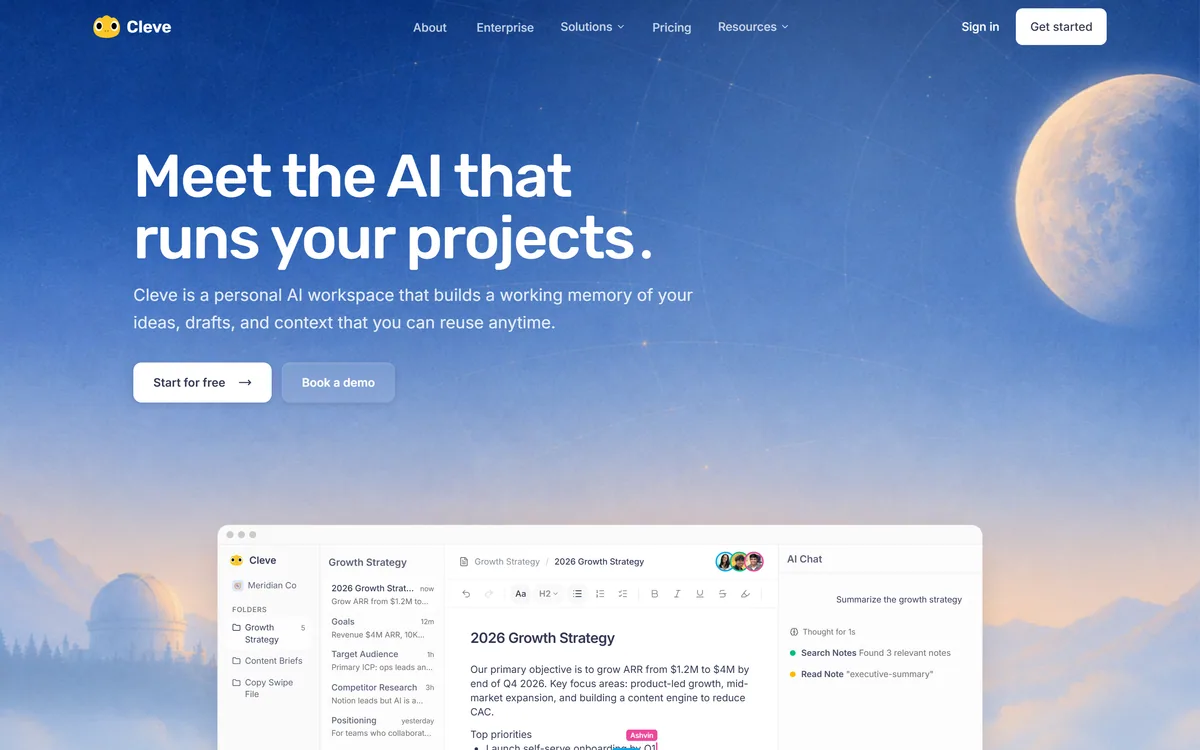
Cleve describes itself as a personal AI workspace that builds a working memory of your ideas, drafts and context that you can reuse anytime.
The framing is right, and it identifies something prompt engineering cannot solve. A prompt is a few hundred words; your context is a project's history, a client's preferences, three previous drafts and the reason you rejected an approach in March.
You cannot type that each time, so in practice you type an abbreviated version — and the model produces work that is generically competent because it is working from a generic brief. The gap between good and generic output is almost always context rather than capability.
Accumulated memory changes what you are doing with the tool. Instead of briefing a stranger repeatedly, you are working with something that has read what you wrote, which is closer to how a colleague becomes useful over months.
The honest caution is that accumulated context is not automatically good context. A workspace that has absorbed three years of your work includes abandoned directions, superseded decisions and things you no longer believe — and unless you can see and prune what it is drawing on, stale context degrades output in ways that are hard to diagnose.
The comparison worth holding in mind is with a workspace such as Notion AI, where the assistant sits beside your documents but does not treat them as standing memory. The difference is whether the tool has to be told what you already wrote, or already knows.
The gap between generic output and good output is almost always context, not capability. And you cannot retype your context every morning.
Cleve offers Skills, reusable prompt shortcuts invoked with a slash, and document references invoked with an @ mention.
Together these solve the practical problem that accumulated memory creates: if the workspace knows everything, how do you tell it what matters right now?
Mentions are the explicit answer. Rather than hoping relevant context surfaces, you name the documents that should inform this piece of work. That control is what makes a large workspace usable rather than unpredictable.
Skills address the other half. Most people who use AI regularly have three or four prompts they have refined over months and retype from memory each time, slightly differently. Saving those as invocable shortcuts turns a habit into a tool, and it makes them shareable with a team — which is how a good prompt stops being one person's private trick.
The two together give you a workspace with memory you can direct, which is more useful than either memory or prompting alone.
Cleve supports ChatGPT, Claude and Gemini, and connects to external tools through MCP and an API.
Model choice matters less than it did — the frontier models are close enough that most knowledge work is served by any of them — but it still matters for two reasons.
The first is that they have genuinely different characters. Some people find one model's prose consistently better for their voice, and being locked to a vendor's choice means living with an output style you did not pick.
The second is durability. Frontier leadership has changed hands repeatedly, and a workspace welded to one provider inherits whichever bad quarter that provider has.
MCP support is the more forward-looking inclusion, and it is what stops this becoming another place your work gets stuck. It means your accumulated context can be reached by other AI tools — the site names Claude, ChatGPT, Cursor and Hermes — rather than being locked inside one application.
For a workspace product specifically, that openness matters more than for most categories. The whole value proposition is accumulation, and accumulation without portability is lock-in.
In practice this means putting a hard question in front of Claude and a routine one in front of something cheaper, without maintaining two subscriptions and two places where your context lives.
Cleve asks you to accumulate your thinking inside it, which is a materially bigger commitment than trying a generation tool, and the risks deserve stating plainly.
The company is Cleve Sdn. Bhd., a Malaysian registered entity with a company number published — more corporate transparency than many AI tools offer, and it can be checked in a public register. Forty thousand users is real traction for a product of this kind.
It is still a small company, and a workspace holding years of your drafts and context is not something to move casually. The questions that matter are not about features.
What export exists, and in what format? Does your accumulated context leave with you or only your documents? What happens to the workspace if the company is acquired or closes? None of these are answered on the pages we read, and for this category they are the ones to ask before committing.
The site does publish privacy, terms and a security page in its footer, which is where those answers would live. Read them before your workspace becomes something you cannot easily leave — which happens faster than people expect, because the value is precisely the accumulation.
The same question applies to anything that accumulates your work over years. Note apps like Goodnotes and documentation platforms like GitBook earn trust the same way: by making export boring and unremarkable rather than a support ticket.
A memory-based workspace is only as good as what you put in it, and the first week determines whether it becomes useful or becomes a pile.
The bar is step four. If the output with your context is not noticeably better than the same request in a bare chat window, the accumulation is not doing its job.
Access is a subscription with personal and team tiers; amounts are not disclosed on the pages we read.
The team tier is the more interesting one because of what Skills become in a group. A prompt one person refined over months, saved and shared, is organisational knowledge rather than an individual habit — and most teams have no mechanism for that at all today.
Shared context has the same property and the same risk. A workspace holding a team's accumulated project knowledge is valuable, and it also means everyone inherits whatever stale material nobody pruned.
The multi-model support has a cost implication worth checking: whether model access is included in the subscription or requires your own API keys. Those are very different commercial arrangements and the site does not say.
We do not publish amounts. Establish the export path and the model-access arrangement before subscribing, since those two determine what you are actually buying.
| Product type | Personal and team AI workspace for writing and thinking |
|---|---|
| Core concept | Working memory built from your ideas, drafts and context, reusable across sessions |
| Skills | Reusable prompt shortcuts invoked with a slash command |
| Document references | Invoked with @ mentions to name specific context |
| Models supported | ChatGPT, Claude and Gemini |
| External connections | MCP and API, reaching Claude, ChatGPT, Cursor and Hermes |
| Capture | Voice notes and meeting capture alongside documents |
| Collaboration | Team workspaces with auto-saving |
| Languages | 50+ |
| Stated users | 40,000+ |
| Legal entity | Cleve Sdn. Bhd., company number 202301049149 |
| Pricing model | Subscription with personal and team tiers; amounts not disclosed |
| Published links | Pricing, Blog, Careers, Terms, Privacy, Security |
Working memory accumulated from your documents, drafts and context
Skills — reusable prompt shortcuts invoked with a slash command
Document references invoked with @ mentions for explicit context control
Multi-model support across ChatGPT, Claude and Gemini
MCP and API connections to Claude, ChatGPT, Cursor and Hermes
Voice notes and meeting capture as input alongside documents
Team collaboration with automatic saving
Support for more than fifty languages
These tools differ on what they accumulate and who they serve — a workspace, a knowledge base and a note app solve different halves of the same problem.
| Tool | Accumulates | Model choice | Best for |
|---|---|---|---|
| Cleve | Working memory across your drafts and context | ChatGPT, Claude or Gemini | Individuals doing repeated knowledge work in a consistent domain |
| Notion AI | Structured team documents and databases | Bundled | Team knowledge with structure and permissions |
| Claude | Conversation and project context | One provider by definition | Reasoning and writing directly |
| Goodnotes | Handwritten notes and annotations | Bundled | Thinking on paper with searchable retrieval |
| Saner.ai | Personal tasks, notes and email | Bundled | Organisation rather than thinking |
Last checked . Read from cleve.ai, including the footer, with the screenshot above captured in the same session.
What we could not confirm: no export path is described anywhere on the pages we read, which for a workspace built on accumulation is the most important unanswered question; it is not stated whether model access is included in the subscription or requires your own API keys, and those are very different commercial arrangements; no pricing amounts are disclosed; no data retention or deletion terms appear outside the linked policy pages; and we did not use the product, so nothing here reflects tested output quality.
Compare on what each one accumulates, since that determines what compounds over time.
Cleve scores well because it identified the real limitation of chat-based AI work: every conversation starts from nothing, so you re-explain your project, your audience and your constraints indefinitely. Accumulating that as reusable working memory, with Skills as saved prompt shortcuts and @-mentions to pull in specific documents, is a better answer than any prompt technique. Multi-model support and MCP connections keep it from being another silo. It loses ground because a workspace holding your accumulated thinking is a serious commitment for a small company, and because the site publishes no export path. AInexfinder Editor Score: 4.0/5.
AInexfinder does not list plan prices or billing details. For current pricing, plans, and trials, visit the official Cleve website.
Visit official website for pricingVendor pricing, credits, and billing policies change over time. Always confirm on the official site before you buy.
Log in to write a review.
No reviews yet. Be the first to share your experience with Cleve.
Assigned reviewer
Daniel ReedSenior AI Tools Reviewer
Daniel reviews AI tools the slow way — by actually using them on real projects. His reviews cover what works, what breaks, and who each tool is genuinely a good fit for.
Daniel and the AInexfinder editorial team research Cleve using public product information, listing evidence, and (when available) hands-on checks. Scores reflect listing completeness and transparency — not paid placement.
Copy.ai has become an AI-native go-to-market platform: workflows and agents that run prospecting, lead processing, deal coaching, ABM, and CRM enrichment across Salesforce, HubSpot, Gong, Outreach, and 2,000+ integrations.

Writesonic has become an AI search growth platform — tracking whether your brand appears across 10 AI platforms, running optimisation and citation work through an Action Center, and reporting results against traffic and revenue.
Talefy, from AIcberg Labs, is an interactive AI storytelling platform. Readers make choices that change the plot, and creators build characters, worlds and branching narratives across fantasy, sci-fi, romance, horror and comedy.
MailMaestro is an AI email assistant from Maestro Labs that drafts replies, summarizes threads and triages your inbox directly inside Outlook and Gmail, offering three drafts per request in your tone across 20+ languages, with enterprise-grade security.
Type.ai is an AI editor built for long-form creative writing, with a draft and AI assistant deeply integrated, story notes for characters and settings, custom style rules, offline mode and export to DOCX, PDF or narrated audio.
Postiv packages LinkedIn strategy, drafting, carousel design, scheduling, analytics and comment replies into a single weekly ritual run by an assistant called Bob, working through the official LinkedIn API rather than a browser extension.