

Copy.ai has become an AI-native go-to-market platform: workflows and agents that run prospecting, lead processing, deal coaching, ABM, and CRM enrichment across Salesforce, HubSpot, Gong, Outreach, and 2,000+ integrations.
FreemiumWriting & Content
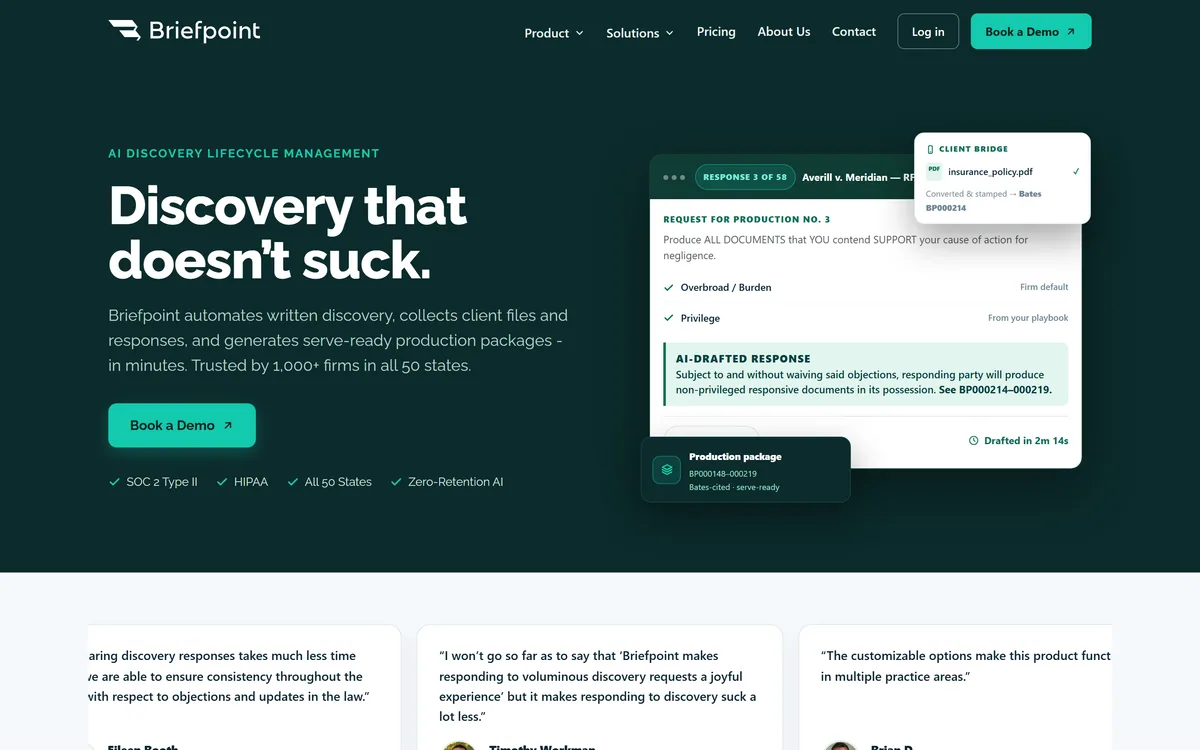
Briefpoint is an AI discovery-lifecycle tool for law firms that drafts written-discovery responses and requests in a jurisdiction's format, collects client files and responses, and assembles Bates-stamped, serve-ready production packages, with SOC 2, HIPAA and zero-retention AI.
A note on scope Briefpoint is a drafting and workflow tool for legal professionals, not a provider of legal advice. Its drafts are a starting point an attorney reviews, revises and takes responsibility for. We review it as productivity software for law firms, and any compliance claims are the vendor's, to verify.
Written discovery is the grind of litigation: drafting responses and requests, objection by objection, then collecting documents and assembling production. Briefpoint automates the drafting and packaging so lawyers spend less time on the rote parts.
It drafts discovery responses and requests in a jurisdiction's format, collects client files and responses, and generates Bates-stamped, serve-ready production packages, with stated SOC 2, HIPAA and zero-retention AI, used by a claimed 1,000+ firms. It sits near legal-AI tools like Harvey AI, but is narrowly focused on the discovery lifecycle.
This review covers how Briefpoint handles the discovery cycle, who it fits with the legal caveat it requires, how it is priced, and who should pass, treating it strictly as productivity software for professionals.
| What it is | AI discovery-lifecycle software for law firms |
|---|---|
| Drafts | Discovery responses and requests in-format |
| Objections | From your firm's playbook defaults |
| Collects | Client files and responses |
| Produces | Bates-stamped, serve-ready packages |
| Security | SOC 2 Type II, HIPAA, zero-retention AI (vendor) |
| Reach | 1,000+ firms, all 50 states (vendor) |
| Model | Demo-led, per-firm |
Briefpoint targets a specific, painful slog: written discovery. It drafts responses and requests, interrogatories, requests for admission, requests for production, objections included, in your jurisdiction's format, turning hours of templated drafting into minutes for an attorney to review.
The narrow focus is a strength. Rather than being a general legal chatbot, it does the discovery lifecycle deeply, which is why its outputs, format, objections, Bates stamping, match how firms actually work.
The essential framing, which we make plainly: Briefpoint drafts; it does not practise law. Every output is a starting point an attorney reviews, revises and takes responsibility for. We review it as productivity software, not a source of legal advice.
Briefpoint drafts; it does not practise law. Every output is a starting point an attorney reviews, revises and takes responsibility for.
It spans drafting on one side and collection-plus-production on the other.
Briefpoint drafts both responses and the requests you propound, applying your firm's default objections and playbook so output is consistent across matters, in the correct jurisdictional format, for review in Word. That consistency is a real benefit for a firm standardising its discovery.
A broad legal-AI platform like Harvey AI spans many legal tasks; Briefpoint's bet is that doing discovery drafting specifically, in-format and playbook-driven, beats a generalist for this one job.
Beyond drafting, it collects client files and responses, converts and Bates-stamps documents, and assembles serve-ready production packages, closing the loop from request to production. That packaging is the other half of the discovery grind it removes.
The document and workflow side overlaps with general tools; a knowledge platform like Document360 handles docs for a different purpose, while Briefpoint keeps everything inside the litigation-discovery process with legal formatting and Bates numbering.
Briefpoint fits litigation firms and practitioners, from solos to larger firms, that handle real written-discovery volume and want to cut the time spent drafting and producing, while keeping consistency across the firm.
The playbook objections and in-format drafting suit firms standardising their approach, and the collection-and-production tools suit anyone tired of the manual Bates-stamping grind. For discovery-heavy practices, the time saving is the clear draw. Firms wanting to automate document-heavy workflows beyond discovery might pair it with a no-code agent platform like Cassidy, which works a broader, non-litigation set of tasks.
The caveat is non-negotiable and the firm's responsibility: these are drafts, and an attorney must review, verify and revise them before serving, exercising professional judgement. Briefpoint's SOC 2, HIPAA and zero-retention claims are vendor-stated and should be verified against your obligations around client confidentiality.
Briefpoint is sold per-firm via a book-a-demo motion, rather than public self-serve pricing. We do not publish prices; there are none listed.
The value question is concrete for a firm: how many attorney or paralegal hours does it save on drafting and production, against the subscription, which for a discovery-heavy practice can be substantial, as its own testimonials claim.
Because the stakes involve client documents and court deadlines, a scoped trial on real (or realistic) matters, with the firm's compliance and confidentiality requirements checked, is the right way to evaluate it, not a feature list.
Because the output goes into live litigation, trial Briefpoint carefully, with attorney review built in.
Discovery response drafting
Discovery request drafting
Playbook objections as defaults
Jurisdiction-correct formatting
Client file and response collection
Bates stamping
Serve-ready production packages
Review in Word
The real comparison is between automated drafting-and-production and doing it by hand, plus adjacent tools.
| Tool | Approach | Strength | Best for |
|---|---|---|---|
| Briefpoint | AI discovery drafting + production | In-format drafts, Bates packages | Discovery-heavy litigation firms |
| Manual discovery | Full control, slow | No tooling cost | Low-volume or bespoke matters |
| Harvey AI | Broad legal AI | Many legal tasks | General legal work |
| Document360 | Knowledge base | General documentation | Internal docs, not litigation |
Last checked . Read from briefpoint.ai during this check, with the screenshot above captured at the same time.
Briefpoint is drafting and workflow software for legal professionals, not legal advice; an attorney reviews, revises and owns every output. Its firm-count and compliance claims are vendor-stated and should be verified against your confidentiality obligations.
A broad legal AI, an enterprise agent platform and a knowledge base to weigh alongside Briefpoint.
Briefpoint earns 4.0 as a focused, genuinely useful tool for litigation firms: it drafts written-discovery responses and requests in the right format with playbook objections, then collects files and builds Bates-stamped, serve-ready production packages, with a strong stated security posture. It is drafting software, not legal advice, so an attorney must review and own every output, and its compliance claims need verifying, but for discovery-heavy practices it removes real grind. AInexfinder Editor Score: 4.0/5.
AInexfinder does not list plan prices or billing details. For current pricing, plans, and trials, visit the official Briefpoint website.
Visit official website for pricingVendor pricing, credits, and billing policies change over time. Always confirm on the official site before you buy.
Log in to write a review.
No reviews yet. Be the first to share your experience with Briefpoint.
Assigned reviewer
Daniel ReedSenior AI Tools Reviewer
Daniel reviews AI tools the slow way — by actually using them on real projects. His reviews cover what works, what breaks, and who each tool is genuinely a good fit for.
Daniel and the AInexfinder editorial team research Briefpoint using public product information, listing evidence, and (when available) hands-on checks. Scores reflect listing completeness and transparency — not paid placement.
Copy.ai has become an AI-native go-to-market platform: workflows and agents that run prospecting, lead processing, deal coaching, ABM, and CRM enrichment across Salesforce, HubSpot, Gong, Outreach, and 2,000+ integrations.

Writesonic has become an AI search growth platform — tracking whether your brand appears across 10 AI platforms, running optimisation and citation work through an Action Center, and reporting results against traffic and revenue.
LogicBalls is an AI writing and content platform whose central idea is verification before generation — it asks clarifying questions rather than assuming intent. It offers thousands of task-specific tools across writing, research, analysis and explanation, and claims 15M+ clarified generations.
Smartcat combines AI translation across 280+ languages with a CAT tool, translation memory, a marketplace of 500,000+ linguists, and AI agents for writing, auditing and maintaining content — integrated with Figma, Contentful, WordPress, Git and Salesforce.

Jasper has moved from AI copywriting to orchestrating marketing agents, with 100+ specialised agents, Content Pipelines, the Jasper IQ context hub, Jasper Studio for custom agents, and brand governance across everything a marketing team produces.
Spiral, a product from Every, uses stylometry to build a voice profile from your existing writing, then drafts tweets, blog posts, LinkedIn updates and newsletters in that voice. It adds shareable team styles, a knowledge base, and MCP and API access.