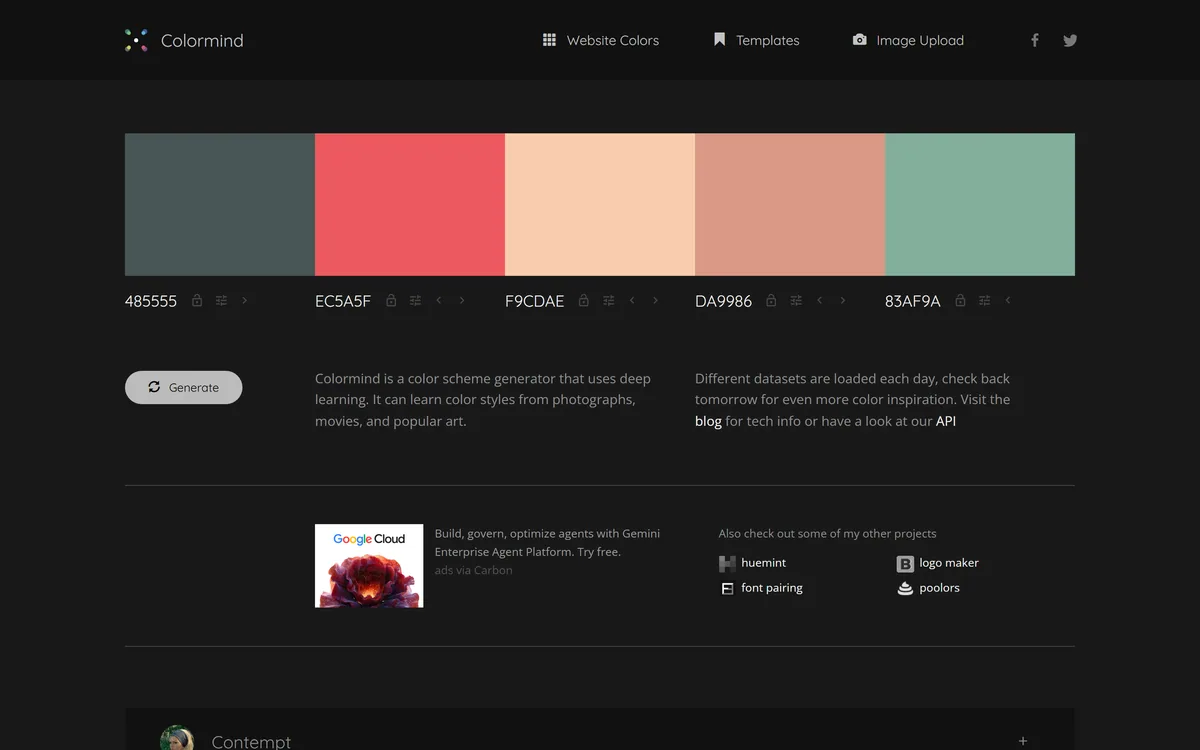
Colormind is a free, deep-learning colour-palette generator that learns colour styles from photos, films and art and produces harmonious palettes, with lockable colours, a website-colours mode, image upload and a public API, aimed at designers and developers.
Choosing a colour palette is a small task that quietly derails designers and developers for far too long. Colormind's answer is to generate harmonious palettes instantly, learned from real-world colour rather than maths alone.
It is a free, deep-learning palette generator that models colour styles from photos, films and art, lets you lock colours and generate around them, and offers a website-colours mode and a public API. It sits among design utilities like the editor Pixlr, as a focused, free tool rather than a platform.
This review covers how Colormind builds a palette, who it suits and its limits, how it stays free, and who needs something more. We are clear that it is an indie utility, judged on that basis.
Colormind generates palettes learned from photos, film and art, with colours you can lock.
Colour Palettes Learned From Photos And Film
Colormind's distinctive idea is that good palettes come from the real world, not just colour-wheel rules. It trains on photos, films and art, so the palettes it generates carry the feel of those sources rather than a mechanical harmony.
That is why its datasets rotate daily, one day drawing from night-sky photography, another from watercolour or a specific aesthetic, so the generator's taste shifts and you can catch a style that fits your project.
It is, refreshingly, a free utility that just works in the browser with no account. We review it as exactly that, a focused, well-made tool, not an enterprise product, and the absence of user counts or certifications is a category fact, not a flaw.
Good palettes come from the real world, not just colour-wheel rules. Colormind trains on photos, films and art, so its palettes carry the feel of those sources.
How Does Colormind Build A Palette?
The control it gives you is what turns a random generator into a usable design tool.
Locking Colours And Reading Datasets
You can generate random palettes or lock a starting colour and have Colormind fill in harmonious intermediates, and crucially the position of a locked colour matters, place complementary colours at the ends for a gradient, or contrasting ones together for a triadic scheme.
That lock-and-generate loop is the core craft, and understanding it is what separates lucky results from deliberate ones. For turning a palette into a usable interface, a design tool like UXMagic works the layout side, while Colormind settles the colour.
Website Mode, Upload And The API
Beyond general palettes, a Website Colors mode generates schemes with Bootstrap UI templates, you can upload an image to extract a palette from it, and a public API lets developers pull palettes programmatically into their own tools.
The API is a quietly powerful feature for a free tool, letting it become a building block rather than just a website. For broader design-asset needs around a brand, a tool like Mew Design covers more ground; Colormind stays sharp on colour.
Who Colormind Suits, And Its Limits
Colormind suits designers and developers who need a good palette fast, for a website, a UI, a brand or an illustration, and who value a free, no-friction tool over a heavy platform.
It is especially handy for developers thanks to the Website Colors mode and the API, which let colour decisions be automated or pulled into a build, and for anyone who learns colour better by generating and adjusting than by theory.
Its limits are those of a focused indie utility: no team features, brand management, support or guarantees, and output that still needs a designer's eye to finalise. It is a starting point and an idea-generator, not a complete brand-colour system.
How Colormind Stays Free
Colormind is a free web tool with a public API and no visible paid tiers, supported by unobtrusive advertising, and it sits in a small family of related colour and design micro-tools from the same maker.
For users, free is the whole appeal: there is no decision to make and no risk in trying it, which is exactly right for a utility you reach for occasionally rather than live in.
The honest caveat of a free indie tool is sustainability and support, there are no enterprise guarantees, so for anything mission-critical treat it as a helpful generator rather than infrastructure you depend on.
It is also worth appreciating what the free model enables creatively: because there is no credit meter or paywall, you can generate dozens of palettes in a sitting to explore a direction, which is exactly the kind of low-stakes experimentation that leads to a better final choice. A tool you hesitate to open because each use costs something quietly discourages the exploration that good colour work depends on.
A Fast Way To Try Colormind
Because it is free and instant, the best way to judge Colormind is to use it on a real colour decision now.
Open it and generate a few palettes to get a feel for the current day's dataset.
Lock a brand or starting colour and generate around it, trying different lock positions.
Use the Website Colors mode if you are picking a UI scheme, with the Bootstrap preview.
Upload an image, a photo or a reference, and extract a palette from it.
If you build tools, pull a palette through the public API to test the integration.
Pass/fail: Colormind is worth keeping bookmarked if it gets you to a usable palette faster than doing it by hand.
Treat it as a generator to refine, not a finished brand-colour system.
Colormind, The Short Gist
Colormind is a free AI colour-palette generator: it builds harmonious palettes using deep learning, no account needed.
It learns from real sources: palettes are modelled on photos, films and art, with datasets that rotate daily.
You can steer it: lock individual colours (position matters) and use a dedicated website-colours mode.
It is an indie utility: genuinely useful and free, with a public API, but no enterprise claims or support.
Key features of Colormind
AI palette generation
Palettes learned from photos, film and art
Daily-rotating datasets
Lockable colours (position matters)
Website Colors mode
Bootstrap UI templates
Image upload for palette extraction
Public API
Pros & cons
Pros
5
Genuinely free with no account
Palettes learned from real-world sources
Lock-and-generate gives real control
Public API makes it a building block
Website mode suits developers
Cons
5
No team or brand-management features
No support or enterprise guarantees
Output needs a designer's eye to finalise
An indie tool, so sustainability is a question
Not a full design system
Best For
Quick colour decisions
Developers using the API
Website colour schemes
Learning colour by doing
No-friction utility seekers
Colormind Against Other Palette Tools
The useful comparison is with other design utilities, on focus and on free-versus-platform.
Anyone who learns colour by generating and adjusting
Those who want a no-account, no-friction utility
When Colormind Is Too Basic
Teams needing brand-colour management and sharing
Anyone wanting support or enterprise guarantees
Projects that need a full design system, not a palette
Users who want finished output with no refining
Mission-critical work that cannot rely on an indie tool
How We Tried Colormind
Last checked . Read from colormind.io during this check, with the screenshot above captured at the same time.
A free, deep-learning colour-palette generator
Palettes modelled on photos, films and art
Datasets that rotate daily
Lockable colours where position affects the result
A Website Colors mode with Bootstrap UI templates
Image upload to extract a palette
A public API for programmatic use
A free tool with no visible paid tiers, ad-supported
No prices to reproduce, in line with this site's pricing policy
Colormind is an indie, free utility with no user counts, certifications or enterprise support; we review it on that basis. For mission-critical work, treat it as a generator, not depended-upon infrastructure.
Other Design And Colour Tools
An image editor, a UI-design tool and a broader design tool to weigh alongside Colormind.
Colormind earns 3.8 as an unusually thoughtful free utility: a deep-learning palette generator that learns from photos, film and art, gives real control through lockable colours whose position matters, and exposes a public API that turns it into a building block. It is an indie tool with no team features, support or guarantees, and output still needs a designer's eye, but for quick colour decisions it is a keeper. AInexfinder Editor Score: 3.8/5.
Colormind pricing
AInexfinder does not list plan prices or billing details. For current pricing, plans, and trials, visit the official Colormind website.
Vendor pricing, credits, and billing policies change over time. Always confirm on the official site before you buy.
Frequently asked questions
What is Colormind?
Colormind is a free, deep-learning colour-palette generator. It models colour styles from photos, films and art to produce harmonious palettes, lets you lock individual colours and generate around them, and offers a Website Colors mode, image upload and a public API, aimed at designers and developers.
Is Colormind free?
Yes. Colormind is a free web tool with a public API and no visible paid tiers, supported by unobtrusive advertising. There is no account required, which makes it ideal as a utility you reach for occasionally rather than a platform you commit to.
How does Colormind generate palettes?
It uses deep learning trained on photos, films and art, so palettes carry the feel of real-world sources rather than only colour-wheel maths, and its datasets rotate daily. You can generate randomly or lock a starting colour and have it fill harmonious intermediates around it.
Does the position of a locked colour matter?
Yes, and it is a key detail. Where you place a locked colour changes the result: put complementary colours at the ends for a gradient, or contrasting colours together for a triadic scheme. Understanding that lock-and-position behaviour is what turns lucky results into deliberate ones.
Can developers use Colormind programmatically?
Yes. Colormind offers a public API, so developers can pull palettes into their own tools or builds, and a Website Colors mode with Bootstrap templates helps pick UI schemes. The API is a quietly powerful feature that lets a free tool act as a building block rather than just a website.
Who is Colormind best for?
Designers and developers who need a good palette quickly and free, people choosing website or UI colour schemes, and anyone who learns colour better by generating and adjusting than by theory. Its API and website mode make it especially handy for developers.
What are Colormind's limits?
It is a focused indie utility, so there are no team features, brand-colour management, support or guarantees, and its output still needs a designer's eye to finalise. It is a palette generator and idea source, not a full design system or a tool to depend on for mission-critical work.
Can I make a palette from my own image?
Yes. Colormind lets you upload an image and extract a palette from it, which is useful when you want colours drawn from a specific photo, brand asset or reference rather than a generated scheme. It is a quick way to turn a visual you like into a usable set of colours.
Is Colormind reliable for professional work?
For generating ideas and quick decisions, yes, it is well made and genuinely useful. But as a free indie tool it offers no support, uptime guarantees or enterprise features, so for mission-critical or team-wide brand work, treat it as a helpful generator rather than infrastructure you rely on.
How is Colormind different from a paid palette tool?
Paid tools add team sharing, brand management, support and guarantees. Colormind trades those for being free, instant and account-free, with the distinctive touch of learning palettes from real photos and film and a public API. For individual, quick colour work that trade is often exactly right.
Daniel reviews AI tools the slow way — by actually using them on real projects. His reviews cover what works, what breaks, and who each tool is genuinely a good fit for.
Daniel and the AInexfinder editorial team research Colormind using public product information, listing evidence, and (when available) hands-on checks. Scores reflect listing completeness and transparency — not paid placement.
Listings may include affiliate or sponsored placements, which are labeled when present. Editorial scores and cons are not sold. See our affiliate disclosure and review methodology.
Canva AI is the Magic Studio suite built into Canva — Magic Write for copy, Dream Lab for images, Magic Edit, Expand and Eraser for photos, Magic Switch for reformatting, Magic Charts for data, and Canva Code for interactive widgets.
Magic Patterns is an AI design tool for product teams that turns prompts, requirements and ideas into high-fidelity UI, matching your existing design system so teams can prototype and test directions before committing engineering resources.
UXMagic turns text prompts, sketches or screenshots into Figma-ready UI designs, generating wireframes, sitemaps and multiple screens, importing your design system, and exporting to Figma, HTML, React or Webflow.
ColorKit is a free set of browser-based colour tools built by andy feliciotti: a palette generator, gradient maker, colour picker, contrast checker, palette from image, SVG colour changer, background maker and colour mixer. The site is ad-funded through Raptive.
Visily generates editable UI designs from screenshots, text prompts, diagrams or templates, aimed explicitly at non-designers who need to convey product ideas, with smart components, auto-prototyping, on-canvas collaboration and a Figma plugin for handoff.