

Descript is a video and audio editor that works by editing a transcript — delete a sentence and the footage goes with it — plus Studio Sound, Eye Contact, filler-word removal, AI voices, avatars, and the Underlord assistant.
FreemiumVideo & Audio
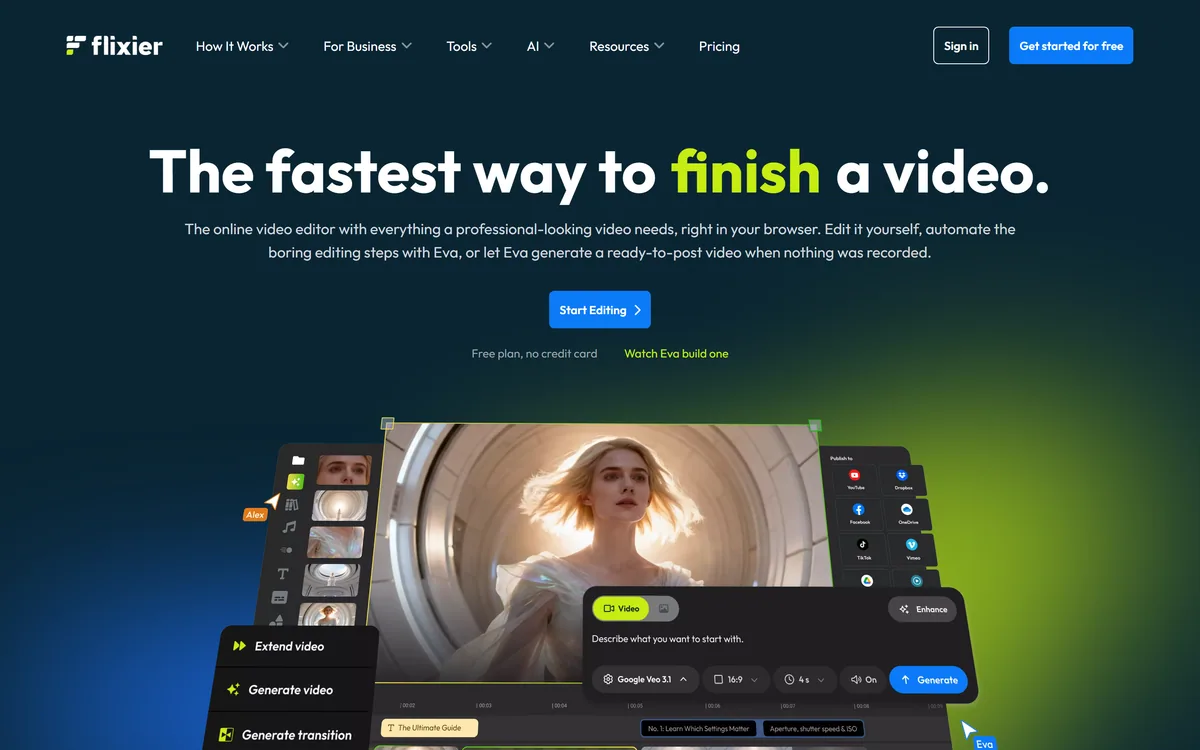
Flixier is a browser-based video editor that renders in the cloud rather than on your machine, so it works on Chromebooks, tablets and low-spec hardware. It adds automatic subtitles in 130+ languages, translation, AI voiceover, an editing assistant called Eva, real-time collaboration and direct publishing.
Video editing has always had a hardware problem that nobody in the software talks about. The application is affordable; the machine that runs it acceptably is not.
That is why editing has stayed a professional activity in a way that writing and design have not. A student with a Chromebook, a teacher with a school laptop, or a small business owner with a five-year-old machine can write and design perfectly well, and cannot edit video without watching a progress bar for forty minutes.
Flixier's answer is to move the expensive part somewhere else. Editing happens in your browser; rendering happens on their hardware. That single architectural decision is what the product is, and it changes who can edit video at all.
| Product type | Browser-based video editor with cloud rendering |
|---|---|
| Hardware requirement | A browser only; runs on Chromebooks, tablets and low-spec devices |
| Rendering | Performed in the cloud rather than on your device |
| Subtitles | Automatic generation across 130+ languages |
| Language tools | Video translation, AI voiceover and speech generation |
| Audio | Audio enhancement and transcription |
| AI assistant | Eva, for editing automation and generating video from prompts |
| Image tools | Background removal |
| Collaboration | Real-time multi-user editing with timeline comments |
| Export | Up to 4K MP4 |
| Publishing | Direct to YouTube, TikTok and Google Drive |
| Pricing model | Four tiers — Free with watermark, Starter, Creator, Business — all including AI credits |
| Published links | AI tools, editing tools, comparisons, guides, pricing, help centre, blog, affiliate and creator programmes, privacy policy, terms |
Flixier states that renders happen in the cloud instead of on your laptop, and that it runs on Chromebooks, tablets and low-spec devices with a browser as the only requirement.
Understanding why this matters requires separating two things that feel like one. Editing — arranging clips, cutting, adding text — is not computationally demanding; a browser handles it fine with proxy previews. Exporting is where the work happens, because every frame has to be composited and encoded, and that is what melts a modest laptop.
Moving only the export to remote hardware means the cheap part stays local and responsive while the expensive part runs on machines built for it. Your export speed becomes a function of their infrastructure rather than your budget.
The consequences are social as much as technical. A school can teach video editing on the machines it already has. A distributed team can work without standardising on hardware. Someone can finish an edit on a borrowed laptop.
The honest trade is dependency. Cloud rendering requires connectivity and a working service, so you cannot export on a train or during an outage. For professional work with a deadline that is a real risk to weigh; for most people most of the time it is not.
The obvious comparison is a desktop editor such as Wondershare Filmora, where the render happens on your machine and the ceiling is whatever hardware you happened to buy.
Editing does not need a powerful machine. Exporting does — which is why moving only that step changes who can edit at all.
Flixier generates subtitles automatically across more than 130 languages, with translation and AI voiceover alongside.
Subtitles matter more than most creators realise, for two reasons that have nothing to do with translation. A large share of social video is watched with sound off, so a video without captions is effectively silent to much of its audience. And captions are an accessibility requirement, not a nicety — for deaf and hard-of-hearing viewers they are the difference between accessible content and inaccessible content.
Adding them by hand is tedious enough that most people skip it, which is exactly the kind of task automation should absorb.
The 130-language figure covers both captioning and translation, which opens an audience most creators never reach. The usual caution applies and applies strongly: you cannot judge translation quality in a language you do not speak, so have a native speaker check before publishing to a market.
Machine captions also need review in your own language. Names, technical terms and anything said quickly are where they fail, and a wrong caption is worse than none because viewers trust it.
Flixier supports real-time multi-user collaboration with timeline comments, which is a capability desktop editing has never handled well.
The reason is architectural rather than a failure of effort. Desktop editors work on local files with local media, so collaboration means moving large files around, managing versions, and hoping everyone has the same assets. Anyone who has emailed a rough cut and received notes as timestamps in a message knows how bad the alternative is.
A browser-based editor with cloud media has no such problem — everyone is looking at the same project, and comments attach to the timeline rather than to a paragraph in an email.
For marketing teams, agencies and anyone whose video passes through an approval process, that is the difference between a review cycle that takes an afternoon and one that takes three days.
It is also the feature most likely to justify the subscription for a team, independent of the AI tools. Review friction is where video projects actually lose time, and it is rarely what people evaluate on.
Collaboration is also where browser tools diverge from each other. VEED.IO and CapCut weight review and speed-of-first-cut differently, and it is worth deciding which of those you actually need.
Being fair to a browser editor means being clear about what desktop software still does better, because the gap is real even as it narrows.
Precision is the first. Frame-accurate trimming, fine audio work, keyframed effects and colour grading are all more comfortable in a desktop application with keyboard-driven controls and no browser between you and the timeline.
Media handling is the second. Professional footage is large, and every file has to reach the cloud before you can work with it. On a slow connection, uploading an afternoon's filming is its own project — and this is where the model's advantage inverts, because a desktop editor reads from a local drive instantly.
Offline capability is the third and is absolute rather than gradual: no connection means no editing, which for anyone who works while travelling is a genuine constraint.
None of these matter for the audience Flixier is built for — social video, marketing content, education, quick turnaround work. They matter enormously for a colourist or a documentary editor, and it is worth knowing which of those you are before choosing.
For transcript-driven editing specifically, Descript remains the tool built around that idea, and for cutting long video into short clips OpusClip does one job and does it well.
The free tier watermarks output but is enough to test the thing that matters, which is whether the architecture solves your actual bottleneck.
The bar is step three. If uploading your footage takes longer than your old machine took to render it, the model does not help you.
Flixier offers four tiers — Free, Starter, Creator and Business — with the free tier watermarking output. All tiers include AI credits, and paid plans remove the watermark and raise export, storage and feature limits.
The watermark on free is the standard arrangement and it is honest: you can evaluate everything, and you cannot publish. That is a reasonable line, and it means the free tier is a genuine trial rather than a crippled product.
The variable to model is AI credits rather than export count, because subtitles, translation, voiceover and Eva all consume them and they are the features most likely to run out mid-project.
Storage is the second thing to check, and it is easy to underestimate. Cloud editing means your media lives on their servers, and video is large — a plan sized for your export volume may not be sized for your footage.
We do not publish amounts. Check what happens to projects and media if you stop paying, since cloud-based editing means your work is not on your own machine.
Browser-based editing with no installation required
Cloud rendering, so export speed does not depend on your hardware
Automatic subtitle generation across 130+ languages
Video translation and AI voiceover generation
Audio enhancement and transcription
Eva AI assistant for editing automation and prompt-based generation
Real-time multi-user collaboration with timeline comments
Export up to 4K MP4 with direct publishing to YouTube, TikTok and Google Drive
Video tools differ on where the work happens and what they are built to produce. Both decide whether one fits your hardware and your output.
| Tool | Where it runs | Best at | Main limitation |
|---|---|---|---|
| Flixier | Browser, rendering in the cloud | Editing on modest hardware, with real collaboration | Upload time, offline use and fine precision work |
| CapCut | Desktop and mobile apps | Fast social editing with strong templates | Local rendering, so hardware still matters |
| VEED.IO | Browser | Subtitles and quick social edits | Similar browser constraints |
| Wondershare Filmora | Desktop application | Fuller editing control and effects | Requires capable hardware |
| Descript | Desktop and cloud | Editing by transcript rather than timeline | Different model — best for talking-head content |
Compare on where rendering happens and what kind of video you make — those two decide the fit.
Last checked . Read from flixier.com, including the footer, with the screenshot above captured in the same session.
What we could not confirm: no pricing amounts or per-tier AI credit allowances are disclosed; no storage limits are stated, and cloud storage is easy to underestimate for video; no legal entity name appears beyond a copyright line; no export speed figures are published, which is the central claim of the cloud rendering model; supported input formats and maximum project length are not stated; and we did not edit a project, so nothing here reflects measured performance.
Flixier scores well because cloud rendering is a genuinely different architecture rather than a marketing line: exports happen on someone else's hardware, which means a Chromebook edits at the same speed as a workstation and the machine you own stops being the constraint. For schools, distributed teams and anyone editing on borrowed hardware that is a real unlock. Subtitles in 130+ languages and real-time collaboration with timeline comments are strong supporting features. It loses ground because browser editing still trails desktop software on precision and offline reliability, and because the free tier watermarks output. AInexfinder Editor Score: 4.0/5.
AInexfinder does not list plan prices or billing details. For current pricing, plans, and trials, visit the official Flixier website.
Visit official website for pricingVendor pricing, credits, and billing policies change over time. Always confirm on the official site before you buy.
Log in to write a review.
No reviews yet. Be the first to share your experience with Flixier.
Assigned reviewer
Daniel ReedSenior AI Tools Reviewer
Daniel reviews AI tools the slow way — by actually using them on real projects. His reviews cover what works, what breaks, and who each tool is genuinely a good fit for.
Daniel and the AInexfinder editorial team research Flixier using public product information, listing evidence, and (when available) hands-on checks. Scores reflect listing completeness and transparency — not paid placement.
Descript is a video and audio editor that works by editing a transcript — delete a sentence and the footage goes with it — plus Studio Sound, Eye Contact, filler-word removal, AI voices, avatars, and the Underlord assistant.
Vibrantsnap is an AI tool that turns a rough screen recording into a polished walkthrough: it rewrites your narration, reads it in a studio voice in any language, and auto-edits the video with zooms, chapters and captions.
Kapwing is a browser-based video studio combining a timeline editor, subtitler, audio editor and dubbing into 40+ languages with AI tools including Smart Cut, Trim with Transcript, B-Roll Generator, Clip Maker and Character Consistency. Made in San Francisco.
BlipCut translates and dubs video into more than 140 languages with AI lip synchronisation, so translated speech aligns with the speaker's mouth. It also clones voices in 29 languages, offers 600+ voices across 40+ languages, and generates, translates and edits subtitles from uploads or YouTube links.
VEED is an AI video-creation platform that takes an idea to a finished social video in the browser, bundling generation, AI avatars, subtitles, dubbing, clean audio and a brand kit, plus access to frontier models like Sora 2, Veo and Kling.
BIGVU is an AI personal-branding video platform with a teleprompter, AI avatars and voice cloning, auto-editing (caption, filler removal, eye-contact correction), and one-click social posting, aimed at realtors, coaches and marketers, with synthetic-media features that carry likeness and consent considerations.