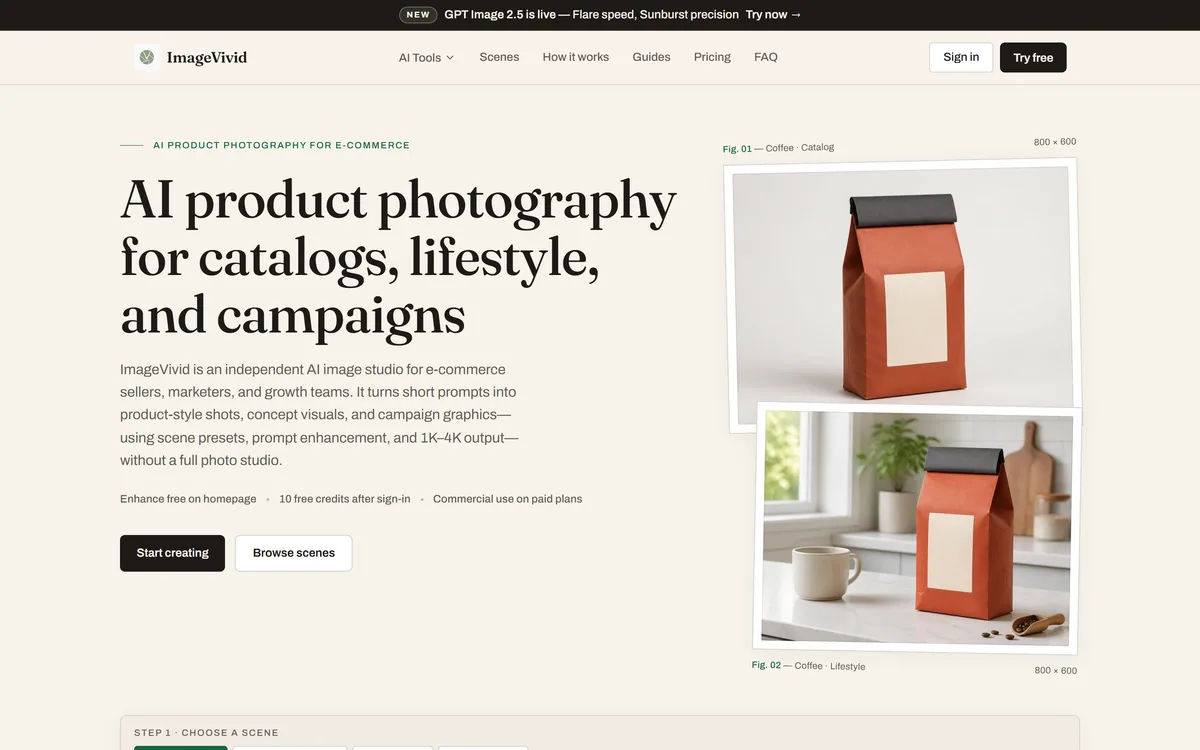
ImageVivid is an independent AI image studio for e-commerce, turning short prompts into catalog-style product shots, lifestyle images, marketing banners and social creatives using scene presets, prompt enhancement and 1K to 4K output.
General image generators can make a product shot, but getting a clean, catalog-ready one out of a blank prompt box is fiddly, and the results rarely match across a range. ImageVivid narrows the whole problem to the one job e-commerce teams actually need done.
It is an independent AI image studio aimed at sellers, marketers and growth teams, turning a short description into product-style shots, lifestyle imagery, marketing banners and social creatives. Scene presets, automatic prompt enhancement and output up to 4K are built to get usable commerce visuals without a full photo studio.
This review covers how the preset-driven workflow speeds up a shoot, what the four core workflows cover, what 'independent' and its model choices mean, how its credits work, and the sellers it suits versus those better served by a general tool.
ImageVivid narrows AI image generation to one job: product and marketing visuals for stores.
ImageVivid In Four Quick Takeaways
ImageVivid is an AI product-photography studio for e-commerce, turning short prompts into catalog, lifestyle and campaign visuals.
It is purpose-built, not general: scene presets for product shots, marketing banners and social posts do the heavy lifting, not blank-canvas prompting.
It is explicit about being independent, running on current image models with prompt enhancement and 1K to 4K output.
It uses credits with free credits to start and commercial use on paid plans — a focused tool rather than a do-everything generator.
Catalog And Lifestyle Shots From A Short Prompt
ImageVivid's core promise is that a short description — 'minimal skincare product set', 'sneaker product shot' — comes back as a usable commerce image, not a generic render you then have to fight into shape.
That focus is the difference from a general tool. You can make a product image in Midjourney, but you carry all the prompt craft yourself and consistency across a catalog is on you. ImageVivid bakes the commerce context in, so a clean white-background listing shot or a bright lifestyle scene is the default rather than a lucky prompt.
It covers the range a store needs: catalog shots on clean backgrounds, lifestyle scenes, launch-campaign heroes with copy space, and the same product adapted across social formats. For sellers iterating before a real studio shoot, that is a fast, cheap way to test concepts.
A general generator can make a product shot. ImageVivid makes the next thirty, matching, which is the part that actually sells a catalog.
How Do ImageVivid's Scene Presets Speed Up A Shoot?
The presets are the engine of the tool, and they are what turn a prompt box into something a non-designer can get a consistent result from.
Four Workflows Tuned For Commerce
ImageVivid organises work into focused workflows — free creation, product shot, marketing banner and social post — each shipping with its own aspect ratios, style chips and example prompts. Choosing the workflow closest to what you need means the tool is already pointed at the right output before you type a word.
This is a deliberately narrower surface than a design suite like Canva AI, which does layout, text and much more. ImageVivid is not trying to be that; it is trying to make the image itself, well, for commerce, and leave the layout to your store or your design tool.
Prompt Enhancement And 4K Output
Guests can use AI prompt enhancement for free on the homepage, and the tool optimises your prompt automatically while letting you review or edit it before generating. Output runs up to 4K, which matters when an image has to hold up on a product page or a printed banner rather than just a thumbnail.
The combination — a short prompt, automatic enhancement, high-resolution output — is aimed squarely at people who are not prompt engineers. For teams who need commercial-safety assurances about training data, a model like Adobe Firefly makes that its central claim, so weigh that against ImageVivid's convenience if it matters to your brand.
An Independent Studio Built On Current Image Models
ImageVivid describes itself plainly as an independent AI image studio, and names the current models it builds on, including GPT Image 2.5. That candour is worth crediting: it is clear about being a focused application layer over strong models rather than claiming a proprietary engine.
The upside of that approach is that it rides improvements in the underlying models while keeping the commerce-specific workflow and presets that are its real value. The limit is the same as any application layer — the raw image quality tracks the models it uses.
It also publishes the pages a careful buyer checks: an image license, an acceptable-use policy, terms and a refund policy, with a support email. For a tool whose output goes straight onto product pages, clear licensing is not a nicety, it is the point — read it before you build a catalog on it.
How ImageVivid Prices Product Image Credits
ImageVivid runs on credits. You get a handful free after signing in to try it, then recurring plans for regular work and one-time credit packs for spikes, with commercial use available on paid plans. The free credits are enough to judge quality before paying.
AInexfinder does not publish plan prices, which change and are best read on the pricing page. The figure that matters is effective cost per usable image at the resolution you actually publish, since higher quality costs more credits and you will discard some results.
Because commercial use is tied to paid plans, confirm your plan covers the commercial rights you need before putting generated images on a live storefront, and check whether unused credit packs expire.
A Quick Test Of ImageVivid On One Product
The honest test for a product-image tool is one real product, taken through the images a listing actually needs.
Sign in for the free credits and pick one product you genuinely sell or plan to.
Generate a clean white-background catalog shot and judge whether it is listing-ready or needs editing.
Create a lifestyle scene for the same product and check it looks plausible, not obviously synthetic.
Adapt it to two social formats and confirm the product stays consistent across them.
Generate at the resolution you would actually publish and inspect fine detail at full size.
Pass/fail: ImageVivid earns a plan only if a set of images for one product comes back consistent and usable with light editing.
Finally, read the image-license terms and confirm commercial use covers your storefront before relying on the output.
Key features of ImageVivid
AI product and lifestyle shots from short prompts
Workflows for product, banner and social creatives
Scene presets with ratios, style chips and example prompts
Automatic prompt enhancement with manual review
Output from 1K to 4K resolution
Reference-image support for guiding results
Free credits to start, with credit packs to top up
Published image-license and acceptable-use policies
Pros & cons
Pros
5
Purpose-built for commerce, so product shots are the default not a lucky prompt
Presets give non-designers consistent, usable results
High-resolution output holds up on product pages and print
Honest about being an independent layer over current models
Clear licensing and acceptable-use pages for published output
Cons
5
Narrow by design; not a general creative tool
Raw image quality tracks the models it builds on
No standalone layout or typography like a design suite
No training-data commercial-safety guarantee of the Firefly kind
Credit-based, so cost rises with resolution and discarded results
Best For
E-commerce sellers needing catalog and lifestyle shots
Marketers on short campaign deadlines
Brand teams testing concepts before a shoot
Non-designers who want product images without prompt craft
Stores adapting one product across social formats
ImageVivid Against Other Product-Image Tools
The choice is a commerce-specialised studio versus general generators and design suites.
E-commerce sellers who need listing and lifestyle visuals at catalog scale
Marketers shipping campaign creatives on short deadlines
Brand teams testing concept shots before a full studio shoot
Non-designers who want a usable product image without prompt craft
Stores that need the same product adapted across social formats
When A General Image Tool Serves Better
Artists and creators who want open-ended, non-commercial imagery
Teams needing deep layout and typography, not just the image
Brands that require strict training-data commercial-safety guarantees
Anyone whose work is not product or marketing visuals
Users who will not check the image-license terms before publishing
ImageVivid Product-Photo Facts
What it is
AI product-photography and marketing-image studio
Positioning
Independent studio for e-commerce sellers and marketers
Underlying model
Current image models, including GPT Image 2.5
Workflows
Free creation, product shot, marketing banner, social post
Scene presets
Seven presets with ratios, style chips and example prompts
Output
1K to 4K resolution
Free tier
10 free credits after sign-in; commercial use on paid plans
Policy pages
About, contact, privacy, terms, image license, acceptable use and refund
How We Put ImageVivid To The Test
Last checked . Read from imagevivid.com during this check, with the screenshot above captured at the same time.
AI product-photography studio described as independent, aimed at e-commerce
Workflows for free creation, product shots, marketing banners and social posts
Automatic prompt enhancement and output from 1K to 4K
Built on current image models, including GPT Image 2.5, as stated on the site
10 free credits after sign-in, with commercial use on paid plans
Credit packs available to top up subscriptions
About, contact, privacy, terms, image-license, acceptable-use and refund pages in the footer
No plan prices reproduced here, in line with this site's pricing policy
Image quality tracks the underlying models the studio uses; confirm commercial-use terms in the image-license page before publishing to a live store.
Other Ways To Make Product Visuals
General generators, a commercial-safe model, and a design suite.
Midjourney — best-in-class general image generation, with prompt craft on you
Adobe Firefly — commercial-safety focus and native Adobe integration
Canva AI — a design suite for layout and text around your images
Editor's Verdict
3.8/5
ImageVivid earns 3.8 for doing one thing well — turning short prompts into consistent, high-resolution commerce visuals through sensible presets — and for being honest that it is an independent layer over current models; it is capped because that same focus means its raw quality tracks those models and it is no use outside product and marketing imagery. AInexfinder Editor Score: 3.8/5.
ImageVivid pricing
AInexfinder does not list plan prices or billing details. For current pricing, plans, and trials, visit the official ImageVivid website.
Vendor pricing, credits, and billing policies change over time. Always confirm on the official site before you buy.
Frequently asked questions
What is ImageVivid?
ImageVivid is an independent AI image studio for e-commerce. It turns short prompts into catalog-style product shots, lifestyle images, marketing banners and social creatives, using scene presets, automatic prompt enhancement and output up to 4K.
How is ImageVivid different from a general image tool?
General tools can make a product image, but you carry the prompt craft and consistency yourself. ImageVivid bakes the commerce context into presets so a clean listing shot or lifestyle scene is the default, and the same product stays consistent across formats.
What image models does ImageVivid use?
ImageVivid describes itself as an independent studio built on current image models, including GPT Image 2.5. It is candid about being a focused application layer over strong models rather than claiming a proprietary engine, so raw quality tracks those models.
Can I use ImageVivid images commercially?
Commercial use is available on paid plans, and the site publishes an image-license and acceptable-use policy. Because the output goes on live storefronts, read the licence and confirm it covers your commercial use before building a catalog on it.
Is ImageVivid free?
You get a handful of free credits after signing in, enough to judge quality. Regular use runs on recurring plans with one-time credit packs for spikes. Commercial use is tied to paid plans, so factor that in if your images go on a store.
What resolution does ImageVivid output?
It generates from 1K up to 4K. Higher resolution matters when an image has to hold up on a product page or a printed banner rather than a thumbnail, and it typically costs more credits, so generate at the size you will actually publish.
How does ImageVivid compare with Adobe Firefly?
Adobe Firefly centres on commercial-safety guarantees about training data and Adobe integration. ImageVivid centres on fast, consistent product imagery through commerce presets. If training-data assurances are critical to your brand, weigh Firefly; for quick usable product shots, ImageVivid is more direct.
How does ImageVivid compare with Canva AI?
Canva AI is a broad design suite handling layout, text and templates. ImageVivid focuses on generating the product or marketing image itself and leaves layout to your store or design tool. Use Canva for full design, ImageVivid to make the image at its centre.
Do I need design skills to use ImageVivid?
No. The presets, automatic prompt enhancement and workflow structure are built so a non-designer can get a usable result from a short description, with the option to review and edit the prompt before generating.
Is ImageVivid good for a small store?
Often yes, especially for testing concepts and producing listing and social visuals without a photo studio. The free credits let you judge quality on your own product first; weigh the per-image credit cost against how many images your store needs.
Daniel reviews AI tools the slow way — by actually using them on real projects. His reviews cover what works, what breaks, and who each tool is genuinely a good fit for.
Daniel and the AInexfinder editorial team research ImageVivid using public product information, listing evidence, and (when available) hands-on checks. Scores reflect listing completeness and transparency — not paid placement.
Listings may include affiliate or sponsored placements, which are labeled when present. Editorial scores and cons are not sold. See our affiliate disclosure and review methodology.
krea2.org is a browser image-generation workspace that runs several third-party models side by side, including Krea 2 tiers, FLUX.2, GPT Image 2, Nano Banana and Seedream 5.0, with reference uploads, six aspect ratios and live model switching.
Pet Pic Portraits turns a pet photo into styled artwork — Royal King, Pop Art, Watercolour, Viking, Wizard and more — with an instant preview before ordering. Output is a digital download, a canvas print or framed wall art, and it includes a pet memorial option.
VividManga colourises black-and-white manga while keeping recurring characters on a fixed palette and leaving speech bubbles untouched. It takes ZIP and CBZ archives, offers twelve-plus styles, and exports pages individually or as a packaged chapter.
RetypeWords is a browser tool that replaces text that has been flattened into a PNG, JPG or WebP image. It reads the words with OCR, lets you correct what it read, then regenerates the selected area so the new wording sits in the picture rather than on top of it.
Canva AI is the Magic Studio suite built into Canva — Magic Write for copy, Dream Lab for images, Magic Edit, Expand and Eraser for photos, Magic Switch for reformatting, Magic Charts for data, and Canva Code for interactive widgets.
Pixlr is a browser-based photo editor from Pixlr Pte Ltd with two editors and a generative AI layer — Generative Fill, Expand and Transform, background and object removal, Super Scale upscaling, face swap, plus image, video, and audio generation.