Insight Timer offers a very large free audio library for meditation, sleep, yoga and breathwork, contributed by psychologists, spiritual leaders and mindfulness teachers. Live yoga and breathwork sessions run alongside courses, with a Member Plus subscription above a genuinely free core.
insighttimer.com10 viewsAdded September 4, 2025229K visitors
Meditation apps have a conversion problem they rarely discuss. The people most likely to benefit are the ones least likely to pay upfront, because they have no idea whether it will work for them and every reason to suspect it will not.
Most of the category solves this with a seven-day trial, which asks someone to decide about a long-term practice within a week — a window in which meditation feels like sitting uncomfortably and failing to stop thinking, which is what it feels like for everyone at first.
Insight Timer took the other path. The library is free, permanently, with a subscription for extras. That single decision shapes everything about the product, including its weaknesses.
What Makes Insight Timer Unusual?
The library is free rather than trial-free — described as the world's largest free audio library for everyday wellbeing.
Hundreds of thousands of tracks from psychologists, spiritual leaders and mindfulness teachers, though the site states the figure inconsistently.
Breadth of tradition, not just volume: clinical approaches sit alongside spiritual ones, which matters because people bounce off styles rather than off meditation.
Live sessions including yoga and breathwork, alongside recorded courses.
30 million people stated, with a Member Plus subscription above the free core and retreats offered separately.
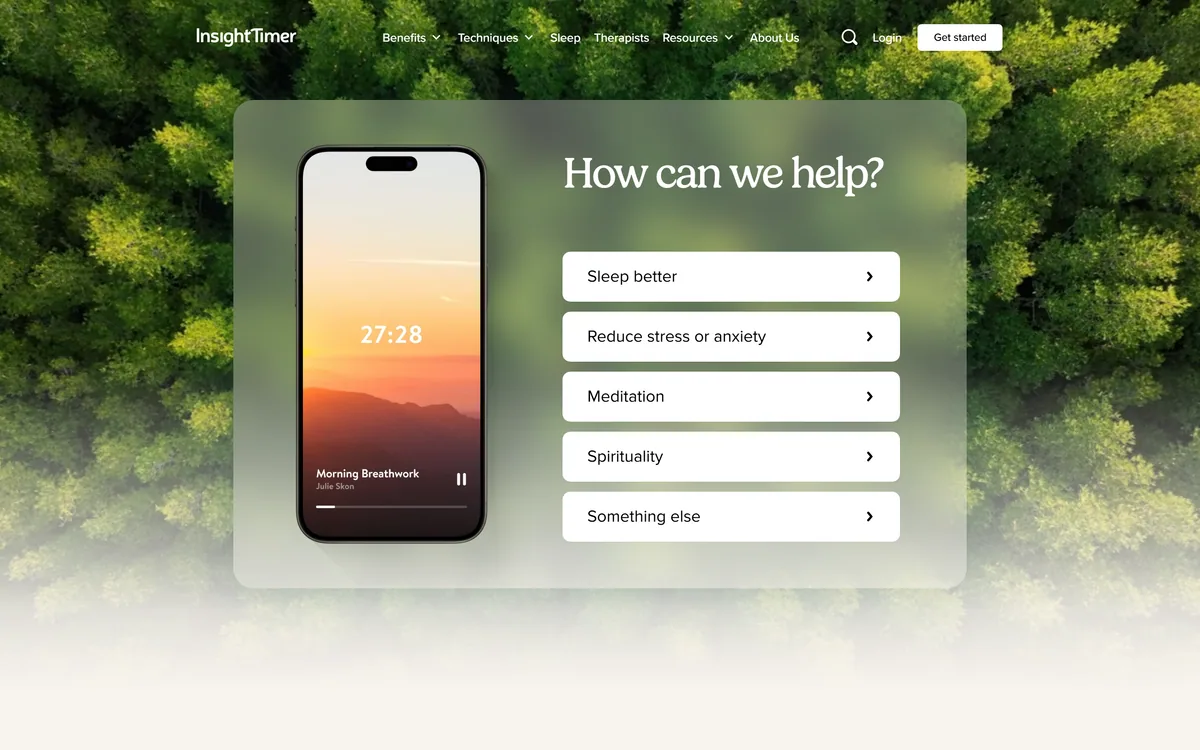
Insight Timer's homepage, captured 9 September 2026. The free library is the headline, which is unusual in a category built on subscriptions.
Why Does Free Change Who Establishes A Practice?
Insight Timer describes itself as the world's largest free audio library for everyday wellbeing, with thousands of free meditations, nature sounds, ambient music and bedtime stories.
The significance is about timing rather than money. Meditation has a well-known adoption curve: the first two weeks feel like failure, because your mind wanders constantly and you assume you are doing it wrong. Everyone experiences this; most people quit during it.
A subscription that starts before you have got through that period converts the ordinary difficulty into a financial decision, and the decision goes badly for exactly the reason it should not.
Free access removes the deadline. Someone can try for a month, stop for two, come back, and try a different teacher — which is how practices actually get established rather than how a trial period assumes they do.
The corresponding weakness is inseparable from the strength. A free library funded by a minority of subscribers has no incentive to gatekeep contributions, so the quality range is enormous. Some of what is available is genuinely excellent and some of it is not, and nothing on the surface distinguishes them.
Paywalls are why most meditation apps lose their users in week two. A subscription tool like StillMind asks for a decision before a habit exists, which is the wrong order.
The first two weeks of meditation feel like failure for everyone. A trial that expires during them converts an ordinary difficulty into a financial verdict.
Breadth Of Tradition Matters More Than Volume
The library draws on psychologists, spiritual leaders and mindfulness teachers — three quite different traditions with different assumptions about what meditation is for.
That range is more useful than the headline number, because people do not bounce off meditation so much as off a particular framing of it.
Someone who finds spiritual language alienating will abandon a practice presented that way and get on perfectly well with a clinical, secular framing derived from mindfulness-based stress reduction. Someone else finds the clinical version bloodless and needs the contemplative tradition it was extracted from.
A library holding both means a bad first experience is a reason to try a different teacher rather than to conclude meditation is not for you — which is the conclusion most people reach after one attempt.
The practical advice follows: if a session grates, change teacher rather than stopping. The variance between teachers is far larger than most beginners assume, and finding one whose voice and framing suit you is most of the battle.
Navigating A Library Nobody Curated
A collection this size with open contribution has an obvious consequence: finding something good is a skill you have to develop, and the app cannot do it for you.
The honest framing is that this is a library rather than a course. A curated app with a hundred sessions has decided what you should do; an open library with hundreds of thousands has not, and that freedom costs you the guidance.
For a complete beginner, that is genuinely harder. Being handed an enormous menu when you do not know what you want is worse than being handed a structured programme, and some people will do better starting with a curated app and moving here later.
The way through is to stop browsing and commit. Pick one teacher whose voice you can tolerate, do their sessions for two weeks, and change only if it is clearly not working. Sampling forty different meditations is a way of avoiding practising while feeling productive.
Courses are the middle path the library offers, providing structure inside an open collection. For someone who wants a sequence rather than a menu, that is the right entry point.
Curation is the trade being made. A smaller, structured library — the approach Liven takes — removes choice paralysis at the cost of range.
Pick one teacher and stay with them for two weeks rather than sampling widely.
Change teacher if the framing grates — variance between teachers is larger than beginners expect.
Start with a course if you want structure, since the open library provides none.
Use the length filter honestly: ten minutes you complete beats thirty you abandon.
Treat browsing as procrastination, because that is usually what it is.
What The Numbers Do And Do Not Say
The site states 30 million people, and gives the library size as both 350,000 tracks and 250,000 tracks in different places.
That inconsistency is worth noting plainly. It is almost certainly a stale figure somewhere on a large site rather than anything intentional, but it does mean neither number can be relied on, and it is the sort of thing worth flagging in a review that takes facts seriously.
The more useful point is that library size stops mattering above a certain threshold. Whether there are 250,000 or 350,000 tracks makes no difference to anyone, because nobody will hear more than a few hundred. Past a few thousand, the constraint is discovery rather than supply.
The 30 million figure describes registered users rather than active ones, as such figures almost always do. Meditation apps have notoriously steep drop-off — most people who download one stop within a month — so registration counts overstate the practising population everywhere in this category.
None of that is a criticism of the product, which is genuinely large and genuinely free. It is a reason to weigh your own two-week experience far above any number on the homepage.
Establishing A Practice In Two Weeks
Because the library is free, evaluation costs nothing but time — and the right test is whether you keep going rather than whether you enjoy a session.
The bar is step five. Two weeks is roughly where the initial difficulty eases, and stopping before then tells you nothing about meditation.
Start with a guided course rather than browsing, since structure beats choice when you do not yet know what you want.
Choose ten minutes rather than twenty. A session you complete daily is worth more than a longer one you skip.
Do it at the same time each day, ideally attached to something you already do — after coffee, before bed.
If the teacher's framing grates within three sessions, change teacher rather than concluding meditation is not for you.
Continue for fourteen days regardless of whether it seems to be working, because the first two weeks feel like failure for everyone.
Only then decide whether Member Plus adds anything, since by that point you will know what you actually use.
Who Pays For The Free Library
The free library is funded by a Member Plus subscription and by retreats hosted worldwide, with retreat prices spanning a wide range.
That structure is worth understanding because it explains the product's shape. A minority of subscribers and retreat customers pay for a library the majority use free, which is why the free tier is genuinely usable rather than a lead magnet.
It also explains why contributions are open. A curated library requires paying curators; an open one scales without that cost, and the trade is exactly the quality variance described above.
The retreat business is the more interesting revenue line and the one to approach with the usual care. Retreats are a significant purchase and a significant commitment, and the ordinary due diligence applies — who is teaching, what the itinerary is, what the cancellation terms are, and what happens if you need to leave.
We do not publish amounts. The practical advice is simply to establish a practice on the free tier first; you will know within a month whether a subscription would add anything, and most people find the free library sufficient.
For mood support specifically rather than practice, tools such as Youper and Soula address needs a meditation library does not pretend to cover.
Which Meditators Insight Timer Serves
Start here when
You have tried meditation before and stopped, and a trial deadline would make that worse rather than better.
You bounced off a particular style and want teachers from a genuinely different tradition.
You want sleep content, breathwork or yoga alongside meditation rather than a single-purpose app.
You value not paying while you find out whether a practice suits you.
You would use live sessions, which few competitors offer.
Start elsewhere when
You want to be told exactly what to do each day, where a curated app removes a choice you do not want.
An enormous menu paralyses you, which is a real response and worth respecting.
You need clinical treatment for anxiety, depression or trauma, where meditation is not the intervention and a professional is.
You want consistent production quality, which open contribution cannot guarantee.
You would spend more time browsing than practising, which the library makes easy.
Insight Timer: Library And Structure
Product type
Meditation, sleep and wellbeing audio library
Access model
Free core library, with a Member Plus subscription above it
Library size
Stated as 350,000 tracks in one place and 250,000 in another on the same site
Contributors
Psychologists, spiritual leaders and mindfulness teachers
Meditation, guided programmes and conversational support are different interventions for different needs.
StillMind — a more curated meditation experience if choice is the obstacle
Liven — structured wellbeing programmes rather than an open library
Youper — conversational support when the need is mood rather than practice
Soula — an emotional companion for the hours between appointments
Mindsera — reflective journalling as a different route to the same self-awareness
What Insight Timer's Site States
Last checked . Read from insighttimer.com, including the footer, with the screenshot above captured in the same session.
Positioning read from the site as the world's largest free audio library for everyday wellbeing
Content types confirmed as meditation, sleep content, yoga, breathwork and contemplation tools
Contributors described as psychologists, spiritual leaders and mindfulness teachers
Library size stated on the site as 350,000 tracks in one place and 250,000 tracks in another
Sleep content described as thousands of free meditations, nature sounds, ambient music and bedtime tales
Live events confirmed as including live yoga streams and live breathwork sessions
Meditation courses confirmed as accessible through a directory
User figure stated on the site as 30 million people
Member Plus confirmed as a subscription tier above the free library
Retreats confirmed as hosted worldwide across meditation, yoga, wellness and specialised categories
Legal entity given as Insight Network Inc.; footer confirmed to carry Browse, Resources and Company sections including meditation guides, teacher directories, blog, support, careers, legal terms and an accessibility statement
What we could not confirm: the library size is stated inconsistently on the site itself, at both 350,000 and 250,000 tracks, so neither figure can be relied on; the 30 million user figure almost certainly describes registrations rather than active practitioners, as such figures generally do in this category; what Member Plus specifically adds is not detailed on the pages we read; no teacher vetting or curation process is described; and we did not use the product, so nothing here reflects assessed content quality.
Editor's Verdict
4.2/5
Insight Timer scores well because it made a structural choice its competitors did not: the library is genuinely free rather than free-for-a-week, which removes the single largest barrier to establishing a meditation practice at the point where establishing one is hardest. The breadth — hundreds of thousands of tracks from teachers with very different traditions and training — means someone who bounced off one style has somewhere else to go. It loses ground because that same breadth means quality varies enormously with no curation to guide you, and because the library size is stated inconsistently on its own site. AInexfinder Editor Score: 4.2/5.
Insight Timer pricing
AInexfinder does not list plan prices or billing details. For current pricing, plans, and trials, visit the official Insight Timer website.
Vendor pricing, credits, and billing policies change over time. Always confirm on the official site before you buy.
Frequently asked questions
Is Insight Timer actually free?
Yes — the core library is genuinely free rather than free for a trial period, which is unusual in this category. A Member Plus subscription sits above it, and the free tier is funded by that minority of subscribers plus retreats. That structure is why the free experience is usable rather than a lead magnet.
How big is the Insight Timer library?
The site states 350,000 tracks in one place and 250,000 in another, so neither figure can be relied on. Practically it makes no difference: nobody will hear more than a few hundred, and above a few thousand the constraint becomes discovery rather than supply.
Is Insight Timer good for beginners?
It is good for beginners who have tried before and stopped, because the absence of a deadline is exactly what they need. It is harder for complete beginners, because an enormous unstructured menu is more difficult than a curated hundred sessions. If choice paralyses you, start with a course rather than browsing.
Why does the variety of teachers matter?
Because people bounce off a framing rather than off meditation itself. Someone who finds spiritual language alienating will abandon a practice presented that way and do fine with a clinical, secular approach — and someone else needs the contemplative tradition the clinical version was extracted from. A library holding both means a bad first session is a reason to change teacher.
What does Member Plus add?
The site does not detail this on the pages we read. The practical advice is to establish a practice on the free tier first — you will know within a month what you actually use, and most people find the free library sufficient. Deciding about a subscription before you have a habit is deciding without information.
How long should I meditate to know whether it works?
Two weeks, at ten minutes rather than twenty. The first fortnight feels like failure for everyone — your mind wanders constantly and you assume you are doing it wrong — and stopping during that period tells you nothing. A shorter session you complete daily is worth considerably more than a longer one you skip.
Is meditation a treatment for anxiety or depression?
No. Meditation has a reasonable evidence base as a wellbeing practice and is not a treatment for a mental health condition. If you are experiencing persistent anxiety, low mood or the effects of trauma, speak to a doctor or a qualified professional — an app is a complement to that, not a substitute for it.
Are the teachers on Insight Timer qualified?
The site describes contributors as psychologists, spiritual leaders and mindfulness teachers, but no vetting or curation process is described. With open contribution at this scale, quality varies enormously and nothing on the surface distinguishes excellent from mediocre. Judge by whether a teacher's sessions work for you rather than by the library's size.
Does Insight Timer offer live sessions?
Yes — live yoga streams and live breathwork sessions, which few competitors offer. Live sessions add something recordings cannot: the accountability of a scheduled time and the sense of practising alongside others, both of which help people who struggle to sit down on their own.
How does Insight Timer compare with subscription meditation apps?
The trade is curation for freedom. A subscription app hands you a decided programme with consistent production quality; Insight Timer hands you an enormous library and no guidance. If you want to be told what to do each day, a curated app is better. If you have tried that and stopped, the absence of a deadline here is the point.
Daniel reviews AI tools the slow way — by actually using them on real projects. His reviews cover what works, what breaks, and who each tool is genuinely a good fit for.
Daniel and the AInexfinder editorial team research Insight Timer using public product information, listing evidence, and (when available) hands-on checks. Scores reflect listing completeness and transparency — not paid placement.
Listings may include affiliate or sponsored placements, which are labeled when present. Editorial scores and cons are not sold. See our affiliate disclosure and review methodology.
RelaxFrens is a personalised meditation and sleep app that builds a plan around your goals, schedule and daily mood check-ins. Its companion, Fren, guides breathing exercises and conversations, and the app uses streaks, badges, nature sounds and adjustable voices and session lengths.
Aura is a personalised mental-wellness and sleep app bundling meditation, sleep tracks, hypnosis, CBT-style content, coaching, breathwork and more, with AI-driven recommendations and live coach and therapist sessions, offered as a freemium subscription and framed here as a wellbeing aid, not medical care.
moonbird is a tactile, screen-free handheld breathing coach that expands and contracts in your palm to pace your breath, reads your pulse and HRV, and pairs with an app whose Aura AI coach personalises the rhythm, aimed at calm and sleep as a wellbeing tool.
StillMind is an iOS and Android meditation app that generates a session from what you describe — choosing technique, length and script to match the moment. It adds a voice journal, mood-tagged entries, AI-composed courses and pattern tracking without streaks.
Brizzy is a guided-breathing app with 30 evidence-rated techniques, an AI coach that tailors sessions in 70+ languages, and an unusually honest, four-level evidence rating for each technique. It runs instantly in the browser and is a wellness tool, not medical care.