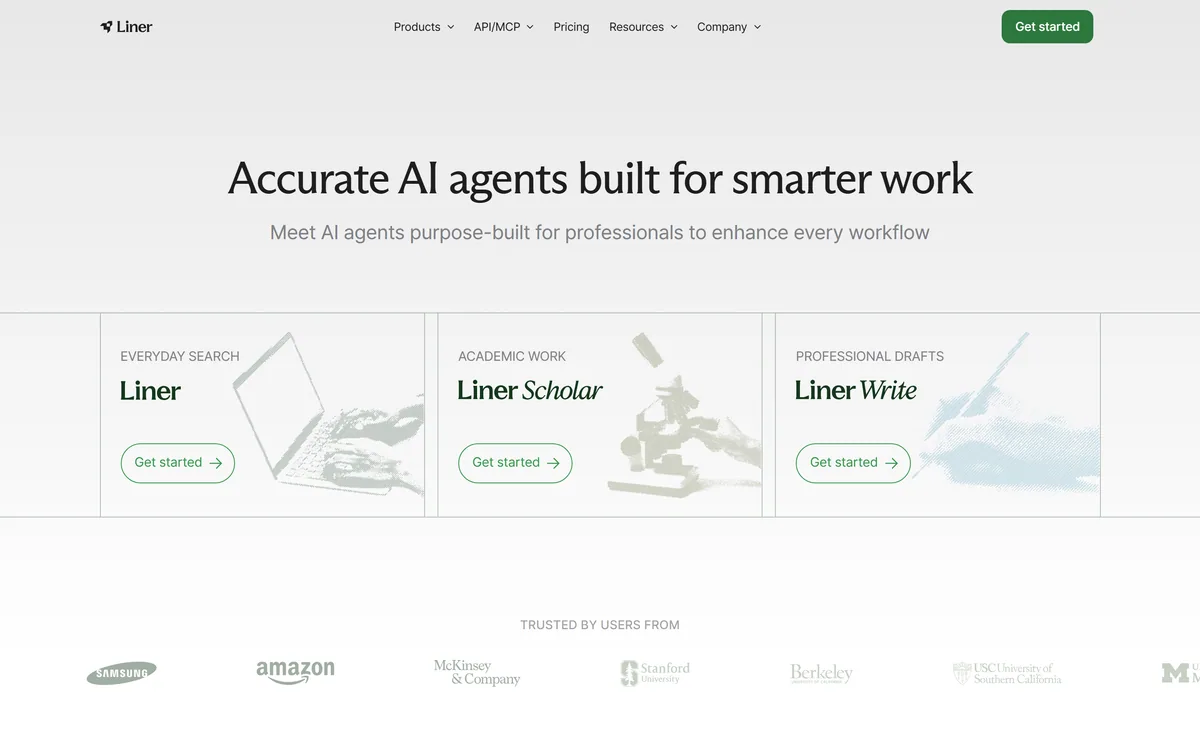
Liner splits into three purpose-built agents: everyday search returning cited answers with one-click verification and mind maps, Liner Scholar for finding, comparing and citing papers and building literature reviews, and a writing agent that drafts, verifies and edits in the same window.
The reason general assistants are distrusted in research is specific and well earned: they invent citations. A reference that looks correct, formatted properly, attributed to real authors, and describing a paper that does not exist.
Liner's design treats the citation as the output rather than the decoration. Every answer links to what it came from, and checking is one click.
It then splits into three agents rather than one, because finding a fact, reviewing a literature and drafting a report are genuinely different jobs.
Liner's homepage, captured 9 September 2026.
Liner: Three Agents For Professional Work
Three separate agents — everyday search, academic research, and professional drafting — rather than one general assistant.
Every answer cited, with one-click access to each source and follow-up questions to go deeper.
Liner Scholar finds and compares papers, surfaces citations and builds literature reviews.
Mind maps for processing complex topics, alongside the linear answer.
An API and MCP server, plus published case studies from named universities and researchers.
Why Do Citations Matter More Than Answers?
Liner's search agent is described as giving cited answers, with every citation checkable in one click and follow-up questions to deepen understanding.
That ordering — citation first, answer second — is the whole argument, and the reason is about what a professional actually needs.
An answer you cannot trace is not usable in any context where you are accountable for it. A consultant putting a figure in a client report, an analyst supporting a recommendation, a journalist publishing a claim — each of them needs the source more than the summary, because the source is what survives being challenged.
Its own displayed testimonials say exactly this. A marketing consultant describes using it to fact-check insights for client reports; a content researcher describes verifying sources before publishing. Both are checking rather than asking.
The deeper point is that a cited answer changes what the tool is for. Uncited, it is something that tells you things. Cited, it is something that finds things — and finding is the part that was actually slow.
An answer you cannot trace is unusable anywhere you are accountable for it. The source is what survives being challenged.
Liner Scholar And Finding Real Papers
The academic agent is described as finding and comparing papers, strengthening a paper with the right citations, and producing literature reviews in minutes. Among the published case studies is a professor using it to find papers without fake citations.
That phrase names the problem that has kept general assistants out of academic work entirely.
Fabricated references are the single most damaging failure a research tool can have, because they are indistinguishable from real ones at a glance. Correct author names, plausible journal, plausible year, and no such paper — which a supervisor discovers rather than the student.
A tool that retrieves from an actual index cannot invent a reference, because everything it returns exists by construction. That is an architectural guarantee rather than a quality improvement.
What it cannot do is judge the paper. Finding twenty relevant papers in minutes is genuinely valuable and it moves the bottleneck rather than removing it — reading them, assessing methodology and deciding which ones matter remains the work.
Search, Research And Write As One Window
The writing agent is described as searching, writing and editing in one window — drafting from a topic, shaping ideas into emails, newsletters and reports, and editing and verifying without breaking flow.
Keeping verification inside the drafting window is the useful part, and it addresses a specific failure in how people write with AI.
The normal pattern is fragmented: generate a draft in one tool, notice a claim you are unsure about, open a browser, search, lose your place, come back and have forgotten what you were writing. The verification step is where the flow breaks and, more often, where it gets skipped.
Collapsing the two means checking a claim costs seconds instead of a context switch, which is the difference between verifying and intending to verify.
The trade is scope. A dedicated writing tool will out-feature this on style and structure, and a dedicated editor will out-feature it on clarity — the reason a tool like Hemingway Editor still has a place beside it. What Liner offers instead is a draft whose claims you can stand behind.
Read the citation, not just the answer — that is the whole point.
Use Scholar for literature and the search agent for facts.
Treat found papers as a reading list, not a conclusion.
Check the mind map when a topic will not sit in your head.
Verify claims while drafting rather than intending to afterwards.
Mind Maps And Structuring A Topic
Among the search features is processing complex topics with mind maps, offered alongside the conventional answer.
Visual structure is an odd thing for a search product to build, and it is more defensible than it first appears.
A linear answer imposes an order that may not match the subject. When you are trying to understand something with many interacting parts — a regulatory landscape, a technical architecture, a field with competing schools — prose forces a sequence and hides the relationships.
A map shows what connects to what, which is usually the thing you were actually trying to work out. It also makes gaps visible in a way paragraphs do not; an empty branch is obvious, a missing sentence is not.
Its displayed testimonial for this feature comes from a product manager breaking down complex topics while planning features, which is the right use. It is a comprehension aid rather than a deliverable, and it earns its place by getting you oriented faster. For general questions Komo is the lighter tool, and Daloopa applies the same source-linking discipline inside a single domain.
Who The Case Studies Are Actually About
Liner publishes case study material naming a university pharmacy programme using Liner Scholar in research education, a public policy researcher short of time, a professor avoiding fabricated citations, and a piece about a major developer community positioning itself as a knowledge layer for AI agents.
Read as a set, those describe a specific customer that most AI search products do not target.
Every one is someone whose output is checked by other people. A pharmacy educator, a policy researcher, a professor — all working in contexts where a wrong citation has consequences beyond embarrassment.
That explains the product decisions. Citation-first output, an academic agent, one-click source access and the security and compliance page are all what you build for users who are accountable rather than curious.
The named institutions also make the claims checkable in principle, which is a higher standard than a logo wall. What the site does not give is measured outcomes — how much time was saved, or how the tool changed what those researchers produced — so the case studies establish who uses it rather than what it achieved.
Researching Something You Have To Defend
Research tooling fails when it becomes a substitute for reading rather than a way of finding what to read.
This sequence uses the citation architecture for what it is actually good at.
Pick the right agent — search for facts, Scholar for literature, write for drafting.
Open at least three citations on any claim that matters.
Use the mind map first when a topic has many moving parts.
Treat a literature review as a reading list you still have to read.
Verify claims inside the draft rather than promising to check later.
Keep the sources with the document, not just the conclusion.
Key features of Liner
Cited answers with one-click source access
Follow-up questioning to deepen a topic
Mind maps for structuring complex subjects
Liner Scholar for finding and comparing papers
Literature review generation
Citation suggestion for your own writing
A drafting agent with verification in the same window
An API and MCP server for external access
Pros & cons
Pros
7
Treats the citation as the output rather than a footnote
Retrieval architecture makes fabricated references structurally impossible
Three separate agents for three genuinely different jobs
Verification inside the drafting window means checking actually happens
Mind maps make relationships and gaps visible that prose hides
Case studies name real institutions rather than showing a logo wall
An MCP server makes the capability reachable from other assistants
Cons
7
Which indexes Scholar searches, and how completely, is not stated
Case studies name users but quantify no outcomes
Finding papers moves the bottleneck to reading them rather than removing it
A dedicated writing tool will out-feature the drafting agent
The security and compliance page's actual certifications are unclear
Our capture stopped before the footer, so company details went unread
No pricing on the pages we read
Best For
Consultants and analysts who must defend their claims
Postgraduate students and academics doing literature work
Last checked . Read from liner.com in a browser session on the date above, with the screenshot captured at the same time.
Positioned as accurate AI agents built for professionals
Three entry points shown: everyday search, academic work and professional drafts
Search described as giving cited answers with every citation checkable in one click
Follow-up questions and mind maps both listed as search features
Liner Scholar described as finding and comparing papers and producing literature reviews
Liner Write described as searching, writing and editing in one window
An API and MCP offering present in the site navigation
A dedicated AI security and compliance section displayed
Testimonials shown with first names and roles including consultants, PhD candidates and research scientists
Case study material naming a university pharmacy programme and a public policy researcher
One case study specifically about a professor finding papers without fake citations
A published piece on a developer community positioning itself as a knowledge layer for AI agents
What we could not confirm: our capture did not reach the site footer, so we make no claim in either direction about what is published there, including the operating company. We also could not confirm which indexes Liner Scholar searches or how complete its coverage is; what the security and compliance page actually certifies; whether the named case studies produced measured outcomes, since none is quantified; how the API and MCP offerings are scoped; and pricing. We did not run a search or build a literature review.
Editor's Verdict
4.2/5
Liner has made the correct structural decision for research tooling: three agents rather than one, because searching, reviewing literature and drafting are different jobs with different requirements. Citation is treated as the primary output rather than a footnote, and its own case study material leans on exactly that — a professor using it to find papers without fabricated citations. That is the failure mode that has made general assistants unusable for academic work. What it cannot do is read the paper for you, and it does not pretend otherwise. AInexfinder Editor Score: 4.2/5.
Liner pricing
AInexfinder does not list plan prices or billing details. For current pricing, plans, and trials, visit the official Liner website.
Vendor pricing, credits, and billing policies change over time. Always confirm on the official site before you buy.
Frequently asked questions
What is Liner?
A set of three AI agents for professionals: everyday search with cited answers, Liner Scholar for finding and comparing academic papers, and a writing agent that drafts and verifies in the same window.
Why does citation matter so much?
Because an answer you cannot trace is unusable anywhere you are accountable for it. The source is what survives being challenged, and its own testimonials describe people checking rather than asking — fact-checking client reports, verifying before publishing.
Does it invent references?
A retrieval system cannot, because everything it returns exists by construction. That is an architectural property rather than a quality improvement, and it is why one of its published case studies is specifically about avoiding fabricated citations.
Why are fabricated citations so damaging?
Because they are indistinguishable from real ones at a glance — correct-seeming authors, plausible journal, plausible year, and no such paper. The person who discovers it is usually a supervisor or a reviewer rather than the writer.
Can it write my literature review?
It can find and compare the papers and draft a structure, which is genuinely the slow part. Reading them, assessing methodology and deciding which matter is still the work, and treating the output as finished is the mistake to avoid.
What are the mind maps for?
Understanding subjects with many interacting parts, where prose forces a sequence and hides relationships. A map shows what connects to what, and it makes gaps visible in a way paragraphs do not.
Why three agents instead of one?
Because finding a fact, surveying a literature and drafting a report have different requirements. A general assistant balances them all badly; three purpose-built agents can each be shaped around what its job actually needs.
What does verifying inside the draft change?
Whether it happens. The normal pattern — generate, notice a doubtful claim, open a browser, lose your place — is where verification gets skipped. Collapsing it to seconds is the difference between verifying and intending to.
Who is it built for?
Its case studies describe a pharmacy education programme, a public policy researcher and a professor — all people whose output is checked by others. That accountability, rather than curiosity, is what the product decisions are shaped around.
Can I use it from another AI tool?
An API and MCP offering appear in its navigation, which means the search and research capability can be reached from another assistant rather than only from Liner's own interface. Scope was not something we could confirm.
Daniel reviews AI tools the slow way — by actually using them on real projects. His reviews cover what works, what breaks, and who each tool is genuinely a good fit for.
Daniel and the AInexfinder editorial team research Liner using public product information, listing evidence, and (when available) hands-on checks. Scores reflect listing completeness and transparency — not paid placement.
Listings may include affiliate or sponsored placements, which are labeled when present. Editorial scores and cons are not sold. See our affiliate disclosure and review methodology.
Exa is a search API that gives AI agents real-time access to the web, built on its own large index, embedding and retrieval models, with selectable latency, search verticals, token-efficient highlights, structured enrichments and an MCP server.
Felo is a multilingual AI search and creation platform from Felo Inc. It pairs an answer engine with Felo Slides, an agent mode, an LLM playground, LiveDoc and an API, with the multilingual layer as its distinguishing feature rather than an afterthought.
Komo is an AI search engine that answers with sources across three modes — Web, People and Deep research. Its Firsthand feature finds the right people to answer what AI cannot, and it offers a Komo Fast model, saved history and an Earn programme.
R Discovery is a research reading and literature search app from Cactus Communications, covering 150M+ journal articles, 78M+ open access papers and 10M+ conference documents. It offers AI summaries with citations, chat with a PDF, generated literature reviews, audio papers and translation into 30+ languages.
Voiceflow is an enterprise conversational AI platform where CX teams design agent workflows visually, prototype them in place, and deploy one agent across web, app, WhatsApp, SMS and voice. It states 500-millisecond voice latency, 300,000 messages per minute and more than 10,000 live agents in production.