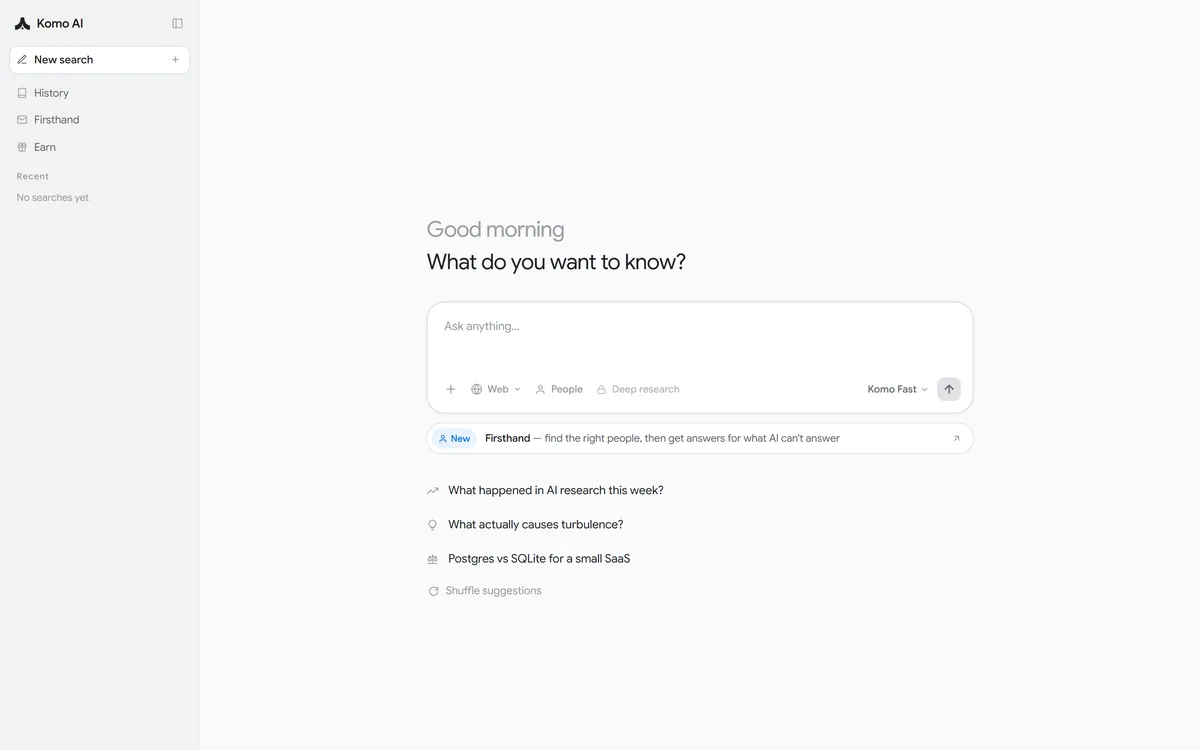
Komo is an AI search engine that answers with sources across three modes — Web, People and Deep research. Its Firsthand feature finds the right people to answer what AI cannot, and it offers a Komo Fast model, saved history and an Earn programme.
The pitch for AI search is that you get an answer instead of ten links. It is a genuine improvement for a large class of questions, and it introduces a new failure that ordinary search did not have.
A list of links makes its uncertainty visible — you can see that the sources disagree, or that nothing on page one is quite right. A synthesised answer resolves that disagreement silently and hands you one confident paragraph.
Komo's design responds to that in two ways: citing sources on every answer, and building an explicit route to actual people for the questions where no amount of searching will work.
Komo: Search That Cites Its Sources
Three modes — Web for ordinary questions, People for reaching humans, Deep research for longer work.
Firsthand finds the right people, then gets answers for what AI cannot answer, which is an unusually honest feature to build.
Answers with sources is the stated promise, printed in the footer rather than buried in marketing.
Komo Fast is the default model, with deep research gated behind a paid plan.
An Earn programme and saved search history, with a private-search positioning.
Komo's interface, captured 9 September 2026, showing the Web, People and Deep research modes.
What Separates An Answer Engine From Search?
Komo's footer states its promise plainly: answers with sources. That combination is the definition of the category.
Traditional search retrieves and ranks. It shows you where information lives and leaves the reading, the reconciling and the judgement entirely to you, which is slow and honest.
An answer engine reads several sources and synthesises. That is faster, and it moves the judgement — which source to believe, how to reconcile a contradiction — inside a system whose reasoning you cannot inspect.
Citations are the mitigation, and they only work if you use them. An answer with sources that nobody clicks is functionally an answer without sources, and the convenience of synthesis is precisely what discourages checking.
The practical discipline is to click through on anything you will act on or repeat. That is the difference between AI search making you faster and making you confidently wrong — the same discipline grounded professional tools like CoCounsel build their entire product around.
An answer with sources that nobody clicks is functionally an answer without sources.
Web, People And Deep Research Modes
Komo's query box exposes three modes, and making the user choose is better design than inferring it.
Web is the default and covers the ordinary case: a question with an answer that exists somewhere, needing a fast synthesis rather than a research project.
Deep research, which the interface notes requires a paid plan, is the longer form — more sources, more time, a structured output. It suits questions where you would otherwise have spent an afternoon, and it is wasted on questions you could answer in a sentence.
The reason explicit modes beat automatic detection is cost and expectation. A system guessing that your question needs deep research will sometimes spend several minutes on something trivial, and sometimes give a one-line answer to something that deserved twenty sources.
People is the third and the genuinely unusual one, and it is worth treating as a separate product rather than a mode.
Firsthand And Asking Actual People
Komo describes Firsthand as finding the right people, then getting answers for what AI cannot answer.
That phrase — what AI cannot answer — is a rare admission in this category, and it points at a real and permanent limit.
Language models can only surface what has been written down. An enormous amount of useful knowledge never was: what a tool is actually like to use daily, why a company made a decision, whether a supplier is reliable, what went wrong on a project nobody published a post-mortem about.
For those questions the honest answer is not a better search — it is a person who was there. Building a route to that inside a search product acknowledges the boundary instead of generating a plausible guess past it.
The obvious questions are about incentives and verification. How people are found, whether they are compensated, and how you know their expertise is real all determine whether this is genuinely useful, and the pages we read do not answer them. The Earn programme visible in the interface suggests some form of participant reward, which makes those questions more pressing rather than less.
Click at least one source on anything you will act on or repeat.
Choose the mode deliberately — deep research is wasted on simple questions.
Use People-type routing for knowledge that was never written down.
Ask how contributors are found and rewarded before relying on their answers.
Keep a normal search engine for navigation, which answer engines do badly.
Where Answer Engines Are Worse Than Search
It is worth being specific about where synthesis is the wrong tool, because the failures are systematic rather than occasional.
Navigation is the clearest. When you want a specific page — a company's pricing, a login, a documentation section — you want the link, and an answer engine will describe the page to you instead.
Recency is the second. Anything that changed in the last few hours may be summarised from cached or older sources, and an answer engine rarely signals that its material is stale.
Contested questions are the third and most important. Where sources genuinely disagree, a list makes the disagreement visible and a synthesised answer flattens it into one position, usually the one most commonly stated rather than the one best supported.
And anything requiring judgement about source quality is worse, not better, because the weighing happened invisibly. Research-specific tools such as Felo face the same limits — this is a property of the category, not a fault in any one product.
Privacy, History And What Gets Stored
Komo is positioned around private AI search, with a History section and saved searches visible in the interface.
Those two things are in tension, and it is worth understanding how rather than assuming either.
Search history is unusually revealing. What somebody searches for over a year describes their health, finances, employment, relationships and interests more completely than almost any other record they generate.
Saved history is genuinely useful — being able to return to research you did three weeks ago is a real feature — but it means the record exists, which is the thing privacy positioning usually implies does not.
The questions to answer are concrete: whether history is retained by default, whether it can be deleted, whether it is used to personalise or train anything, and what the Earn programme does with participation data. None are addressed on the pages we read, and all are worth checking before making it your default engine.
The alternative posture is to keep the index yourself. Locally run assistants such as Khoj answer over your own documents without a history sitting on somebody else's infrastructure, which is a genuinely different trade rather than a better one — you gain control and give up the web-scale corpus a hosted engine reaches.
Using Komo For Research That Holds Up
The way AI search goes wrong is not dramatic. You read a fluent answer, absorb it, repeat it in a meeting, and only later discover the source said something narrower.
This sequence keeps the speed while preserving the checkable chain.
Pick the mode before typing — Web for facts, deep research for questions worth an afternoon.
Read the answer, then open at least one cited source before believing it.
For contested topics, run the same question twice and look for disagreement between answers.
Use a normal search engine when you want a specific page rather than an explanation.
Route questions about lived experience to people rather than to a model.
Check the history and retention settings before making it your default.
Answer Engine Terms
The vocabulary of AI search, and what each term actually implies.
undefined
undefined
undefined
undefined
undefined
undefined
Komo: Modes And Company
Product type
AI search engine
Stated promise
Answers with sources
Modes
Web, People, Deep research
Deep research
Requires a paid plan, per the interface
Default model
Komo Fast
Firsthand
Finds the right people, then gets answers for what AI cannot answer
What we could not confirm: pricing and what separates the free tier from paid; which underlying models Komo Fast and deep research use; how Firsthand identifies the right people, whether they are verified, and how they are compensated; what the Earn programme rewards and what data participation involves; whether search history is retained by default, deletable, or used for personalisation or training; and the operating company beyond the name in the footer. We were signed out, so we did not run a search.
Editor's Verdict
4.0/5
Komo's most interesting idea is an admission: it has a mode for the questions AI cannot answer, and that mode routes you to people. Every answer engine hits the same wall — anything not written down anywhere is unanswerable no matter how good the model — and most products pretend otherwise, producing a confident guess instead. Building an explicit escape hatch is more honest than that, and more useful. The three-mode split between Web, People and Deep research is a clean way to make the user choose depth deliberately, and the footer's own line — answers with sources — is the right promise. AInexfinder Editor Score: 4.0/5.
Komo pricing
AInexfinder does not list plan prices or billing details. For current pricing, plans, and trials, visit the official Komo website.
Vendor pricing, credits, and billing policies change over time. Always confirm on the official site before you buy.
Frequently asked questions
What is Komo?
Komo is an AI search engine that answers with cited sources across three modes: Web, People and Deep research. Its Firsthand feature finds the right people to answer what AI cannot, and the interface shows a Komo Fast model, saved history and an Earn programme.
How is an answer engine different from search?
Traditional search retrieves and ranks, leaving the reading and judgement to you. An answer engine reads several sources and synthesises, which is faster but moves the judgement — which source to believe, how to reconcile contradictions — inside a system you cannot inspect.
Do citations actually solve that?
Only if you use them. An answer with sources that nobody clicks is functionally an answer without sources, and the convenience of synthesis is exactly what discourages checking. Click through on anything you will act on or repeat.
What is Firsthand for?
Questions AI cannot answer, which is a rare admission in this category. Models can only surface what was written down, and a great deal never was — what a tool is like daily, why a company decided something, whether a supplier is reliable. Those need a person who was there.
What should I ask about the People mode?
How people are found, whether their expertise is verified, and how they are compensated. Those determine whether the answers are worth anything, and the pages we read do not address them. The Earn programme suggests some participant reward, which makes the question more pressing.
Why choose the mode manually?
Because automatic detection fails in both directions. A system guessing your question needs deep research will sometimes spend minutes on something trivial, and sometimes return a line where twenty sources were warranted. Explicit modes put the cost decision with you.
When is ordinary search better?
Navigation, recency and contested topics. When you want a specific page, an answer engine describes it instead of linking it. Anything that changed in the last few hours may be summarised from stale sources. And where sources genuinely disagree, a list shows the disagreement that synthesis hides.
What is synthesis flattening?
What happens when sources conflict and one answer is produced anyway. The disagreement disappears silently, usually in favour of the most commonly stated position rather than the best supported one — which is the opposite of what you want on a contested question.
Is my search history private?
The product is positioned around private search and also saves history, and those are in tension. Search history is unusually revealing — it describes health, finances, employment and relationships more completely than most records. Check retention and deletion settings before making it your default.
How do I use it without getting caught out?
Pick the mode before typing, open at least one cited source before believing anything, and run contested questions twice to see whether the answers disagree. Keep a normal search engine for navigation, which answer engines handle worst.
Daniel reviews AI tools the slow way — by actually using them on real projects. His reviews cover what works, what breaks, and who each tool is genuinely a good fit for.
Daniel and the AInexfinder editorial team research Komo using public product information, listing evidence, and (when available) hands-on checks. Scores reflect listing completeness and transparency — not paid placement.
Listings may include affiliate or sponsored placements, which are labeled when present. Editorial scores and cons are not sold. See our affiliate disclosure and review methodology.
Exa is a search API that gives AI agents real-time access to the web, built on its own large index, embedding and retrieval models, with selectable latency, search verticals, token-efficient highlights, structured enrichments and an MCP server.
Felo is a multilingual AI search and creation platform from Felo Inc. It pairs an answer engine with Felo Slides, an agent mode, an LLM playground, LiveDoc and an API, with the multilingual layer as its distinguishing feature rather than an afterthought.
Liner splits into three purpose-built agents: everyday search returning cited answers with one-click verification and mind maps, Liner Scholar for finding, comparing and citing papers and building literature reviews, and a writing agent that drafts, verifies and edits in the same window.
R Discovery is a research reading and literature search app from Cactus Communications, covering 150M+ journal articles, 78M+ open access papers and 10M+ conference documents. It offers AI summaries with citations, chat with a PDF, generated literature reviews, audio papers and translation into 30+ languages.
Zendy is an AI-powered research library combining open-access and premium academic literature with ZAIA, an assistant that summarises papers, highlights key phrases and gives reference-backed answers, aimed at independent researchers and institutions.