Eve builds EveOS for plaintiff-side firms in personal injury, employment, medical malpractice, workers' compensation and Social Security disability. It runs intake, structures medical records, drafts demands and discovery, audits open matters nightly, and answers plain-English questions about the firm's own numbers.
CoCounsel
Verified
CoCounsel Legal is Thomson Reuters' AI legal assistant. It reasons from Westlaw content, Practical Law guidance and your firm's own documents, producing cited research, analysis and drafts, with Workspaces, Westlaw Brief Builder and Tabular Analysis across up to 10,000 documents.
4.3Editor Score
legal.thomsonreuters.com5 viewsAdded April 7, 2026312K visitors
Every lawyer who has tried a general-purpose chatbot on a legal question has had the same experience. The answer is fluent, well structured, correctly formatted — and somewhere in it is a case that does not exist.
That is not a bug to be patched. A model generating text will generate plausible citations the same way it generates plausible sentences, because from the inside those are the same operation.
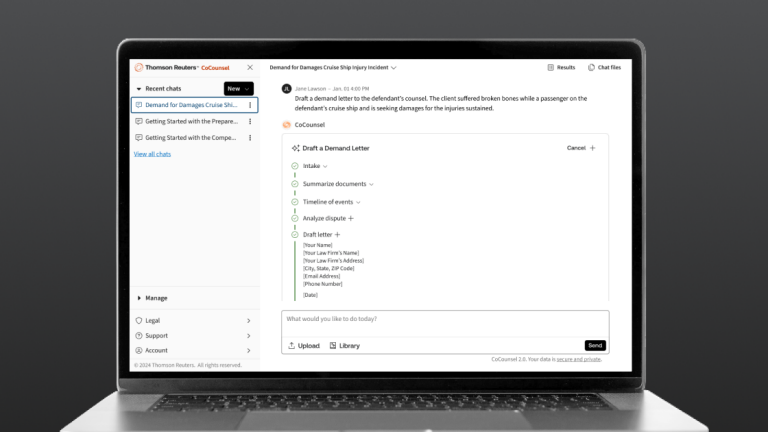
CoCounsel's response is to change what the system reasons from. Instead of the open web, it works from Westlaw, Practical Law and your own documents, and it returns citations you can click.
CoCounsel: Legal AI Grounded In Westlaw
- Thomson Reuters' own product, reasoning from Westlaw content, Practical Law guidance and your organisation's documents.
- Linked citations you can open and verify, which changes the failure mode from invented authority to retrievable authority.
- Tabular Analysis reviews up to 10,000 documents against 100 questions in one table.
- Westlaw Brief Builder takes a litigation brief from issue framing to argument structure, with the attorney in control.
- Percentages published with an asterisk — 76%, 64% and 33% figures that describe survey agreement, not measured outcomes.
What Does Grounding In Westlaw Change?
Thomson Reuters describes CoCounsel Legal as the only AI grounded in Westlaw content, Practical Law guidance and your firm's own documents, handling research, analysis and drafting from a single query.
The important word is grounded, and it means something specific: the system retrieves from a defined corpus and reasons over what it retrieved, rather than generating from everything it has ever absorbed.
That changes the character of the mistakes. An ungrounded model can produce a citation to nothing; a grounded one can produce a citation to something real but wrong for your matter. The second is a legal judgement error, which lawyers are trained to catch. The first is a fabrication, which nothing in professional training prepares you for.
The corpus itself is the other half. Westlaw and Practical Law are licensed, edited and maintained, with editorial treatment layered on top of primary law — which is a meaningfully different input from whatever version of a case happens to be indexed publicly.
None of this removes the obligation to verify. It changes what verification consists of, from checking whether the authority exists to checking whether it says what the tool claims — which is the work a lawyer should have been doing anyway.
An ungrounded model can cite nothing. A grounded one can cite something real but wrong. The second is a judgement error lawyers are trained to catch; the first is not.
Why Citations You Can Click Matter
The site states that drafts come with linked citations for verification, and that is a design decision worth understanding rather than skimming past.
Verification friction determines whether verification happens. If checking a citation means leaving the tool, opening a database, running a search and reading a case, most people will check the first two and assume the rest.
A linked citation collapses that to one click, which is the difference between a policy that says everything must be verified and a practice where it actually is.
It also makes the tool auditable after the fact. When someone asks in six months how a conclusion was reached, the chain from assertion to authority is still there rather than reconstructed from memory.
This is the same principle behind grounded drafting in other regulated fields — patent work in DeepIP and contract review in LegalOn both live or die on whether the output points back at something checkable.
Reviewing 10,000 Documents Against 100 Questions
Tabular Analysis is described as reviewing up to 10,000 documents against 100 questions, with results delivered in one dynamic table you can filter.
The shape of that feature tells you what it is for. This is diligence, discovery and portfolio review — the work where the difficulty is not any individual document but the volume and the consistency of the questions asked of each one.
Consistency is the real gain. A team of associates reviewing ten thousand documents will interpret question seven slightly differently on day four than on day one, and nobody will notice until it matters.
The table format matters too. Answers arranged in a grid are comparable, sortable and reviewable in aggregate, which lets you spot the outliers — the three contracts that answered differently — rather than reading everything again.
What it does not do is remove the need to read the ones that matter. The right use is triage: let the table tell you which two hundred documents deserve human attention, then give them proper attention rather than skim ten thousand.
- Verify what a citation says, not merely that it exists — that is the new work.
- Use bulk review as triage, not as a substitute for reading what matters.
- Read the asterisk on any published percentage before quoting it internally.
- Check whether your own documents are used to train anything, in writing.
- Pilot on a closed matter where you already know the right answer.
Reading The Percentages On The Page
The product page leads with three figures: 76% agree it improved research and drafting quality, 64% agree it helped reduce risk, and a 33% average reduction in time spent on document review, research and drafting. All three carry an asterisk.
Two of those are agreement statistics, which measure what users reported believing rather than what was measured. That is not worthless — practitioner perception is a real signal about whether a tool gets adopted — but it is a different thing from an outcome study.
The third, the 33% time reduction, is the one that would matter most for a business case, and it is also the one most sensitive to how it was collected. Self-reported time savings are notoriously generous, and averages hide the distribution.
None of this makes the figures dishonest. They are published with an asterisk, which is the correct way to present survey data, and the honest reading is that they indicate direction rather than magnitude.
The practical response is to generate your own number. Run a defined task both ways on a closed matter, measure the actual difference, and use that for your business case rather than a vendor's average.
Where CoCounsel Sits Among Legal Tools
Legal AI has fragmented into categories that look similar and solve different problems, and the distinctions matter when you are choosing what to buy.
Research and drafting assistants — CoCounsel's category — start from a legal question and produce reasoned, cited work product. The differentiator is the corpus behind them.
Contract review sits elsewhere. Assessing whether a clause is acceptable against your playbook is a comparison task rather than a research task, which is why dedicated reviewers such as Ivo and Luminance exist as separate products rather than features.
Contract storage is a third thing again, and the most commonly conflated. Being able to find and track your executed agreements — what platforms like ContractSafe do — is an operations problem, not a legal reasoning one.
The fourth category is intelligence about risk that has not yet become a matter, which is a genuinely different proposition from anything above. Confusing these four is the most common way firms buy the wrong thing and conclude that legal AI does not work.
Introducing CoCounsel To A Practice
Adoption failures in legal AI are rarely technical. They happen because the tool was introduced without a rule about what it may be used for and who checks the output.
This sequence establishes both before anything touches live client work.
- Pilot on a closed matter where you already know the correct answer.
- Compare the tool's output against what the file actually shows, citation by citation.
- Write down which task types are permitted and which are not, before wider rollout.
- Establish who verifies output and record that the verification happened.
- Get the data handling terms in writing, particularly around your own uploaded documents.
- Measure your own time saving on a defined task rather than adopting a published average.
Key features of CoCounsel
Research grounded in Westlaw and Practical Law
Step-by-step reasoning plans you can inspect
Drafting with linked, verifiable citations
Workspaces holding matter context between sessions
Westlaw Brief Builder for litigation drafting
Tabular Analysis across up to 10,000 documents
Reasoning over your organisation's own documents
No prompt engineering required, per the page
Pros & cons
Pros
7- Grounding in a licensed, edited corpus changes the failure mode from fabrication to judgement
- Linked citations reduce verification friction, which is what determines whether verification happens
- Content and AI come from the same publisher rather than two vendors pointing at each other
- Tabular Analysis brings consistency to questions asked across thousands of documents
- Workspaces preserve matter context instead of restarting from scratch
- Statistics are published with asterisks rather than presented as unqualified fact
- An inspectable reasoning plan supports the audit trail regulated work needs
Cons
7- Most of the value depends on already licensing Westlaw and Practical Law
- Two of the three headline figures are agreement statistics, not measured outcomes
- Self-reported time savings are a weak basis for a business case
- Grounding reduces fabrication risk but does not remove the duty to verify
- Data handling for uploaded firm documents is not described on the page we read
- Jurisdictional coverage outside the United States is unstated
- No pricing visible without going through a plans or sales route
Best For
- Firms already embedded in the Westlaw and Practical Law ecosystem
- Litigation practices doing significant brief drafting
- Teams running large document review or diligence exercises
- In-house departments needing an auditable research trail
- Practices that rejected general AI specifically over fabricated citations
CoCounsel Against Other Legal AI
Legal AI splits into research, review, storage and risk intelligence — four different purchases.
| Tool | Category | What it reasons from | Best for |
|---|---|---|---|
| CoCounsel | Research, analysis and drafting | Westlaw, Practical Law and your documents | Firms that already rely on Westlaw |
| Ivo | Contract review | Your playbook and positions | Reviewing agreements against standards |
| Luminance | Contract analysis at scale | Your document corpus | Large review and diligence exercises |
| Paxton AI | Legal research and drafting | Its own sources | Smaller practices without a Westlaw licence |
| Darrow | Risk before a matter exists | Regulatory filings and market signals | Finding exposure rather than researching it |
CoCounsel: Capabilities And Publisher
| Publisher | Thomson Reuters |
|---|---|
| Product | CoCounsel Legal |
| Positioning | Fiduciary-Grade AI™ built to the standard the legal profession demands |
| Grounded in | Westlaw content, Practical Law guidance and your organisation's own knowledge |
| Output | Research, analysis and drafting with linked citations |
| Workspaces | Documents, templates, conversations and matter history held together per matter |
| Brief Builder | Westlaw-grounded litigation briefs from issue framing to argument structure |
| Tabular Analysis | Up to 10,000 documents reviewed against 100 questions in one filterable table |
| Published figures | 76% and 64% agreement statistics and a 33% average time reduction, each asterisked |
| Prompt engineering | Stated as not required |
Does CoCounsel Suit Your Firm?
A clear fit for firms when
- Westlaw and Practical Law are already part of how your firm works.
- Fabricated citations are the risk that has kept you away from AI so far.
- You run document review exercises large enough to need consistent questioning.
- Litigation drafting is a meaningful share of your billable work.
- You need an auditable chain from an assertion back to its authority.
Stay with your current stack when
- You do not license Westlaw, which removes most of the differentiator.
- Your need is contract review against a playbook rather than legal research.
- You mainly need to find and track executed agreements, which is a storage problem.
- Your practice area is thinly covered by the underlying corpus.
- You cannot resource the verification discipline that any legal AI requires.
More Legal AI Tools
Adjacent legal products, grouped by which part of the work they touch.
- Ivo — contract review against your own playbook
- Luminance — document analysis across large review exercises
- Paxton AI — research and drafting without a Westlaw licence
- ContractSafe — finding and tracking executed agreements
- DeepIP — the patent equivalent of grounded legal drafting
CoCounsel: Read From Thomson Reuters
Last checked . Read from the CoCounsel Legal product page on legal.thomsonreuters.com on the date above.
- Published by Thomson Reuters, confirmed in the page footer
- Described as Fiduciary-Grade AI™ built to the standard the legal profession demands
- Stated as reasoning from Westlaw content, Practical Law guidance and your organisation's own knowledge
- Research, analysis and drafting handled from a single query, per the page
- Linked citations for verification stated
- Prompt engineering stated as not required
- Workspaces described as holding documents, templates, conversations and matter history per matter
- Westlaw Brief Builder described, with the attorney reviewing facts, choosing arguments and validating citations
- Tabular Analysis stated as reviewing up to 10,000 documents against 100 questions
- Three statistics displayed with asterisks: 76% and 64% agreement figures and a 33% average time reduction
What we could not confirm: pricing or plan structure, since the page routes to a plans view we did not read; the methodology, sample and date behind the three asterisked statistics, which the footnote marker points to and we did not open; which underlying models are used; how firm-uploaded documents are stored, retained and whether they are used for any training; jurisdictional coverage outside the United States; and how the product performs in practice, since we did not use it. Nothing here should be read as legal advice or as an endorsement for any particular matter.
Editor's Verdict
4.3/5The problem with general-purpose AI in legal work is not that it writes badly — it is that it will produce a confident citation to a case that does not exist. CoCounsel's answer is structural rather than a warning label: it reasons from Westlaw content and Practical Law guidance, which are licensed, edited corpora, and it returns linked citations you can open. That does not remove the duty to verify, and no product can. But it changes the failure mode from invented authority to retrievable authority, which is a different category of risk. Being Thomson Reuters' own product also means the underlying content and the AI are not two vendors pointing at each other. AInexfinder Editor Score: 4.3/5.
CoCounsel pricing
AInexfinder does not list plan prices or billing details. For current pricing, plans, and trials, visit the official CoCounsel website.
Visit official website for pricingVendor pricing, credits, and billing policies change over time. Always confirm on the official site before you buy.
Frequently asked questions
What is CoCounsel?
CoCounsel Legal is Thomson Reuters' AI legal assistant. It reasons from Westlaw content, Practical Law guidance and your organisation's own documents to handle research, analysis and drafting from a single query, returning work product with linked citations you can open and verify.
Does grounding stop AI inventing cases?
It changes the failure mode rather than eliminating error. A grounded system retrieves from a defined corpus, so instead of citing a case that does not exist it may cite a real case that is wrong for your matter. The second is a judgement error lawyers are trained to catch.
Do I still have to verify the output?
Yes, and no product changes that. What grounding changes is what verification consists of: instead of checking whether an authority exists, you check whether it says what the tool claims — which is the work a lawyer should have been doing anyway.
Why do linked citations matter?
Because verification friction determines whether verification happens. If checking means leaving the tool, opening a database and running a search, most people check the first two and assume the rest. One click is the difference between a policy and a practice.
What is Tabular Analysis for?
Reviewing up to 10,000 documents against 100 questions in one filterable table. It is a diligence and discovery tool, and its real gain is consistency: a team of associates will interpret question seven differently on day four than on day one, and nobody notices until it matters.
Should I trust the 33% time reduction figure?
Treat it as direction rather than magnitude. It is published with an asterisk, which is the correct way to present survey data, but self-reported time savings are generous and averages hide the distribution. Generate your own number on a defined task instead.
Is CoCounsel worth it without Westlaw?
Much less so, since grounding in Westlaw and Practical Law is the central differentiator. Firms without those licences are effectively buying a general legal AI, and there are products built for that position rather than assuming the ecosystem underneath.
Is this a contract review tool?
No — different category. Assessing whether a clause is acceptable against your playbook is a comparison task, not a research task, which is why dedicated contract reviewers exist as separate products. Conflating research, review, storage and risk intelligence is how firms buy the wrong thing.
How should we pilot it?
On a closed matter where you already know the correct answer, comparing output citation by citation against what the file actually shows. Then write down which task types are permitted, who verifies output, and how that verification is recorded — before anything touches live client work.
What happens to documents we upload?
The page we read does not describe retention or whether firm documents are used for training, and that is the question to settle in writing before uploading privileged material. It is the single most important term in any legal AI agreement, ahead of price.
Reviews
Log in to write a review.
User Reviews
No reviews yet. Be the first to share your experience with CoCounsel.
Reviewed by Daniel Reed
Assigned reviewer
Daniel ReedSenior AI Tools Reviewer
Daniel reviews AI tools the slow way — by actually using them on real projects. His reviews cover what works, what breaks, and who each tool is genuinely a good fit for.
Hands-on reviewsProduct testingAI software
Daniel and the AInexfinder editorial team research CoCounsel using public product information, listing evidence, and (when available) hands-on checks. Scores reflect listing completeness and transparency — not paid placement.
- Last verified
- Methodology
- How we review AI tools
- Sources used
- legal.thomsonreuters.com/en/products/cocounsel-legal
- AInexfinder listing fields (features, pros/cons, description)
- Public vendor pages when available
- Editorial policy
- Listings may include affiliate or sponsored placements, which are labeled when present. Editorial scores and cons are not sold. See our affiliate disclosure and review methodology.
Related tools

Harvey is an AI platform for legal and professional services — agents, a Vault for documents, Knowledge, Spaces, and Contract Intelligence — used by firms including A&O Shearman, Latham & Watkins, and Norton Rose Fulbright.
Solve Intelligence is an AI platform for patent work, covering application drafting, office action responses, invalidity and claim-mapping charts, freedom-to-operate reviews and portfolio analysis. It is used by over 700 in-house IP teams and law firms, with SOC 2 Type II and ISO 27001 certification and no training on customer data.
Ivo is AI contract review for in-house legal teams. It applies redlines directly in Microsoft Word or Google Docs, evaluates agreements against your playbooks and historical contracts, benchmarks clauses by governing law and industry, and queries executed contracts in plain language.
Spellbook reviews and drafts contracts inside Word and Google Docs, redlining against a firm's own playbooks, comparing terms to thousands of similar agreements, and indexing signed contracts for search — used by a stated 5,000-plus legal teams in 80-plus countries.
LegalOn is a contract lifecycle platform from LegalOn Technologies, Inc. covering intake, review, redlining, storage and analysis, built on more than 135 attorney-authored playbooks across industries and countries, with a Microsoft Word integration and agentic workflows.
Explore More
Embed this listing on your site
Featured on AInexfinder