Kuse is an AI workspace from Kuse Inc. built around scheduled workflows: describe a recurring task in plain language, connect the apps it touches, and let it run. It also generates websites, documents, presentations and spreadsheets, with several model families available.
Almost every AI tool is a destination. You open it, you ask something, you get an answer, and nothing happens until you come back.
That is fine for thinking and useless for the parts of a job that repeat. The weekly lead pull, the Monday report, the monitoring nobody does because it is boring — these fail not because they are hard but because someone has to remember.
Kuse's framing is the interesting part: the workflow runs on a schedule whether or not you show up. That turns an assistant into a process, and processes are what actually change how a week goes.
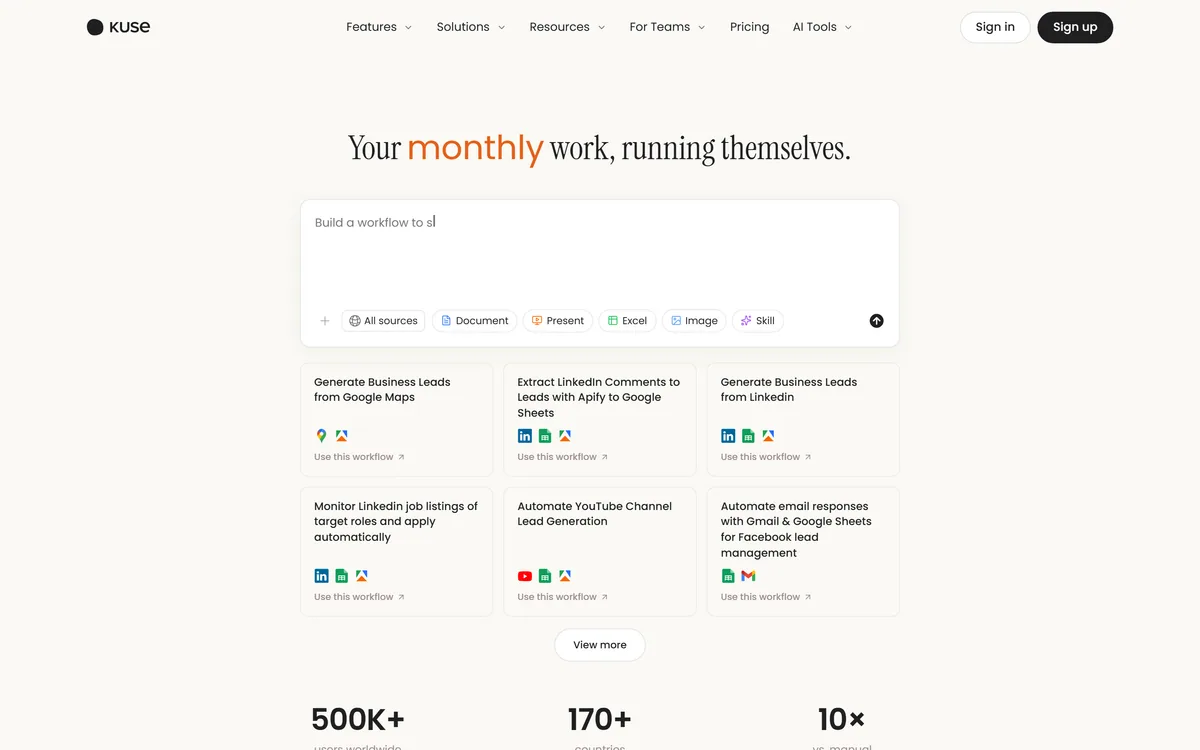
Kuse's homepage, captured 9 September 2026, showing prebuilt workflow templates for lead generation and monitoring tasks.
The Kuse Picture In Five Lines
Workflows that run on a schedule — describe the job once in plain language, connect the apps, set a trigger, and results arrive in the workspace.
Operated by Kuse Inc., with the homepage stating 500K+ users worldwide across 170+ countries.
It creates files, not just answers: websites, documents, presentations and spreadsheets, stored in a cloud file system.
Integrations aimed at real repetition — Google Maps, LinkedIn, Google Sheets, Gmail, YouTube, Facebook and Apify.
Several model families available, including Claude and Gemini variants, so you are not locked to one vendor's behaviour.
Kuse: Company And Capabilities
Operating company
Kuse Inc.
Product type
AI workspace with scheduled workflows
Core model
Describe the work in plain language, connect apps, set a trigger, receive results
Outputs
Websites, documents, presentations and spreadsheets
Storage
Cloud file system inside the workspace
Integrations
Google Maps, Apify, LinkedIn, Google Sheets, YouTube, Gmail, Facebook
Models offered
Several families including Claude and Gemini variants
Stated reach
500K+ users worldwide across 170+ countries, per the homepage
Footer sections
Features, Solutions, Resources, Company, with documentation, templates, blog and social links
Which Kuse Workflows Are Worth Building?
Kuse describes a four-step model: describe the work in plain language, connect apps if needed, set a schedule or a manual trigger, and receive results in the workspace.
The templates on its homepage tell you what it is really for. Generating business leads from Google Maps and LinkedIn, extracting LinkedIn comments into Google Sheets, monitoring job listings, automating YouTube channel lead generation, handling email responses through Gmail and Sheets — this is prospecting and monitoring, not creative work.
That focus is a strength rather than a limitation, because those tasks share the properties that make automation pay. They are repetitive, the output format is stable, the input is public or already in your systems, and being slightly imperfect is acceptable because a human reviews the list anyway.
The workflows worth building are the ones you currently do badly because they are dull. A weekly competitor check you skip half the time is a better candidate than a monthly report you already do carefully, because automation converts inconsistency into consistency rather than saving an hour.
The ones not worth building are those where a wrong result is expensive and invisible. Anything that sends an email on your behalf, edits a live record, or feeds a number into a decision needs a review step, and a workflow with a review step is not really unattended.
If the repetition you want to remove happens in a browser tab rather than on a schedule, Bardeen attacks the same problem from the other end and is worth comparing before you commit.
Automate the task you currently do badly because it is dull. Converting inconsistency into consistency is worth more than saving an hour.
The Quiet Failure Problem With Scheduled Automation
This is the risk that defines unattended workflows, and it is worth understanding before you build several.
A manual task fails loudly: you did not do it, and you know. A scheduled workflow fails silently. The page structure changed, the login expired, the rate limit kicked in, and the job now returns nothing or returns garbage — and it keeps doing that every week until somebody notices.
Scraping-based workflows are the most exposed, because they depend on someone else's page layout. LinkedIn and Google Maps change their markup regularly and have no obligation to warn you, which means a lead-generation workflow can decay from useful to empty without a single error message.
The mitigations are unglamorous and effective. Build a sanity check into the output — a week returning zero rows should be treated as a failure rather than a slow week. Look at the actual results monthly rather than trusting the schedule. And keep the workflows few enough that you would notice one going quiet.
It is also worth knowing whose terms you are operating under. Automated collection from social platforms sits in a grey area that varies by platform and jurisdiction, and the account that gets restricted is yours rather than the tool's.
Files As Output Changes What The Tool Is
Kuse creates websites, documents, presentations and spreadsheets, and stores them in its own cloud file system. That is a meaningfully different product from a chat interface.
The reason is that most work ends in an artefact somebody else opens. An answer in a chat window has to be copied, reformatted and pasted before it becomes useful to anyone but you, and that transfer is where the time actually goes.
A workflow producing a spreadsheet is finished work. A workflow producing a paragraph describing what should be in a spreadsheet is homework, and the distinction decides whether automation saves anything.
Spreadsheets are the most valuable of the four here, because they suit the prospecting and monitoring tasks the platform is built around, and because a structured file can feed the next step in a process rather than needing a human to read it.
The cloud file system is worth a question before you commit. Files accumulating inside a vendor's storage become a migration problem later, and the useful thing to check early is whether workflows can write to Google Drive or Sheets directly rather than only to Kuse's own store.
For lead lists specifically, the harder problem is usually data quality rather than collection, which is the gap a tool such as Clay exists to fill.
Prefer workflows that end in a structured file rather than prose.
Check whether output can land in your own Drive or Sheets rather than only in Kuse.
Add a sanity check so an empty result is treated as a failure.
Review actual outputs monthly, since scheduled jobs decay silently.
Keep the number of active workflows small enough that a quiet one gets noticed.
Why Multiple Model Families Is A Practical Choice
Kuse's site lists several model families, including Claude and Gemini variants alongside others, and offering a choice matters for reasons beyond preference.
Different models genuinely differ at different jobs. A long document summary, a strict structured extraction and a piece of persuasive copy have different failure modes, and a model that is excellent at one can be mediocre at another.
For scheduled workflows this matters more than for chat, because you are not there to notice. A model that occasionally ignores a formatting instruction is a minor annoyance in conversation and a broken spreadsheet in an unattended job.
It also removes a dependency risk. A workspace tied to one provider inherits that provider's price changes, outages and deprecations, and model deprecation in particular is a real operational event — a workflow built around a model that gets retired stops working on someone else's timetable.
The practical advice is to test your highest-value workflow on two model options before settling. The difference in reliability on structured output is usually larger than the difference in eloquence, and reliability is what an unattended job needs.
The same argument for model choice is being made at the enterprise end by platforms like Ema, and it is easier to claim than to demonstrate in either case.
Building Your First Three Workflows Properly
The mistake is building ten workflows in the first week and reviewing none of them in the second.
Start with the task whose current failure mode is that you skip it.
Pick one recurring task you currently do inconsistently, and write down what a good result looks like.
Build it to run manually first, and run it three times before putting it on a schedule.
Compare each manual run against what you would have produced yourself, and note where it diverges.
Add an explicit check that fails loudly on an empty or implausible result before you automate it.
Schedule it, then diarise a monthly review of the real output rather than the run history.
Only add a second workflow once the first has survived a month, and stop adding when you can no longer name them all.
Key features of Kuse
Workflows defined in plain language rather than drawn as a flowchart
Scheduled or manually triggered execution, so jobs run unattended
File output as websites, documents, presentations and spreadsheets
A cloud file system holding the workspace's outputs
Integrations with Google Maps, LinkedIn, Google Sheets, Gmail, YouTube, Facebook and Apify
A choice of model families rather than a single provider
Prebuilt workflow templates for lead generation and monitoring tasks
Pros & cons
Pros
6
Scheduling turns an assistant into a process, which is the meaningful difference
Templates target genuinely repetitive prospecting and monitoring work
Producing structured files rather than chat answers means the output is finished work
Model choice reduces exposure to one provider's pricing, outages and deprecations
Plain-language setup avoids the flowchart-building most automation tools require
A named operating company and a complete footer
Cons
6
Unattended workflows fail silently, and scraping-based ones decay as pages change
Automated collection from social platforms carries terms-of-service risk you carry, not the vendor
Whether output can land in your own Drive or Sheets is not stated
User and country figures are vendor-stated with no methodology
Pricing, run limits and retention policy are not published on the pages we read
No registered address is given for Kuse Inc.
Best For
Small teams doing prospecting and monitoring by hand
Anyone whose weekly report or competitor check keeps getting skipped
Workflows that should produce a spreadsheet rather than a paragraph
Users living in Google Workspace and LinkedIn
Testing automation without learning a flowchart builder
Kuse Beside Other Automation And Workspace Tools
Automation tools differ on who writes the logic and whether anything runs when you are not watching.
Tool
How work is defined
Runs unattended
Best for
Kuse
Plain-language description of a recurring job
Yes, on a schedule
Prospecting and monitoring that currently gets skipped
You have recurring tasks you skip half the time because they are dull.
Your repetition is prospecting, monitoring or reporting rather than creative work.
You want output as spreadsheets and documents rather than as chat responses.
The apps you live in are Gmail, Google Sheets, LinkedIn and YouTube.
You want model choice so an unattended job is not tied to one provider.
Wait a while when
Your work is one-off and varied, where scheduling adds nothing.
A wrong result would be expensive and would not be noticed for weeks.
You need output written directly into your own systems rather than a vendor store.
Your automations would depend on scraping platforms whose terms you cannot accept.
Nobody will review the outputs monthly, which is what keeps scheduled jobs honest.
Other Automation And Agent Tools
The automation category splits by where the logic lives and how much of it you have to draw yourself.
Bardeen — browser-side automation for the things you do in tabs
Zapier AI — when integration breadth matters more than plain-language setup
Clay — if lead data quality rather than scheduling is the real problem
Ema — the enterprise end of the same idea, with compliance attached
Notion AI — for working inside documents rather than running scheduled jobs
Sourcing Kuse Claims
Last checked . Read from kuse.ai and its footer navigation, with the screenshot above captured in the same session.
Operating company stated as Kuse Inc.
Positioned as an AI workspace that automates repetitive daily work
Four-step model confirmed: describe the work, connect apps, set a schedule or manual trigger, receive results
File creation confirmed for websites, documents, presentations and spreadsheets
A cloud file system confirmed as part of the workspace
Integrations confirmed for Google Maps, Apify, LinkedIn, Google Sheets, YouTube, Gmail and Facebook
Several model families listed as available, including Claude and Gemini variants
Workflow templates confirmed on the homepage for Google Maps lead generation, LinkedIn comment extraction, LinkedIn lead generation, job-listing monitoring, YouTube channel lead generation and Gmail response automation
Stated reach of 500K+ users worldwide and 170+ countries read from the homepage
Footer sections confirmed for Features, Solutions, Resources and Company, with documentation, templates, blog and social links
What we could not confirm: the user and country figures are vendor-stated with no methodology and are animated counters on the page, so they read as zero to an automated fetch; pricing and plan structure; how many workflows or runs a plan permits; whether outputs can be written directly to Google Drive or Sheets rather than only to Kuse's storage; data retention and deletion; a registered address for Kuse Inc.; and how the platform handles the terms of service of the sites its workflows collect from. We did not build a workflow, so nothing here reflects tested reliability.
Editor's Verdict
3.9/5
Kuse's good idea is scheduling. Most AI assistants are things you visit — you open a tab, ask, and get an answer — which means the work still starts with you remembering to do it. Kuse frames its workflows as recurring jobs that run whether you show up or not, which is the difference between a tool and a process. The integration list is well chosen for the lead-generation and reporting tasks people actually repeat, and multiple model families avoid a single-vendor bet. The score reflects a genuine risk: an unattended workflow that fails quietly is worse than one that was never built. AInexfinder Editor Score: 3.9/5.
Kuse pricing
AInexfinder does not list plan prices or billing details. For current pricing, plans, and trials, visit the official Kuse website.
Vendor pricing, credits, and billing policies change over time. Always confirm on the official site before you buy.
Frequently asked questions
What is Kuse?
Kuse is an AI workspace from Kuse Inc. built around scheduled workflows. You describe a recurring task in plain language, connect the apps it touches, set a schedule or trigger, and results arrive in the workspace. It also generates websites, documents, presentations and spreadsheets, and offers several model families.
How is Kuse different from a chat assistant?
A chat assistant is a destination — nothing happens until you open it. Kuse's workflows run on a schedule whether or not you show up, which turns an assistant into a process. That distinction matters most for the tasks that fail because someone has to remember them, rather than because they are hard.
Which tasks are actually worth automating here?
The ones you currently do badly because they are dull. A weekly competitor check you skip half the time is a better candidate than a monthly report you already do carefully, because automation converts inconsistency into consistency. Avoid anything where a wrong result is expensive and would not be noticed.
What happens when a scheduled workflow breaks?
Usually nothing visible, which is the real risk. A page layout changes or a login expires, and the job starts returning nothing — every week, until somebody notices. Build a check that treats an empty result as a failure, review actual outputs monthly rather than run history, and keep the number of workflows small enough to notice one going quiet.
What does Kuse integrate with?
Google Maps, Apify, LinkedIn, Google Sheets, YouTube, Gmail and Facebook. That set is well matched to the prospecting and monitoring templates the homepage leads with — lead generation from Maps and LinkedIn, comment extraction into Sheets, job-listing monitoring and Gmail response handling.
Is scraping LinkedIn or Google Maps allowed?
Automated collection from social platforms sits in a grey area that varies by platform and by jurisdiction, and the terms are the platform's rather than the tool's. The practical point is whose account bears the consequence if a platform objects: yours. Read the terms of the sites your workflows touch before scheduling anything.
Which AI models can I use in Kuse?
The site lists several families, including Claude and Gemini variants alongside others. That matters more for scheduled work than for chat: a model that occasionally ignores a formatting instruction is a minor annoyance in conversation and a broken spreadsheet in an unattended job. Test your highest-value workflow on two options before settling.
Where do Kuse's outputs get stored?
In a cloud file system inside the workspace. Worth checking early is whether a workflow can write directly to your own Google Drive or Sheets instead, because files accumulating in a vendor's storage become a migration problem later, and structured output is far more useful when it lands where the rest of your process already looks.
Are the 500K users and 170 countries figures reliable?
They are vendor-stated on the homepage with no methodology, and they are animated counters, which is why an automated fetch reads them as zero. Take them as a claim about scale rather than a measurement. Nothing about the figures changes whether the product suits your workflow, which is the only question that matters.
How should I start with Kuse?
Build one workflow, not ten. Pick a task you currently do inconsistently, run it manually three times and compare each result against what you would have produced yourself, add a check that fails loudly on an empty result, then schedule it. Add a second only once the first has survived a month.
Daniel reviews AI tools the slow way — by actually using them on real projects. His reviews cover what works, what breaks, and who each tool is genuinely a good fit for.
Daniel and the AInexfinder editorial team research Kuse using public product information, listing evidence, and (when available) hands-on checks. Scores reflect listing completeness and transparency — not paid placement.
Listings may include affiliate or sponsored placements, which are labeled when present. Editorial scores and cons are not sold. See our affiliate disclosure and review methodology.
CrewAI is an enterprise platform to build and run AI agents: a Discovery layer that finds automation opportunities, a no-code canvas and code-first Python API for building role-based multi-agent workflows, and a control plane that adds tracing, RBAC, audit and human-in-the-loop approvals.
Axiom is a browser-automation and web-scraping platform you can build no-code in a Chrome extension, script in your IDE, or drive agentically through Claude and MCP, running on cloud browsers or your own machine for scrapers, form-fillers, monitors and scheduled workflows.
Formless by Typeform is a conversational AI form builder. Trained on your own data, it asks questions in natural language and answers the respondent's questions back, adapts its path without branching logic, and supports over 120 languages.
Browser Use is an open-source project (117k GitHub stars, MIT) offering AI agents that complete web tasks and a simple remote browser infrastructure for your own agents, benchmark-led, pay-as-you-go, with MCP, form-filling and login automation, usable in the cloud or self-hosted.
Zapier's AI layer adds agents and MCP tool access on top of its automation platform, connecting more than 9,000 apps with governed access so teams can mix AI decisions with deterministic rules under central oversight.
Fillout is a form builder that also handles scheduling, payment collection, PDF generation, e-signatures and workflow routing. Forms can be fully white-labelled down to the favicon, served from your own domain, embedded four ways, and made editable by respondents through login forms.