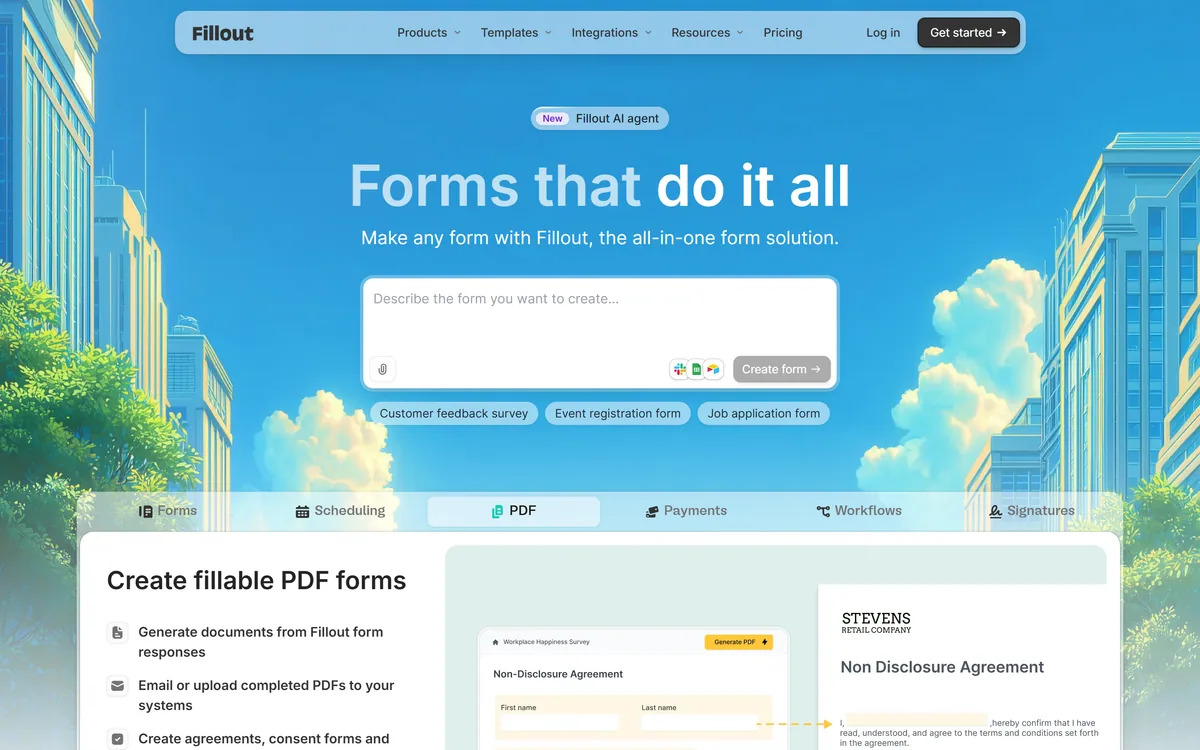
Fillout is a form builder that also handles scheduling, payment collection, PDF generation, e-signatures and workflow routing. Forms can be fully white-labelled down to the favicon, served from your own domain, embedded four ways, and made editable by respondents through login forms.
fillout.com8 viewsAdded January 5, 202627K visitors
Fillout's homepage, captured 9 September 2026.
Fillout: Forms, Payments And Signatures
Six products in one: forms, scheduling, PDF generation, payments, workflows and signatures.
White-label to the favicon, served from your own custom domain with custom social share previews.
Respondents can edit their own submissions through login forms — the feature that saves the most support time.
Four embed modes — popup, slider, side tab and full screen — rather than one iframe.
SOC 2 Type 2 with 256-bit encryption, and 100,000-plus organisations claimed.
Fillout: Products And Security
Company
Restly, Inc., per the footer copyright
Product surfaces
Forms, scheduling, PDF generation, payments, workflows and signatures
New feature
A Fillout AI agent, flagged as new on the homepage
Claimed adoption
100,000-plus organisations for secure data intake
Displayed rating
Average 4.8 out of 5, shown as 5 out of 5 on business reviews and 4.7 on Product Hunt
Branding
Pre-built themes or your own fonts, logo, colours and custom CSS; white-label to the favicon
Distribution
Custom domain, QR code, email, and four embed modes
Payments
One-off or subscription, with discounts, free trials and ACH
Respondent access
Login forms allowing people to update existing submissions
AI tools listed
AI form builder, quiz maker, survey maker, signature maker and PDF to form
Security
SOC 2 Type 2 compliant, 256-bit AES encryption, 24/5 support
Comparisons published
Against Jotform, Typeform, Google Forms, SurveyMonkey, Formstack and FormAssembly
Why Do Form Builders Keep Adding Products?
Fillout describes itself as the all-in-one form solution, and lists scheduling, PDF, payments, workflows and signatures alongside forms themselves.
That expansion is not feature creep. It follows the shape of what actually happens after a form is submitted.
Consider an event registration. Someone fills in a form, pays, picks a time slot, receives a confirmation document, and possibly signs a waiver. Five products, one process, and historically five subscriptions plus an automation service holding them together.
Every join in that chain is a place where data goes missing, a webhook fails silently, or a person ends up registered but unpaid. Collapsing the chain removes the joins rather than automating them.
The trade is the usual one. A specialist scheduling tool will out-feature this, and so will a dedicated e-signature platform. What you buy instead is one place where the record is complete — which is the same argument that makes a consolidated knowledge base like Document360 beat five well-integrated wikis.
Five products, one process, and five places where someone ends up registered but unpaid. Collapsing the chain removes the joins.
Letting Respondents Edit Their Own Answers
Buried in the feature list is something more valuable than its placement suggests: login forms that let respondents update their existing submissions, with the option to make forms internal-only.
Anyone who has run an intake process knows what this replaces.
Somebody enters the wrong email address, or their availability changes, or they need to correct a dietary requirement. Without self-service the only route is an email to whoever owns the form, a manual database edit, and a reply — several minutes of someone's time, multiplied by the number of respondents.
Self-service editing turns that into nothing. It also improves data quality, because people will correct their own record when it is easy and will not when it requires asking a stranger for a favour.
The reason it is rarely advertised is that it is unglamorous and requires real work — identity, permissions and versioning on a form submission. Its presence is a better signal of product maturity than any AI feature on the page.
White Labelling Down To The Favicon
The branding claim is unusually specific: pre-built themes or your own fonts, logo, colours and custom CSS, control over social share previews, full white-labelling down to the favicon, and sharing from your own custom domain.
Naming the favicon is the detail that shows someone has actually thought about this.
White-label is a term applied loosely. Most tools mean the vendor's logo is hidden from the page, while the browser tab still shows their icon, the share preview still carries their branding, and the URL still says their domain. Each of those leaks the vendor at a moment the respondent is deciding whether to trust the form.
That matters because forms are where people hand over personal data, and an unfamiliar domain is exactly the signal security training teaches them to distrust.
So a form on your own domain, with your favicon and your share preview, is a conversion feature rather than a vanity one. The four embed modes serve the same end — a popup or side tab keeps the respondent on your site entirely, which is better again. Referral and affiliate intake is a specific version of the same problem, handled end to end by Partnero.
Conditional Logic And Where It Breaks
Fillout describes smart forms that reduce manual work with intelligent routing, plus workflows as a distinct product surface.
Conditional logic is where every form builder is genuinely tested, and where most of them quietly fail.
The simple case is easy and every tool handles it: if the answer is yes, show the next question. The difficulty is compounding — a form where the fourth question depends on the first and second, the routing depends on the fourth, and someone changes their answer to the first after reaching question six.
That is where builders break, either by showing a question that no longer applies or by silently keeping an answer that is now orphaned. Both produce data that looks clean and is wrong.
The practical test during evaluation is to build your ugliest real form rather than a demo one, then go back and change an early answer. Whether the tool recovers gracefully tells you more than any feature list, and it is the single thing worth spending an hour on.
Build your ugliest real form, not a demo one, during evaluation.
Change an early answer after reaching the end and see what happens.
Set up the custom domain before sharing anything externally.
Enable respondent editing if the same data ever needs correcting.
Check the integration to your CRM before the first live submission.
Reading The Ratings And The Customers
Fillout displays an average of 4.8 out of 5 from hundreds of reviews, broken into 5 out of 5 on business reviews and 4.7 on Product Hunt, alongside a claim of 100,000-plus organisations.
A perfect 5 out of 5 on any platform with a meaningful sample is worth reading carefully rather than as a straightforward endorsement, since averages that clean usually indicate a small or recent review base.
The customer names carry more weight. A county election manager and a giving programme at a consumer brand are both organisations with real data-intake requirements and, in the first case, unusual scrutiny.
The election manager's quote is the most useful thing on the page — describing trying many form builders over the years and finding this one more robust and more flexible. That is a comparison from someone with a professional reason to be careful.
The published comparison pages against six named competitors point the same way. A company that invites direct comparison with Jotform, Typeform and Formstack is confident about where it lands, and those pages are a reasonable place to start your own evaluation. What happens to the responses afterwards is a separate question, and where a tool like Quadratic takes over.
Building A Form That Actually Converts
Form abandonment is a design problem rather than a tooling one, and the most common cause is asking for things you do not yet need.
This sequence uses the platform's strengths and avoids the mistakes that lose respondents.
Cut every field you will not act on — each one costs completions.
Set up the custom domain and branding before sharing anything.
Use conditional logic so nobody sees a question that does not apply.
Embed as a popup or side tab rather than sending people away.
Enable respondent editing so corrections do not become support tickets.
Watch the analytics for the field where people stop, and remove it.
Key features of Fillout
Drag-and-drop form building with custom CSS
Scheduling built into the same product
Payment collection, one-off or subscription
PDF generation from responses
E-signature capture
Workflow routing and conditional logic
Login forms with respondent-editable submissions
Custom domain, QR codes and four embed modes
Pros & cons
Pros
7
Collapses five adjacent products into one record
White-labelling down to the favicon and your own domain
Respondent self-editing saves real support time and improves data quality
Four embed modes keep people on your own site
SOC 2 Type 2 and 256-bit encryption published up front
Named customers with genuine data-intake scrutiny
Publishes direct comparisons against six named competitors
Cons
7
Specialists will out-feature it on scheduling and signatures individually
A perfect 5 out of 5 rating implies a small or recent review base
The organisation count is not broken down by paid versus free
Conditional logic behaviour on changed early answers is untested here
The new AI agent is displayed rather than explained
Six surfaces is a lot to own for a small team
No pricing on the pages we read
Best For
Teams running intake that involves payment or scheduling
Organisations consolidating several form and workflow subscriptions
Anyone who needs forms to look like their own brand
Processes where respondents regularly correct their submissions
Companies with SOC 2 requirements in procurement
Fillout Against Other Form Builders
Data collection tools differ by how much of the process after submission they own.
What we could not confirm: how many reviews sit behind the 5 out of 5 business rating, since a perfect average usually indicates a small base; what the 100,000-plus organisation figure counts, including free accounts; how conditional logic behaves when an early answer is changed after later branches have been completed; what the Fillout AI agent does in practice; and pricing, which sits on a separate page we did not reproduce. We did not build or publish a form.
Editor's Verdict
4.2/5
Fillout's bet is that the tools clustered around a form — the scheduling link, the payment page, the PDF it generates, the signature it needs — belong in the same product, and the bet is largely right. Most organisations are already paying for four of those separately and stitching them together with automation. White-labelling down to the favicon and serving from your own domain is unusually thorough. Letting respondents log back in and edit their own submission is the feature that quietly saves the most support time, and almost nobody advertises it. AInexfinder Editor Score: 4.2/5.
Fillout pricing
AInexfinder does not list plan prices or billing details. For current pricing, plans, and trials, visit the official Fillout website.
Vendor pricing, credits, and billing policies change over time. Always confirm on the official site before you buy.
Frequently asked questions
What is Fillout?
A form builder from Restly, Inc. that also handles scheduling, payments, PDF generation, e-signatures and workflow routing — six product surfaces around a single submission record rather than four subscriptions stitched together.
Why do form builders keep expanding?
Because the process after submission is where things break. An event registration involves a form, a payment, a time slot, a confirmation document and possibly a signature — and every join between separate tools is a place someone ends up registered but unpaid.
What is the most underrated feature?
Login forms letting respondents edit their own submissions. Without it, every wrong email address and changed availability becomes an email, a manual database edit and a reply. With it, people fix their own records — which also improves data quality.
What does white-labelling to the favicon mean?
That the browser tab icon, the social share preview and the domain are all yours, not the vendor's. Most tools only hide their logo from the page itself, and each remaining leak arrives while a respondent is deciding whether to trust the form.
How should I test conditional logic?
Build your ugliest real form rather than a demo, reach the end, then go back and change an early answer. Whether the tool recovers gracefully — rather than orphaning data that still looks clean — tells you more than any feature list.
Is it secure enough for sensitive intake?
It publishes SOC 2 Type 2 compliance and 256-bit AES encryption, with 24/5 support. Verify the current certification scope during procurement, and check where data is stored if residency matters to you.
How reliable is the 4.8 rating?
The Product Hunt component at 4.7 is the more informative half. A perfect 5 out of 5 on the other usually indicates a small or recent review base rather than universal satisfaction, and the site does not give the count.
Can I take payments through a form?
Yes — one-off or subscription, with discounts, free trials and ACH mentioned. That is what makes registrations and memberships a single process rather than a form followed by a separate payment link.
What makes a form convert better?
Removing fields. Every question you do not act on costs completions, and the analytics will show you exactly which field people stop at. Embedding as a popup or side tab rather than sending people away helps too.
Who should not use it?
Anyone who needs three questions answered once, and teams with a specialist scheduling or signature tool already embedded in their workflow. The consolidation argument only pays when you are genuinely running several of these processes.
Daniel reviews AI tools the slow way — by actually using them on real projects. His reviews cover what works, what breaks, and who each tool is genuinely a good fit for.
Daniel and the AInexfinder editorial team research Fillout using public product information, listing evidence, and (when available) hands-on checks. Scores reflect listing completeness and transparency — not paid placement.
Listings may include affiliate or sponsored placements, which are labeled when present. Editorial scores and cons are not sold. See our affiliate disclosure and review methodology.
CrewAI is an enterprise platform to build and run AI agents: a Discovery layer that finds automation opportunities, a no-code canvas and code-first Python API for building role-based multi-agent workflows, and a control plane that adds tracing, RBAC, audit and human-in-the-loop approvals.
Kuse is an AI workspace from Kuse Inc. built around scheduled workflows: describe a recurring task in plain language, connect the apps it touches, and let it run. It also generates websites, documents, presentations and spreadsheets, with several model families available.
Axiom is a browser-automation and web-scraping platform you can build no-code in a Chrome extension, script in your IDE, or drive agentically through Claude and MCP, running on cloud browsers or your own machine for scrapers, form-fillers, monitors and scheduled workflows.
Formless by Typeform is a conversational AI form builder. Trained on your own data, it asks questions in natural language and answers the respondent's questions back, adapts its path without branching logic, and supports over 120 languages.
Browser Use is an open-source project (117k GitHub stars, MIT) offering AI agents that complete web tasks and a simple remote browser infrastructure for your own agents, benchmark-led, pay-as-you-go, with MCP, form-filling and login automation, usable in the cloud or self-hosted.
Zapier's AI layer adds agents and MCP tool access on top of its automation platform, connecting more than 9,000 apps with governed access so teams can mix AI decisions with deterministic rules under central oversight.