WebinarGeek is webinar software running entirely in the browser with no download for hosts or viewers. It covers registration, branding, automated email, live and recorded delivery for audiences up to 5,000, viewer-level analytics under GDPR, and integrations with more than 6,000 other tools.
webinargeek.com6 viewsAdded May 22, 20268K visitors
Webinar software is judged on the wrong things. Feature lists compare polling and breakout rooms, when the number that actually decides whether a webinar worked is how many registrants turned up.
That number is mostly determined by friction, and the largest single source of friction is being asked to install something five minutes before a session starts.
WebinarGeek's central design choice is to eliminate that entirely, and everything else it does sits on top of that decision.
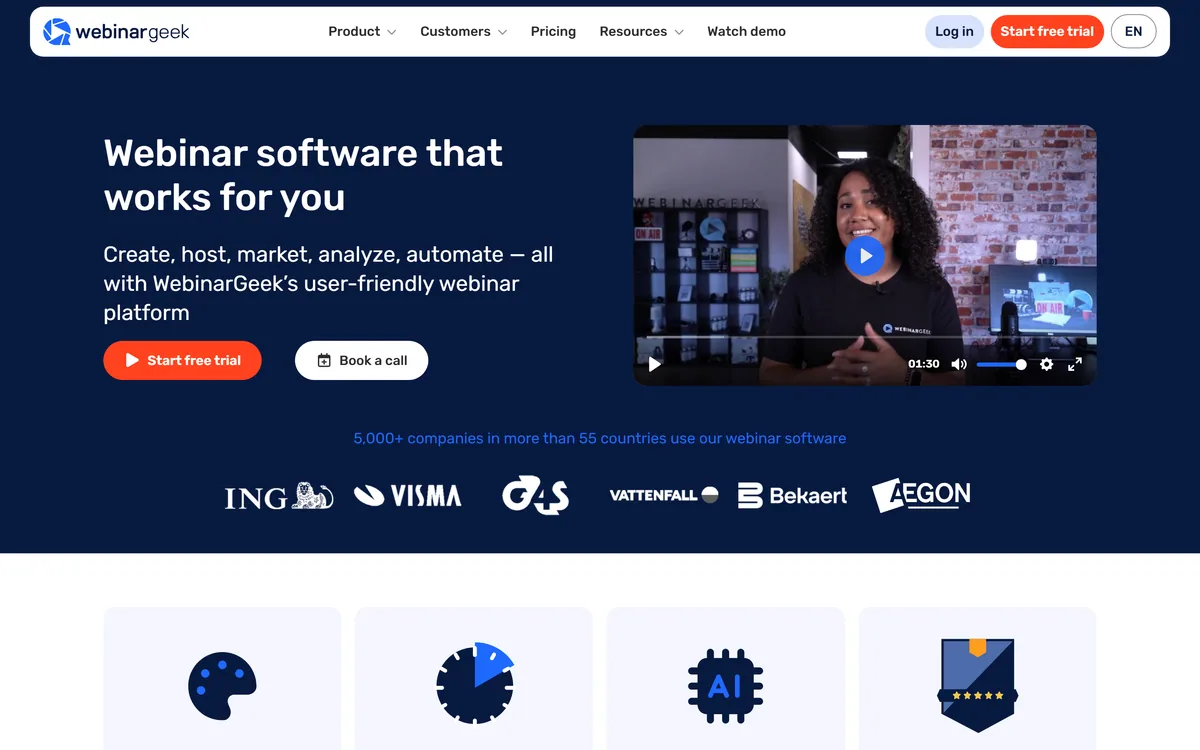
WebinarGeek's homepage, captured 9 September 2026.
WebinarGeek: Webinars Without An App
Entirely browser-based — no download for the host or the audience, which is where webinar attendance usually leaks.
Up to 5,000 viewers per webinar, live or recorded, sharing slides, video or your screen.
Fully branded registration page, streaming page and automated emails via drag-and-drop editors.
Viewer-level analytics under stated GDPR compliance, with 6,000-plus integrations.
Operating since 2015, with 5,000-plus companies in more than 55 countries and offices in New York and Zoetermeer.
Why Does Browser-Based Delivery Matter For Webinars?
The site states that a webinar can be created and delivered entirely from the browser, on any browser, with no app download needed — and one of its own customers cites exactly that as the differentiator against other tools.
The reason this matters more than any feature is arithmetic. Registration-to-attendance rates for webinars are typically well under half, and every step between the reminder email and the session is where people drop out.
A download prompt is the worst of those steps. It arrives at the moment of intent, often on a locked-down work laptop where the person cannot install software at all, and there is no recovery — they close the tab and the registration is wasted.
Browser delivery removes that failure entirely. A link opens a page and the session starts, which is the behaviour every registrant already expects from everything else they click.
Set-up speed follows the same logic on the host side. The site claims a webinar can be running the same day without prior experience, and the credible version of that claim is that there is no procurement, no IT ticket and no install to schedule.
A download prompt arrives exactly when someone has decided to attend, often on a laptop where they cannot install anything. There is no recovery from that.
What Five Thousand Viewers Actually Implies
The stated ceiling is 5,000 viewers per webinar, which is worth reading as a description of who this is for rather than as a limit to worry about.
Five thousand concurrent attendees is a very large webinar. Most business webinars run in the dozens or low hundreds, and a marketing team celebrating a thousand live attendees is having an exceptional day.
So the number is not a constraint for the overwhelming majority of users. It is a signal that the platform is engineered for scale and that the streaming infrastructure is not a thin wrapper around a meeting tool.
That distinction matters technically. A meeting product distributes video between participants who can all talk; a webinar product broadcasts one way to an audience that mostly cannot, and those are different problems with different failure modes at scale.
The practical read is that if you are anywhere near five thousand attendees you should be discussing capacity directly with them, and if you are nowhere near it, the number tells you the platform will not be the thing that breaks.
Branding, Automation And Live Versus Recorded
Each webinar can be fully branded to a corporate identity, with drag-and-drop editors for the registration page, the streaming page and the automated emails, stated as requiring no technical knowledge.
Branding a webinar sounds cosmetic and is not, for a specific commercial reason.
A webinar is usually a lead generation mechanism, and the registration page is a landing page. A page carrying a software vendor's branding rather than yours converts worse and looks like an event someone else is running, which is the opposite of the impression a marketing webinar is trying to make.
The email automation is the part that decides attendance. Confirmation, reminder, last-call and follow-up sequences do more for turnout than any content decision, and having them inside the platform rather than stitched to an email tool means they fire on the actual event schedule.
Automated and recorded webinars extend the same asset further. A session recorded once and replayed on a schedule generates registrations indefinitely, which is how a single afternoon of work becomes an evergreen channel — the point at which webinar software starts paying for itself rather than costing time. A dedicated email platform such as MailerLite still owns the nurture sequence that follows.
Brand the registration page before running anything — it is a landing page.
Set the full email sequence up front; it decides attendance more than content.
Reuse a strong session as an automated webinar rather than re-presenting it.
Check the integration to your CRM before the first event, not after.
Test on a locked-down corporate laptop, since that is what your audience uses.
Reading Attendance And Engagement Data
The platform describes powerful statistics, collection of individual viewing behaviour, and following up with warm leads, all stated as GDPR compliant.
Viewer-level data is where webinar software separates itself from streaming, and it is also where the responsibility sits.
Knowing that someone watched forty minutes of a fifty-minute session, or dropped out at the pricing slide, is genuinely useful sales intelligence. It converts a list of registrants into a ranked list of people worth calling.
It is also personal data about identifiable individuals, which is why the GDPR reference is more than a badge. A Dutch company with a stated European entity is operating inside that regime rather than adapting to it, and the platform gives you controls; the lawful basis for what you then do with the data is yours.
The practical caution is proportionality. Attendance duration and question activity are reasonable to act on; assembling a detailed behavioural profile to use in a cold sales call is the kind of thing that produces complaints, and it is a decision the software will let you make either way. Which ads filled the room is a separate measurement again, and where attribution tools like Cometly belong.
Support Claims And Company Provenance
WebinarGeek makes unusually specific support claims: 4.9 out of 5 rated for support, live chat and technical support for all customers, and answers within three minutes described as the fastest response time in the industry.
In webinar software, support quality is not a soft consideration. It is close to a primary feature.
The reason is that a webinar failure is public and unrecoverable. If audio breaks four minutes before three hundred people join, you need a human immediately — not a ticket queue, and not a knowledge base article. One of the platform's own testimonials makes precisely that point.
A three-minute response commitment is specific enough to be tested, which is the right kind of claim. Ratings of 4.7 and 4.5 across four review platforms sit alongside it, and consistency across sources is more informative than any single figure.
The provenance supports it. A copyright range from 2015, a Netherlands office in Zoetermeer, a New York address and published sales lines for three regions is a real company with real accountability, which is worth more in event software than any feature comparison. What attendees said in the chat is worth reading properly too, and that is Thematic's territory.
Running A Webinar That People Attend
Almost every disappointing webinar is a promotion and logistics failure rather than a content one. The material was fine; nobody came, or nobody stayed.
This sequence puts effort where it changes the outcome.
Brand the registration page and write the promise in one clear sentence.
Build the full email sequence — confirmation, reminder, last call, follow-up.
Connect your CRM before the event so leads arrive where you work.
Rehearse the exact screen or slide share you will use, in the browser.
Watch drop-off points in the analytics rather than only totals.
Republish the recording as an automated webinar to keep it earning.
Is WebinarGeek Right For Your Webinars?
Host it here when
Your audience includes people who cannot install software.
The registration page needs to look like your brand, not a vendor's.
Webinars are a lead channel rather than an occasional event.
You want viewer-level data to prioritise follow-up.
European data handling matters to your organisation.
Use a meeting tool when
The session is a two-way discussion rather than a broadcast.
Fifteen colleagues need to talk to each other, not watch you.
You already run everything through an existing conferencing contract.
Production values require a studio, switching and multiple operators.
You will run one webinar and never repeat it.
WebinarGeek: Reach And Limits
Operating since
Copyright range 2015–2026 per the footer
Offices
Zoetermeer, the Netherlands and an address on 6th Avenue, New York
Adoption
5,000-plus companies in more than 55 countries, as stated
Audience size
Up to 5,000 viewers per webinar
Delivery
Entirely browser-based, with no app download for host or viewer
Content sharing
Presentation, video or your own screen
Branding
Drag-and-drop editors for registration page, streaming page and automated emails
Formats
Live, automated and recorded webinars
Analytics
Individual viewing behaviour and follow-up data, stated as GDPR compliant
Integrations
Stated at over 6,000 tools
Support
Live chat and technical support for all customers, with a stated three-minute response time and 4.9/5 support rating
Trial
14 days free with all premium features
Key features of WebinarGeek
Browser-based hosting with no downloads
Live, automated and recorded webinars
Audiences up to 5,000 viewers
Branded registration and streaming pages
Automated email sequences around each event
Viewer-level engagement analytics
Presentation, video and screen sharing
Integrations across more than 6,000 tools
Pros & cons
Pros
7
No downloads removes the largest cause of registrants failing to attend
Branded registration pages convert better than a vendor-branded page
Email automation lives with the event schedule rather than beside it
Automated replays turn one session into an evergreen channel
Viewer-level analytics make follow-up prioritisation possible
Support claims are specific enough to be tested
A real company since 2015 with published addresses in two countries
Cons
7
Built for broadcast, so it is the wrong tool for two-way discussion
The four displayed ratings do not name their platforms in our capture
Integration counts of this size usually include indirect connections
Whether the 5,000 viewer figure is concurrent is not stated
The AI features referenced on the homepage are not described in detail
Viewer-level tracking puts a real compliance responsibility on you
Studio-grade production still needs equipment and operators
Best For
Marketing teams running webinars as a lead channel
Trainers and educators presenting to external audiences
Companies whose audience uses locked-down work laptops
European organisations with GDPR requirements
Teams reusing recorded sessions as evergreen content
WebinarGeek Against Other Event Tools
Marketing tools around an event differ by which part of the funnel they own.
Typeface — producing the campaign around the webinar
WebinarGeek: Checked On The Product Pages
Last checked . Read from webinargeek.com in a browser session on the date above, including the full footer. The screenshot was captured at the same time.
Positioned as webinar software covering create, host, market, analyse and automate
Stated as used by 5,000-plus companies in more than 55 countries
Audience capacity stated as up to 5,000 viewers
Delivery stated as entirely from the browser with no app download needed
Content sharing listed as presentation, video or your own screen
Branding described via drag-and-drop editors for registration page, streaming page and automated emails
Analytics described as individual viewing behaviour for following up warm leads, stated as GDPR compliant
Integrations stated at over 6,000 tools
Support described as live chat and technical support for all customers with answers within three minutes
Ratings displayed as 4.7, 4.5, 4.7 and 4.7 out of 5, plus 4.9 out of 5 for support
Trial stated as 14 days free with all premium features
What we could not confirm: which four review platforms the displayed ratings come from, as the platform names did not render in our capture; how the three-minute response time is measured or during which hours; what the 6,000-plus integration figure counts, which for most platforms includes indirect connections through an automation service; whether 5,000 viewers is concurrent or cumulative per session; and what the AI features referenced on the homepage actually do. Plan prices are on a separate page and are not reproduced here. We did not host a webinar.
Editor's Verdict
4.1/5
The single most valuable thing about WebinarGeek is also the least glamorous: nobody has to install anything. Webinar attendance dies at the download prompt, and removing it removes the largest cause of registrants who never arrive. Everything else is solid rather than remarkable — branded registration pages, automated email, viewer-level analytics under GDPR, a large integration list. The support claims are unusually specific and the company has been operating since 2015 with real addresses in two countries, which counts for a lot in event software where a failure is public. AInexfinder Editor Score: 4.1/5.
WebinarGeek pricing
AInexfinder does not list plan prices or billing details. For current pricing, plans, and trials, visit the official WebinarGeek website.
Vendor pricing, credits, and billing policies change over time. Always confirm on the official site before you buy.
Frequently asked questions
What is WebinarGeek?
Browser-based webinar software from a Dutch company, covering registration, branding, automated email, live and recorded delivery for up to 5,000 viewers, viewer-level analytics under stated GDPR compliance, and integrations with thousands of other tools.
Do attendees need to install anything?
No — delivery is entirely browser-based for both host and viewer. That matters more than any feature, because a download prompt arrives at the moment someone has decided to attend, often on a laptop where they cannot install software.
How many people can attend?
Up to 5,000 viewers per webinar. For most business webinars that is far beyond what you will need, so read it as evidence the streaming infrastructure is built for broadcast rather than as a limit to plan around.
Why does branding the registration page matter?
Because it is a landing page in a lead generation funnel. A page carrying a software vendor's branding converts worse and reads like an event somebody else is running, which is the opposite of what a marketing webinar is trying to achieve.
What actually drives attendance?
The email sequence, more than the content. Confirmation, reminder, last-call and follow-up messages do more for turnout than any presentation decision, and having them inside the platform means they fire on the real event schedule.
What are automated webinars for?
Replaying a recorded session on a schedule so it keeps generating registrations. It is how one strong afternoon of work becomes an evergreen channel rather than a single event, and it is where the software starts paying for itself.
What does the viewer-level data include?
Individual viewing behaviour, which lets you see who watched most of a session and where people dropped out. That converts a registrant list into a ranked list of people worth calling, and it is personal data you are responsible for handling proportionately.
How good is the support?
The claims are specific: live chat and technical support for all customers, a 4.9 out of 5 support rating, and answers within three minutes. In event software that matters more than usual, because a failure four minutes before a session is public and unrecoverable.
Is it a Zoom alternative?
Not really, and that is the point. A meeting tool distributes video between people who can all talk; a webinar platform broadcasts one way with registration, branding and analytics around it. Choose by whether the session is a discussion or a presentation.
Can I try it first?
The site states 14 days free with all premium features. Worth using that window to test on a locked-down corporate laptop and to confirm your CRM integration works, since both are things you cannot fix on the day.
Daniel reviews AI tools the slow way — by actually using them on real projects. His reviews cover what works, what breaks, and who each tool is genuinely a good fit for.
Daniel and the AInexfinder editorial team research WebinarGeek using public product information, listing evidence, and (when available) hands-on checks. Scores reflect listing completeness and transparency — not paid placement.
Listings may include affiliate or sponsored placements, which are labeled when present. Editorial scores and cons are not sold. See our affiliate disclosure and review methodology.
Artisan builds AI workers it calls Artisans. The first, Ava, is an autonomous business development rep that sources and enriches B2B leads, writes and sends personalised outreach across email and LinkedIn, handles replies and books meetings — consolidating the data, deliverability and sequencing stack into one product.
Livestorm is a browser-based, all-in-one webinar and video-engagement platform that runs the full event lifecycle, registration, live engagement, AI transcription, on-demand replays and analytics, with CRM integrations and an EU-hosted, ISO 27001 posture, aimed at marketing teams.
Partnero runs affiliate, referral, influencer and newsletter referral programs from a single account, each with its own commission rules and branded portal. It states unlimited partners and no transaction fees on every plan, and its AI builds a launch-ready program from a description of your business.
6sense is an account-based marketing and revenue-intelligence platform that captures buying signals, resolves identities and predicts buying stages, turning raw data into cited GTM intelligence delivered to sales, marketing, ads and AI agents via APIs and MCP.
Listomize is an Etsy SEO platform that generates titles, tags, and descriptions within Etsy's own limits, scores listings, optimises 100+ listings from a CSV, tracks competitors and trends, and auto-generates Pinterest pins.
Lahjty (لهجتي) is an Arabic-first marketing platform for MENA campaigns. From one brief it produces dialect-aware ad copy, headlines, campaign images with Arabic text rendered in, dialect-aware voice, and SEO articles grounded in your own brand sources — with a Partner API and an MCP server for teams that want it inside their own workflow.