Duplichecker review on AInexfinder — freemium AI tool for Writing & Content. Features, pricing notes, and alternatives.
FreemiumWriting & Content
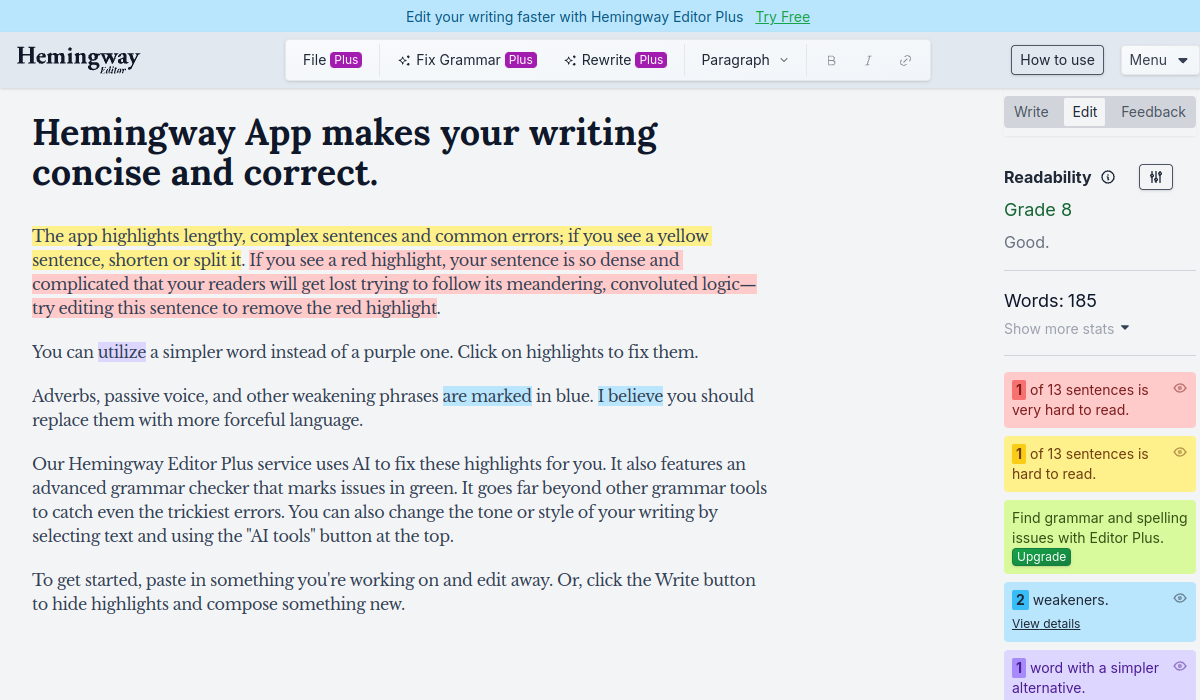
Hemingway Editor highlights writing problems by colour — long sentences in yellow, unreadable ones in red, complex words in purple, adverbs and passive voice in blue — and reports a readability grade. A paid tier adds AI fixes, an advanced grammar checker and tone adjustment.
Most writing tools now offer to write for you. Hemingway Editor has spent thirteen years refusing to, and that refusal is the product.
Paste your draft and it colours the sentences that are too long, the words with simpler alternatives, and the adverbs propping up weak verbs. Then it stops.
The homepage demonstrates this by being the demonstration — the text explaining how the tool works is itself marked up, complete with a deliberately red sentence.
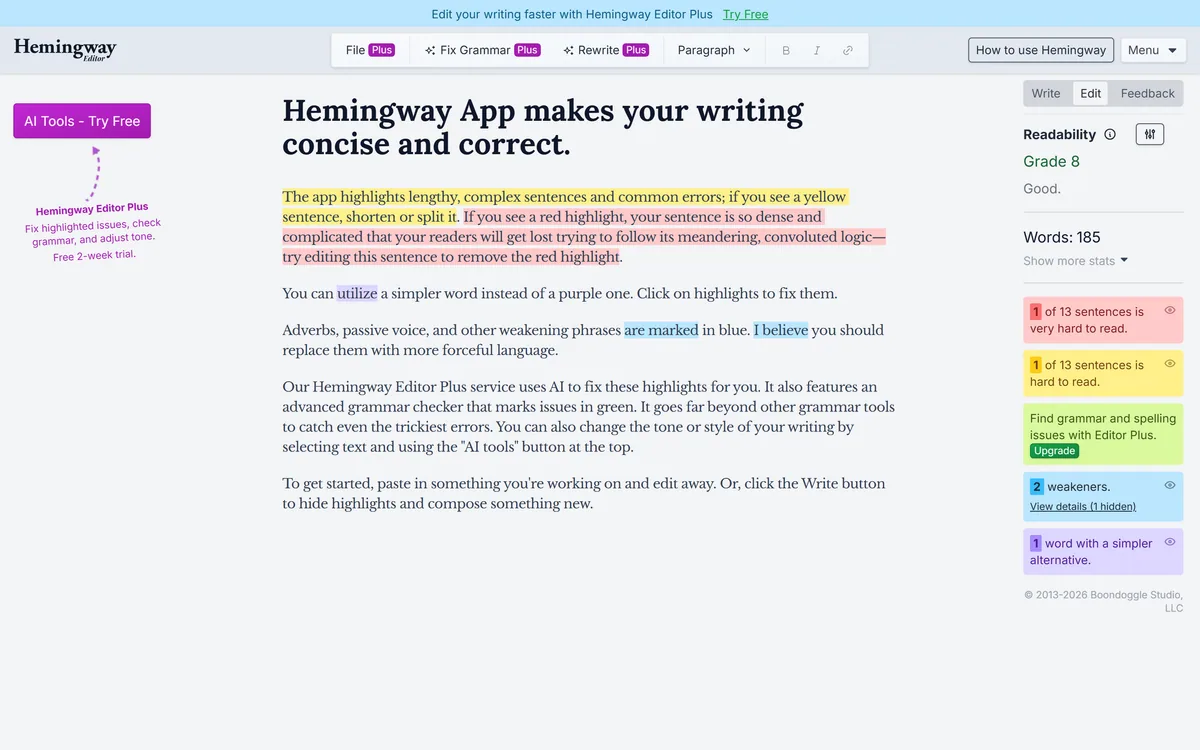
The core mechanic is two colours doing most of the work: yellow marks a lengthy, complex sentence you should shorten or split, and red marks one so dense that readers will get lost following its meandering logic.
Sentence length is the crudest possible measure of difficulty and also the most reliable, which is worth understanding rather than dismissing.
Reading requires holding a sentence's structure in working memory until it resolves. A long sentence with several clauses asks the reader to keep more suspended for longer, and the failure is silent — they do not stop, they just absorb less.
That is why every readability formula in existence, however unsophisticated, weights sentence length heavily. It is a proxy for cognitive load, and it correlates well enough to be useful.
The honest caveat is that it is a proxy. A long sentence with clean parallel structure reads easily; a short sentence containing an unfamiliar technical term does not. The colours cannot tell those apart, which is why the tool marks rather than judges.
A reader does not stop at a long sentence. They keep going and absorb less, which is why the failure is invisible to the writer.
The tool is named after a writer with an unusually distinctive prose style, and that is not incidental — it encodes a specific aesthetic as though it were a set of neutral rules.
Short declarative sentences. Concrete words over abstract ones. Active voice. Verbs carrying the weight rather than adverbs. This is a real and defensible position about English prose, and it is a position rather than a law.
Applied to a business email, a landing page or a set of instructions it is almost always right. Those are texts where the reader wants the point and clarity is the only virtue that matters.
Applied indiscriminately it flattens. Legal writing needs qualification that reads as complexity. Academic writing needs hedging that the tool marks as weakness. A passive construction is correct when the object genuinely matters more than the actor, and the highlight cannot know that.
The right posture is to treat every highlight as a question rather than an instruction. Most of the time the answer is yes, this sentence is too long — and knowing when the answer is no is what separates using the tool from obeying it.
The footer carries a copyright range from 2013 and names Boondoggle Studio, LLC, with three products listed — the free editor, Classic, and Plus.
Thirteen years is close to geological time in writing software, and the product has not fundamentally changed in it.
That is unusual enough to be worth reading as a signal. The category has seen enormous churn — grammar tools acquired, rebuilt, subsumed into word processors, and repositioned around AI — while this has kept doing one thing.
Maintaining a free web tool for over a decade also implies an economic model that works, which is what a subscriber actually needs to know. Free tools with no visible business behind them disappear.
The keeping of a Classic edition alongside the current one is the detail that suggests real users. Products only maintain a legacy version when a meaningful number of people preferred the old behaviour and said so. Template-driven generation went the other way entirely, which is LogicBalls's premise.
Hemingway Editor Plus adds three things: AI that fixes the highlights for you, an advanced grammar checker marking issues in green, and tone or style adjustment on selected text.
The first of those sits in tension with everything that makes the free tool good, and the tension is worth naming.
The whole value of highlighting-without-fixing is that you do the work. Rewriting your own long sentence teaches you why it was long, and next time you write it shorter. A button that fixes it produces a better document and an unchanged writer.
That is a legitimate trade when the document is what matters — a deadline, a bulk edit, writing in a second language. It is a bad trade when you were hoping to improve.
The grammar checker is the less philosophically fraught addition and the more practically useful one, since grammar errors are genuinely errors rather than stylistic preferences. The free two-week trial with no card required is enough to establish which half you actually wanted. At catalogue scale the calculation changes again, and a bulk generator like Describely becomes the only practical option.
The free tools listed in the footer are instructive: a grammar checker, an AI proofreader, a readability checker — and a paraphrasing tool.
That last one places the product in a category it otherwise stands apart from, and the distinction is worth drawing carefully.
Hemingway's core mechanic assumes your words are yours and your judgement improves. Paraphrasing assumes the opposite — that the text is an input to be transformed, and the writer's role is to approve the output.
Those are different relationships with your own writing, and the second is where most of this category has gone, including tools built explicitly around rewriting to evade detection like Humalingo.
It matters because clarity and authorship are separate goods. A tool that makes your writing clearer without making it less yours is doing something valuable and increasingly rare, and it is worth choosing on purpose rather than by default.
The mistake almost everyone makes with this tool is opening it too early, then writing self-consciously against the colours.
This sequence separates the drafting from the editing, which is the only way either goes well.
Colour-coded highlighting across five problem types
Readability grade and writing statistics
Write mode for composing without distraction
Edit mode for reviewing highlights
AI fixes for highlighted issues on the Plus tier
Advanced grammar checking on Plus
Tone and style adjustment on selected text
Free grammar, proofreading and readability tools
Writing tools differ by whether they mark, rewrite or generate.
| Tool | Does | Authorship | Best for |
|---|---|---|---|
| Hemingway Editor | Marks problems, you fix them | Stays yours | Making your own prose clearer |
| LogicBalls | Generates from templates | Generated | Producing a first draft quickly |
| Describely | Generates product copy in bulk | Generated | Catalogue-scale writing |
| Humalingo | Rewrites to change how text reads | Transformed | A category we would treat cautiously |
| Frase | Optimises for search and AI | Mixed | Content that has to be found |
| Company | Boondoggle Studio, LLC, per the footer |
|---|---|
| Copyright range | 2013 to 2026 |
| Products | Hemingway Editor, Hemingway Editor Classic and Hemingway Editor Plus |
| Yellow | Lengthy, complex sentences to shorten or split |
| Red | Sentences dense enough that readers will get lost |
| Purple | Words with a simpler alternative available |
| Blue | Adverbs, passive voice and other weakening phrases |
| Green | Grammar issues, available in the Plus tier |
| Modes | Write mode hides highlights; Edit mode shows them |
| Statistics | Readability grade, word count and sentence difficulty counts |
| Plus features | AI fixes for highlights, advanced grammar checking and tone or style adjustment |
| Trial | Two weeks free with no credit card required |
Other tools across writing, editing and generation.
Last checked . Read from hemingwayapp.com in a browser session on the date above, including the full footer. The screenshot was captured at the same time.
What we could not confirm: which readability formula produces the grade level; what the AI fix feature actually does to a sentence, since we did not subscribe; how the advanced grammar checker compares with alternatives; what distinguishes Hemingway Editor Classic from the current version; the claim of millions of writers, which is stated without a figure or period; and pricing, which we did not reproduce. We pasted no text into the editor.
Thirteen years on, Hemingway Editor is still built on one good idea executed without compromise: show the writer what is wrong and make them fix it. That constraint is the whole product, because the fixing is where the learning happens — a tool that rewrites for you teaches nothing and you make the same mistake tomorrow. The free version remains genuinely complete. What deserves stating is that its rules encode a style rather than a law, and applying them to every kind of writing produces prose that is clear and slightly flattened. AInexfinder Editor Score: 4.1/5.
AInexfinder does not list plan prices or billing details. For current pricing, plans, and trials, visit the official Hemingway Editor website.
Visit official website for pricingVendor pricing, credits, and billing policies change over time. Always confirm on the official site before you buy.
Log in to write a review.
No reviews yet. Be the first to share your experience with Hemingway Editor.
Assigned reviewer
Daniel ReedSenior AI Tools Reviewer
Daniel reviews AI tools the slow way — by actually using them on real projects. His reviews cover what works, what breaks, and who each tool is genuinely a good fit for.
Daniel and the AInexfinder editorial team research Hemingway Editor using public product information, listing evidence, and (when available) hands-on checks. Scores reflect listing completeness and transparency — not paid placement.
Duplichecker review on AInexfinder — freemium AI tool for Writing & Content. Features, pricing notes, and alternatives.
ProWritingAid is a writing platform for novelists from Orpheus Technology, combining grammar and style reports with manuscript-level critique — Chapter Critique, Character Analysis, Virtual Beta Reader and Marketability Analysis — across Word, Google Docs and Scrivener.

Grammarly is an AI writing assistant that checks grammar, clarity, and tone wherever you already write — browser, desktop, mobile keyboard, Google Docs, and Microsoft Office — and now ships AI agents for humanising, detecting, and grading text.
Originality.ai detects AI-generated text and checks for plagiarism, with fact checking, readability and grammar tools alongside. It runs on a patented modified BERT model, publishes its own false positive rates, and is built around team workflows for publishers and agencies rather than individual writers.

Copy.ai has become an AI-native go-to-market platform: workflows and agents that run prospecting, lead processing, deal coaching, ABM, and CRM enrichment across Salesforce, HubSpot, Gong, Outreach, and 2,000+ integrations.

Writesonic has become an AI search growth platform — tracking whether your brand appears across 10 AI platforms, running optimisation and citation work through an Action Center, and reporting results against traffic and revenue.