
Treblo generates complete songs from a text prompt in any style, with a browsable style library, an Explore feed of what others have made, iOS and Android apps, and a developer section for building on it.
FreemiumVideo & Audio
LyricLab generates song lyrics from a chosen mood, style, genre, key and language, structured into verses, choruses and bridges. It can start from an uploaded image or a written story, turn finished lyrics into a sung track, and export lyrics and chords into Band in a Box.
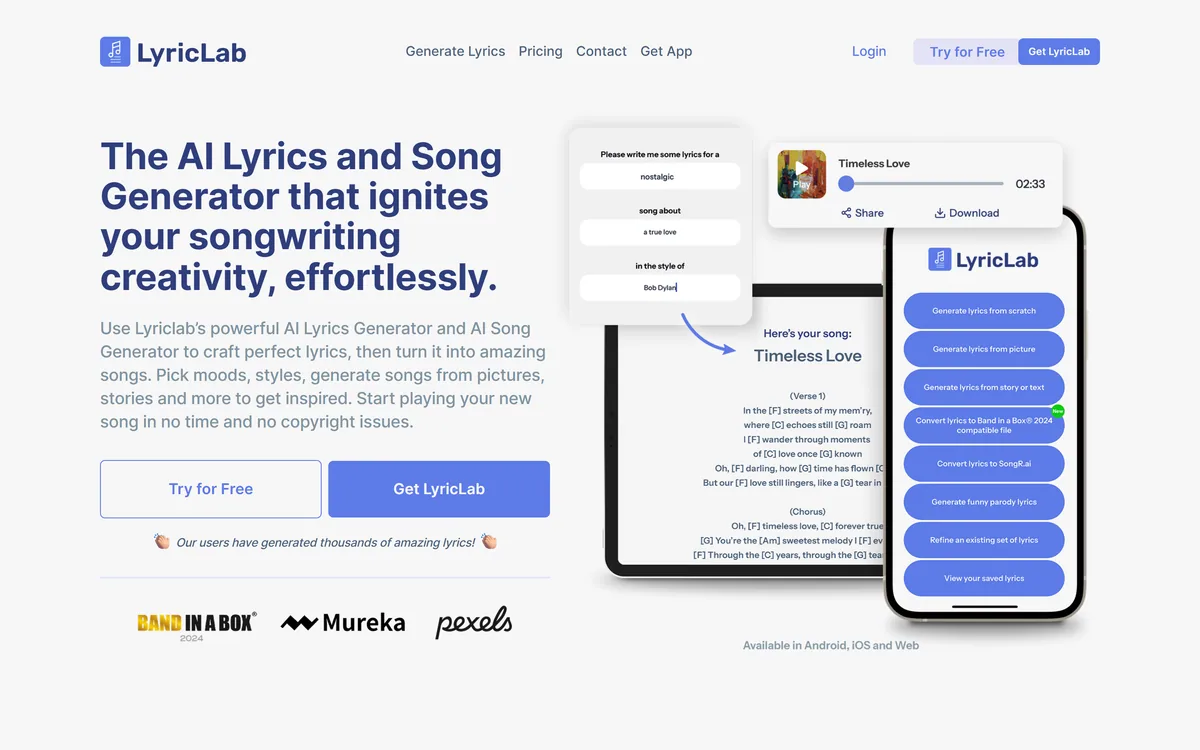
LyricLab positions itself as igniting songwriting creativity and crushing writer's block, with quality results you can modify as you wish.
That framing is more honest than it might appear, and it is worth separating what generated lyrics do well from what they do not.
What a model handles competently is craft mechanics: rhyme that scans, syllable counts that fit a meter, a chorus that repeats, a structure that resolves. Those are pattern problems and models are good at pattern problems.
What it cannot supply is the thing a lyric exists for. A song works because someone meant it — a specific detail, an unflattering admission, an image only that person would have chosen. Generated lyrics are competent and general, which is precisely the combination that produces something forgettable.
So the defensible use is as a drafting partner rather than a writer. A generated verse that is nearly right is far easier to fix than an empty page, and the fixing is where your song actually gets made — the same relationship a writer has with any drafting tool.
Models handle rhyme and meter well. What they cannot supply is the reason a lyric exists — that someone meant it.
The generator lets you choose mood, style, genre, key, time signature and chords, and structure output into verses, choruses and bridges.
Generating by song part rather than as continuous text is the most consequential of those choices.
A lyric is not prose broken into lines. A verse advances the story and a chorus repeats a single idea; a bridge changes perspective; and each has a different syllabic and rhythmic obligation because the melody underneath differs. Text generated without those constraints produces lines that read fine and cannot be sung.
Specifying the key and time signature pushes the same way. A lyric written to a four-four feel scans differently from one written to six-eight, and a generator that knows which is which is producing something a musician can use.
The absent constraint is melody. Lyrics and tune are usually written against each other, and a lyric generated without one will need reshaping when the melody arrives — which is normal songwriting work and worth expecting rather than resenting.
Alongside a text prompt, LyricLab can generate from an uploaded image or from a story you tell it — framed as ending the blank page.
The image input is the better idea, and the reason has to do with how songs actually start.
Asking someone to describe the song they want is asking them to already have it. A person with writer's block does not lack the words for their idea; they lack the idea, and a prompt box demands exactly the thing they do not have.
An image sidesteps that. You choose a photograph that feels like something, and the specifics in it — weather, light, a place, a face — become raw material the generator can work from without you having articulated anything.
Telling it a story does the same in a different register, and it is closer to how songs are actually written: something happened, and the song is about that. Both inputs are more useful than a genre dropdown, and they are the features to reach for first.
The site states that there is no need to worry about plagiarism or copyright issues, and that your lyrics and chords are unique and yours to keep.
That is stated more absolutely than any generator can support, and it deserves unpacking rather than repeating.
Two separate questions hide inside it. The first is whether the output resembles an existing work closely enough to matter — usually no for freshly generated lyrics, and not something anyone can promise in advance, particularly with common phrases in a genre built on them.
The second is whether you own the output at all. Copyright in most jurisdictions requires human authorship, and purely machine-generated text has an unsettled and in places explicitly unprotected status. A lyric you substantially rewrote is a different case from one you accepted as generated.
The practical consequence is straightforward: rewrite it. Your contribution is what makes the work yours in the sense that matters, and it is also what makes it worth singing — so the legal advice and the creative advice happen to be identical. Broader music platforms such as MusicCreator AI raise the same question about audio, and general writing tools like LogicBalls about text.
The most specific claim on the page is that lyrics and chords export to Band in a Box, stated as available in the 2024 edition for PC.
That is a narrow integration and a meaningful signal.
Band in a Box is long-established songwriting and arranging software with a substantial installed base among working and hobbyist musicians. It is not a fashionable product, and its users are people who make music regularly rather than people trying an app.
Building an export path into it means someone made a decision about who this product is for — the songwriter who already has a workflow — rather than chasing whoever downloads a lyrics app.
It also places the tool honestly in the chain. Lyrics come out of LyricLab and go somewhere else to become a song, which is a more accurate description of what it does than the sung output feature suggests, and a better reason to use it — much as Loudly earns credibility by covering mastering and distribution rather than only generation.
The mistake with a lyric generator is accepting what it produces, which yields a competent song nobody remembers.
This sequence uses it for the part it is good at and keeps the part that makes a song yours.
| Core function | AI lyrics generation, with optional song generation from those lyrics |
|---|---|
| Generation inputs | Mood, style, genre, chords, key, time signature, language, plus images and stories |
| Structure | Verses, choruses and bridges specified separately |
| Song output | A sung track with a male or female voice in a chosen genre |
| Export | Lyrics and chords to Band in a Box, stated for the 2024 PC edition |
| Refinement | Refining existing lyrics and generating parody lyrics |
| Mood control | A simple palette on the free tier and a comprehensive one on paid |
| Platforms | Web, Android and iOS |
| Free tier | Original lyrics, one free song generation, story-to-lyrics and simple chords |
| Paid tier | A one-off membership with song generation credits and advanced controls |
| Stated position | No plagiarism or copyright issues, with lyrics and chords described as unique and yours |
| Testimonials | Displayed with first names, one referring to the product's maker by name |
Lyric generation structured by song part
Mood, genre, key and time signature controls
Generation from an image or a written story
Chord suggestions alongside lyrics
Sung song generation from finished lyrics
Parody lyric generation
Refinement of existing lyrics
Export of lyrics and chords to Band in a Box
Music tools differ by which part of a song they produce.
| Tool | Produces | Rights position | Best for |
|---|---|---|---|
| LyricLab | Lyrics, chords and a sung demo | Stated as unique and yours | Songwriters stuck on words |
| Loudly | Instrumentals and full songs | Cleared at generation | Commercial and background music |
| MusicCreator AI | Tracks from a description | Stated in its own terms | Quick complete tracks |
| LogicBalls | General written content | Standard generation terms | Writing that is not a song |
| Boomy | Songs plus distribution | Release oriented | Getting a track published |
Other tools across lyrics, composition and release.
Last checked . Read from lyriclab.net in a browser session on the date above, with the screenshot captured at the same time.
What we could not confirm: our capture did not reach a site footer, so we make no claim about what is published there, including the operating company. We also could not confirm the basis for the statement that there are no copyright or plagiarism concerns, which no generator can guarantee and which does not address whether machine-generated text is protectable in your jurisdiction; which models generate the lyrics or the sung audio; how song credits convert to output; and how the sung voices were produced. Plan prices are on the site and are not reproduced here. We did not generate lyrics.
LyricLab is a competent drafting partner aimed at a specific person: the songwriter who has a melody, a mood and no words, staring at a blank page. Its most credible feature is the least flashy — exporting lyrics and chords into Band in a Box, which is real songwriting software people already use, and which places this as a step in a workflow rather than a replacement for one. Where it overreaches is the copyright framing. No generator can promise there are no copyright worries, and stating it flatly is the weakest thing on the page. AInexfinder Editor Score: 3.4/5.
AInexfinder does not list plan prices or billing details. For current pricing, plans, and trials, visit the official LyricLab website.
Visit official website for pricingVendor pricing, credits, and billing policies change over time. Always confirm on the official site before you buy.
Log in to write a review.
No reviews yet. Be the first to share your experience with LyricLab.
Assigned reviewer
Daniel ReedSenior AI Tools Reviewer
Daniel reviews AI tools the slow way — by actually using them on real projects. His reviews cover what works, what breaks, and who each tool is genuinely a good fit for.
Daniel and the AInexfinder editorial team research LyricLab using public product information, listing evidence, and (when available) hands-on checks. Scores reflect listing completeness and transparency — not paid placement.
Treblo generates complete songs from a text prompt in any style, with a browsable style library, an Explore feed of what others have made, iOS and Android apps, and a developer section for building on it.
ACE Studio is an AI music production platform built around singing voice synthesis. You give it MIDI and lyrics and it returns an expressive vocal performance, with 140+ voices across 8 languages, voice cloning, AI instruments, stem splitting and a DAW plugin that brings the whole thing into your session.
Loudly is a Berlin-built AI music platform spanning generation across four proprietary models and one partner model, a remix engine for songs you own, genre-aware mastering, stem splitting, and distribution to more than 50 platforms — with output stated as rights-cleared at generation.
MusicCreator AI generates tracks up to eight minutes from text, photos or genre prompts, and surrounds that with eighteen further tools including stem splitting, vocal removal, audio-to-MIDI conversion, a MIDI editor, mastering, key and BPM detection and a singing voice generator, across eleven interface languages.
Boomy is a generative music platform from Boomy Corporation in Berkeley, California. It creates original songs in seconds, states that artists receive full commercial rights, and publishes a running total of songs made — 22,123,440 at the time we checked.
MakeSong turns a text description or your own lyrics into a complete track with vocals across a wide genre range, exports to MP3 and WAV, and includes a fuller-than-usual set of editing tools — stem splitting, vocal removal, section replacement, song extension and video generation.