Pi is a free personal AI from Inflection AI designed for warm, conversational support: thinking things through, talking about your day or rehearsing a tough conversation. It is a companion-style chatbot, not a productivity assistant, and not a substitute for professional mental-health care.
MaxAI
Verified
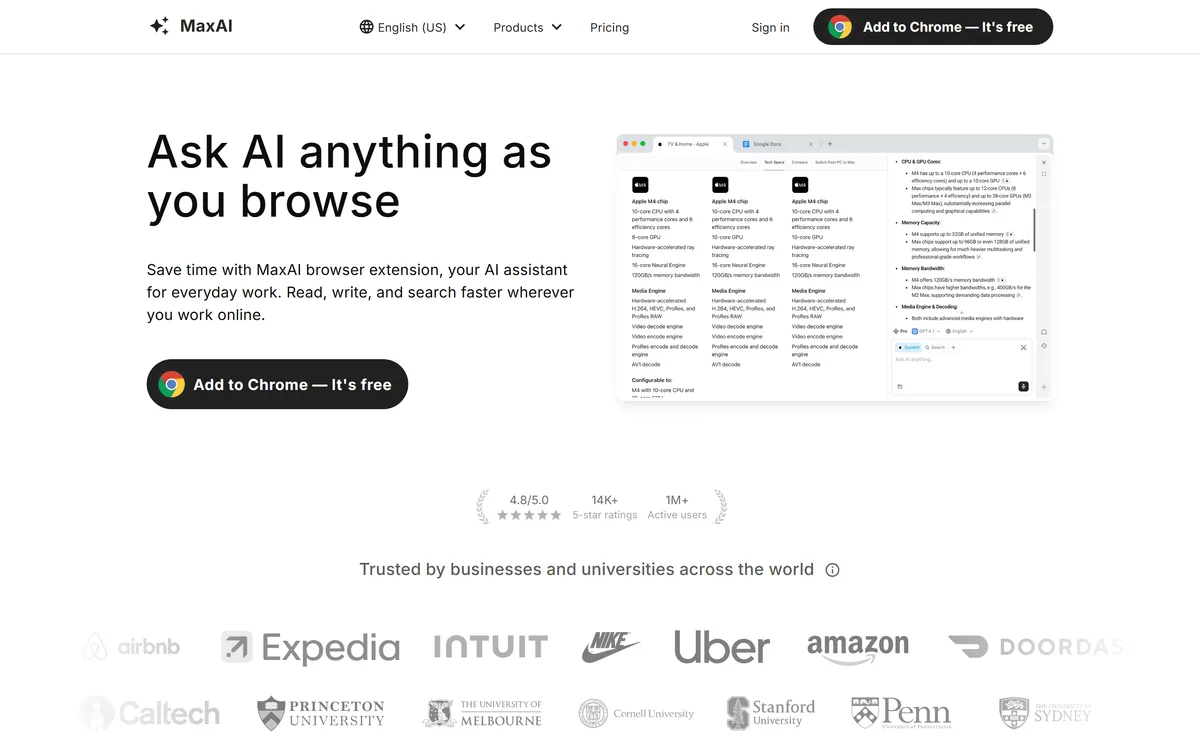
MaxAI is a browser-extension AI assistant that puts a sidebar on every page, letting you ask about the current page, use several top AI models in one place, write, translate, generate images and reuse prompts, without tab-switching or copy-pasting.
3.9Editor Score
maxai.co7 viewsAdded May 14, 2026117K visitors
A lot of AI friction is logistical: you copy text out of a page, open a chatbot in another tab, paste it in, and copy the answer back. MaxAI removes that shuffle by living in a sidebar on every page you visit.
It reads, writes, translates and answers in the context of the current page, bundles several top models in one extension, and adds writing help, translation and image generation. It overlaps with answer engines like Perplexity AI, but its distinctive value is being everywhere you already browse rather than a destination you visit.
This review covers what MaxAI does in the browser, who it is for, what it costs, and where a dedicated tool serves you better.
An AI Sidebar That Follows You Across The Web
MaxAI's core idea is presence: instead of being a site you go to, it is an assistant that is already there in a sidebar, on whatever page you are reading or writing. That removes the constant tab-switching and copy-pasting that makes casual AI use feel like work.
The practical payoff is context. Because MaxAI can see the page you are on, you can ask it to summarise this article, explain this paragraph, or draft a reply here, without first extracting the text. For everyday browsing tasks, that immediacy is the whole appeal.
It also consolidates several top models behind one interface, so you are not committing to a single provider, and it adds writing assistance, translation, image generation and reusable prompts around the core chat.
The honest framing is that MaxAI is a convenience layer, not a new capability: the underlying intelligence comes from models you could reach elsewhere. Its value is purely in how much friction it removes from the way you already browse, which for heavy web workers is real, and for light users is marginal.
MaxAI is a convenience layer, not a new capability; its value is purely in how much friction it removes from the way you already browse.
What Does MaxAI Do In The Browser?
The experience is a contextual sidebar plus a set of everyday productivity features built around it.
Ask, Read, Write And Translate In Context
From the sidebar you can ask about any webpage, summarise or explain content, improve your writing with one click across the web, translate with original and translated text side by side, and save reusable prompts to run instantly. These are the small, frequent tasks that add up over a browsing day.
A privacy-first chat front-end like Duck.ai is a destination you open; MaxAI's difference is doing these jobs in place, on the page, which is a genuine workflow saving for people who live in the browser.
Many Models In One Extension, With A Privacy Note
MaxAI lets you pick among several leading models in one place and returns cited answers, so you can cross-check sources, and it markets itself as privacy-friendly. As with any extension that can read page content, it is worth understanding what it accesses and sends, and reviewing its privacy terms before granting broad permissions.
For a deeper, standalone assistant that manages tasks and context over time, a tool like Cassidy is a different shape; MaxAI is deliberately lightweight and in-browser, which is both its strength and its ceiling.
Who MaxAI Is For Day To Day
MaxAI is for people who spend their day in the browser, reading, researching, writing emails and docs, translating, and want AI help without leaving the page. For them the friction it removes is felt every hour.
It suits anyone who wants to try several models side by side without separate subscriptions, and multilingual users who value in-page translation with original text shown alongside.
It fits less well people who want a single deep workspace with memory and long-context projects, anyone cautious about granting a browser extension page-reading access, and users whose work does not happen mostly in a browser. Its 1M+ users and 4.8 rating are vendor-stated and reflect adoption, not quality for your tasks.
What MaxAI Costs To Add
MaxAI is free to add to Chrome, with paid plans for heavier use and more models. We do not publish prices, which change; check the site.
The value question is simple: does the friction it removes across a browsing day justify a subscription, given the underlying models are reachable elsewhere? For someone who would otherwise tab-switch dozens of times a day, it often does.
Because it is free to install, the sensible approach is to use it for a normal week of real work, notice how often the sidebar genuinely saves you steps, and only upgrade if the time saved is real and the privacy posture suits you.
A Short Trial Of MaxAI
Because MaxAI is about removing friction, trial it on your real browsing, not a contrived test.
- Install the extension and use it on the pages you read and write every day.
- Ask it about the current page to test the contextual answers and citations.
- Try the one-click writing help and side-by-side translation.
- Switch between models and see whether having several in one place is useful.
- Review its permissions and privacy terms before granting broad access.
- Pass/fail: MaxAI is worth it if the sidebar genuinely removes steps across your day.
- Treat the 1M+ users and 4.8 figures as vendor-stated; judge it on your workflow.
MaxAI, The Sidebar Brief
- MaxAI is a browser AI sidebar: ask, read, write and translate on any page without switching tabs or copy-pasting.
- It bundles several models: access multiple top AI models in one extension, with cited answers.
- Context is the pitch: it can answer about the exact webpage you are on, which a separate chatbot tab cannot.
- It is a convenience layer: great for everyday browsing tasks, not a replacement for a dedicated workspace or research tool.
MaxAI Browser-Assistant Facts
| What it is | A browser-extension AI assistant (sidebar) |
|---|---|
| Core | Ask, read, write and translate on any page |
| Models | Several top AI models in one place |
| Context | Answers about the current webpage |
| Sourcing | Cited answers |
| Extras | Writing help, translation, image generation, prompts |
| Platforms | Chrome, Edge and a web app |
| Reach claim | 1M+ active users, 4.8/5 (vendor) |
Key features of MaxAI
Contextual AI sidebar
Multiple AI models
Cited answers
One-click writing help
Side-by-side translation
Image generation
Reusable prompts
Chrome, Edge and web app
Pros & cons
Pros
5- Removes tab-switching and copy-pasting
- Answers in the context of the page
- Several models in one extension
- Handy writing and translation tools
- Free to install
Cons
5- Convenience layer, not new capability
- Needs page-reading permissions
- Not a deep workspace with memory
- Marginal for non-browser work
- User/rating figures are vendor-stated
Best For
- Browser-heavy workers
- Online reading and writing
- Multi-model access
- In-page translation
- Quick everyday AI tasks
MaxAI Against Other Browser Assistants
The useful comparison is with other ways to get AI help while you work.
| Tool | Tool | Type | Best for |
|---|---|---|---|
| MaxAI | Browser AI sidebar | In-page help across the web | People who live in the browser |
| Perplexity AI | Answer engine | Cited answers from the web | Research-style questions |
| Duck.ai | Private chat front-end | Anonymised model access | Private everyday chat |
| Cassidy | AI assistant/automation | Deeper workspace tasks | Standalone assistant work |
Is MaxAI The Right Browser Helper?
Browser-Heavy Workers MaxAI Serves
- People who work mostly in the browser
- Heavy readers, writers and researchers online
- Anyone wanting several models in one place
- Multilingual users needing in-page translation
- Those tired of copy-pasting into a separate chatbot
When MaxAI Is Not Worth Installing
- People wanting a deep workspace with memory
- Anyone cautious about extension page-reading access
- Users whose work is not browser-based
- Those who only need one model occasionally
- People expecting new capability, not convenience
What We Confirmed About MaxAI
Last checked . Read from maxai.co during this check, with the screenshot above captured at the same time.
- A browser-extension AI assistant with a sidebar
- Contextual answers about the current webpage
- Several top AI models in one place
- One-click writing help across the web
- Side-by-side bilingual translation
- Image generation and reusable prompts
- Chrome and Edge extensions plus a web app
- Vendor figures of 1M+ users and a 4.8 rating
- No prices reproduced here, in line with this site's pricing policy
MaxAI is a convenience layer over models you could reach elsewhere; its value is friction removed, not new capability. As a page-reading extension, review its permissions and privacy terms. Its user and rating figures are vendor-stated.
Other Assistant And Chat Tools
An answer engine, a private chat front-end and a standalone assistant to weigh alongside MaxAI.
- Perplexity AI — cited answers from the web
- Duck.ai — anonymised, private chat
- Cassidy — a deeper standalone assistant
Editor's Verdict
3.9/5MaxAI earns 3.9 as a well-executed convenience layer: an AI sidebar that reads, writes, translates and answers in the context of whatever page you are on, with several top models in one extension. For people who live in the browser, removing the constant tab-switching and copy-pasting is a genuine, hourly time-saving. It is not new capability, though, the models are reachable elsewhere, so its worth depends on your friction, and as a page-reading extension it deserves a look at its permissions and privacy terms before you grant broad access. AInexfinder Editor Score: 3.9/5.
MaxAI pricing
AInexfinder does not list plan prices or billing details. For current pricing, plans, and trials, visit the official MaxAI website.
Visit official website for pricingVendor pricing, credits, and billing policies change over time. Always confirm on the official site before you buy.
Frequently asked questions
What is MaxAI?
MaxAI is a browser-extension AI assistant that puts a sidebar on every page. It lets you ask about the current page, use several top AI models in one place, write, translate, generate images and reuse prompts, without switching tabs or copy-pasting into a separate chatbot.
How is MaxAI different from a chatbot in a tab?
Its difference is context and presence: MaxAI can see the page you are on, so you can summarise an article or draft a reply in place, and it is always in the sidebar rather than a destination you open. The underlying intelligence is similar; the friction removed is the point.
Which AI models does MaxAI use?
MaxAI bundles several leading models in one extension and lets you switch between them, returning cited answers so you can cross-check sources. The exact lineup changes as providers update, so check the site for what is currently offered.
Is MaxAI private?
MaxAI markets itself as privacy-friendly, but as a browser extension that can read page content, it is worth understanding what it accesses and sends. Review its permissions and privacy terms before granting broad access, especially if you browse sensitive pages.
Is MaxAI free?
MaxAI is free to add to Chrome, with paid plans for heavier use and more models. We do not publish prices, which change; check the site. Use it on a normal week of real work first and only upgrade if the time saved is genuinely worth it.
Can MaxAI translate web pages?
Yes. It offers bilingual translation that shows the original and translated text side by side, which is useful for reading foreign-language articles in place. That in-page translation is one of the features that makes it appealing to multilingual browser users.
Who is MaxAI best for?
People who spend their day in the browser, reading, researching, writing and translating, and want AI help without leaving the page. It is less useful for those who want a deep standalone workspace, or whose work does not happen mostly in a browser.
Does MaxAI replace a dedicated AI workspace?
No. It is deliberately lightweight and in-browser, which is both its strength and its ceiling. For memory, long-context projects or deeper task management, a standalone assistant is a better fit; MaxAI complements that rather than replacing it.
Are MaxAI's user numbers reliable?
Figures like 1M+ active users and a 4.8 rating are vendor-stated, so treat them as adoption signals rather than proof it suits your tasks. Judge MaxAI on your own week of browsing and how often the sidebar actually saves you steps.
Does MaxAI work in Edge as well as Chrome?
MaxAI offers Chrome and Edge extensions plus a web app, so you can use it in either browser or directly on the web. Check the store listing for current browser support before installing.
Reviews
Log in to write a review.
User Reviews
No reviews yet. Be the first to share your experience with MaxAI.
Reviewed by Daniel Reed
Assigned reviewer
Daniel ReedSenior AI Tools Reviewer
Daniel reviews AI tools the slow way — by actually using them on real projects. His reviews cover what works, what breaks, and who each tool is genuinely a good fit for.
Hands-on reviewsProduct testingAI software
Daniel and the AInexfinder editorial team research MaxAI using public product information, listing evidence, and (when available) hands-on checks. Scores reflect listing completeness and transparency — not paid placement.
- Last verified
- Methodology
- How we review AI tools
- Sources used
- maxai.co
- AInexfinder listing fields (features, pros/cons, description)
- Public vendor pages when available
- Editorial policy
- Listings may include affiliate or sponsored placements, which are labeled when present. Editorial scores and cons are not sold. See our affiliate disclosure and review methodology.
Related tools
All-in-one AI assistant with autonomous task agents Category: AI Chatbots & Assistants.
FreemiumAI Chatbots & Assistants
Exa is a search API that gives AI agents real-time access to the web, built on its own large index, embedding and retrieval models, with selectable latency, search verticals, token-efficient highlights, structured enrichments and an MCP server.
FreemiumAI Chatbots & Assistants
Felo is a multilingual AI search and creation platform from Felo Inc. It pairs an answer engine with Felo Slides, an agent mode, an LLM playground, LiveDoc and an API, with the multilingual layer as its distinguishing feature rather than an afterthought.
FreemiumAI Chatbots & Assistants
R Discovery is a research reading and literature search app from Cactus Communications, covering 150M+ journal articles, 78M+ open access papers and 10M+ conference documents. It offers AI summaries with citations, chat with a PDF, generated literature reviews, audio papers and translation into 30+ languages.
FreemiumAI Chatbots & Assistants
Voiceflow is an enterprise conversational AI platform where CX teams design agent workflows visually, prototype them in place, and deploy one agent across web, app, WhatsApp, SMS and voice. It states 500-millisecond voice latency, 300,000 messages per minute and more than 10,000 live agents in production.
FreemiumAI Chatbots & Assistants
Explore More
Embed this listing on your site
Featured on AInexfinder