Mosso is a personal styling app built around a colour and style quiz that produces a personalised style report, virtual try-on, capsule wardrobe guidance and daily outfit suggestions. Its stated aim is dressing from what you own rather than buying more.
Most people own more clothes than they wear and wear a fraction of what they own, and the reason is rarely that the wardrobe is bad.
It is that getting dressed involves a hundred small decisions — does this go with that, does this colour work on me, is this the right shape — and without a framework those decisions are made again from scratch every morning, badly, in a hurry.
Mosso sells a framework. A quiz, a colour palette, a style report you can return to, and outfit guidance built around what you already have. Whether that framework is correct is a harder question than whether having one helps.
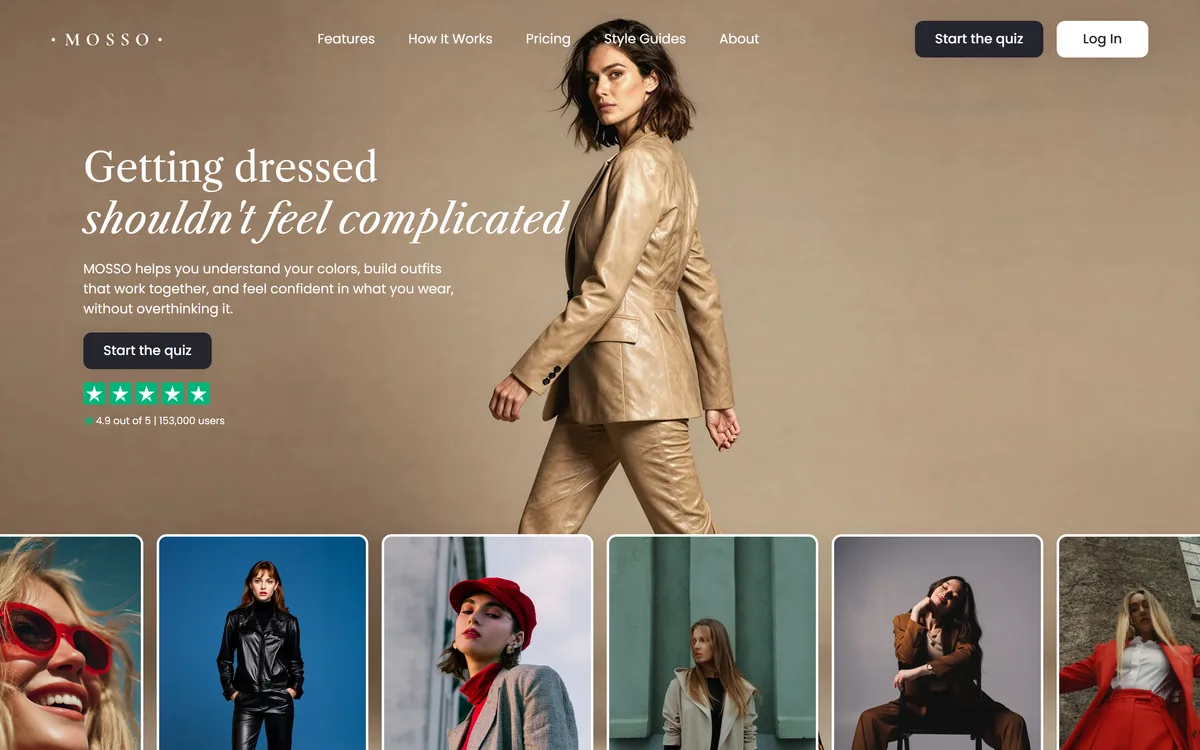
Mosso's homepage, captured 9 September 2026, showing the style quiz entry point and the Trustpilot rating beneath it.
Mosso: What The Quiz Leads To
It starts with a quiz about your features, preferences and lifestyle, which produces a personalised style report you can return to.
Personal colour analysis is the core output — the palette that the app says brings balance to your wardrobe.
Virtual try-on lets you visualise outfit combinations and judge balance, fit and proportion before committing.
Capsule wardrobe and body archetype guidance, focused on silhouette and shape rather than trend.
The stated goal is fewer impulse buys and wearing more of what you already own, which is unusual positioning in this category.
What Can A Colour Analysis App Actually Tell You?
Personal colour analysis is the centre of Mosso's product: it says it helps you discover the colours that bring balance and ease to your wardrobe, so getting dressed feels natural rather than confusing.
The underlying idea is real. Certain colours genuinely do flatter certain complexions more than others, mostly through contrast and undertone, and anyone who has held two shirts up to their face has observed the effect without naming it.
The formalised version of that observation — seasonal colour analysis and its descendants — is a system rather than a science. Practitioners disagree, categories vary between schools, and the same person can be assessed differently by two experts. That is worth knowing before treating a result as a fact about you.
A quiz-based version adds a further layer of approximation. You are describing your own colouring in words, through a screen, under whatever lighting you happen to be in, and the app is working from that description rather than from seeing you.
None of which makes it useless. A consistent palette narrows an unlimited choice down to a manageable one, and most of the benefit comes from having any coherent constraint rather than from having the objectively correct one. Just hold it as a starting hypothesis rather than as a diagnosis.
It is worth comparing that honestly with an app that measures something. MyNetDiary tracks intake against targets; a colour palette has no equivalent quantity to check yourself against.
Most of the benefit comes from having a coherent constraint at all, rather than from having the objectively correct one.
Virtual Try-On And What It Can And Cannot Show
Mosso offers virtual try-on to visualise outfits and understand balance, fit and proportions more confidently, and the useful distinction here is between proportion and fit.
Proportion is what try-on can genuinely help with. Whether a cropped jacket works with a particular trouser length, whether a silhouette balances, whether two pieces read well together — these are visual relationships, and seeing an approximation of them is meaningfully better than imagining them.
Fit is what it cannot show. Whether a garment sits correctly across your shoulders, whether the waist lands where it should, whether the fabric drapes or clings — those depend on the specific garment on your specific body, and no rendering has that information.
That matters because fit is what actually determines whether something looks good. A well-proportioned outfit in badly fitting clothes looks worse than a plain one that fits, which is why tailoring outperforms almost any styling advice.
The honest use is as a filter rather than a decision. Try-on can rule out combinations that clearly do not work and save you the trouble of trying them; it cannot confirm that something will look right in the room.
The Capsule Wardrobe Argument
Mosso's stated outcomes are pointed: build outfits from what you already own, make fewer impulse buys, wear more of what you have, and shop more intentionally.
That framing is worth noticing because it runs against the commercial grain of the entire category. Styling apps are overwhelmingly built as shopping funnels — the advice exists to produce a purchase, and affiliate revenue depends on you buying rather than on you being satisfied.
An app that succeeds when you buy less has to make its money from the subscription, which at least aligns the incentive with the outcome. The testimonials the site publishes reflect that: the quoted customers talk about wearing things they already owned rather than about what they bought.
The capsule wardrobe idea underneath it is sound and old. A smaller set of pieces that combine in many ways produces more outfits and fewer decisions than a larger set that combines in few — and the reason most wardrobes fail is variety without coherence.
The realistic caveat is that a capsule works because of what it excludes, and most people find excluding harder than adding. An app can tell you which twelve pieces work together; it cannot make you stop buying the thirteenth that does not.
The behavioural half of this is a different problem, and a habit tool such as Pattrn is more honest about it than any styling app can be.
Treat the colour result as a hypothesis, not a diagnosis — test it in daylight with real garments.
Use try-on for proportion, and reserve judgement on anything that depends on fit.
Start by applying the palette to clothes you already own, before buying anything.
Prioritise tailoring over styling advice if the two compete for the same money.
Judge the app after a month by how much of your existing wardrobe you now wear.
Reading The Trustpilot Number
Mosso's homepage displays 4.9 out of 5 alongside a figure of 153,000 users, and both deserve a moment's thought rather than acceptance or dismissal.
Third-party review platforms are more trustworthy than testimonials on a vendor's own page, because the vendor does not control the reviews and cannot delete unfavourable ones. That is a genuine difference and it is worth something.
It is also not the whole story. Review scores for consumer subscription apps skew high for structural reasons: satisfied users are prompted at good moments, dissatisfied ones cancel silently, and the distribution of who chooses to review is not the distribution of who uses the product.
A 4.9 therefore means very few people were angry enough to complain publicly, which is a real and limited fact. It is not evidence that the colour analysis is accurate, because almost nobody reviewing a styling app is in a position to assess that.
The user figure is vendor-stated and its definition is unknown — registered accounts, quiz completions, paying subscribers are three very different numbers. Neither figure should move your decision much; a free quiz you can run yourself is far better evidence.
The pattern is identical wherever consumer subscriptions publish scores — the same caveat applies to a library like Insight Timer or a tracker like DreamSync.
Getting Something Useful Out Of The Quiz
The failure mode with any styling framework is treating the output as an identity rather than as a tool.
A palette that stops you wearing a colour you love and look good in is worse than no palette at all.
Take the quiz in natural daylight, since describing your own colouring under artificial light is where the input goes wrong.
Before reading the report, photograph five outfits you already feel good in, so you have your own evidence to compare against.
Check whether the recommended palette overlaps with what you already wear and like — a wildly different result deserves scepticism.
Apply the palette to your existing wardrobe first, and identify which owned pieces suddenly work together.
Use try-on to eliminate combinations rather than to approve them, since it cannot judge fit.
Review after a month on one measure: are you wearing more of what you own, and buying less?
Who Is Mosso Actually For?
Worth the quiz when
You own plenty of clothes and wear very few of them.
Getting dressed costs you time and low-level stress most mornings.
You want a coherent constraint to narrow choices rather than more options.
Impulse buying is your actual problem and you want to buy less.
You would use a style report as a reference rather than treating it as a verdict.
Not for you when
You want an objective answer, which colour analysis cannot provide.
Fit rather than proportion is what is wrong with your clothes — see a tailor.
You already dress confidently and enjoy the decisions.
You would let a palette override something you love and look good in.
You want product recommendations and shopping, which is not how this is positioned.
Mosso: Product And Footer
Product type
Personal styling and colour analysis app
Entry point
A style and colour quiz covering features, preferences and lifestyle
Style report
Personalised, with a colour palette and styling insights to return to
Personal colour analysis
Identifying colours the app says bring balance to your wardrobe
Virtual try-on
Visualising outfits to judge balance, fit and proportion
Capsule wardrobe
Guidance focused on balance, shape and supporting silhouettes
Body archetype
Assessment used to shape recommendations
Daily outfits
AI-powered daily outfit suggestions
Wardrobe management
Included per the site's own comparison table
Stated rating
4.9 out of 5, with 153,000 users, shown on the homepage
Footer — Product
Features, How It Works, Pricing, Style Guides
Footer — Company
About, Contact
Footer — Legal
Privacy policy, Terms of service, Acceptable Use Policy, Subscription & Refund Policy
Key features of Mosso
A style and colour quiz covering features, preferences and lifestyle
A personalised style report you can return to
Personal colour palette analysis
Virtual try-on for visualising outfit combinations
Capsule wardrobe guidance built around silhouette and balance
Body archetype assessment feeding the recommendations
Daily outfit suggestions
Wardrobe management for clothes you already own
Pros & cons
Pros
6
Positioned around wearing what you own rather than buying more, which is unusual here
A subscription model aligns the incentive with satisfaction rather than with purchases
A coherent constraint genuinely does reduce daily decision load
Try-on is a reasonable filter for proportion questions
Complete legal footer including an Acceptable Use and a Subscription & Refund Policy
Customer quotes on the site are about wearing existing clothes rather than shopping
Cons
6
Colour analysis is an interpretive system, not a measurement, and practitioners disagree
A quiz describes your colouring in words rather than seeing you, adding approximation
Virtual try-on cannot assess fit, which is what actually decides how clothes look
No operating company, registration or location appears in the footer
Pricing, models used, and image retention policy are all unstated
The 4.9 rating and user count are displayed without a linked verifiable source
Best For
People with a full wardrobe they barely use
Anyone who finds getting dressed a daily source of low-level stress
Reducing impulse purchases rather than making better ones
Building a capsule wardrobe from clothes already owned
Users who want a starting framework rather than a verdict
Mosso Beside Other Personal AI Tools
Apps that give personal guidance differ mostly in whether the advice is measurable or interpretive.
Personal guidance apps sit on a spectrum from measurable to interpretive, and it helps to know where one falls.
Pattrn — if consistency rather than style is the thing you want to change
DreamSync — a lifestyle app that names a clinical method behind its advice
MyNetDiary — for guidance with actual measurement underneath it
Insight Timer — the free end of the personal-wellbeing category
Pebblely — the retail side — how the clothes were photographed in the first place
Reading Mosso Site End To End
Last checked . Read from mosso.ai, including its How It Works page and footer, with the screenshot above captured in the same session.
Product described as helping you understand your colours, build outfits that work together and feel confident in what you wear
Four-step flow confirmed: take the style and colour quiz, get a personalised style report, try outfits with virtual try-on, get dressed with clarity
Personal colour analysis confirmed as a named capability
Virtual try-on confirmed for visualising outfits and understanding balance, fit and proportion
Capsule wardrobe guidance confirmed, focused on balance and shape
Body archetype assessment confirmed in the site's comparison table
Daily AI-powered outfit suggestions and wardrobe management confirmed in the same table
Stated outcomes confirmed as fewer impulse buys and wearing more of what you own
A 4.9 out of 5 rating with 153,000 users confirmed as displayed on the homepage
Footer confirmed with Product links (Features, How It Works, Pricing, Style Guides), Company links (About, Contact), a newsletter signup, and Privacy policy, Terms of service, Acceptable Use Policy and Subscription & Refund Policy
What we could not confirm: the operating company's legal name, registration or location, none of which appear in the footer; pricing and subscription structure; which AI models power the try-on or outfit suggestions; how images uploaded for try-on are stored, retained or deleted; what methodology underlies the colour analysis; whether the 4.9 rating and 153,000 user figure link to a verifiable third-party profile; and whether any stylist or colour professional is involved. The site returned 403 to our automated fetcher, so pages were read in a real browser. We did not take the quiz, so nothing reflects tested output.
Editor's Verdict
3.6/5
Mosso's most defensible claim is the one it repeats least loudly: that the point is wearing what you already own. Personal styling apps normally exist to sell you clothes, so an app whose stated outcome is fewer impulse buys and better use of an existing wardrobe is taking a genuinely different position, and the customer testimonials on the site reflect that framing rather than a shopping one. Colour analysis is subjective by nature and virtual try-on shows an approximation rather than a fit, so the honest read is that this is a structured opinion rather than a measurement. As structured opinions go, having one is better than having none. AInexfinder Editor Score: 3.6/5.
Mosso pricing
AInexfinder does not list plan prices or billing details. For current pricing, plans, and trials, visit the official Mosso website.
Vendor pricing, credits, and billing policies change over time. Always confirm on the official site before you buy.
Frequently asked questions
What is Mosso?
Mosso is a personal styling app built around a style and colour quiz. It produces a personalised style report with a colour palette, offers virtual try-on for visualising outfits, and gives capsule wardrobe and body archetype guidance. Its stated aim is helping you wear what you already own rather than buy more.
Is personal colour analysis actually accurate?
The underlying observation is real — certain colours flatter certain complexions through contrast and undertone. The formalised systems built on it are frameworks rather than science: practitioners disagree, categories differ between schools, and the same person can be assessed differently by two experts. Treat a result as a hypothesis, not a diagnosis.
How does a quiz know what colours suit me?
It doesn't see you — it works from your description of your own features, through a screen, under whatever lighting you happen to be in. That is a further layer of approximation on top of an already interpretive system. Taking it in natural daylight is the one thing that materially improves the input.
What can virtual try-on actually show me?
Proportion, not fit. Whether a cropped jacket works with a particular trouser length, whether a silhouette balances — these are visual relationships and seeing an approximation helps. Whether a garment sits right across your shoulders depends on that garment on your body, and no rendering has that information.
Does Mosso try to sell me clothes?
Its stated outcomes are the opposite: fewer impulse buys, wearing more of what you own, shopping more intentionally. That runs against the commercial grain of the category, where most styling apps are shopping funnels earning affiliate revenue. A subscription model at least aligns the incentive with satisfaction rather than purchase volume.
Should I trust the 4.9 rating?
As far as it goes. Third-party review scores are more trustworthy than on-site testimonials because the vendor cannot delete unfavourable ones. But consumer app scores skew high structurally — satisfied users get prompted, dissatisfied ones cancel silently — and almost nobody reviewing a styling app can assess whether the colour analysis was correct.
What is a capsule wardrobe and does it help?
A smaller set of pieces that combine in many ways, producing more outfits and fewer decisions than a larger set that combines in few. The idea is sound and old, and the reason most wardrobes fail is variety without coherence. The difficulty is that a capsule works because of what it excludes, which people find harder than adding.
What happens to photos I upload for try-on?
Not stated on the pages we read, and worth resolving before uploading anything. The site does publish a Privacy policy, Terms of service, Acceptable Use Policy and Subscription & Refund Policy in its footer, so the answer is likely there — but the marketing pages do not say how images are stored, retained or deleted.
On one measure after a month: are you wearing more of what you already own, and buying less? That is the outcome the app claims, it is easy to observe, and it does not require you to decide whether the colour analysis was objectively correct — which is a question nobody can answer anyway.
Daniel reviews AI tools the slow way — by actually using them on real projects. His reviews cover what works, what breaks, and who each tool is genuinely a good fit for.
Daniel and the AInexfinder editorial team research Mosso using public product information, listing evidence, and (when available) hands-on checks. Scores reflect listing completeness and transparency — not paid placement.
Listings may include affiliate or sponsored placements, which are labeled when present. Editorial scores and cons are not sold. See our affiliate disclosure and review methodology.
RecipeScan is an Apple-only cooking app that builds a pantry from photos, suggests recipes against what you already have, and coordinates three dishes onto one timeline. It adds grocery lists, budget tracking, calorie estimates and a hands-free cooking mode.
RelaxFrens is a personalised meditation and sleep app that builds a plan around your goals, schedule and daily mood check-ins. Its companion, Fren, guides breathing exercises and conversations, and the app uses streaks, badges, nature sounds and adjustable voices and session lengths.
moonbird is a tactile, screen-free handheld breathing coach that expands and contracts in your palm to pace your breath, reads your pulse and HRV, and pairs with an app whose Aura AI coach personalises the rhythm, aimed at calm and sleep as a wellbeing tool.
Aura is a personalised mental-wellness and sleep app bundling meditation, sleep tracks, hypnosis, CBT-style content, coaching, breathwork and more, with AI-driven recommendations and live coach and therapist sessions, offered as a freemium subscription and framed here as a wellbeing aid, not medical care.
Youper is an AI emotional-health assistant built around conversational check-ins, mood tracking and journaling. The company has announced it is shutting down on 30 September 2026, after which accounts, chat history and personal data are permanently deleted.
Insight Timer offers a very large free audio library for meditation, sleep, yoga and breathwork, contributed by psychologists, spiritual leaders and mindfulness teachers. Live yoga and breathwork sessions run alongside courses, with a Member Plus subscription above a genuinely free core.