Navattic is a no-code interactive demo platform founded in 2020, used by over 1,000 customers. Teams build, embed and share clickable product demos across marketing and sales, with engagement analytics, a Launchpad for sales, Copilot for building and AI-powered agents.
navattic.com6 viewsAdded August 15, 20258K visitors
The most expensive thing in B2B software sales is the discovery call that should never have happened.
A prospect books thirty minutes, a rep spends it explaining what the product does, and both parties discover in minute nineteen that it was never a fit. Multiply that across a quarter and it is the single largest hidden cost in a sales team's week.
Interactive demos exist to move that discovery earlier and make it self-service. Navattic's more interesting contribution is what happens afterwards: every click a prospect makes is a recorded statement about what they actually care about.
Five Things To Know About Navattic
No-code interactive demos you build, embed and share across sales, marketing and growth without engineering time.
Founded in 2020, with 1,000+ customers ranging from startups to what the site describes as global SaaS leaders.
Launchpad extends demo automation to the sales side rather than only to the website.
Copilot builds demos and Navattic Agents run AI-powered autonomous conversations alongside them.
Engagement analytics sync to your CRM, which is the part that turns a demo into a qualification signal.
Why Does An Interactive Demo Convert Differently?
An interactive demo is a clickable replica of your product that a prospect explores without signing up, installing anything, or speaking to anyone.
The reason it converts differently from a video is participation. Watching a demo is passive and easy to abandon; clicking through one requires a decision at every step, and someone who completes it has invested effort that a viewer has not.
It also solves the problem video cannot: relevance. A recorded demo shows what the vendor thinks matters, in the vendor's order. An interactive one lets a prospect go straight to the two things they came for and ignore the rest — which is what people actually do with product pages, and what video forbids.
The comparison against a free trial is the more interesting one. A trial is more convincing and enormously more expensive to reach: setup, data, learning curve, and a prospect who churns before understanding the product. A demo delivers the aha moment in ninety seconds with none of that friction.
The honest limit is that a demo shows the product working perfectly with clean data. Every prospect knows this, so it cannot substitute for a trial in a considered purchase — it moves someone from unaware to interested, and something else has to move them from interested to convinced.
The nearest direct comparison is Storylane, and for lighter walkthroughs built in minutes rather than hours, Arcade occupies the same shelf at less effort.
A recorded demo shows what the vendor thinks matters, in the vendor's order. An interactive one lets a prospect go straight to the two things they came for.
Launchpad And The Sales-Side Case
Navattic's Launchpad applies demo automation to sales rather than to the website, and this is the half of the product that changes rep behaviour.
The problem it addresses is what happens after a call. A rep sends a follow-up email, and the buyer then has to explain the product internally to three colleagues who were not on the call — from memory, badly, with none of the rep's fluency.
That internal explanation is where most B2B deals actually die, and the seller has no visibility into it and no ability to help.
Sending an interactive demo instead of a summary changes that. The champion forwards something the colleagues can click through themselves, which means the pitch survives contact with people who never met the rep.
It also produces a second wave of signal. When four people from one company work through a demo the week after a call, that is a buying committee assembling, and knowing it is happening is worth considerably more than knowing an email was opened.
The Analytics Are The Reason To Buy It
Navattic offers engagement tracking, activity monitoring, buyer interest insights and conversion tracking synced through CRM and marketing automation integrations.
This is the part worth paying for, and the reason is the quality of the signal. Most marketing analytics tell you that attention happened — a page was viewed, an email was opened, a form was submitted. None of that says what the person wanted.
A demo click does. A prospect who spent ninety seconds on the reporting section and skipped integrations entirely has told you, without being asked, which problem they are trying to solve — and they have told you more honestly than they would have on a call, where people describe what they think they should want.
That changes the first conversation completely. A rep who opens by discussing reporting is not guessing, and the prospect experiences a call that started three steps in rather than at the beginning.
The requirement is that the data reaches the CRM and someone acts on it. Demo analytics sitting in a separate dashboard that only marketing opens is a common and expensive failure — the signal is generated, and the person who needed it never sees it.
The other way to learn what a prospect wants is to ask them in a form that can answer back, which is the case a tool like Formless makes.
Route demo engagement into the CRM, not just into a marketing dashboard.
Treat multiple viewers from one company as a buying-committee signal.
Send demos as post-call follow-ups, since that is where deals get re-explained.
Build for the two features prospects actually ask about, not for the full tour.
Keep demos current, because a demo showing an old interface undermines trust immediately.
What A Demo Platform Cannot Fix
Three problems look like demo problems and are not, and buying a platform to solve them wastes money and time.
The first is a product that is genuinely hard to understand. If prospects cannot grasp what you do, an interactive demo makes that confusion clickable rather than resolving it. The fix is positioning, and no amount of tooling substitutes for it.
The second is a maintenance problem in disguise. Demos capture your interface at a moment in time, and a product that ships weekly produces demos that are wrong within a quarter. Somebody has to own updating them, and if nobody does, the demo becomes an active liability — a prospect who sees an interface that does not exist trusts everything else less.
The third is a demand problem. A demo improves conversion of the traffic you have; it does not create traffic. A team with excellent conversion and no visitors has a different problem, and a demo platform will not touch it.
Copilot, Navattic's AI demo builder, addresses the maintenance cost directly by lowering the effort of building and rebuilding — which is the right place to apply automation in this product, because build cost is what makes demos go stale.
Nor does it improve the leads themselves. Enrichment tools such as Clay handle the question of who the person clicking actually is.
Building A Demo That Earns Its Place
The most common failure is building a comprehensive tour, which nobody finishes.
A demo is not documentation. It has one job: get a specific prospect to a specific realisation, quickly.
Ask three reps which two features prospects always ask about, and build only those.
Set an explicit length target — two minutes of clicking, not ten — and cut to reach it.
Use realistic data rather than obviously fake names, since implausible data breaks the illusion instantly.
Place it where intent is highest: the pricing page and the post-call follow-up, not only the homepage.
Verify engagement data lands in the CRM against the right record before launching.
Diarise a quarterly review against the live product, and treat a stale demo as worse than no demo.
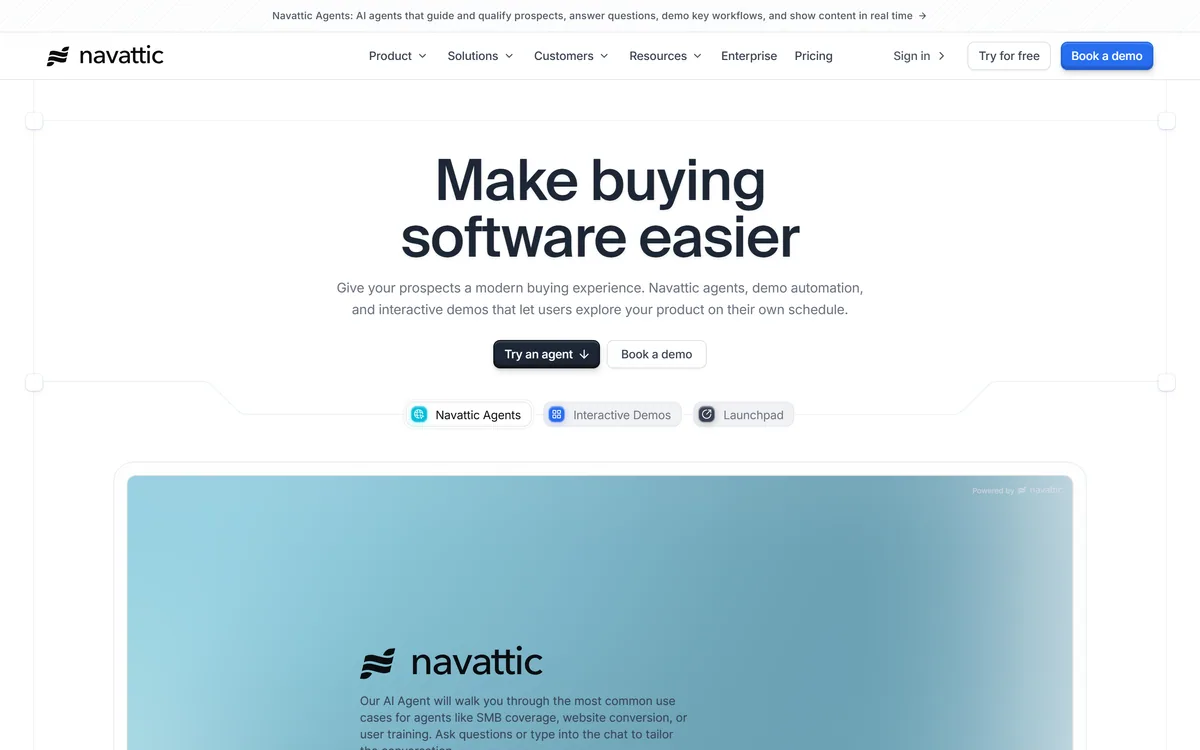
Navattic's homepage, captured 9 September 2026, showing the interactive demo platform positioning across sales, marketing and growth.
Key features of Navattic
No-code interactive product demos built, embedded and shared without engineering
Launchpad for automating demos on the sales side
Copilot as an AI demo builder to lower build cost
Navattic Agents for AI-powered autonomous conversations
Engagement tracking and activity monitoring per viewer
Buyer interest insights derived from what prospects actually explore
Conversion tracking synced through CRM and marketing automation integrations
An enterprise tier for larger deployments
Pros & cons
Pros
7
Demo clicks are intent signal that page views and form fills cannot produce
Launchpad addresses the internal re-explanation where B2B deals actually die
Multiple viewers from one company reveal a buying committee assembling
No-code build removes the engineering dependency that kills demo projects
Copilot lowers the rebuild cost, which is what makes demos go stale
Founded in 2020, so this is an established product rather than a launch
A security page and documentation are both present in the footer
Cons
6
Not a single customer is named despite a claimed 1,000+
Demos capture an interface at a moment in time and require ongoing maintenance
Cannot fix confused positioning — it makes the confusion clickable instead
Improves conversion but creates no demand
Pricing, named integrations and security certifications are not published
The models behind Copilot and Navattic Agents are undisclosed
Best For
B2B SaaS teams whose discovery calls are spent explaining the product
Sales teams whose champions must sell internally without them
Marketing teams wanting intent data richer than page views
Products with enough trial friction that prospects churn before the aha moment
Growth teams that will act on engagement data inside the CRM
Navattic Beside Other Demo Tools
Demo platforms all produce a clickable product. They differ on where the demo is used and what it reports back.
Company (Careers, Security, Contact, legal), Resources (Blog, Documentation), Reports & Research
Do You Need A Demo Platform?
Buy a demo platform when
Discovery calls are being spent explaining what the product does.
Prospects need internal buy-in and your champion has to re-explain the product alone.
You want intent signal richer than page views and form fills.
Your free trial has enough setup friction that people churn before understanding it.
Someone will own keeping demos current as the product changes.
No demo platform needed when
Prospects do not understand what you do, which is a positioning problem.
You have conversion but no traffic, which a demo cannot create.
Your product ships weekly and nobody will maintain the demos.
Demo analytics would sit in a dashboard nobody in sales opens.
Your sale is transactional enough that a demo adds a step rather than removing one.
What Navattic Puts In Writing
Last checked . Read from navattic.com and its footer navigation, with the screenshot above captured in the same session.
Described as a no-code interactive demo platform for creating, embedding and sharing product demos
Founded in 2020, stated on the site
Over 1,000 customers stated, described as ranging from fast-growing startups to global SaaS leaders
Launchpad confirmed as demo automation for sales
Navattic Agents confirmed as AI-powered autonomous conversations
Copilot confirmed as an AI demo builder
Analytics confirmed for engagement tracking, activity monitoring, buyer interest insights and conversion tracking
Integrations confirmed with CRM, marketing automation and analytics platforms
An enterprise tier confirmed
Footer confirmed with Company links including Careers, Security, Contact and legal pages, Resources including Blog and Documentation, and a Reports & Research section
A security overview page exists in the footer
What we could not confirm: no individual customer is named on the pages we read, despite the 1,000+ figure; specific security certifications, which the security overview page did not enumerate for us; pricing and tier structure; which CRM and marketing platforms are supported by name; how demos are captured and how much engineering involvement that requires; which model powers Copilot or Navattic Agents; and any published conversion benchmark. We did not build a demo, so nothing here reflects tested output.
Other Sales And Marketing Tools
The demo is one stage of a funnel, and the tools either side of it matter as much.
Storylane — the closest direct alternative in interactive demos
Arcade — for lighter walkthroughs built in minutes
Formless — capture that answers questions rather than only recording clicks
Instantly — the outbound side, for prospects who never reach your site
Editor's Verdict
4.1/5
Navattic is worth attention less for the demos than for what the demos tell you. An interactive demo is a page where the prospect's every click is a stated interest, and that turns a marketing asset into an intent signal you cannot get any other way — a form tells you someone was curious, a demo tells you which three features they cared about. Launchpad extends that to the sales side and Copilot lowers the build cost. It scores where it does because a demo cannot rescue a product that is genuinely hard to understand, and because the site does not name a single customer despite claiming a thousand. AInexfinder Editor Score: 4.1/5.
Navattic pricing
AInexfinder does not list plan prices or billing details. For current pricing, plans, and trials, visit the official Navattic website.
Vendor pricing, credits, and billing policies change over time. Always confirm on the official site before you buy.
Frequently asked questions
What is Navattic?
Navattic is a no-code interactive demo platform founded in 2020, with over 1,000 customers stated. Teams build, embed and share clickable product demos across sales, marketing and growth, with engagement analytics, a Launchpad for the sales side, an AI demo builder called Copilot, and AI-powered Navattic Agents.
Why is an interactive demo better than a demo video?
Two reasons. Participation — clicking requires a decision at every step, so someone who completes a demo has invested effort a viewer has not. And relevance — a video shows what the vendor thinks matters in the vendor's order, while an interactive demo lets a prospect go straight to the two things they came for.
Does a demo replace a free trial?
No, and it should not try. A trial is far more convincing and far more expensive to reach, requiring setup, data and a learning curve that loses people before they understand the product. A demo delivers the aha moment in ninety seconds with none of that friction. It moves someone from unaware to interested.
What makes the analytics worth paying for?
The quality of the signal. Most marketing analytics only tell you that attention happened. A demo click tells you what the person wanted: a prospect who spent ninety seconds on reporting and skipped integrations has told you which problem they are solving, more honestly than they would on a call.
What is Launchpad for?
The sales side, specifically the moment after a call when your champion has to explain the product internally to three colleagues who were not there — from memory, badly. Sending an interactive demo instead of a summary means the pitch survives contact with people who never met the rep, which is where most B2B deals die.
What can a demo platform not fix?
Three things. Confused positioning — a demo makes that confusion clickable rather than resolving it. A demand problem — demos improve conversion of the traffic you have and create none. And a maintenance gap, since demos capture your interface at a moment in time and a product shipping weekly produces demos that are wrong within a quarter.
How long should an interactive demo be?
Around two minutes of clicking, not ten. The most common failure is building a comprehensive tour that nobody finishes. A demo is not documentation — it has one job, which is getting a specific prospect to a specific realisation quickly. Ask three reps which two features prospects always ask about, and build only those.
Does Navattic name its customers?
Not on the pages we read. The site states over 1,000 customers ranging from startups to global SaaS leaders, and points to Customer Highlights and Showcase pages, but no individual company is named in the material we could read. For a platform at this claimed scale, that is a notable gap in the evidence.
Where should a demo be placed on the site?
Where intent is highest, which is usually the pricing page rather than the homepage. Someone reading pricing has already decided they are interested and is trying to establish whether it fits. The other high-value placement is not on the site at all — it is the post-call follow-up email.
What happens if a demo goes stale?
It becomes worse than having none. A prospect who clicks through an interface that does not match what they later see trusts everything else you said less, and that damage is hard to reverse. Diarise a quarterly review against the live product, and treat demo maintenance as an owned responsibility rather than an occasional tidy-up.
Daniel reviews AI tools the slow way — by actually using them on real projects. His reviews cover what works, what breaks, and who each tool is genuinely a good fit for.
Daniel and the AInexfinder editorial team research Navattic using public product information, listing evidence, and (when available) hands-on checks. Scores reflect listing completeness and transparency — not paid placement.
Listings may include affiliate or sponsored placements, which are labeled when present. Editorial scores and cons are not sold. See our affiliate disclosure and review methodology.
Artisan builds AI workers it calls Artisans. The first, Ava, is an autonomous business development rep that sources and enriches B2B leads, writes and sends personalised outreach across email and LinkedIn, handles replies and books meetings — consolidating the data, deliverability and sequencing stack into one product.
Livestorm is a browser-based, all-in-one webinar and video-engagement platform that runs the full event lifecycle, registration, live engagement, AI transcription, on-demand replays and analytics, with CRM integrations and an EU-hosted, ISO 27001 posture, aimed at marketing teams.
Partnero runs affiliate, referral, influencer and newsletter referral programs from a single account, each with its own commission rules and branded portal. It states unlimited partners and no transaction fees on every plan, and its AI builds a launch-ready program from a description of your business.
6sense is an account-based marketing and revenue-intelligence platform that captures buying signals, resolves identities and predicts buying stages, turning raw data into cited GTM intelligence delivered to sales, marketing, ads and AI agents via APIs and MCP.
Listomize is an Etsy SEO platform that generates titles, tags, and descriptions within Etsy's own limits, scores listings, optimises 100+ listings from a CSV, tracks competitors and trends, and auto-generates Pinterest pins.
Lahjty (لهجتي) is an Arabic-first marketing platform for MENA campaigns. From one brief it produces dialect-aware ad copy, headlines, campaign images with Arabic text rendered in, dialect-aware voice, and SEO articles grounded in your own brand sources — with a Partner API and an MCP server for teams that want it inside their own workflow.