TTSReader turns text, PDFs, and EPUB files into speech in the browser, with voice and language selection, speed control, text highlighting, and MP3 export — the free tier runs on browser voices with no usage cap.
FreemiumVideo & Audio
Noiz AI is a speech platform combining text to speech with emotion control written directly into the script, voice cloning from about three seconds of audio, voice design from a text description or a character image, sound design and one-click video dubbing that preserves the original voice.
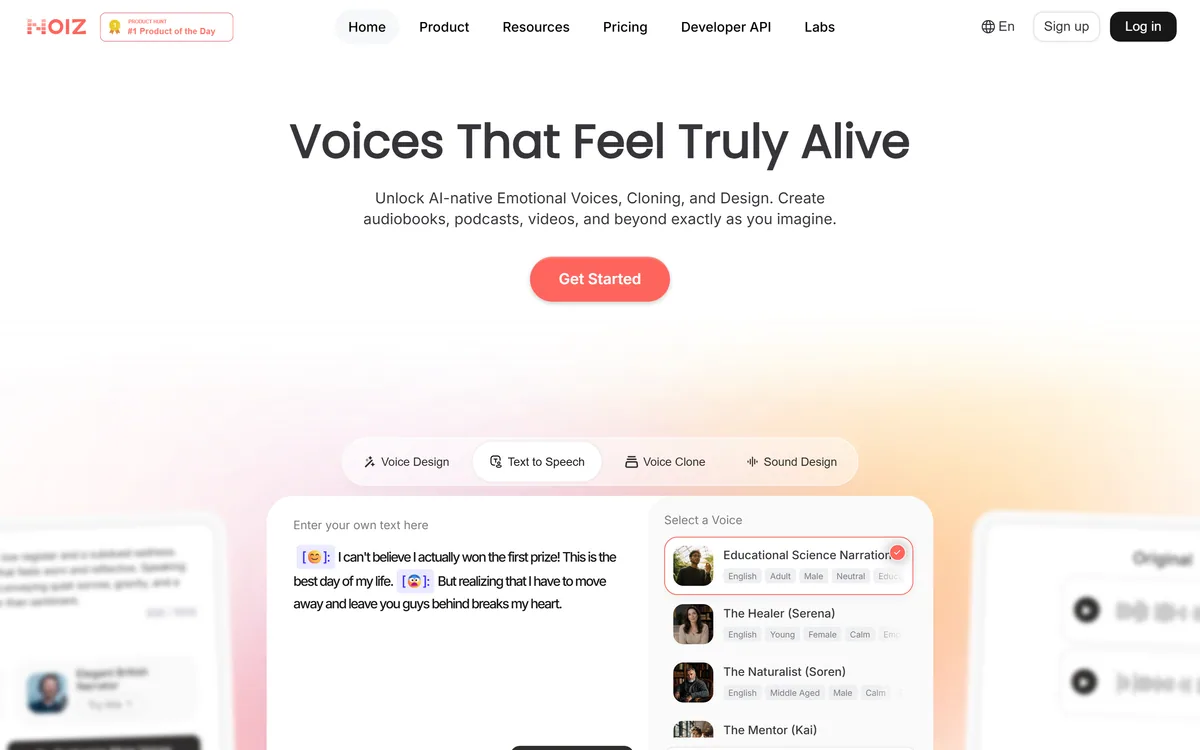
The demonstration on the homepage shows emotion tags placed directly inside the script — a delighted marker on a sentence about winning a prize, a fearful one on the sentence that follows about leaving people behind.
It looks like a novelty and it addresses the most persistent limitation in generated narration.
Conventional text to speech applies one emotional setting to a whole generation. You choose cheerful or serious, and every sentence gets it — which is why generated narration flattens exactly where a human performance would turn.
Real speech does not work that way. A paragraph moves: relief becomes worry, a joke lands and the tone shifts, the last line drops. Those changes are what carry the meaning, and they happen within passages rather than between them.
Inline tags put the direction where it belongs, in the script, at the point it applies. That is how a voice director actually annotates a page, and exposing it as syntax rather than as a slider is the right interface for anyone producing narration seriously.
Conventional narration applies one emotion to a whole passage. Real speech turns mid-paragraph, and the turn is what carries the meaning.
Voice cloning is stated as requiring around three seconds of audio, and the library shows original and cloned pairs side by side.
Three seconds is a genuinely small amount, and it is worth being clear about what that means practically.
Earlier cloning needed minutes of clean studio recording, which was itself a consent mechanism — nobody sits through a recording session unknowingly. Three seconds is a fragment of a voicemail, a clip from a video call, a few words from a podcast.
The technical achievement is real. So is the consequence: the barrier to cloning someone who has not agreed is now effectively zero, and no product-side control can restore it.
Which puts the entire weight on the user. Written consent for anyone else's voice, without exception, and particular care with a voice that could be used to instruct someone — a family member, a colleague, anyone who would act on hearing it. That is the standard that applies to every tool at this capability, Voicemaker included, and it is not optional.
Alongside cloning and the voice library sits voice design: creating a new voice from a text description, or from an image plus text.
Generating a voice from a character image is the most novel capability here and the most useful for a specific kind of work.
Anyone producing animation, a game or an audio drama faces the same problem: they have a character with a face, an age and a demeanour, and they need a voice that belongs to that person. Browsing a library of two hundred voices and picking the closest is a compromise every time.
Describing the voice you want gets closer. Handing over the character design and asking for the voice that fits it is closer still, and it matches how a casting director actually works — looking at the character and hearing something.
The caution is consistency across a project. A designed voice needs to be identical in episode seven and episode one, so the practical question is whether a design is saved as a reusable asset or regenerated each time — and that is worth confirming before a series depends on it.
The voice library is described at 200-plus voices, and the interesting part is how they are labelled: each carries language, age band, gender, tonal qualities and intended use cases such as audiobook, wellness, podcast, education or social video.
Tagging by use is a better organising principle than tagging by name, and the reason is how people actually choose.
Nobody browsing a voice library is looking for a particular person. They have a job — an audiobook chapter, a meditation, a product explainer — and they need a voice that suits it. A list of names requires you to audition your way to that; a list of use cases takes you straight there.
The tonal tags do similar work. Calm and empathetic is a different casting decision from joyful and excited, and those adjectives describe what a listener will experience rather than what the voice is called.
Two hundred is also a sensible size. Large enough to find a fit, small enough that browsing is feasible — which is a better trade than a library of thousands nobody can navigate. A library that size does exist elsewhere — Narration Box ships one — and whether the delivery lands at all is what Hume AI measures.
Beyond narration sit three further capabilities: one-click video dubbing that translates while preserving the original voice and emotional nuance, sound design, and an integration path putting the cloning and design capability into any AI agent.
Dubbing that keeps the original voice is the commercially significant one.
Conventional dubbing replaces a performer with a different performer in another language, and audiences notice — the voice is not the person on screen. Preserving the original timbre while changing the language means a creator's own voice speaks every market, which is a different product from translation.
Preserving emotional nuance is the harder half of that claim, and it is the part to test on real material rather than a demo. Emotion transfers unevenly across languages, and a delivery that reads as warm in one can read as flat in another.
The agent integration is the strategic piece. Making voice cloning and design available to any agent in minutes positions this as infrastructure rather than a studio product, which is a more durable place to be as more software starts needing to speak.
Generated narration usually fails not because the voice is unconvincing but because the delivery is uniform, which is a scripting problem rather than a model problem.
This sequence uses the direction the platform actually exposes.
| Positioning | AI-native emotional voices, cloning and voice design |
|---|---|
| Model | A second-generation model described as emotion-capable, alongside a basic first version |
| Emotion control | Emoji tags written inline in the script, with a smart-emotion one-click option |
| Voice library | 200-plus voices tagged by language, age, gender, tone and use case |
| Cloning | Stated as requiring around three seconds of audio |
| Voice design | From a text description, or from a character image plus text |
| Dubbing | One-click video dubbing preserving the original voice and emotional nuance |
| Other capabilities | Sound design, voice-to-voice conversion and speech to text |
| Developer access | A developer API and a stated integration path for AI agents |
| Recognition | Product Hunt first and second Product of the Day placements displayed |
| Community | A Discord server and a published contact address |
| Copyright | © 2026 Noiz AI |
Text to speech with inline emotion tags
Voice cloning from around three seconds of audio
Voice design from text or a character image
A 200-plus voice library tagged by use case
One-click video dubbing preserving the original voice
Voice-to-voice conversion and speech to text
Sound design
A developer API and agent integration path
Voice tools differ by how much direction they let you give.
| Tool | Direction | Cloning | Best for |
|---|---|---|---|
| Noiz AI | Inline emotion tags per sentence | From about three seconds | Expressive narration and character work |
| Voicemaker | Pitch, speed, pauses and pronunciation | From about a minute | Long-form production at volume |
| Narration Box | Studio workflow controls | Platform dependent | Audiobooks and long-form audio |
| Hume AI | Measures rather than generates | Not applicable | Judging whether a voice works |
| Vozard | Live effect selection | Effect based | Real-time conversation |
Other voice tools across narration, dubbing and evaluation.
Last checked . Read from noiz.ai in a browser session on the date above, including the full footer. The screenshot was captured at the same time.
What we could not confirm: whether any consent verification applies to voice cloning, which matters more at three seconds than at a minute; whether a designed voice is saved as a reusable asset or regenerated each time, which determines usability across a series; how many languages dubbing supports; how well emotional nuance actually transfers between languages; what the two model versions differ on technically; and pricing. We did not generate audio or clone a voice.
Noiz AI's best idea is a small one with large consequences: emotion tags written inline, so a single passage can move from delight to heartbreak mid-paragraph rather than being generated at one flat setting. That is how a performance actually works, and almost no text-to-speech tool exposes it. Voice design from a character image is the other genuinely novel feature. Cloning from three seconds is impressive engineering and the part that requires your own discipline, because a three-second sample is trivially easy to obtain without asking. AInexfinder Editor Score: 4.1/5.
AInexfinder does not list plan prices or billing details. For current pricing, plans, and trials, visit the official Noiz AI website.
Visit official website for pricingVendor pricing, credits, and billing policies change over time. Always confirm on the official site before you buy.
Log in to write a review.
No reviews yet. Be the first to share your experience with Noiz AI.
Assigned reviewer
Daniel ReedSenior AI Tools Reviewer
Daniel reviews AI tools the slow way — by actually using them on real projects. His reviews cover what works, what breaks, and who each tool is genuinely a good fit for.
Daniel and the AInexfinder editorial team research Noiz AI using public product information, listing evidence, and (when available) hands-on checks. Scores reflect listing completeness and transparency — not paid placement.
TTSReader turns text, PDFs, and EPUB files into speech in the browser, with voice and language selection, speed control, text highlighting, and MP3 export — the free tier runs on browser voices with no usage cap.
VMEG from PixRipple translates and dubs video into 170+ languages using 17,000+ voices, with voice cloning, lip-sync, subtitle generation, batch processing, and API and MCP access for automated localisation.
Respeecher is an enterprise voice cloning and text-to-speech platform used in film, television and games. Its credits include young Luke Skywalker in The Mandalorian and Viktor Vektor in Cyberpunk 2077, and it requires documented performer consent before a voice is used.

ElevenLabs is an AI audio platform covering text to speech, voice cloning, speech recognition, dubbing, music, and conversational voice agents, with a library of 5,000+ voices across more than 70 languages and an API behind every model.

The workspace at www-flux3.com generates 5–20 second AI videos with native audio from text or a starting image, routing across FLUX 3, MiniMax H3, Seedance, Wan 3.0 and Kling 3.0 Pro, at 720p or 1080p with video extension.

Runway is an AI video platform built around generative world models — Gen-4.5, Aleph 2.0, and Act-Two for performance capture — split across Runway Creative for filmmakers, Runway Dev for builders, and Runway Robotics.