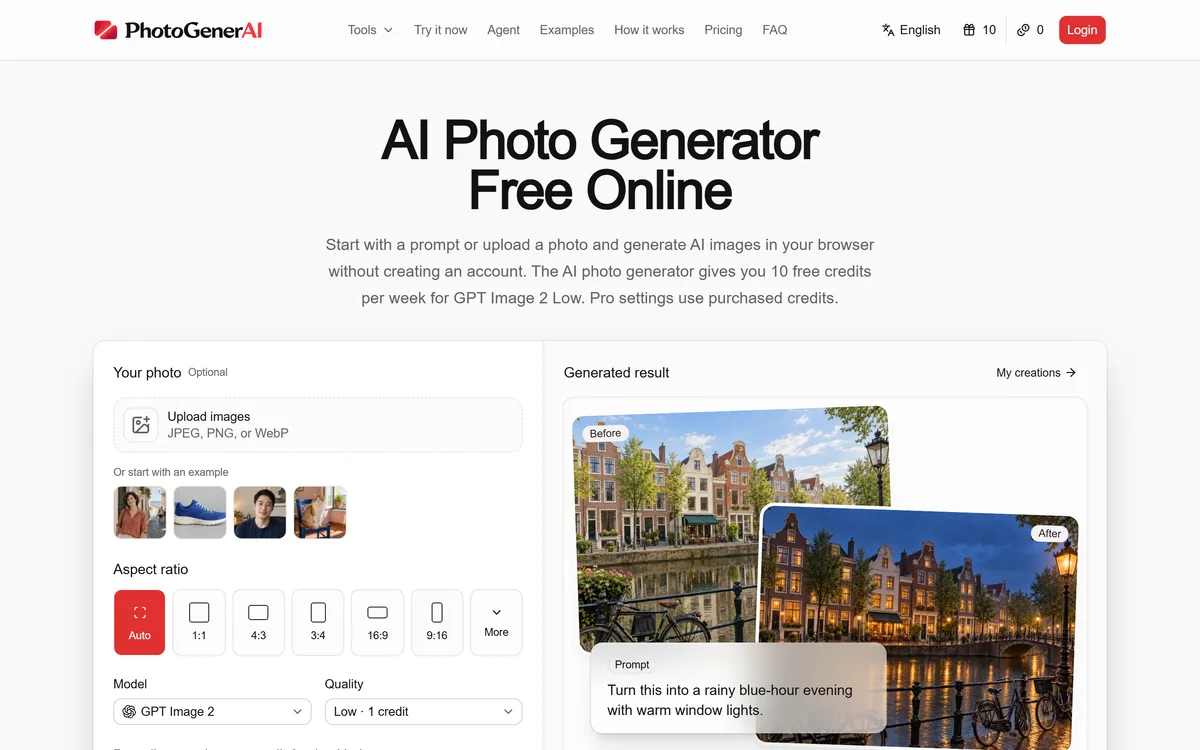
PhotoGenerAI is a browser AI photo generator and editor that creates images from text or edits your own photos, keeping what should stay the same while changing the rest, with free weekly credits and no account needed to start.
The honest demand behind most photo editing is continuity: people do not want a brand-new image, they want their image with one thing changed, their face kept, their exact product kept, two people from separate photos brought together. PhotoGenerAI is built around that need.
It is a browser-based AI photo generator and editor that works from a prompt or an uploaded photo, running on current image models including GPT Image 2. You can create from text, but its more distinctive value is editing: redesign a room, restyle a portrait, put a product in a new scene, turn a sketch into a visual, all while keeping what you tell it to keep.
This review covers what it does with your own photos, the models and free credits behind it, how it is priced, and who it suits against other photo tools.
PhotoGenerAI generates from a prompt or edits your own photo, with free weekly credits.
PhotoGenerAI, The Quick Read
PhotoGenerAI is a browser AI photo generator and editor that works from a text prompt or from a photo you upload.
Editing is its real strength: change, combine or restyle parts of your own image while keeping what should stay recognizable.
It runs on current models such as GPT Image 2, with free weekly credits and no account required to start.
It covers practical jobs: product photos, portraits, room redesigns, sketches to visuals and more.
Key features of PhotoGenerAI
Text-to-image generation in the browser
Editing of your own photos by plain language
Combining multiple images into one composition
Room redesign and portrait restyling
Product photo settings and mockups
Sketch-to-image development
Weekly free credits, no account to start
Focused tools like a clothes changer and enhancer
Pros & cons
Pros
5
Built around the edit-my-photo job people actually have
Keeps faces, products and structure recognizable
Generous free weekly credits and no-account start
Honest about building on current models
Covers practical commerce and personal jobs
Cons
5
From-scratch quality trails dedicated generators
No training-data commercial-safety guarantee
Credit cost rises with quality and discarded results
Cloud-based, not offline or on-device
Not a specialist for high-volume product shoots
Best For
People editing their own photos
Keeping a face or product while changing the rest
Casual users on free weekly credits
Sellers wanting quick product settings
Anyone wanting a no-account start
How PhotoGenerAI Compares For Photo Work
Photo tools differ by whether they generate from scratch, edit your photo, or guarantee commercial safety.
Generate And Edit Photos From Words In The Browser
PhotoGenerAI opens straight into a working generator: describe an image, or upload one and describe the change, and it produces a result in the browser with weekly free credits and no sign-up to begin. That low barrier is a genuine part of the appeal.
It can generate from scratch, a scene, an illustration, a concept, which puts it alongside general generators. But its pitch leans on editing your own photos, where the job is a change rather than an invention.
That framing is honest about what most people actually need from AI imagery day to day, which is not art from nothing but a controlled edit of something they already have.
Most people do not want a brand-new image. They want their image, with one thing changed. That is the job PhotoGenerAI is built around.
What Can PhotoGenerAI Do With Your Own Photo?
The editing range is broad, and it is organised around keeping what matters while changing the rest.
Edit, Combine And Redesign A Scene
You can change elements in a photo with plain language, bring subjects from separate images into one composition, or redesign a room by describing a style while keeping the room and windows. The recurring theme is continuity: it keeps the parts you specify and changes only what you ask.
For open-ended generation rather than editing, a tool like Midjourney leads on raw image quality; PhotoGenerAI's niche is the controlled edit of a photo you already have.
Product Shots And Portrait Restyling
It handles practical commerce and personal jobs too: giving a product a branded setting, restyling a portrait with a new outfit, background or mood while keeping the face recognizable, and seeing artwork on a real product mockup.
For commerce specifically, a focused tool like ImageVivid is built just for product photography, and a commercial-safe option like Adobe Firefly leads on training-data assurances; PhotoGenerAI competes on breadth and the free-to-start, edit-anything workflow.
Built On Current Models, Free To Start Weekly
PhotoGenerAI is candid that it builds on current image models, naming GPT Image 2, rather than claiming a proprietary engine. That is the honest shape of most tools in this category: an application layer with a good workflow over strong underlying models.
The free offer is unusually generous for getting started: weekly free credits for a basic quality tier, with no account needed to try the homepage, and purchased credits for pro settings. For casual, occasional edits that free weekly allowance may be all you need.
The trade-off of building on others' models is the usual one: raw quality tracks those models, and what a generation costs in credits depends on the quality and settings you choose.
How PhotoGenerAI Prices Its Credits
PhotoGenerAI runs on credits: a weekly free allowance for a lower-cost quality tier, and purchased credits for higher-quality or pro settings. You can start without an account and only sign in when you want to spend credits.
AInexfinder does not publish plan prices, which change and are best read on the site. The figure that matters is effective cost per usable image at the quality you actually publish, since higher quality costs more credits and you will discard some results.
Because commercial use is available, confirm the current terms cover how you intend to use the output, especially for product or client work, before relying on it.
A Quick Test Of PhotoGenerAI On One Image
Because its strength is controlled editing, test it on a real photo and a real change rather than open-ended generation.
Upload a photo and ask for a specific change, then check whether it kept the parts you wanted untouched.
Try combining two of your images into one composition and judge how natural the result looks.
Redesign a space or restyle a portrait and see whether identity and structure stay recognizable.
Generate one image from text alone to compare its from-scratch quality with a dedicated generator.
Use the free weekly credits first, then a higher-quality setting, and compare the results.
Pass/fail: PhotoGenerAI earns paid credits only if its edits keep what matters and need little cleanup on your real photos.
Read the commercial-use terms before using output for product or client work.
PhotoGenerAI Facts
What it is
Browser AI photo generator and editor
Inputs
Text prompts or your own uploaded photos
Editing
Change, combine, redesign while keeping chosen elements
Models
Current image models, including GPT Image 2
Free tier
Weekly free credits, no account to start
Use cases
Product photos, portraits, room redesign, sketch to image
Adobe Firefly — commercial-safety focus with Adobe integration
ImageVivid — a specialist for e-commerce product photography
Editor's Verdict
3.8/5
PhotoGenerAI earns 3.8 for building around the real job, a controlled edit of a photo you already have that keeps what matters, with a generous free-to-start workflow and honesty about running on current models; it is capped because from-scratch quality tracks those models and it offers no training-data commercial-safety guarantee. AInexfinder Editor Score: 3.8/5.
PhotoGenerAI pricing
AInexfinder does not list plan prices or billing details. For current pricing, plans, and trials, visit the official PhotoGenerAI website.
Vendor pricing, credits, and billing policies change over time. Always confirm on the official site before you buy.
Frequently asked questions
What is PhotoGenerAI?
PhotoGenerAI is a browser-based AI photo generator and editor. It creates images from text or edits your own uploaded photos, running on current models including GPT Image 2, with weekly free credits and no account required to start.
What makes PhotoGenerAI different from a generator?
Its distinctive value is editing your own photos while keeping what should stay the same, your face, a product, a room's structure, and changing only what you ask. General generators create from scratch; PhotoGenerAI focuses on the controlled edit.
What can I do with my own photo?
Change elements by plain language, combine subjects from separate images, redesign a room's style, restyle a portrait's outfit or background while keeping the face, and create product mockups, all while keeping the parts you specify recognizable.
Is PhotoGenerAI free?
There are weekly free credits for a lower-cost quality tier, and you can try the homepage with no account. Higher-quality and pro settings use purchased credits. For casual, occasional edits the free weekly allowance may be enough.
Which models does PhotoGenerAI use?
It is candid that it builds on current image models, naming GPT Image 2, rather than claiming a proprietary engine. Raw image quality therefore tracks those models, which is the honest shape of most application-layer tools in this category.
Can I use PhotoGenerAI images commercially?
Commercial use is available, but confirm the current terms cover how you intend to use the output, especially for product or client work. It publishes acceptable-use and terms pages worth reading before you rely on it commercially.
How does PhotoGenerAI compare with Midjourney?
Midjourney leads on from-scratch image quality. PhotoGenerAI focuses on editing photos you already have while keeping key elements, and on a free-to-start browser workflow. Use Midjourney for art from nothing, PhotoGenerAI for a controlled edit.
Is PhotoGenerAI good for product photos?
It can set products in branded scenes and make mockups, which suits occasional needs. For high-volume, catalog-scale product photography, a specialist like ImageVivid is more focused; PhotoGenerAI's strength is breadth across many edit types.
Do I need an account to use PhotoGenerAI?
No account is needed to try it on the homepage, and you sign in when you want to spend credits. That low barrier to starting is part of its appeal for casual and first-time users.
What happens to photos I upload?
As with any cloud editing tool, uploads are processed on its servers. Review the privacy policy for how uploads are handled and retained before sending anything sensitive, since editing happens in the cloud rather than on your device.
Daniel reviews AI tools the slow way — by actually using them on real projects. His reviews cover what works, what breaks, and who each tool is genuinely a good fit for.
Daniel and the AInexfinder editorial team research PhotoGenerAI using public product information, listing evidence, and (when available) hands-on checks. Scores reflect listing completeness and transparency — not paid placement.
Listings may include affiliate or sponsored placements, which are labeled when present. Editorial scores and cons are not sold. See our affiliate disclosure and review methodology.
Pet Pic Portraits turns a pet photo into styled artwork — Royal King, Pop Art, Watercolour, Viking, Wizard and more — with an instant preview before ordering. Output is a digital download, a canvas print or framed wall art, and it includes a pet memorial option.
krea2.org is a browser image-generation workspace that runs several third-party models side by side, including Krea 2 tiers, FLUX.2, GPT Image 2, Nano Banana and Seedream 5.0, with reference uploads, six aspect ratios and live model switching.
RetypeWords is a browser tool that replaces text that has been flattened into a PNG, JPG or WebP image. It reads the words with OCR, lets you correct what it read, then regenerates the selected area so the new wording sits in the picture rather than on top of it.
Canva AI is the Magic Studio suite built into Canva — Magic Write for copy, Dream Lab for images, Magic Edit, Expand and Eraser for photos, Magic Switch for reformatting, Magic Charts for data, and Canva Code for interactive widgets.
Pixlr is a browser-based photo editor from Pixlr Pte Ltd with two editors and a generative AI layer — Generative Fill, Expand and Transform, background and object removal, Super Scale upscaling, face swap, plus image, video, and audio generation.
GenApe is an all-in-one AI platform covering writing, chat, image and video generation, image editing, product photography, translation, and research — with 145 free credits on signup and commercial rights granted to paid users.