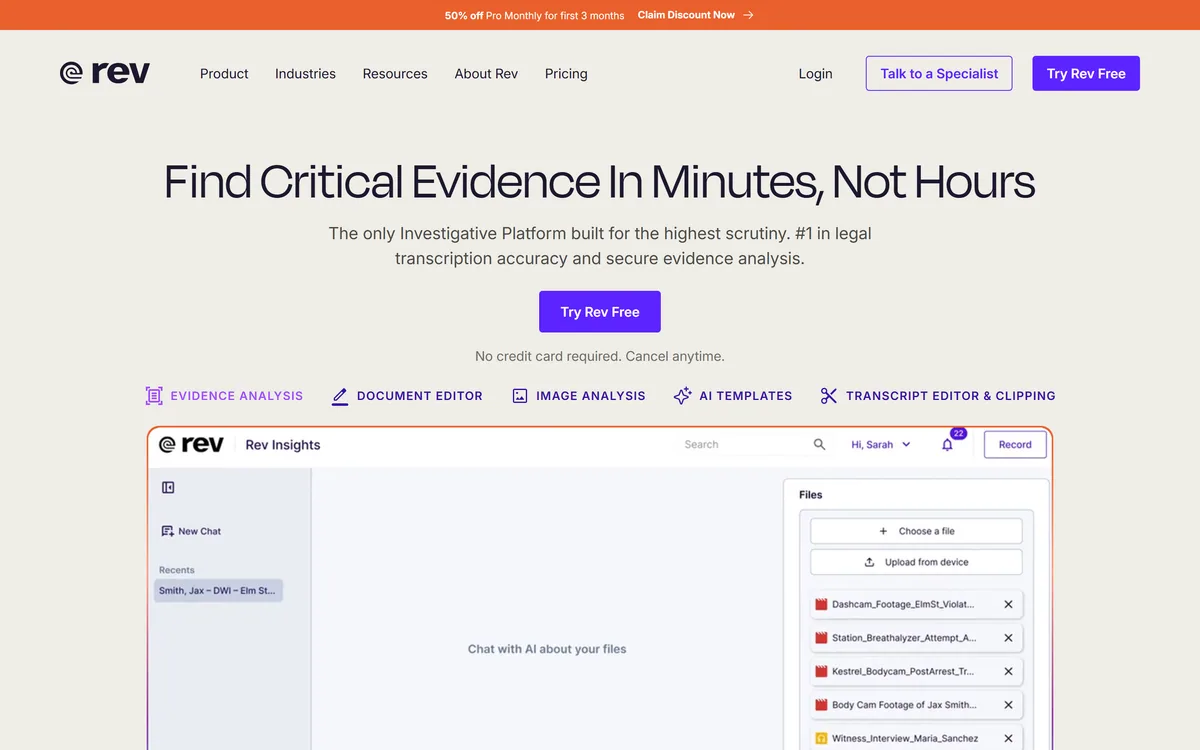
Rev has repositioned from transcription into an investigative intelligence platform for legal teams, combining AI evidence analysis with human-verified transcription guaranteed 99%+ accurate in 12 hours, plus court reporting, deposition summaries and a speech-to-text API.
rev.com11 viewsAdded October 25, 2025300K visitors
If you last looked at Rev a few years ago, you knew it as the place you sent an audio file and got back a transcript typed by a person. That service still exists, and it is still the reason to use them — but it is no longer what the company leads with.
The site now presents an investigative intelligence platform: multi-file evidence analysis, image analysis, AI templates for chronologies and affidavits, a document editor, and a mobile app for secure field recording. Transcription has become the trust layer underneath that rather than the product on top.
This review covers what the repositioning means for an ordinary buyer, why a human accuracy guarantee still commands a premium when Speechmatics can hit a 1% error rate, what page:line accuracy is and why lawyers care, and who should ignore all of it and use the API.
Most people know Rev as transcription. The site now leads with evidence analysis for legal teams.
What Rev Sells In 2026
Rev is a transcription and captioning service that has repositioned around legal and investigative work, pairing AI evidence analysis with human-verified transcripts.
The human tier is the differentiator: 99%+ accuracy guaranteed in 12 hours or less — a promise no pure-AI service makes.
Legal-specific products now sit alongside it: Legal Rough Draft, Legal Premium Transcript, SmartDepo deposition summaries and self-service court reporting.
SmartDepo guarantees 100% page:line accuracy, which is the citation format legal work actually depends on.
Rev.ai is still there for developers who just want a speech-to-text API without any of the above.
Why A Human Guarantee Still Sells
This is the question worth answering first, because AI transcription has got genuinely excellent and the obvious conclusion is that human services are finished.
They are not, and the reason is not accuracy — it is liability. Rev's human tier promises 99%+ accuracy, guaranteed, in 12 hours or less. The operative word is guaranteed. An AI service that averages 99% accuracy gives you a very good transcript and no recourse when a specific one is wrong.
In a deposition, a police interview or a regulatory filing, being wrong is not a quality problem, it is a legal one. Someone has to be accountable for the words on the page, and that accountability is what a professional buyer is paying for.
There is a second, less obvious reason. Word error rate measures errors evenly, but the words that matter in evidence — names, dates, figures, negations — are exactly the ones a model is most likely to get wrong, and a missing "not" changes the meaning of a sentence completely. A human catches that because a human understands the sentence.
AI transcription gives you 99% accuracy. A human service gives you 99% accuracy and somebody to hold responsible for the other one percent.
The Legal Products, And What Page:Line Means
The legal tier is where the specialised vocabulary lives, and it is worth decoding because the terms explain the pricing.
Legal Rough Draft (three days or less) and Legal Premium Transcript (five days or less) are two different products for two different moments — the working copy you read while the case is live, and the certified version that goes in the file.
SmartDepo produces deposition summaries with a guarantee of 100% page:line accuracy. That phrase is the important one. Legal citations reference testimony by page and line number, so a summary that says something appeared at page 43, line 17 has to be exactly right — a summary with drifting line references is worse than no summary, because it sends a lawyer to the wrong place in a 300-page transcript.
That is a genuinely hard guarantee to make with generation alone, and it explains why this sits in the human-verified tier rather than the AI one.
The AI Layer On Top
The platform side is where Rev has moved, and it is aimed at a specific workflow rather than at transcription buyers generally.
Multi-file evidence analysis — reasoning across a set of recordings and documents rather than one file at a time, which is how a case actually arrives
AI templates for chronologies and affidavits — turning a pile of transcripts into the structured documents the work product actually needs
Image analysis alongside audio, since evidence is rarely only spoken
Transcript editor and clipping — pulling the cited passage out for a filing or a hearing
Mobile app for secure field recording, which matters for investigators capturing statements outside an office
Document editor with Word and PDF export, so the output lands in the format a court expects
Where Rev Fits Against The AI-First Services
For most readers the honest comparison is not between Rev's tiers but between Rev and a cheaper AI service.
If you need meeting notes, podcast transcripts, subtitles or a searchable archive, and nobody is going to be cross-examined on the wording, an AI service is the right answer. Otter.ai gives you a finished notes product; HappyScribe gives you a subtitling workflow; Speechmatics gives you an API with an independently benchmarked error rate.
Rev's own Rev.ai API competes in exactly that market, and the site claims its proprietary ASR is 47% more accurate than competitors in challenging environments — a vendor figure, unverified here, and worth testing on your own worst audio rather than accepting.
The human tier is worth its premium in one situation: when being wrong has a consequence beyond irritation. Legal, medical, regulatory, journalistic work where a quote will be published — those are the cases where a guarantee is not a luxury.
One coverage note: human captions cover English and Spanish, and subtitles run to 17 languages. That is narrower than the 55+ languages an API-first vendor offers, and it is the trade you make for having people involved.
Choosing The Right Tier
Rev's own product list is long enough to be confusing. This is the shortest route through it.
Ask whether anyone could be challenged on the exact wording. If no, stop here and use an AI service.
If yes, decide whether you need it fast or certified — Rough Draft for working use, Premium for the file.
For depositions specifically, look at SmartDepo rather than a general transcript, because page:line accuracy is the thing you actually need.
For captions, check the language first — human captions are English and Spanish only.
If you are building software rather than buying a service, go straight to Rev.ai and benchmark it against at least one other API on your own audio.
Test the mobile recording app before relying on it in the field, not during the interview that matters.
Keep the original audio regardless of tier. Every transcript is a derived artefact and the recording is the evidence.
Services, Guarantees And Coverage
Company
Rev
Positioning
Investigative intelligence platform with human-verified transcription
Human transcription
99%+ accuracy, guaranteed in 12 hours or less
Legal Rough Draft
3 days or less
Legal Premium Transcript
5 days or less
SmartDepo
Deposition summaries with 100% page:line accuracy guaranteed
Other human services
Human captions, court reporting self-service, global subtitles
AI platform features
Multi-file evidence analysis, image analysis, transcript editor and clipping, AI templates, document editor, mobile field recording app
Caption languages
English and Spanish
Subtitle languages
17
Developer API
Rev.ai speech-to-text with documentation and status monitoring
Vendor ASR claim
47% more accurate than competitors in challenging environments (Rev's own figure)
Named audiences
Prosecutors, defence attorneys, law enforcement, civil law firms, court reporting agencies, researchers, journalists, educators
Key features of Rev
Human transcription at 99%+ accuracy, guaranteed in 12 hours or less
Legal Rough Draft and Legal Premium Transcript tiers
SmartDepo deposition summaries with page:line accuracy
Court reporting self-service
Human captions in English and Spanish
Global subtitles in 17 languages
Multi-file evidence analysis across a case
AI templates for chronologies and affidavits
Transcript editor with clipping, and a document editor exporting to Word and PDF
Mobile app for secure field recording
Rev.ai speech-to-text API for developers
Pros & cons
Pros
5
A guaranteed accuracy figure, which no pure-AI service offers
Page:line accuracy on deposition summaries is the detail legal work actually turns on
Two legal transcript tiers match the working copy and the filed copy
Evidence analysis works across a set of files rather than one at a time
Rev.ai gives developers an API route without the service layer
Cons
5
Human captions cover only English and Spanish
Subtitle coverage of 17 languages trails API-first vendors offering 50+
Substantially more expensive than AI transcription for work that does not need a guarantee
The 47% accuracy claim is the vendor's own and unverified
The platform breadth makes the product list confusing for a simple transcription buyer
Best For
Law firms and prosecutors working with recorded evidence
Someone could be cross-examined on the exact wording
You need depositions summarised with reliable page:line citations
A certified transcript has to go into a case file
Investigators are capturing statements in the field
A published quote has to be defensible
Use An AI Service When
You want meeting notes, summaries or a searchable archive
The transcript is for your own reference and nobody else will read it
You need a language outside English and Spanish for captions
Volume matters more than a guarantee
You are building software and want an API rather than a service
Other Transcription And Speech Tools
APIs, finished apps and human services — three answers to the same audio file.
Speechmatics — an API with an independently benchmarked error rate, for building rather than buying
Otter.ai — meeting notes and summaries out of the box
HappyScribe — transcription with a subtitling workflow and editor
Cockatoo — straightforward AI transcription without a platform around it
Respeecher — the reverse problem — generating speech rather than transcribing it
Checked Against Rev's Own Pages
Last checked . Read from rev.com during this check, with the screenshot above captured at the same time.
Positioning as an investigative intelligence platform for legal and investigative teams, taken from the site
Human transcription stated as 99%+ accurate, guaranteed in 12 hours or less
Legal Rough Draft at 3 days or less and Legal Premium Transcript at 5 days or less
SmartDepo described as guaranteeing 100% page:line accuracy
AI platform features including multi-file evidence analysis, document editor with Word and PDF export, image analysis, transcript editor and clipping, AI templates and a mobile recording app
Human captions in English and Spanish; subtitles in 17 languages
Rev.ai speech-to-text API with developer documentation and status monitoring
The claim that Rev's proprietary ASR is 47% more accurate than competitors in challenging environments is Rev's own figure and is described as such here
Legal, security, terms, privacy, CA privacy policy and sitemap present in the site footer
No plan prices published here, in line with this site's pricing policy
The 47% accuracy claim and the guarantee terms are as published by Rev; we have not tested either. Commentary on why word error rate understates evidence-critical mistakes describes the metric generally rather than any specific service.
Editor's Verdict
4.4/5
Rev has an AInexfinder Editor Score of 4.4/5.
Rev pricing
AInexfinder does not list plan prices or billing details. For current pricing, plans, and trials, visit the official Rev website.
Vendor pricing, credits, and billing policies change over time. Always confirm on the official site before you buy.
Frequently asked questions
Is Rev still just transcription?
No. It still sells transcription and captioning, but the site now leads with an investigative intelligence platform for legal teams — evidence analysis across multiple files, AI templates for chronologies and affidavits, and a field recording app. Transcription is the trust layer underneath.
Is Rev more accurate than AI transcription?
Its human tier is guaranteed at 99%+, and the guarantee is the point rather than the number. AI services now reach similar accuracy on average but give you no recourse when a specific transcript is wrong — which matters when the wording could be challenged.
How long does Rev take?
Human transcription is guaranteed in 12 hours or less. Legal Rough Draft is 3 days or less and Legal Premium Transcript 5 days or less — the two exist because a working copy and a certified copy are needed at different moments.
What does page:line accuracy mean?
Legal citations reference testimony by page and line number, so a deposition summary must point to exactly the right place. SmartDepo guarantees 100% page:line accuracy. A summary with drifting references is worse than none, because it sends a lawyer to the wrong page of a 300-page transcript.
Rev vs Otter — which should I use?
Use <a href="/ai-tools/otter-ai">Otter.ai</a> for meeting notes, summaries and searchable archives where nobody will be held to exact wording. Use Rev's human tier when being wrong has a consequence — evidence, depositions, published quotes, regulatory filings.
What languages does Rev support?
Human captions cover English and Spanish; subtitles run to 17 languages. That is narrower than API-first vendors offering 50 or more, and it is the trade for having people in the loop.
Does Rev have an API?
Yes — Rev.ai, with developer documentation and status monitoring. If you are building software rather than buying a service, benchmark it against at least one other API on your own worst audio before committing.
Daniel reviews AI tools the slow way — by actually using them on real projects. His reviews cover what works, what breaks, and who each tool is genuinely a good fit for.
Daniel and the AInexfinder editorial team research Rev using public product information, listing evidence, and (when available) hands-on checks. Scores reflect listing completeness and transparency — not paid placement.
Listings may include affiliate or sponsored placements, which are labeled when present. Editorial scores and cons are not sold. See our affiliate disclosure and review methodology.
AssemblyAI sells voice AI infrastructure: production APIs for pre-recorded and real-time speech-to-text on its Universal models, a Speech Understanding API that turns transcripts into structured insight, a Voice Agent API over a single WebSocket, and guardrails including PII redaction and content moderation.
Deepgram provides speech-to-text and text-to-speech through its Flux models, plus a Voice Agent API that combines transcription, speech synthesis and LLM orchestration into a single interface. Everything runs in real time or batch, in the cloud or self-hosted, with text-to-speech latency stated as low as 80ms.
The workspace at www-flux3.com generates 5–20 second AI videos with native audio from text or a starting image, routing across FLUX 3, MiniMax H3, Seedance, Wan 3.0 and Kling 3.0 Pro, at 720p or 1080p with video extension.
Runway is an AI video platform built around generative world models — Gen-4.5, Aleph 2.0, and Act-Two for performance capture — split across Runway Creative for filmmakers, Runway Dev for builders, and Runway Robotics.
Descript is a video and audio editor that works by editing a transcript — delete a sentence and the footage goes with it — plus Studio Sound, Eye Contact, filler-word removal, AI voices, avatars, and the Underlord assistant.