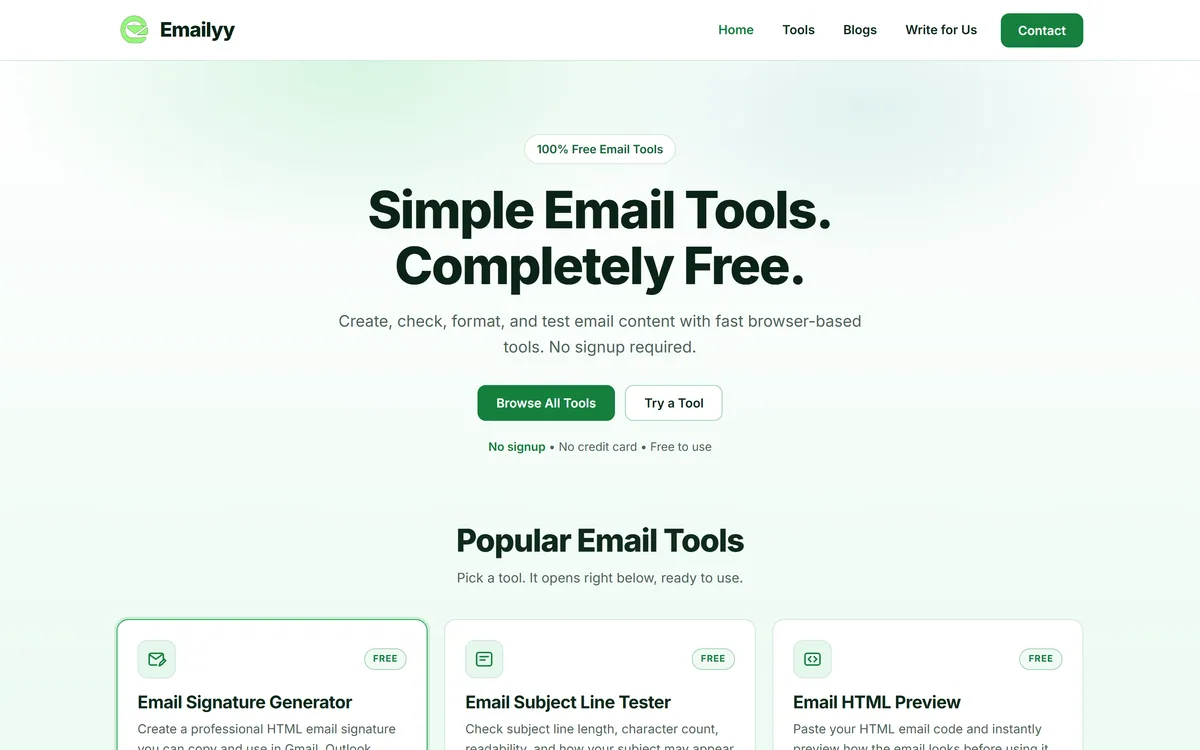
Emailyy is a free, no-sign-up email utility site with five live tools: an HTML signature generator, a subject line tester, an HTML email preview, a word counter and an email header analyzer, with eight more marked coming soon. It is a utility, not an AI writer.
An honest note on what this is: Emailyy is a set of free, browser-based email utilities, not an AI email writer. It is listed in this directory, so we review it as a utility and judge it on that job, not on AI capability it does not claim.
Emailyy is a free website of small email utilities. Its homepage hosts five working tools, an HTML signature generator, a subject line tester, an HTML email preview, a word counter and a header analyzer, each opening below its card, plus eight tools marked Coming Soon.
Despite sitting in an AI directory, it is not an AI product: it builds, measures and inspects email rather than writing it. If drafting is what you need, an AI assistant like MailMaestro is the relevant tool; Emailyy covers the mechanical jobs around a message.
This review covers the five live tools, who benefits most from the header analyzer, what the page source shows about your data, and how far a free utility site goes next to a full email platform.
Emailyy offers browser-based email tools with no sign-up.
Emailyy's Five Live Tools At A Glance
What it is: five free browser tools for everyday email work, with eight more listed as coming soon.
Not an AI writer: the tools build, measure and inspect email; none drafts copy for you.
The standout: a header analyzer that shows servers, timestamps, routing and authentication results without connecting your mailbox.
Runs in the page: the tool code we read makes no network requests, but the site publishes no privacy policy and names no operator.
Score 3.3: useful for quick signature and header jobs; thin beside what email platforms include, and only days old.
A Free Email Toolkit, Not An AI Writer
Emailyy does one kind of job: the small, mechanical tasks around an email. You fill in a form to get an HTML signature, paste a subject line to see its length, paste HTML to preview it, paste copy to count it, or paste a raw header to read it. Nothing generates text, and nothing on the site claims to.
That makes it a utility, and it should be judged as one. The questions are whether each tool does its job accurately, whether it is quicker than the tools you already have, and whether you can trust the site with what you paste.
The site is brand new. WordPress page dates show the homepage, blog and Write for Us page were all published on 2 October 2026, and 15 of the blog's 16 posts, roundups of email marketing agencies by city, followed on 5 and 6 October. Eight of the 13 tools on the homepage are still marked Coming Soon.
The footer lists the tools, a contact address and a Write for Us link, but no privacy policy, about page or company name. For a site whose most useful tool reads email headers, which contain addresses and server details, that gap matters, even though the tools appear to run entirely in your browser.
Emailyy handles the mechanics around an email, signatures, length, previews and headers, but it never writes the email.
Which Email Jobs Can Emailyy Handle Today?
Five tools are live; each is a form or a paste box with an instant result.
Signature Builder, Subject Tester And Word Counter
The signature generator takes a name, title, company, phone, email, website, an optional address, a photo or logo URL and a LinkedIn link, plus an accent colour and one of five web-safe fonts, then lets you copy the rendered signature or its HTML. The site notes that images must be hosted online and that some email clients block them until the reader allows images.
The subject line tester reports length, character count and readability and shows how a subject may appear in common inbox layouts, while the word counter counts words, characters, sentences and paragraphs. Both are quick checks; neither predicts open rates.
HTML Preview And A Header Analyzer For Deliverability
The HTML preview renders pasted email code so you can see it before sending. It shows how the code renders in a browser, not in Outlook, Gmail or Apple Mail, which each treat email HTML differently, so treat it as a sanity check rather than an inbox test.
The header analyzer is the most technical tool: paste a raw header and it lays out delivery information, timestamps, mail servers, routing and authentication results, without connecting an email account. Sending platforms such as Mailjet pair delivery with their own testing tools, but a standalone header reader is handy when a message from anywhere looks wrong.
Who Gets The Most From Emailyy's Header Analyzer?
Office administrators, IT generalists and freelancers who field the question "is this email genuine?" get the most value. A header shows which servers actually handled a message and whether it passed SPF, DKIM and DMARC checks, which is often enough to spot a spoofed sender or a forwarding problem.
Small-business owners setting up a new domain can also use it to confirm their own mail is authenticated after changing DNS records: send yourself a test and paste its header.
It is less useful for deep deliverability work. Working out why a campaign lands in spam involves sender reputation, list quality and content, none of which a header alone reveals. Marketing platforms such as MailerLite handle authentication setup and sending reputation as part of the service.
Treat the analyzer as a reader, not a verdict. Authentication results in a header are written by the receiving server, so they tell you what that server decided; they are evidence for a judgement, not a guarantee that a message is safe.
Emailyy's Free, Account-Free Approach
All five tools are free, with no account, credits or paid upgrades; the site says so plainly and shows no pricing anywhere.
The site does not say how it is funded. Beyond the tools, its visible activity is the blog and a Write for Us page inviting guest contributions, and we found no ad or analytics scripts in the homepage source during this check.
Free and account-free suits tools like these. The trade-off is the usual one for a very new free site: no support commitment, no stated uptime, and no guarantee that the coming-soon tools will arrive.
Trying Emailyy's Signature In Gmail And Outlook
A signature is only useful if it survives real email clients, so test before you roll one out.
Build a signature with your real details and a logo hosted on your own site.
Copy the rendered signature into Gmail's signature settings and send a test to an Outlook address.
Open the test on desktop and mobile, with images blocked and then allowed.
Check that links, phone numbers and the accent colour survive in each client.
Paste the received message's header into the header analyzer and read the SPF, DKIM and DMARC results.
Open your browser's network tab and confirm nothing is sent when you use a tool.
Pass/fail: adopt the signature only if it renders cleanly in every client your recipients use.
Emailyy Email-Utility Facts
What it is
Free browser tools for email work
AI features
None claimed or found
Live tools
Signature generator, subject tester, HTML preview, word counter, header analyzer
Coming soon
Eight more, including a spam word checker and a domain checker
Account
Not required
Data handling
No network requests in the tool code we read
Ads and analytics
None found in the homepage source
Signature export
Copy the rendered signature or its HTML
Site age
Homepage first published 2 October 2026
Operator and privacy policy
Neither named nor published; contact by email
Emailyy Header And Deliverability Terms
Email header
The hidden lines at the top of a message recording who sent it, which servers handled it and when.
SPF
Sender Policy Framework: a DNS record listing which servers may send mail for a domain.
DKIM
DomainKeys Identified Mail: a signature showing a message was not altered and came from the signing domain.
DMARC
A DNS policy telling receivers what to do when SPF or DKIM checks fail, and where to send reports.
HTML signature
A signature built from HTML so it can carry formatting, links and images in email clients.
Should Emailyy Replace Your Email Platform's Tools?
Freelancers And Admins Emailyy's Tools Help
Freelancers who need a quick HTML signature
Office admins checking whether a message is genuine
Small businesses testing email authentication on a new domain
Writers checking subject length and word count
Anyone who wants email tools without an account
When Emailyy's Header Check Is Not Enough
Marketers who need inbox-client rendering tests
Teams diagnosing campaign deliverability
Organisations that require a named vendor and a privacy policy
Anyone wanting AI to draft emails
Investigators pasting headers from sensitive cases
Key features of Emailyy
HTML email signature generator
Subject line length and readability tester
HTML email preview
Email word and character counter
Email header analyzer
Copy as rendered signature or HTML
No account or install
Responsive on mobile
Pros & cons
Pros
5
Free with no account
Header analyzer needs no mailbox access
Signature exports as rendered copy or HTML
Tool code shows no network requests
Honest note about image blocking in signatures
Cons
5
Not an AI tool despite the directory listing
Eight of 13 listed tools not yet built
No privacy policy or named operator
HTML preview is not an inbox test
Site is only days old
Best For
Quick email signatures
Checking email headers
Subject line length checks
Previewing email HTML
No-account email utilities
Emailyy Compared With Email Platforms' Built-In Tools
Most people already have some of these tools inside the platform they send from.
Last checked . Read from emailyy.online during this check, with the screenshot above captured at the same time. We also read the page source and used the site's public WordPress page list to confirm which pages it publishes.
Five live tools and eight marked Coming Soon
Signature generator fields, five fonts and two copy options
No email account connection needed for the header analyzer
No fetch or XHR calls in the tool code we read
No ad or analytics scripts in the homepage source
Homepage, blog and Write for Us page first published 2 October 2026
No privacy policy, about page or operator name found
Subject tester's inbox previews not tested by us against real inboxes
This is a research-based review of the live site and its source code on 8 October 2026; we did not test the tools against real inboxes. Page code can change, so recheck before pasting headers that contain sensitive details.
Email Platforms To Weigh Beside Emailyy
Two sending platforms and an AI assistant to weigh beside a free utility site.
MailerLite — newsletters and automations with sending built in
Mailjet — marketing and transactional sending on one platform
MailMaestro — AI drafting and triage inside Outlook and Gmail
Editor's Verdict
3.3/5
Emailyy earns 3.3 as a clean, free set of five email utilities, led by a header analyzer that reads routing and authentication results without touching your mailbox and a practical signature generator. It is not an AI writer, its HTML preview is not an inbox test, eight of its 13 listed tools are not built yet, and the days-old site names no operator and publishes no privacy policy. Good for quick checks; not a platform replacement. AInexfinder Editor Score: 3.3/5.
Emailyy pricing
AInexfinder does not list plan prices or billing details. For current pricing, plans, and trials, visit the official Emailyy website.
Vendor pricing, credits, and billing policies change over time. Always confirm on the official site before you buy.
Frequently asked questions
What is Emailyy?
Emailyy is a free website with five browser-based email tools: an HTML signature generator, a subject line tester, an HTML email preview, a word counter and an email header analyzer.
Is Emailyy an AI email writer?
No. Its tools build, measure and inspect email but do not write it. For AI drafting, an assistant such as MailMaestro is the relevant category.
Is Emailyy free?
Yes. The live tools are free, with no account, credits or paid tier.
Does Emailyy read my mailbox?
No. The header analyzer works on a header you paste, with no email account connection, and the tool code we read makes no network requests.
How do I use an Emailyy signature in Gmail?
Build the signature, copy the rendered version and paste it into Gmail's signature settings. Host any logo online first, and send yourself a test to check it in other clients.
What does Emailyy's header analyzer show?
Delivery information, timestamps, the mail servers that handled the message, routing and authentication results such as SPF, DKIM and DMARC.
Can Emailyy tell if an email is fake?
It helps you judge. Authentication results and the server path are strong evidence about a sender, but they reflect what the receiving server decided, so treat them as evidence rather than a final verdict.
Does Emailyy test how my email looks in Outlook?
No. Its HTML preview shows how code renders in your browser. Outlook, Gmail and Apple Mail each render email HTML differently, so test in real clients.
Who runs Emailyy?
The site does not name an operator. Contact is through editor@emailyy.online, and it publishes no privacy policy or about page.
What are alternatives to Emailyy?
Email platforms such as MailerLite and Mailjet include their own editors and testing; for AI help writing and triaging email, MailMaestro.
Daniel reviews AI tools the slow way — by actually using them on real projects. His reviews cover what works, what breaks, and who each tool is genuinely a good fit for.
Daniel and the AInexfinder editorial team research Emailyy using public product information, listing evidence, and (when available) hands-on checks. Scores reflect listing completeness and transparency — not paid placement.
Listings may include affiliate or sponsored placements, which are labeled when present. Editorial scores and cons are not sold. See our affiliate disclosure and review methodology.
axess is a free AI job-search tool that scans LinkedIn, Indeed and Glassdoor daily, scores each role against your profile on both relevance and likelihood, researches the employer, and prepares a tailored CV and cover letter for the matches worth pursuing.
Otter.ai transcribes meetings live, writes summaries and action items, and organises everything into searchable Channels — with OtterPilot joining Zoom, Teams, and Google Meet, plus role-specific agents for sales, recruiting, and SDR work.
MiroFish is a multi-agent simulation platform for scenario prediction. You ask a plain-language question, attach supporting files, and it returns a structured report covering likely reactions, narrative paths, risk signals and follow-up questions.
CrewAI is an enterprise platform to build and run AI agents: a Discovery layer that finds automation opportunities, a no-code canvas and code-first Python API for building role-based multi-agent workflows, and a control plane that adds tracing, RBAC, audit and human-in-the-loop approvals.
AudioNotes is an AI note-taker that turns voice, audio, video and text into structured notes, transcripts and summaries in 99+ languages, with custom templates, chat-with-your-notes, integrations, and a clear no-AI-training privacy stance.
Goodnotes is a handwriting-first note-taking app spanning iPad, iPhone, Mac, Windows, Android and web. It converts handwriting to text, searches across typed text, handwriting and sketches, annotates PDFs, records and transcribes audio, and turns notes into mind maps and project plans.