Heptabase is a visual knowledge base for students, researchers and lifelong learners, combining whiteboards and cards, bi-directional links, a block-based editor, PDF annotation and Readwise and Zotero integrations, with an AI Tutor that guides structured learning sessions.
heptabase.com7 viewsAdded October 2, 202525K visitors
Note-taking apps are easy; making sense of a large, messy body of reading is hard. Heptabase is built for the second problem, giving you a spatial canvas to lay out ideas and sources until the structure of what you are learning becomes visible.
It combines whiteboards and cards with bi-directional links, a block-based editor, PDF annotation, daily journals and integrations like Readwise and Zotero, plus an AI Tutor for structured learning. It sits in the knowledge-tool space alongside research aids like NotebookLM, but its distinctive bet is the visual whiteboard for thinking, not just storing.
This review covers what Heptabase holds together, who it suits, how it prices, and when it is more tool than you need.
Heptabase organises sources, notes and ideas on visual whiteboards, with an AI Tutor.
Heptabase, The Study Brief
Heptabase is a visual knowledge base: whiteboards and cards for making sense of what you read and think.
It is built for deep work: bi-directional links, a block-based editor, PDF annotation and Readwise and Zotero integrations.
An AI Tutor guides learning: structured, personalised sessions on top of your knowledge base.
It rewards commitment: powerful for serious researchers and learners, probably too much tool for light note-taking.
A Visual Knowledge Base For Deep Research
Heptabase's core idea is that understanding is spatial. Instead of filing notes in a list, you arrange cards on whiteboards, move them around, and connect them until the relationships between ideas are something you can see. For people doing genuine synthesis, that is a meaningfully different way to work.
The reason it matters is that the hard part of research is not capturing information but organising it into understanding. A canvas you can rearrange lets you hold a complex topic in view and restructure your thinking as it develops, which a linear notes app makes awkward.
It is aimed squarely at students, researchers and serious lifelong learners, and the whole feature set, sources, highlights, links, journals, reflects that. This is a tool for people who read deeply and need to build connected knowledge over time, not for jotting a quick list.
The honest framing is that Heptabase is powerful and opinionated. For its intended user, the visual model is a genuine advantage; for someone who just wants fast notes, that same depth is friction. Fit depends heavily on how you actually work.
The hard part of research is not capturing information but organising it into understanding; Heptabase's canvas is built for that.
What Does Heptabase Hold Together?
The platform ties a visual canvas to a connected editor and a set of source and AI integrations.
Whiteboards, Cards And Bi-Directional Links
At its heart are whiteboards and cards, written in a block-based editor and joined by bi-directional links, so a note can live in context on a board and also connect to every related idea. That combination of spatial layout and linked notes is what lets a knowledge base grow without becoming an unsearchable pile.
This is where Heptabase differs from quick-capture tools. A lightweight assistant-notes app like Saner.ai is built for speed and retrieval; Heptabase is built for structure and synthesis, which is a slower, deeper activity with a different payoff.
An AI Tutor, PDF And Readwise Integrations
Heptabase lets you annotate PDFs, clip from the web, keep daily journals, and pull in highlights and references through Readwise and Zotero, so your sources and your thinking live in one place. On top of that sits an AI Tutor that guides structured, personalised learning sessions and can explain sources and help organise your base.
The AI is positioned as a learning companion rather than an answer machine, which fits the tool's studious character. A focused AI assistant like Cora handles a different, inbox-and-task kind of job; Heptabase's AI is about deepening understanding of material you are actively working through.
Who Heptabase Suits Among Thinkers
Heptabase suits students, academics, researchers and serious self-learners who read deeply, work with many sources, and need to build connected understanding over time rather than just capture notes. For them, the visual canvas and linking are a real advantage.
It suits people who already use Readwise or Zotero and want their highlights and references in a thinking space, and those drawn to the AI Tutor's structured approach to learning a subject rather than looking up isolated answers.
It fits less well anyone who wants quick, lightweight note-taking, teams needing heavy real-time collaboration as the primary mode, and people who would not invest the time to learn an opinionated, spatial tool. Its investor backing and feature breadth are facts about the product, not a promise it fits your workflow.
How Heptabase Charges For Its Workspace
Heptabase offers a 7-day trial and is then a paid subscription, reflecting its position as a serious tool rather than a free notes app. We do not publish prices, which change; check the site.
The value question is whether the depth earns its keep for you: for someone doing sustained research or study, a tool that turns scattered reading into structured understanding can be worth a subscription, while for light note-taking it clearly is not.
Because there is a trial, the sensible approach is to run a real project through it, one actual topic you are researching, and see whether the whiteboards and links genuinely change how well you understand the material before committing.
A Considered Way To Try Heptabase
Because Heptabase rewards commitment, trial it on a real body of reading, not a toy note.
Pick a real topic you are actually researching or studying.
Annotate a few PDFs or clip sources, and pull in Readwise or Zotero highlights if you use them.
Build a whiteboard, lay out cards, and connect them with bi-directional links.
Use the AI Tutor to run a structured session on the material and judge its usefulness.
Notice whether the spatial layout actually improves your understanding of the topic.
Pass/fail: Heptabase is worth it if the visual model changes how well you synthesise material.
Be honest about whether you will invest the time an opinionated tool requires.
Heptabase Knowledge Facts
What it is
A visual knowledge base for learners and researchers
Core
Whiteboards and cards to clarify thinking
Linking
Bi-directional links and a block-based editor
Sources
PDF annotation, highlights and web clipper
Integrations
Readwise and Zotero
AI
AI Tutor for structured, personalised learning
Extras
Daily journals and a Heptabase CLI
Access
7-day trial, then paid
Heptabase Knowledge Terms
Visual knowledge base
A notes system arranged on a spatial canvas, so relationships between ideas are seen and rearranged rather than only listed.
Bi-directional links
Links that connect two notes both ways, so you can traverse a web of related ideas from either end.
Block-based editor
An editor where each paragraph, image or item is a movable block, making notes easy to restructure and reuse.
AI Tutor
Heptabase's AI agent that guides structured, personalised learning sessions and helps explain and organise your material.
Is Heptabase The Right Thinking Space?
People Heptabase Serves
Students and academics working with many sources
Researchers building connected understanding over time
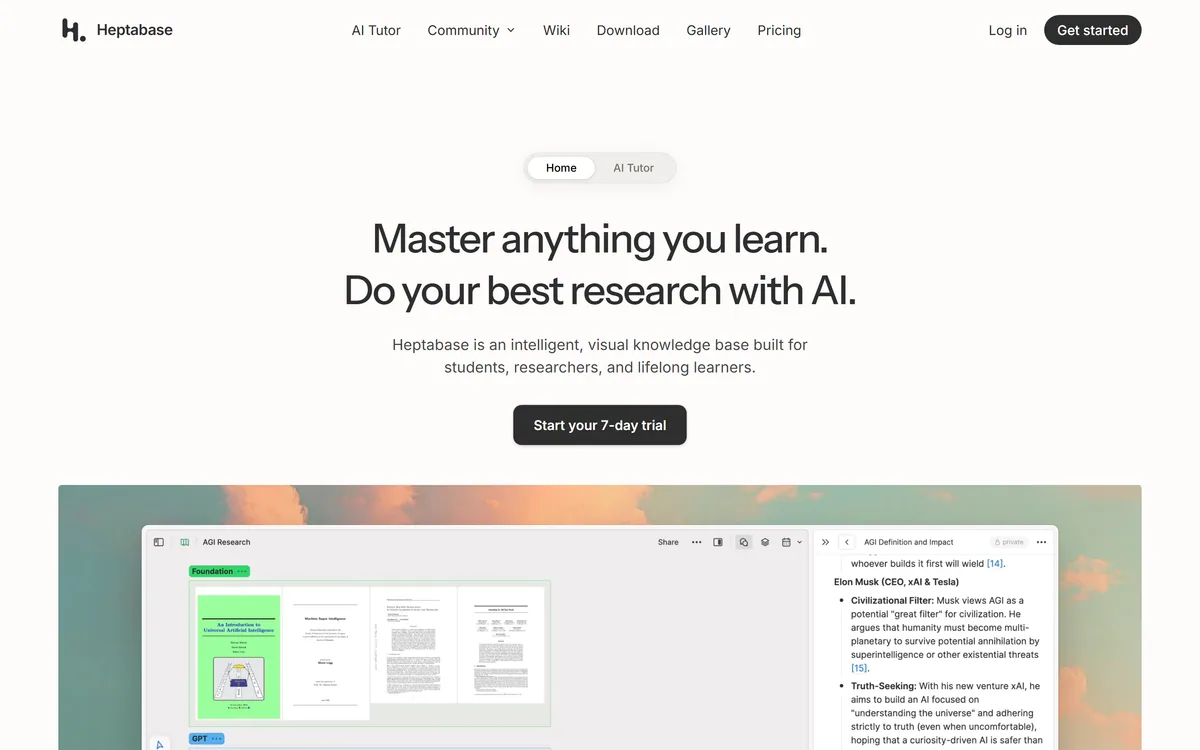
Last checked . Read from heptabase.com during this check, with the screenshot above captured at the same time.
A visual knowledge base for learners and researchers
Whiteboards and cards to organise thinking
Bi-directional links and a block-based editor
PDF annotation, highlights and a web clipper
An AI Tutor for structured, personalised learning
Daily journals and a Heptabase CLI
A 7-day trial, then a paid subscription
No prices reproduced here, in line with this site's pricing policy
Heptabase is powerful and opinionated, built for deep synthesis rather than quick notes. Fit depends heavily on whether you read and research seriously enough to use the visual model, so trial it on a real project before committing.
Other Notes And Research Tools
A source-grounded research tool, a fast notes assistant and an AI assistant to weigh alongside Heptabase.
Heptabase earns 4.2 as a powerful, opinionated visual knowledge base for people who genuinely do deep work: whiteboards and cards, bi-directional links, a block-based editor, PDF annotation and Readwise and Zotero integrations, with an AI Tutor that guides structured learning rather than just answering questions. Its spatial model is a real advantage for synthesis, which is the hard part of research, but it is too much tool for light note-taking and takes time to learn. For serious students, researchers and lifelong learners, it is excellent; trial it on a real project first. AInexfinder Editor Score: 4.2/5.
Heptabase pricing
AInexfinder does not list plan prices or billing details. For current pricing, plans, and trials, visit the official Heptabase website.
Vendor pricing, credits, and billing policies change over time. Always confirm on the official site before you buy.
Frequently asked questions
What is Heptabase?
Heptabase is a visual knowledge base for students, researchers and lifelong learners. It combines whiteboards and cards, bi-directional links, a block-based editor, PDF annotation and Readwise and Zotero integrations, with an AI Tutor that guides structured, personalised learning sessions.
How is Heptabase different from a notes app?
Most notes apps store information in lists; Heptabase arranges it spatially on whiteboards, so you can see and rearrange the relationships between ideas. That makes it built for synthesis, organising reading into understanding, rather than just fast capture and retrieval.
What does the Heptabase AI Tutor do?
The AI Tutor guides structured, personalised learning sessions on top of your knowledge base, and can explain sources and help organise your material. It is positioned as a learning companion that deepens understanding, rather than an answer machine that hands you facts.
Does Heptabase work with Readwise and Zotero?
Yes. It integrates with both Readwise and Zotero, so your highlights and references can live alongside your notes and whiteboards. It also offers PDF annotation and a web clipper, keeping your sources and your thinking together in one connected space.
Who is Heptabase best for?
Students, academics, researchers and serious lifelong learners who read deeply, work with many sources and need to build connected understanding over time. It is less suited to anyone who just wants quick, lightweight notes or a free notes app.
Is Heptabase hard to learn?
It is opinionated and spatial, so it takes more time to learn than a simple notes app. That investment pays off for people doing sustained research or study, but if you would not put in the time to learn a deliberate, structured tool, it may feel like friction.
How much does Heptabase cost?
Heptabase offers a 7-day trial and is then a paid subscription. We do not publish prices, which change; check the site. Run a real research project through the trial and see whether the visual model genuinely improves your understanding before committing.
Can I collaborate in Heptabase?
Heptabase is primarily designed around individual thinking and knowledge work rather than heavy real-time team collaboration. If collaboration is your main need, weigh that carefully; the tool's strength is personal synthesis of sources and ideas over time.
Does Heptabase work offline?
Heptabase offers desktop apps and is built to keep your knowledge base usable as a serious work tool, though specific offline and sync behaviour is best confirmed on the site, since it can change. Because the point is sustained, structured thinking, reliable access to your base matters, so check the current details for your setup.
Is Heptabase good for note-taking specifically?
It can take notes, but it is built for synthesis, organising many notes and sources into connected understanding on whiteboards, rather than quick capture. If you only want fast, lightweight notes, a simpler tool fits better; Heptabase's depth pays off when you are building knowledge over time.
Daniel reviews AI tools the slow way — by actually using them on real projects. His reviews cover what works, what breaks, and who each tool is genuinely a good fit for.
Daniel and the AInexfinder editorial team research Heptabase using public product information, listing evidence, and (when available) hands-on checks. Scores reflect listing completeness and transparency — not paid placement.
Listings may include affiliate or sponsored placements, which are labeled when present. Editorial scores and cons are not sold. See our affiliate disclosure and review methodology.
AudioNotes is an AI note-taker that turns voice, audio, video and text into structured notes, transcripts and summaries in 99+ languages, with custom templates, chat-with-your-notes, integrations, and a clear no-AI-training privacy stance.
Goodnotes is a handwriting-first note-taking app spanning iPad, iPhone, Mac, Windows, Android and web. It converts handwriting to text, searches across typed text, handwriting and sketches, annotates PDFs, records and transcribes audio, and turns notes into mind maps and project plans.
Buildin is an all-in-one AI workspace for docs, mind maps and databases, with lossless Notion import, AI throughout, cross-platform sync, an open API and MCP, and a distinctive built-in paid-subscription feature so you can monetise your content directly.
axess is a free AI job-search tool that scans LinkedIn, Indeed and Glassdoor daily, scores each role against your profile on both relevance and likelihood, researches the employer, and prepares a tailored CV and cover letter for the matches worth pursuing.
Otter.ai transcribes meetings live, writes summaries and action items, and organises everything into searchable Channels — with OtterPilot joining Zoom, Teams, and Google Meet, plus role-specific agents for sales, recruiting, and SDR work.
MiroFish is a multi-agent simulation platform for scenario prediction. You ask a plain-language question, attach supporting files, and it returns a structured report covering likely reactions, narrative paths, risk signals and follow-up questions.