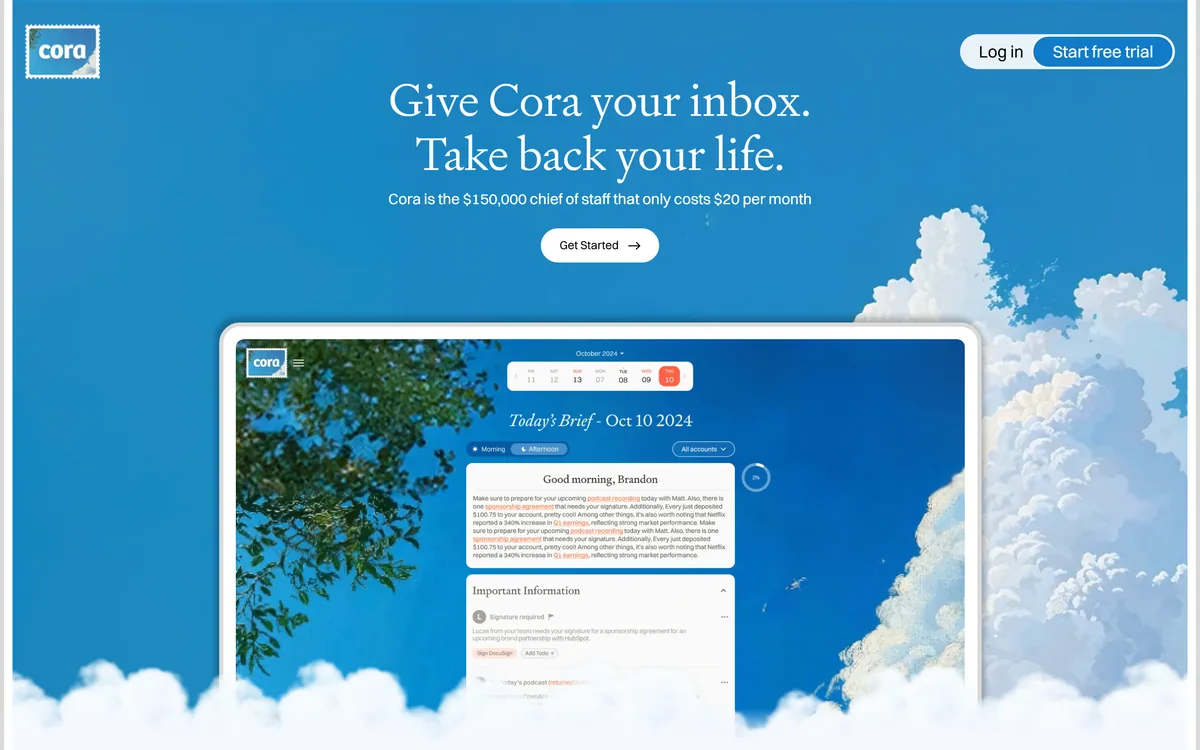
Cora is an AI email assistant from Every that organises your inbox, drafts responses and delivers a daily brief summarising what arrived. It states it holds no ability to send or delete emails, is Google Verified and CASA Tier 2 compliant, and offers no backdoor access to your mail.
Email management tools have historically promised to clear your inbox, and the people who most need that are exactly the people who cannot risk it. An assistant that archives the wrong thread or sends a half-right reply is worse than the mess it replaced.
Cora takes the opposite position. It reads everything, organises it, drafts what it can, and then stops — because it does not have permission to do anything else.
The product that emerges from that constraint is not an inbox cleaner but a briefing service: something reads your mail and tells you what happened, and you decide what to do about it.
Cora: An Inbox That Briefs You
It cannot send or delete — stated plainly as a permissions limit, which is the whole trust argument.
A daily brief summarising what arrived, instead of a queue you work through.
Pre-drafted responses that you review and send yourself.
Google Verified and CASA Tier 2 compliant, with the site stating no backdoor access to your emails.
Built by Every, alongside its other products, and endorsed on the homepage by named technology figures.
What Does Cora Actually Do To Email?
Cora's stated behaviour is to organise the inbox, categorise incoming mail, pre-draft responses and deliver daily brief summaries of what arrived.
The important structural point is that none of those actions are destructive. Organising and categorising change where things sit; drafting produces text you have not sent; a summary is a new artefact rather than an alteration.
That matters because the anxiety around email automation is specific rather than general. Nobody worries that a tool will summarise badly — they worry it will archive something that mattered or reply to a client with something wrong.
By staying entirely on the read-and-prepare side, Cora sidesteps the failure that makes people abandon these tools in week two. The worst case is that a summary is unhelpful, which costs you nothing.
The trade is that you remain the actor. Cora does not clear your inbox; it changes what facing your inbox involves, which is a smaller promise and a far more credible one.
Nobody worries an email tool will summarise badly. They worry it will archive something that mattered or reply to a client with something wrong.
Why It Cannot Send Or Delete
The site states directly that Cora does not have the ability or permissions to send or delete emails, and that there is no backdoor access to view your mail.
Publishing a limitation this prominently is a deliberate positioning choice, and it is the correct one for the category. In email, capability is not the scarce resource — trust is.
The reason it works as reassurance is that it is a permissions boundary rather than a promise about behaviour. A tool that could send but says it will not asks you to trust its judgement; a tool that cannot send asks you to trust nothing at all.
That distinction is worth internalising when evaluating any assistant with account access. What a product is technically able to do sets the worst case, and stated intentions do not change it.
The practical consequence is that Cora is safe to try in a way that most inbox automation is not. If it is useless you have lost time; you cannot lose an email — a materially different risk profile from tools such as WriteMail.ai that operate at the point of sending.
The Daily Brief Instead Of The Inbox
Cora's central output is a daily brief summarising what arrived, and the homepage testimonials describe reaching inbox zero and having a brief to read instead.
This reframes the medium. An inbox is a queue with an implicit obligation attached to each item; a brief is a document you read once and then decide about.
The psychological difference is larger than the functional one. A queue produces the feeling of falling behind, which is why people check email compulsively and still feel they are losing. A summary has an end.
It also changes what you see. Reading messages one at a time gives you no sense of the shape of the day's mail — a brief can tell you that four of eleven items are the same thread, that two need you today, and that the rest are newsletters.
The limitation is that a summary is an interpretation, and interpretations lose things. Tone, urgency implied rather than stated, the sentence that matters buried in paragraph six — these are exactly what summarisation flattens, so the brief works best as triage rather than as a replacement for reading what turns out to matter.
Judge an email assistant on what it cannot do, not what it can.
Treat the brief as triage — open anything that turns out to matter.
Check what OAuth scopes any inbox tool actually requests before granting them.
Read drafted replies properly; a good draft is more dangerous than a bad one.
Give it two weeks before deciding, since categorisation improves with volume.
Email Permissions Worth Understanding
Cora states it is Google Verified and CASA Tier 2 compliant, which are specific things rather than marketing adjectives, and worth knowing how to read.
Google's verification process applies to applications requesting sensitive or restricted scopes — which reading someone's entire mailbox certainly is — and involves review of what the app does with that access.
CASA, the Cloud Application Security Assessment, is a third-party security assessment framework, with tiers reflecting depth. Tier 2 is a meaningful bar for a small product, and citing it specifically rather than saying enterprise-grade security is a good sign.
What neither of these tells you is retention: how long your mail is held, where, and whether any of it contributes to training. Those are separate questions that certifications do not answer.
The general habit worth forming is to read the consent screen rather than the marketing page. The scopes an application requests are the actual contract, and they are shown to you at the moment you are least inclined to read them.
Where An Email Assistant Stops Helping
Inbox assistants have a ceiling, and it arrives sooner for some people than others.
Volume is the first factor. Below roughly thirty messages a day, the overhead of reading a brief about your email approaches the cost of reading your email, and the tool is solving a problem you do not have.
Predictability is the second. If your mail is mostly newsletters and notifications, filters you set up once will do the same job with no ongoing dependency and no access granted to anyone.
The nature of the work is the third. People whose email is the work — negotiating, advising, deciding — cannot delegate reading, because the reading is the job. What they can delegate is sorting, which is the narrower and real benefit.
And an assistant cannot fix a culture. If your organisation runs on email because it has no other way to make decisions, better inbox management treats a symptom — the underlying fix looks more like the knowledge discipline that tools such as Wave and Dosu address, which is getting decisions out of inboxes entirely.
Handing Over Your Inbox Safely
Granting an application read access to your entire email history is one of the larger permissions most people ever give, and it deserves more thought than the two seconds a consent screen usually gets.
This sequence gets you a real evaluation without exposing more than necessary.
Read the OAuth consent screen and check the scopes match what the product claims.
Start with a secondary account if you have one, rather than your primary inbox.
Use it for two full weeks — categorisation quality is not visible on day one.
Compare the brief against the raw inbox daily at first, to see what it drops.
Read every pre-drafted reply carefully, since a plausible wrong draft is the real risk.
Check retention and training terms in writing before moving your main account across.
Cora's homepage, captured 9 September 2026, showing the inbox assistant positioning.
Cora: Product And Security
Product type
AI email assistant
Made by
Every
Positioning
Give Cora your inbox, take back your life
Core output
Daily brief summaries of what arrived
Organisation
AI inbox categorisation
Drafting
Pre-drafted responses for you to review and send
Send and delete
Stated as not possible — no ability or permissions
Backdoor access
Stated as none; nobody can view your emails
Security
Google Verified and CASA Tier 2 compliant, per the site
Accounts
Multiple email accounts supported, with an unlimited tier
Bundle
Available within an Every bundle alongside Spiral and Sparkle
Trial
A free trial offered on the site
Key features of Cora
AI categorisation of incoming email
Daily brief summarising what arrived
Pre-drafted responses for your review
Support for multiple email accounts
No send or delete permissions by design
Google Verified status
CASA Tier 2 compliance
Available within a wider product bundle
Pros & cons
Pros
7
Cannot send or delete, which removes the failure mode people actually fear
A permissions boundary is stronger reassurance than a stated intention
The daily brief has an end, unlike a queue that always feels behind
Safe to trial — the worst case is an unhelpful summary, not a lost email
Security posture documented specifically rather than described as enterprise-grade
Multiple accounts consolidated into one view
Drafting without sending keeps judgement where it belongs
Cons
7
You still have to act — it changes triage, it does not clear the inbox
Summaries flatten tone and implied urgency, which is where email nuance lives
Below about thirty messages a day the overhead outweighs the benefit
Retention, processing location and training use are not stated
The underlying models are not named
Granting read access to an entire mailbox is a large permission whatever the safeguards
Cannot fix an organisation that uses email as its decision-making system
Best For
Founders and executives with high inbox volume
People who rejected email automation over what it might do
Anyone running several accounts who wants one daily view
Users who prefer a summary to a queue
Teams that care about documented security posture in small products
Cora Against Other Inbox Tools
Email tools differ by whether they read, write, or act on your behalf.
You receive enough mail that triage itself has become a daily task.
You have avoided email automation specifically because of what it might do.
You want a summary of the day rather than a queue to work through.
You run several email accounts and want one view of them.
Documented security posture matters to you more than feature breadth.
Keep your filters when
You get fewer than about thirty messages a day.
Your inbox is mostly newsletters that a filter rule already handles.
Reading your email carefully is the actual work you are paid for.
You cannot grant a third party read access to your mail on policy grounds.
You need something that acts — sending, archiving, replying — rather than briefing.
More Email And Productivity Tools
Adjacent products for writing, capturing and reducing email.
WriteMail.ai — composing outgoing mail rather than triaging incoming
Wave — capturing what you need to act on outside the inbox
Clueso — documentation that removes explanatory email
Ema — internal requests that would otherwise arrive as mail
Simular — acting on your behalf, which Cora deliberately does not
Cora: Confirmed From The Product Site
Last checked . Read from cora.computer in a browser session on the date above, with the screenshot captured alongside.
Positioned as give Cora your inbox, take back your life
Made by Every, per the site and testimonials
AI inbox organisation stated
Pre-drafted responses stated
Daily brief summaries stated
Explicitly stated that Cora cannot send or delete emails, with no ability or permissions to do so
Stated that there is no backdoor access or ability to view your emails
Stated as Google Verified and CASA Tier 2 compliant
Multiple email accounts supported, with an unlimited tier available
An Every bundle referenced covering Cora, Spiral and Sparkle
A free trial offered
What we could not confirm: how long email content is retained and where it is processed, which certifications do not answer; whether any content contributes to model training; which underlying models are used; the operating entity behind Every and its jurisdiction; how accurate categorisation is in practice; and whether the Google verification and CASA assessment are current, since we read them as stated on the vendor's page. The homepage carries named endorsements from technology figures, which we report as present rather than as evidence of quality. We did not connect an account.
Editor's Verdict
4.2/5
The most interesting thing about Cora is a restriction rather than a feature: it cannot send or delete email. That sounds like a limitation and functions as a trust mechanism, because the entire risk of handing an assistant your inbox is that it does something irreversible on your behalf. A tool that can only read and prepare cannot embarrass you. Built on top of that is the daily brief, which reframes email from a queue you process into a summary you read — a genuinely different relationship with the medium. The security posture is unusually well documented for a small product. AInexfinder Editor Score: 4.2/5.
Cora pricing
AInexfinder does not list plan prices or billing details. For current pricing, plans, and trials, visit the official Cora website.
Vendor pricing, credits, and billing policies change over time. Always confirm on the official site before you buy.
Frequently asked questions
What is Cora?
Cora is an AI email assistant from Every that organises your inbox, categorises incoming mail, pre-drafts responses and delivers a daily brief of what arrived. The site states it has no ability or permissions to send or delete emails, and no backdoor access to view your mail.
Why can't Cora send or delete email?
By design, and it is the central trust argument. A tool that could send but promises not to asks you to trust its judgement; a tool that cannot send asks you to trust nothing at all. What a product is technically able to do sets the worst case.
Does that make it less useful?
Less powerful, more adoptable. The anxiety about email automation is specific — that it will archive something important or reply badly to a client — and staying on the read-and-prepare side sidesteps exactly the failure that makes people abandon these tools in week two.
What is the daily brief?
A summary of what arrived, read once, instead of a queue worked through. The psychological difference is bigger than the functional one: a queue always feels like falling behind, while a brief has an end. It also shows the shape of the day's mail rather than one message at a time.
Can I stop reading my email entirely?
No, and treating the brief that way is the mistake. Summaries flatten tone, implied urgency and the sentence that matters buried in paragraph six. Use it as triage, then open properly whatever turns out to matter.
What do Google Verified and CASA Tier 2 mean?
Google's verification applies to apps requesting sensitive or restricted scopes — reading a whole mailbox qualifies — and reviews what the app does with that access. CASA is a third-party security assessment framework, and Tier 2 is a meaningful bar for a small product.
Do those certifications cover data retention?
No. How long your mail is held, where it is processed, and whether any of it contributes to training are separate questions that certifications do not answer. Get those in writing before moving a primary account across.
How should I trial it safely?
Read the OAuth consent screen and check the scopes match the claims, start with a secondary account if you have one, and use it for two full weeks since categorisation quality is not visible on day one. Compare the brief against the raw inbox daily at first.
Who is Cora not for?
Anyone under about thirty messages a day, since the overhead approaches the benefit. Anyone whose inbox is mostly newsletters, where a filter rule does the same job with no access granted. And anyone whose email is the actual work, because reading cannot be delegated even when sorting can.
Are the pre-drafted replies safe to send?
Read them properly. A plausible wrong draft is more dangerous than an obviously bad one, because it invites a glance rather than a read. The design keeps you as the sender precisely so that judgement stays with a person who knows the context.
Daniel reviews AI tools the slow way — by actually using them on real projects. His reviews cover what works, what breaks, and who each tool is genuinely a good fit for.
Daniel and the AInexfinder editorial team research Cora using public product information, listing evidence, and (when available) hands-on checks. Scores reflect listing completeness and transparency — not paid placement.
Listings may include affiliate or sponsored placements, which are labeled when present. Editorial scores and cons are not sold. See our affiliate disclosure and review methodology.
Serif is an AI-agent platform for email and document work: agents read threads, pull attachments, run lookups, apply your policies and write replies around the clock, routing uncertain cases to people, for workflows like document collection, compliance, intake and quoting, and support.
axess is a free AI job-search tool that scans LinkedIn, Indeed and Glassdoor daily, scores each role against your profile on both relevance and likelihood, researches the employer, and prepares a tailored CV and cover letter for the matches worth pursuing.
Otter.ai transcribes meetings live, writes summaries and action items, and organises everything into searchable Channels — with OtterPilot joining Zoom, Teams, and Google Meet, plus role-specific agents for sales, recruiting, and SDR work.
MiroFish is a multi-agent simulation platform for scenario prediction. You ask a plain-language question, attach supporting files, and it returns a structured report covering likely reactions, narrative paths, risk signals and follow-up questions.
CrewAI is an enterprise platform to build and run AI agents: a Discovery layer that finds automation opportunities, a no-code canvas and code-first Python API for building role-based multi-agent workflows, and a control plane that adds tracing, RBAC, audit and human-in-the-loop approvals.
AudioNotes is an AI note-taker that turns voice, audio, video and text into structured notes, transcripts and summaries in 99+ languages, with custom templates, chat-with-your-notes, integrations, and a clear no-AI-training privacy stance.