Gemini Notebook is Google's research and thinking tool, grounded in sources you upload rather than the open web. Renamed from NotebookLM on 16 July 2026, it now also runs code in a secure cloud environment and syncs notebooks with the Gemini app.
notebook.google9 viewsAdded January 27, 20262M+ visitors
A general chatbot given a document will answer from the document and from everything else it knows, and it will not tell you which is which.
For casual questions that is fine. For research it is disqualifying, because the whole point of asking about a source is finding out what the source says — and an answer blending your document with the model's prior training is worse than useless, since it is confidently unattributable.
Gemini Notebook is built around refusing to do that. It answers from what you gave it, with citations back into your own material, and that constraint is the entire product.
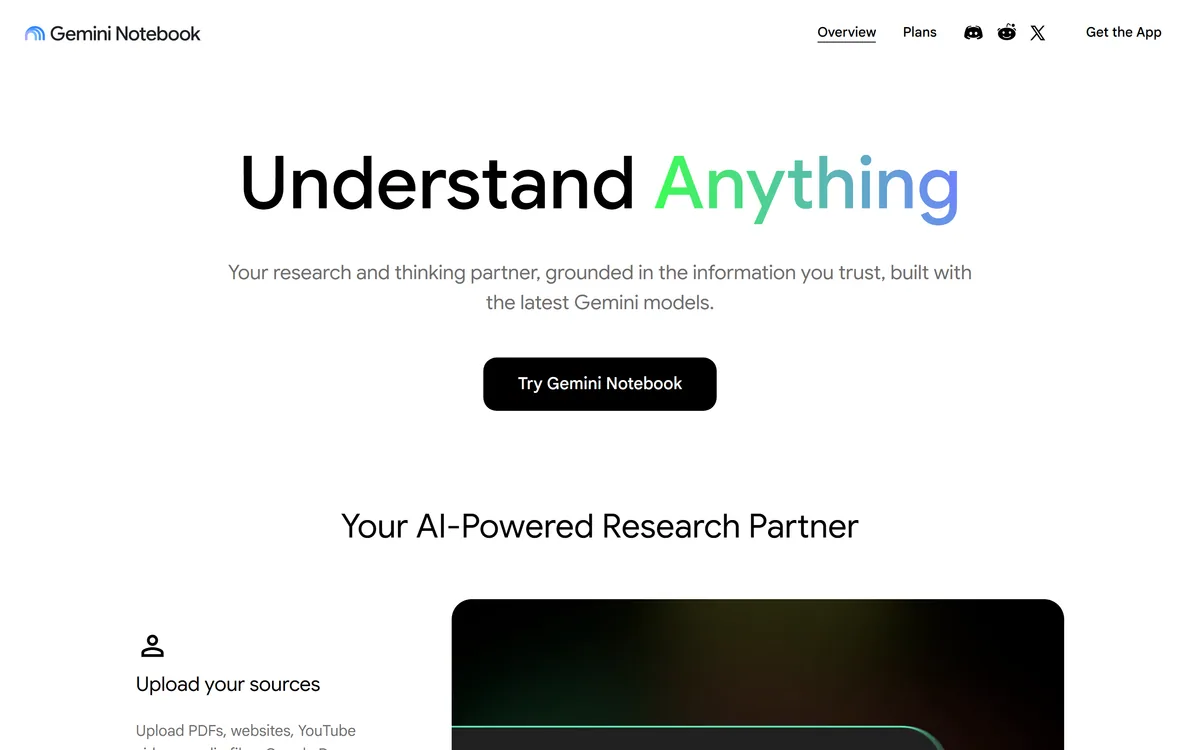
The Gemini Notebook homepage at notebook.google, captured 9 September 2026, showing the product under its post-rename branding.
Gemini Notebook: The Rename And The Rest
NotebookLM is now Gemini Notebook, renamed by Google on 16 July 2026. Same team, same notebooks, same product focus.
Answers are grounded in your sources, not the open web — the design decision that makes it different from a chatbot.
New: code execution in a secure cloud environment, so a notebook can run data analysis on your uploaded material rather than only summarising it.
Notebooks now sync with the Gemini app, so the same notebook is available in both places.
Scale behind it: Google states over 30 million users and 600,000 organisations since the 2023 debut.
Gemini Notebook: Naming And Capabilities
Current name
Gemini Notebook
Former name
NotebookLM
Rename date
16 July 2026
Operator
Google
Current URL
notebook.google, with notebooklm.google redirecting
Positioning
AI research tool and thinking partner, grounded in the information you trust
Grounding
Answers drawn from uploaded sources, with citations
Model
Built with the latest Gemini models, per the site
Source types
PDFs, websites, YouTube videos, audio files and Google Docs
New in 2026
Code execution in a secure cloud environment for data analysis on your sources
Gemini app sync
Notebooks created in the Gemini app sync with the standalone site
Planned
Integration with Search's AI Mode
Stated scale
30 million+ users and 600,000 organisations since the 2023 debut
What Changed When NotebookLM Was Renamed?
On 16 July 2026 Google renamed NotebookLM to Gemini Notebook. The product remains a standalone research tool run by the same team, with existing notebooks and sources untouched and links redirecting.
The name matters mostly for finding it. Anyone searching for NotebookLM will land on the same product under a different label, and documentation, tutorials and internal references written before that date now use a name that no longer appears in the interface.
The strategic read is that Google is consolidating its AI products under the Gemini brand, and the announcement frames the change as reflecting how the product will evolve across the Google ecosystem rather than as a change of direction.
Two substantive changes shipped alongside it. Notebooks can now run code in a secure cloud environment, doing data analysis grounded in your uploaded sources rather than only summarising them — rolling out first to AI Ultra and Workspace customers, then to Pro users.
And notebooks created in the Gemini app now sync with the standalone site, so the same notebook is available in both. Google has also said integration with Search's AI Mode is planned, which suggests the standalone product is becoming a component as much as a destination.
Naming churn is not unique to Google. It is worth keeping a note of what a tool was called when you wrote about it — the same problem arises with any product that rebrands, and it quietly breaks internal documentation.
The rename changed the label, not the tool. Same team, same notebooks — but anything you wrote about NotebookLM before July now names something that no longer appears on screen.
Code Execution Is The Real New Capability
Running code in a secure cloud environment against your own sources is a larger change than the rename, and it is worth understanding why.
Language models are famously unreliable at arithmetic. Ask one to compute a total across forty rows and it will produce a plausible number, sometimes correct, with no way to tell which. That has been the hard ceiling on using them with quantitative material.
Executing code removes the guessing. The model writes the calculation, the calculation runs, and the result is the actual result — arithmetic done by a computer rather than predicted by a language model.
For a research notebook holding spreadsheets, reports and datasets, that turns summarisation into analysis. You can ask what the trend is across the quarters in an uploaded file and get a computed answer rather than an impression.
The caution is unchanged from any analysis: the code is only as right as its assumptions about your data. A calculation over a column the model misidentified is precisely wrong rather than vaguely wrong, and precisely wrong is harder to spot.
Source Grounding Is Why People Trust It
The defining constraint is that answers come from the sources you upload, with citations back to them. Everything else the product does follows from that.
The immediate benefit is verifiability. A claim in an answer points at the passage it came from, so checking it takes seconds rather than requiring you to re-read the document you were trying to avoid re-reading.
The deeper benefit is a category of error that simply cannot occur. A grounded notebook cannot tell you something plausible that appears nowhere in your material, which is the failure mode that makes general chatbots unsafe for anything you will be held to.
It also changes what a wrong answer means. If a grounded tool says something incorrect, either the source is wrong or the retrieval missed — and both are diagnosable. When a general chatbot is wrong, you frequently cannot tell why.
The corresponding limit is that grounding is not verification. A notebook built on a poor source will faithfully report poor information with full citations, and the confidence of the presentation makes that more dangerous rather than less. What goes in decides what comes out.
Compare that with a web answer engine. Perplexity cites pages it found rather than pages you chose, which is the right behaviour for a different question entirely.
Curate sources deliberately — grounding reports what you gave it, wrong or right.
Check citations on anything you will repeat, since the passage is one click away.
Use code execution for numbers rather than trusting a model's arithmetic.
Keep separate notebooks per topic, since a mixed corpus dilutes retrieval.
Update anything you wrote referring to NotebookLM, which is no longer the product's name.
Where A Notebook Beats A Chatbot
The distinction is about what you are asking for, and getting it right saves a great deal of frustration.
A chatbot is the right tool when you want knowledge you do not have — explain this concept, draft this email, what are the common approaches to this problem. Its training is the asset.
A notebook is the right tool when the answer must come from specific material — what does this contract say about termination, what did these twelve papers conclude, what is in this 200-page report I have not read. Here the training is a liability, because you want the source rather than the average.
The confusion arises because both accept documents. A chatbot with an attachment feels like a notebook and behaves quite differently, blending the attachment with everything else it knows, invisibly.
The practical test is what you would do with a wrong answer. If you would need to know where it came from, use a notebook. If you would simply try again, a chatbot is fine and usually faster.
For academic work specifically, Elicit retrieves from an indexed literature corpus, and a workspace like Cleve answers from everything you have written rather than from one session's uploads.
Setting Up A Notebook That Answers Well
Retrieval quality is decided by what you upload and how you organise it, far more than by how you phrase questions.
The most common failure is one enormous notebook containing everything, which dilutes every query.
Create one notebook per question or project, not one per person, since mixed corpora blur retrieval.
Upload the primary sources rather than summaries of them, because the notebook can only cite what it holds.
Remove sources you know to be outdated, since grounding will faithfully report them alongside current ones.
Ask a question you already know the answer to first, and check that the citation points at the right passage.
Use code execution for anything numerical rather than accepting a stated total.
Re-check citations before repeating anything externally, since a grounded answer is only as good as its source.
Is Gemini Notebook Your Research Tool?
Ideal when
Your question is about specific documents rather than general knowledge.
You need to be able to show where an answer came from.
You have more source material than you have time to read.
Your notebook contains numbers and you want them computed, not estimated.
You already work in the Google ecosystem and want the Gemini app sync.
Reach for a chatbot when
You want knowledge you do not have, where a model's training is the asset.
You are drafting or brainstorming rather than interrogating sources.
You have no curated sources, since grounding has nothing to ground in.
Your sources are of unknown quality, which grounding will faithfully report.
You need an answer from the live web rather than from what you uploaded.
Key features of Gemini Notebook
Answers grounded in sources you upload, with citations back into them
Support for PDFs, websites, YouTube videos, audio files and Google Docs as sources
Code execution in a secure cloud environment for data analysis on your own material
Notebook sync between the Gemini app and the standalone site
Built on Google's current Gemini models
Planned integration with Search's AI Mode
Existing notebooks and shared links preserved through the rename
Pros & cons
Pros
7
Source grounding removes the failure mode that makes chatbots unsafe for research
Citations point at the passage, so verification takes seconds
A wrong answer is diagnosable — either the source or the retrieval failed
Code execution replaces model arithmetic with actual computation
The rename preserved notebooks, sources and links rather than breaking them
Sync with the Gemini app means one notebook rather than two copies
Scale and Google backing make abandonment unlikely in the near term
Cons
6
Grounding is not verification — a poor source is reported faithfully and confidently
Documentation, tutorials and links written before July 2026 use a name that no longer exists
Code execution rolls out by tier, so availability depends on your plan
Wrong code over a misidentified column is precisely wrong, which is harder to spot
The app is behind a sign-in, so limits and tier differences are not publicly readable
No data-use or training policy for uploaded sources was stated on the page we read
Best For
Researchers working through more source material than they can read
Anyone who must be able to show where an answer came from
Analysts with quantitative material in uploaded files
Teams already inside the Google ecosystem
Students and professionals interrogating dense reports and papers
Gemini Notebook Against Other Research Tools
Research tools differ on where the answer is allowed to come from, and that decides what they are safe for.
A workspace that remembers rather than a research session
Confirming The Gemini Notebook Rename
Last checked . Read from notebook.google and Google's own announcement, with the screenshot above captured in the same session.
notebooklm.google.com returns a 301 redirect to notebook.google.com, and notebooklm.google redirects to notebook.google
The marketing page at notebook.google is titled "Gemini Notebook | AI Research Tool & Thinking Partner"
The captured homepage shows the product branded "Gemini Notebook" with a "Try Gemini Notebook" call to action
Homepage positioning confirmed as a research and thinking partner grounded in the information you trust, built with the latest Gemini models
Rename to Gemini Notebook confirmed by Google's own announcement, dated 16 July 2026
Announcement confirms it remains a standalone product focused on research, run by the same team
Announcement confirms new code execution in a secure cloud computer for data analysis grounded in your sources, rolling out first to AI Ultra and Workspace customers, then to Pro users
Announcement confirms notebooks created in the Gemini app sync with the standalone Gemini Notebook site
Announcement confirms planned future integration with Search's AI Mode
Scale stated in the announcement as over 30 million users and 600,000 organisations since the 2023 debut
Source types visible on the homepage include PDFs, websites, YouTube videos, audio files and Google Docs
What we could not confirm: the app itself sits behind a Google sign-in, so we could not read source limits, notebook counts, or per-tier feature availability from inside the product; the current status of Audio Overview, Video Overview and Mind Map features, which were not enumerated on the marketing page we read; which specific Gemini model version is used; language support; data-use and training policy for uploaded sources; and whether any capability differs between the standalone site and the Gemini app. We did not use the product, so nothing here reflects tested retrieval quality.
Other Research And Note Tools
Grounded notebooks, web answer engines and personal workspaces solve three different problems that look similar.
Perplexity — when the answer is published on the web rather than in your files
Elicit — for academic literature, with structured evidence extraction
Felo — multilingual research that ends in a presentation
Cleve — a workspace built on everything you have written rather than on a session
Goodnotes — if the sources you want to query are handwritten
Editor's Verdict
4.5/5
Gemini Notebook scores highly for a design constraint most AI products refuse to accept: it answers only from sources you gave it. That single decision removes the failure mode that makes general chatbots unusable for serious research — you cannot tell which parts came from your document and which came from the model's training. Here, everything is attributable. The July 2026 rename to Gemini Notebook changed the branding rather than the product, and the addition of code execution against your own sources is a genuine capability step. It sits just below the top because grounding is only as good as what you upload. AInexfinder Editor Score: 4.5/5.
Gemini Notebook pricing
AInexfinder does not list plan prices or billing details. For current pricing, plans, and trials, visit the official Gemini Notebook website.
Vendor pricing, credits, and billing policies change over time. Always confirm on the official site before you buy.
Frequently asked questions
Is NotebookLM still called NotebookLM?
No. Google renamed it Gemini Notebook on 16 July 2026. It remains a standalone research product run by the same team, with existing notebooks and sources untouched and old links redirecting — notebooklm.google now resolves to notebook.google. Anything you wrote referring to NotebookLM names a product that no longer appears on screen.
What is Gemini Notebook?
Google's research and thinking tool, grounded in sources you upload rather than the open web. You add PDFs, websites, YouTube videos, audio files or Google Docs, and it answers from those with citations back into them. It is built on Google's current Gemini models and can now run code against your material.
Why does source grounding matter?
Because a general chatbot given a document answers from the document and from everything else it knows, without telling you which is which. For research that is disqualifying. Grounding makes every claim attributable and rules out an entire category of error: it cannot tell you something plausible that appears nowhere in your material.
What changed in the rename besides the name?
Two substantive things. Notebooks can now run code in a secure cloud environment, doing data analysis grounded in your sources rather than only summarising them — rolling out first to AI Ultra and Workspace customers, then Pro. And notebooks created in the Gemini app now sync with the standalone site.
Why is code execution significant?
Language models are unreliable at arithmetic — ask one to total forty rows and it produces a plausible number with no way to tell if it is right. Executing code removes the guessing: the model writes the calculation, the calculation runs, and you get the actual result. For notebooks holding spreadsheets, that turns summarisation into analysis.
Does grounding mean the answers are correct?
No, and this is the most important caveat. Grounding is not verification. A notebook built on a poor source will faithfully report poor information with full citations, and the confidence of the presentation makes that more dangerous rather than less. Curating what goes in is the actual work.
When should I use a chatbot instead?
When you want knowledge you do not have — explaining a concept, drafting something, surveying common approaches. There the model's training is the asset. Use a notebook when the answer must come from specific material you hold, where that same training becomes a liability because you want the source rather than the average.
Do my old NotebookLM links still work?
Yes. Google's announcement states that automatic redirects keep existing shared notebooks and user links working, and notebooklm.google.com issues a 301 to the new domain. Your notebooks and sources were not affected by the rename — the change was to branding and to where the product sits in Google's line-up.
How should I organise notebooks?
One per question or project, not one per person. A single enormous notebook containing everything dilutes retrieval on every query, because the tool has to find the relevant passage among unrelated material. Upload primary sources rather than summaries, and remove anything you know to be outdated.
How many people use it?
Google's announcement states over 30 million users and 600,000 organisations since the product debuted in 2023. That is vendor-stated and unaudited, but it does mean this is an established product with a large user base rather than an experiment — which matters when you are deciding whether to build a research habit on it.
Daniel reviews AI tools the slow way — by actually using them on real projects. His reviews cover what works, what breaks, and who each tool is genuinely a good fit for.
Daniel and the AInexfinder editorial team research Gemini Notebook using public product information, listing evidence, and (when available) hands-on checks. Scores reflect listing completeness and transparency — not paid placement.
Listings may include affiliate or sponsored placements, which are labeled when present. Editorial scores and cons are not sold. See our affiliate disclosure and review methodology.
Elicit is an AI research assistant for scientific literature. It searches across more than 125 million papers, screens and extracts data at systematic-review scale, and produces research reports where every claim carries a sentence-level citation back to its source.
AnswerThis is an AI research assistant for literature reviews that searches a large database of papers and trials, checks citations and claims against their sources, supports PRISMA- and Cochrane-style systematic reviews, and helps draft, revise and collaborate on research writing.
Consensus is an AI-powered academic search engine that searches and analyses hundreds of millions of peer-reviewed research papers, with a Deep Search that automates literature review, a Medical mode for clinical sources, and natural-language filters, used across university libraries.
LUCA is a K-12 reading intervention platform that analyses student reading at the phoneme level rather than the word level, identifying skill gaps in real time. It reports a 17.4 words-per-minute average fluency gain and 763,000+ grapheme-phoneme mappings, delivered through SoundScout, StoryGen and Assessment Intelligence.