Jamie is an on-device AI meeting assistant that captures and summarizes meetings, online and in person, without a bot joining the call, then powers prep, search, chat and post-meeting workflows, aimed at regulated fields with an EU-data-residency, privacy-first posture.
meetjamie.ai7 viewsAdded July 14, 202520K visitors
Most AI note-takers send a bot into your call, which is awkward in sensitive meetings and useless in person. Jamie's defining choice is to do neither: it captures on-device, with nothing joining the call.
It is an on-device meeting assistant that takes notes online and in person, then powers prep, search, chat and post-meeting workflows, aimed squarely at regulated fields like finance, law and healthcare. For the broader capture-and-summarise job it overlaps with tools like AudioNotes, but its privacy posture is the differentiator.
This review covers how Jamie captures a meeting on-device, where it suits regulated teams, how it approaches pricing and data, and who should look elsewhere.
Jamie captures meetings on your device, with no bot appearing in the call.
Jamie, The Quick Briefing
Jamie is an on-device AI meeting assistant: it notes meetings, online and in person, without a bot joining the call.
No bot is the headline: nothing visible joins the meeting, which matters for discretion and for in-person conversations.
It does more than notes: pre-meeting prep, chat across all meetings, and post-meeting workflow automation.
Built for regulated fields: EU data residency, ISO 27001 and DORA alignment, audio deleted after transcription.
Meeting Notes Without A Bot In The Call
Jamie's single most important design decision is that no bot joins your meeting. Instead of a participant called "Jamie's Notetaker" appearing on the call, it captures on-device, which changes what you can comfortably use it for.
That matters in two ways. In a sensitive or client call, a visible recording bot is a trust and etiquette problem; and for an in-person meeting, a bot-based tool simply cannot help at all, while Jamie can. The no-bot approach widens where note-taking is acceptable.
It is positioned for high-stakes, regulated work, private equity, banking, law, consulting, healthcare, where discretion and data handling are not nice-to-haves. The product's whole shape follows from taking those buyers seriously.
A visible recording bot is a trust problem in a client call and useless in person. Capturing on-device with no bot widens where note-taking is actually acceptable.
How Does Jamie Capture A Meeting On-Device?
The capture is only the start; the value compounds in what Jamie does around the meeting.
No-Bot Capture And Templated Notes
Jamie runs on your Mac, Windows or iPhone and captures the audio locally across Zoom, Teams, Meet or any platform, producing accurate notes in seconds using templates you can customise for your meeting types.
Templated, consistent notes are what make meeting AI actually usable later, and pairing fast capture with a voice-input habit from a tool like Wispr Flow suits people who would rather talk than type their follow-ups.
Chat, Workflows And A Privacy Posture
Beyond notes, Jamie builds pre-meeting briefings, lets you chat across all your meetings, and runs post-meeting Workflows that update a CRM or draft follow-ups, either automatically or after review. An MCP connection lets you query your meetings from Claude or ChatGPT.
On privacy it states audio is deleted after transcription, data stays in the EEA, Switzerland or UK, and it never trains models on your data. Those claims are the vendor's, and for anyone organising around meetings a tool like Saner.ai handles the wider task layer that Jamie's follow-ups feed into.
Where Jamie Suits Regulated Teams
Jamie fits best where conversations are sensitive and data rules are strict: deal teams in private equity and banking, lawyers, consultants, healthcare and public-sector staff. For them, the no-bot capture and EU data residency are decisive, not cosmetic.
It also suits anyone who takes a lot of in-person meetings, which bot-based tools cannot cover at all, and teams that want the post-meeting admin, CRM updates, follow-ups, handled automatically.
It fits less well for a casual user who just wants a free transcript of the occasional online call, where a simpler or built-in tool is enough. Jamie's depth and posture are aimed at people for whom a meeting record is a professional artefact, and for whom a stray recording bot or an off-shore data path would be a genuine compliance problem rather than a minor annoyance.
How Jamie Approaches Pricing And Data
Jamie is a downloadable app with a pricing tier and an enterprise book-a-demo path; specific tiers are not laid out on the page. We do not publish prices, which change; check the site.
The more important part of the equation for its audience is the data handling, and here the claims are clear and relevant: ISO 27001 certification, GDPR compliance, DORA alignment, EU/UK data residency, encryption in transit and at rest, audio deleted after transcription, and no model training on your data.
For a regulated buyer, those commitments, which should be verified against current documentation and your own compliance team, are often what decides the purchase more than price.
A Quick Way To Trial Jamie
Because the no-bot, on-device claim is the whole point, test it on your real meetings, including an in-person one.
Install the app on your Mac, Windows or iPhone and run it on a real online call.
Confirm that nothing visibly joins the meeting and the notes are accurate.
Capture an in-person meeting, which bot-based tools cannot do, and judge the result.
Set up a note template for your most common meeting type and check the consistency.
Trial a post-meeting Workflow, like a CRM update or follow-up draft, in review-first mode.
Pass/fail: Jamie is worth it if capture is reliable and the data posture satisfies your compliance team.
Verify the current certifications and data-residency terms for your own requirements.
Jamie Meeting Assistant Facts
What it is
An on-device AI meeting assistant
Capture
Online and in-person, no bot joins
Notes
Templated summaries in seconds
Beyond notes
Prep briefings, chat across meetings, workflows
Platforms
Mac, Windows, iPhone; any meeting app
Integrations
MCP, Webhooks, API, CRM/document sync
Security
ISO 27001, GDPR, DORA-aligned (vendor)
Data
Audio deleted after transcription; no training on your data
Key features of Jamie
On-device, no-bot capture
Online and in-person meetings
Templated notes in seconds
Pre-meeting briefings
Chat across all meetings
Post-meeting workflow automation
MCP, Webhook and API
EU data residency and deletion claims
Pros & cons
Pros
5
No bot joins, suiting sensitive and in-person meetings
On-device capture with a clear privacy posture
Notes plus prep, chat and automated follow-ups
Strong certifications aimed at regulated fields
Works across any meeting platform
Cons
5
Overkill for a casual one-off transcript
Pricing tiers not spelled out on the page
Data claims need verifying for compliance
Depth aimed at professionals, not light users
Value tied to how many meetings you run
Best For
Regulated deal and advisory teams
In-person meeting takers
Privacy-strict organisations
Teams automating follow-ups
Heavy meeting schedules
Jamie Beside Other Meeting Tools
The useful comparison is with other ways teams capture and act on meetings.
Teams needing EU data residency and strict handling
People who want follow-ups and CRM updates automated
When Jamie Does Not Suit
Casual users wanting a free one-off transcript
Anyone fine with a bot joining their calls
Teams with no privacy or compliance constraints
People who take very few meetings
Those who will not verify the data claims
How We Looked At Jamie
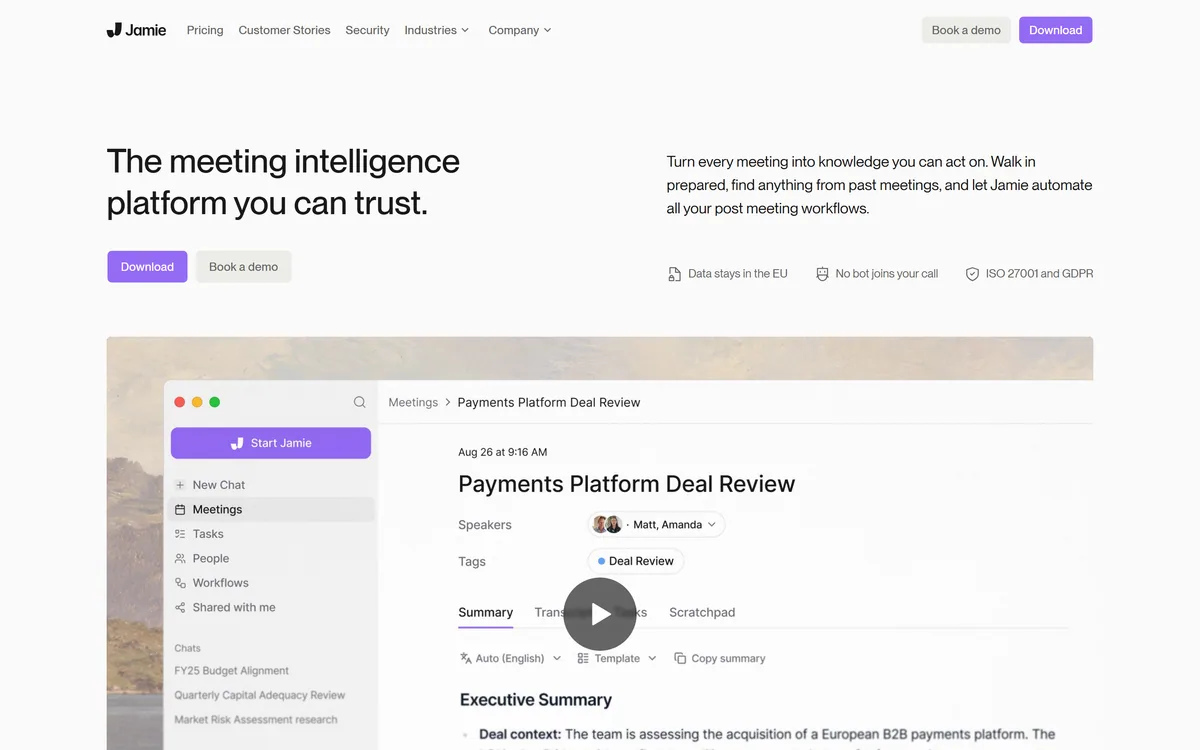
Last checked . Read from meetjamie.ai during this check, with the screenshot above captured at the same time.
An on-device AI meeting assistant with no bot joining the call
Capture of online and in-person meetings
Templated notes generated in seconds
Pre-meeting briefings and chat across all meetings
Post-meeting Workflows for CRM updates and follow-ups
MCP, Webhook and API access; desktop and iPhone apps
Stated ISO 27001, GDPR and DORA alignment with EU data residency
Stated deletion of audio after transcription and no training on your data
No plan prices reproduced here, in line with this site's pricing policy
Jamie's security and data-handling claims (ISO 27001, DORA, residency, deletion) are vendor-stated; regulated buyers should verify them against current documentation.
Meeting And Note Tools To Compare
An audio-notes tool, a voice-input tool and an AI organiser to weigh alongside Jamie.
AudioNotes — turning spoken audio into structured notes
Wispr Flow — dictation instead of typing, across apps
Saner.ai — an AI organiser for acting on follow-ups
Editor's Verdict
4.3/5
Jamie earns 4.3 for one decisive design choice, capturing meetings on-device with no bot joining the call, which makes it usable in sensitive client calls and in-person meetings where bot-based tools cannot help, layered with prep, cross-meeting chat and automated follow-ups and a privacy posture aimed at regulated fields. Its data claims need verifying and it is overkill for a casual transcript, but for professionals it is a strong, considered fit. AInexfinder Editor Score: 4.3/5.
Jamie pricing
AInexfinder does not list plan prices or billing details. For current pricing, plans, and trials, visit the official Jamie website.
Vendor pricing, credits, and billing policies change over time. Always confirm on the official site before you buy.
Frequently asked questions
What is Jamie?
Jamie is an on-device AI meeting assistant that captures and summarizes meetings, online and in person, without a bot joining the call. Beyond notes it provides pre-meeting briefings, chat across all your meetings, and post-meeting workflow automation, aimed at regulated, high-stakes fields.
Does Jamie put a bot in my meeting?
No, and that is its defining feature. Jamie captures on-device rather than sending a visible notetaker bot into the call. That makes it usable in sensitive client meetings where a recording bot is awkward, and in in-person meetings, which bot-based tools cannot cover at all.
Can Jamie record in-person meetings?
Yes. Because it captures on-device rather than joining a video call, Jamie can take notes in face-to-face meetings as well as online ones. That is a meaningful advantage over notetakers that rely on a bot joining a Zoom, Teams or Meet call.
How does Jamie handle privacy and data?
The vendor states audio is deleted after transcription, data stays in the EEA, Switzerland or UK, and it never trains models on your data, with ISO 27001 certification, GDPR compliance and DORA alignment. Regulated buyers should verify these against current documentation and their compliance team.
What can Jamie do after a meeting?
It runs post-meeting Workflows that can update a CRM, draft follow-up messages and more, either automatically or after you review them. It also lets you chat across all your meetings and connect via MCP so you can query them from an assistant like Claude or ChatGPT.
How much does Jamie cost?
Jamie is a downloadable app with a pricing tier and an enterprise book-a-demo path, though specific tiers are not detailed on the page. We do not publish prices, which change; check the site. For its audience, the data-handling commitments often matter more than price.
Which platforms does Jamie run on?
It runs on Mac, Windows and iPhone, and works with Zoom, Teams, Google Meet or any meeting platform since it captures on-device rather than integrating with a specific video service. It also offers MCP, Webhook and API access for connecting into other tools.
Who is Jamie best for?
Teams in high-stakes, regulated fields, private equity, banking, M&A, law, consulting, healthcare and the public sector, plus anyone who takes many in-person meetings. Its no-bot capture, EU data residency and strict handling are aimed at buyers for whom a meeting record is a professional artefact.
Does Jamie train AI on my meetings?
The vendor states it never trains models on your data and deletes audio after transcription. For sensitive or regulated conversations you should still confirm the current terms with your compliance team, but the stated posture is explicitly privacy-first, which is central to Jamie's positioning.
Who should not use Jamie?
Casual users who just want a free transcript of the occasional online call, anyone comfortable with a bot joining their meetings, and teams with no privacy or compliance constraints. Jamie's depth and privacy posture are built for professionals, which is more than a light user needs.
Daniel reviews AI tools the slow way — by actually using them on real projects. His reviews cover what works, what breaks, and who each tool is genuinely a good fit for.
Daniel and the AInexfinder editorial team research Jamie using public product information, listing evidence, and (when available) hands-on checks. Scores reflect listing completeness and transparency — not paid placement.
Listings may include affiliate or sponsored placements, which are labeled when present. Editorial scores and cons are not sold. See our affiliate disclosure and review methodology.
Otter.ai transcribes meetings live, writes summaries and action items, and organises everything into searchable Channels — with OtterPilot joining Zoom, Teams, and Google Meet, plus role-specific agents for sales, recruiting, and SDR work.
Wave records, transcribes and summarises meetings, calls and lectures across iPhone, Android, web, desktop, Apple Watch and Wear OS. It covers 76 languages, identifies speakers with Voice ID, and states that it never trains AI models on customer data.
axess is a free AI job-search tool that scans LinkedIn, Indeed and Glassdoor daily, scores each role against your profile on both relevance and likelihood, researches the employer, and prepares a tailored CV and cover letter for the matches worth pursuing.
MiroFish is a multi-agent simulation platform for scenario prediction. You ask a plain-language question, attach supporting files, and it returns a structured report covering likely reactions, narrative paths, risk signals and follow-up questions.
CrewAI is an enterprise platform to build and run AI agents: a Discovery layer that finds automation opportunities, a no-code canvas and code-first Python API for building role-based multi-agent workflows, and a control plane that adds tracing, RBAC, audit and human-in-the-loop approvals.