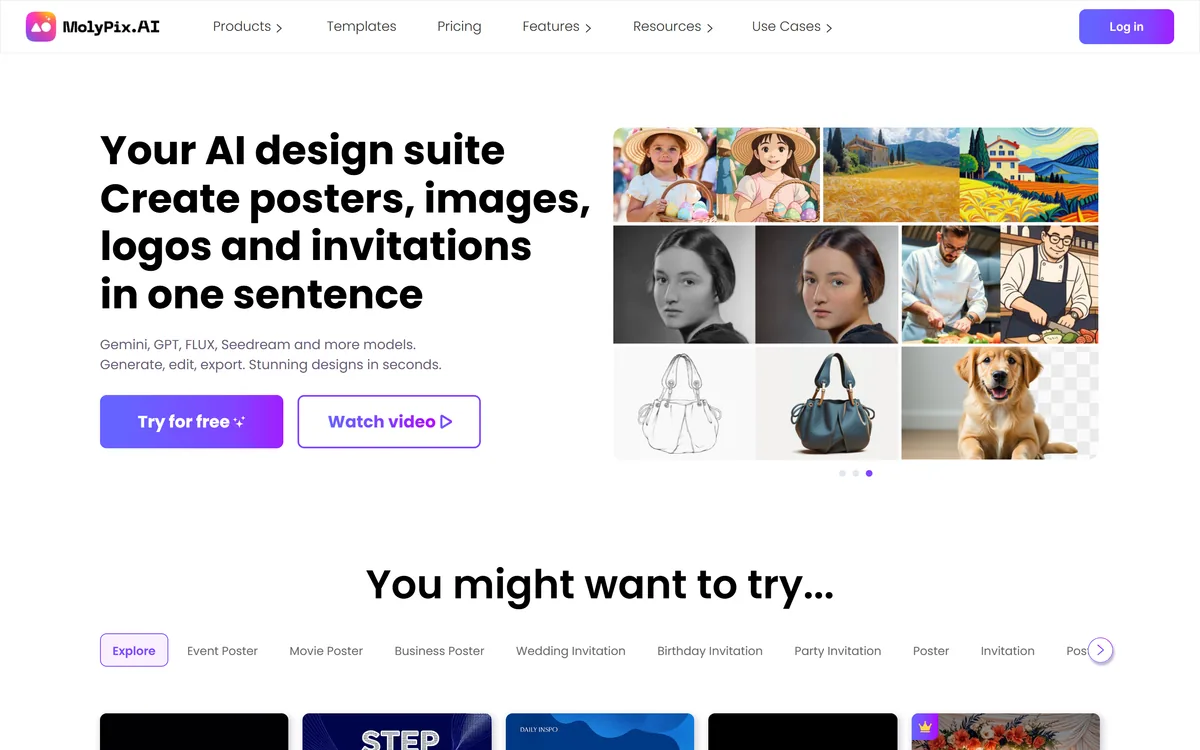
MolyPix.AI generates posters, invitations, postcards, logos, social posts and images from a single sentence, across models including Gemini, GPT, FLUX and Seedream. Its distinguishing claim is that output arrives as fully editable layers — text, elements and layout all adjustable after generation.
Fully editable layered output — change text, layout and elements after generation instead of regenerating.
Named models: Gemini, GPT, FLUX and Seedream among them, rather than an undisclosed engine.
Format-specific products for posters, invitations, postcards, LinkedIn posts, logos and images.
A brand kit that applies your logo, colours and name automatically to every design.
AI templates that adapt, keeping a layout while the prompt behind it changes.
MolyPix.AI: Products And Models
Positioning
An AI design suite creating posters, images, logos and invitations from one sentence
Key differentiator
Described as the first AI tool creating fully editable layered designs
Models named
Gemini, GPT, FLUX and Seedream, among others
Products
Poster maker, invitation maker, postcard maker, LinkedIn post maker, logo maker, image maker and a design assistant
Editing
Text, layout, layers, elements, resolution and AI-based partial edits
Templates
AI templates that keep a layout while the prompt is modified
Brand kit
Automatic application of logo, brand colours and brand name
Prompt help
An enhance-prompt feature to expand a short idea
Additional tools
AI filters, add text to photo, generative fill, background removal, HD upscaling, image extender and photo restoration
Onboarding
Free credits offered on signup
Contact
A support email address published rather than only a form
Positioning claim
Aimed at small businesses replacing outsourced design
Why Do Generated Designs Need Layers?
MolyPix.AI describes itself as the world's first AI tool creating fully editable layered designs, letting you modify text, adjust layouts, add elements, increase resolution and refine details without additional cost.
That is the whole product, and the problem it solves is the one that makes most design generators frustrating in practice.
A generated image is a flat grid of pixels. The text in it is not text — it is a picture of text. So when the date on your event poster changes, or the model has rendered a word with one letter wrong, there is nothing to edit. You regenerate and get a different design, and the one you liked is gone.
That failure is why generated design has been better at inspiration than at delivery. You could show someone a concept and you could not ship it.
Layers change the category. Text that is text can be corrected, a logo can be swapped, an element can be moved — which means the generator produces a starting point you finish rather than a lottery ticket you keep buying.
Text in a generated image is not text. It is a picture of text — which is why one wrong letter costs you the whole design.
Text Accuracy And Why It Matters Here
The site emphasises text-accurate output alongside editability, and the pairing is not accidental.
Rendering legible text has been the persistent weakness of image generation. Models improved enormously at faces, hands and lighting while still producing signage with invented letters, because text is symbolic rather than visual and a model reproducing letter shapes is not spelling.
For most image generation that is a curiosity. For design it is disqualifying, because a poster is text — a date, a price, a name, an address — and one wrong character makes the whole thing unusable.
Layered output partly sidesteps the problem rather than solving it. If the text is a real text layer rendered by the editor rather than painted by the model, it is correct by construction and always editable.
That is the architecturally sound answer, and it is worth verifying which way a given output works. A design whose text is a genuine layer behaves completely differently from one where the text was generated and merely happens to be right.
Four Named Models Behind One Prompt
The homepage names its underlying models directly: Gemini, GPT, FLUX and Seedream among others.
Publishing that list is unusual in consumer design tools and it is genuinely useful.
These models differ visibly. Some render photographic scenes convincingly, some handle graphic and illustrative styles better, some are markedly stronger at text than others. A tool that routes between them can pick per job, and a user who knows the list can reason about why a result looked the way it did.
It also sets expectations about change. An orchestration layer inherits improvements as those models ship new versions, and it inherits retirements too — so a look you achieved may not be reproducible in six months.
The practical habit is the same as with any multi-model platform: note what produced anything you intend to repeat. That is the trade for breadth, and it applies here as much as to PixelLab or any other generator with several engines behind one interface.
Check whether text arrives as a real layer or as pixels.
Set up the brand kit before generating a second design.
Use adaptive templates rather than starting from scratch each time.
Note which model produced anything you want to repeat.
Confirm commercial rights before a design goes into paid media.
Brand Kits And Repeated Design Work
The brand kit is described as automatically aligning every design with your brand — no manually adding logos, adjusting colours or declaring the brand name each time.
This is the feature that separates a tool you use once from one you use weekly.
The first design is always the enjoyable one. The fortieth is the problem: a small business producing a promotion, an event notice, a seasonal post and a price update each month, every one of which needs the same logo in the same place and the same two colours.
Doing that by prompt is unreliable, because a generator asked to use your brand blue will produce something adjacent to it. Doing it by hand afterwards is the tedium the tool was meant to remove.
Encoding it once and applying it automatically is the correct architecture, and it is the same reasoning behind brand containers in enterprise marketing platforms — just at the scale of a shop rather than a corporation, which is arguably where it matters more because there is no designer to catch the drift.
Templates That Adapt Rather Than Repeat
The site draws a distinction between searching through countless static templates and AI templates that adapt to a scenario while maintaining the layout, with endless variation through modifiable prompts.
That distinction is real and worth understanding, because static template libraries have a well-known failure.
The failure is search. A library of ten thousand templates sounds generous and functions badly, because finding the one that fits your event, your season and your brand takes longer than starting fresh — and the one you settle for is nearly right rather than right.
An adaptive template inverts it: the layout is the fixed part, which is the part professional designers actually contribute, and the content varies to whatever you need.
The limit is that layout is not neutral. A poster layout designed for a music event carries visual assumptions that fight a corporate announcement, and adapting the prompt does not change the underlying composition. Choosing a layout whose structure suits your message remains a judgement, and it is the one thing this cannot do for you. Product imagery at catalogue volume is a different discipline, handled by Photoroom, and the type inside a design by Font AI.
Designing A Poster You Can Still Change
The mistake with generated design is treating the first output as the deliverable, which is exactly what layers exist to prevent.
This sequence uses the editability rather than regenerating repeatedly.
Set up the brand kit before making anything you will repeat.
Pick the product that matches the format — poster, invitation, post.
Write one clear sentence and use the prompt enhancer to expand it.
Edit text and layout in the editor rather than regenerating.
Check every date, price and name character by character.
Confirm commercial licensing before it runs anywhere paid.
Key features of MolyPix.AI
One-sentence generation across six design formats
Fully editable layered output
Text, layout and element editing after generation
Brand kit applying logo, colours and name automatically
Adaptive AI templates
Prompt enhancement for short ideas
Generative fill, background removal and image extension
HD upscaling and photo restoration
Pros & cons
Pros
7
Layers turn generation into a starting point rather than a lottery
Editable text sidesteps the persistent weakness of image generation
Names its underlying models rather than hiding them
Format-specific products carry assumptions a general prompt box cannot
The brand kit is what makes it useful the fortieth time, not just the first
Adaptive templates avoid the search problem in large static libraries
Free credits and a published support email lower the barrier to trying it
Cons
7
Whether text is a real layer or generated pixels is not stated
Model routing per request is not disclosed
Commercial licensing terms were not readable on the pages we covered
Layout judgement — which composition suits your message — remains yours
Multi-model output is not reliably reproducible over time
Credit consumption per generation and per edit is unexplained
Not the right tool for a brand identity you will keep for years
Best For
Small businesses producing their own marketing material
Event organisers making posters and invitations
Social media managers needing format-specific output
Anyone whose designs need dates and prices changed regularly
Teams wanting brand consistency without a designer
MolyPix.AI Against Other Poster Makers
Design tools differ by what you can change after generation.
Imglarger — fixing resolution and framing afterwards
Vector Witch — scalable output for cutting and print
MolyPix.AI: Read From The Design Pages
Last checked . Read from molypix.ai in a browser session on the date above, including the full footer. The screenshot was captured at the same time.
Positioned as an AI design suite creating posters, images, logos and invitations from one sentence
Underlying models named on the homepage as Gemini, GPT, FLUX and Seedream among others
Described as the world's first AI tool creating fully editable layered designs
Editing described across text, layouts, layers, elements, resolution and AI-based partial edits
Output described as text-accurate as well as editable
Format-specific products listed for posters, invitations, postcards, LinkedIn posts, logos and images
AI templates described as adapting to a scenario while maintaining layout
A brand kit described as automatically applying logo, brand colours and brand name
An enhance-prompt feature described for expanding a short idea
Additional tools listed including generative fill, background removal, HD upscaling, image extender and photo restoration
Free credits offered on signup, with a support email address published
Footer confirms products, templates, AI tools, pricing, blog, affiliate programme, privacy policy and terms of service
What we could not confirm: whether text in output is a genuine editable layer rendered by the editor or generated pixels that happen to be correct, which determines how the editing actually behaves; which model handles which request; what commercial licensing applies to generated designs, which the FAQ raises but we did not read in full; how credits are consumed per generation or per edit; and pricing. We did not generate or edit a design.
Editor's Verdict
4.0/5
The single decision that makes MolyPix.AI worth attention is layers. Almost every design generator produces a flattened image, which means one wrong word or a date you need to change costs you a full regeneration and a different design. Editable layers turn generation into a starting point rather than a lottery, which is what a small business making a poster actually needs. Naming its underlying models is a second point in its favour. The brand kit is the feature that decides whether it saves time repeatedly or only once. AInexfinder Editor Score: 4.0/5.
MolyPix.AI pricing
AInexfinder does not list plan prices or billing details. For current pricing, plans, and trials, visit the official MolyPix.AI website.
Vendor pricing, credits, and billing policies change over time. Always confirm on the official site before you buy.
Frequently asked questions
What is MolyPix.AI?
An AI design suite generating posters, invitations, postcards, logos, social posts and images from a single sentence, across named models including Gemini, GPT, FLUX and Seedream, with output arriving as editable layers.
Why do layers matter so much?
Because a generated image is a flat grid of pixels, and the text in it is a picture of text. When your event date changes or a letter is wrong, there is nothing to edit — you regenerate and lose the design you liked.
Does it get text right?
Text accuracy is claimed alongside editability, and layers partly sidestep the problem rather than solving it. If the text is a real layer rendered by the editor, it is correct by construction — worth verifying which way your output works.
Why does naming the models help?
Because they differ visibly — some handle photographic scenes, some graphic styles, some are markedly better at text. Knowing which is available lets you reason about a result rather than guessing why it looked the way it did.
What is the brand kit for?
Applying your logo, colours and name automatically to every design. It is what separates a tool you use once from one you use weekly, because the fortieth design is the problem rather than the first.
Why not just prompt for my brand colours?
Because a generator asked for your brand blue produces something adjacent to it. Encoding the brand once and applying it automatically is reliable in a way a prompt is not, and it removes the manual fixing afterwards.
How are its templates different?
The layout is fixed and the content varies. Static libraries fail on search — finding the one template that fits your event, season and brand takes longer than starting fresh, and you settle for nearly right.
What can it not do for me?
Choose a layout whose structure suits your message. A composition built for a music event fights a corporate announcement, and adapting the prompt does not change the underlying design. That judgement stays with you.
Can I use the designs commercially?
Its FAQ raises the question and we did not read the answer in full. Settle it before anything runs in paid media, and note that output from several different underlying models may carry different terms.
Who should hire a designer instead?
Anyone creating a brand identity to keep for years, anyone with precise typographic or print specifications, and anyone whose output has to look unlike everything else in their market. Generation is a starting point, not an identity.
Daniel reviews AI tools the slow way — by actually using them on real projects. His reviews cover what works, what breaks, and who each tool is genuinely a good fit for.
Daniel and the AInexfinder editorial team research MolyPix.AI using public product information, listing evidence, and (when available) hands-on checks. Scores reflect listing completeness and transparency — not paid placement.
Listings may include affiliate or sponsored placements, which are labeled when present. Editorial scores and cons are not sold. See our affiliate disclosure and review methodology.
krea2.org is a browser image-generation workspace that runs several third-party models side by side, including Krea 2 tiers, FLUX.2, GPT Image 2, Nano Banana and Seedream 5.0, with reference uploads, six aspect ratios and live model switching.
Pet Pic Portraits turns a pet photo into styled artwork — Royal King, Pop Art, Watercolour, Viking, Wizard and more — with an instant preview before ordering. Output is a digital download, a canvas print or framed wall art, and it includes a pet memorial option.
Canva AI is the Magic Studio suite built into Canva — Magic Write for copy, Dream Lab for images, Magic Edit, Expand and Eraser for photos, Magic Switch for reformatting, Magic Charts for data, and Canva Code for interactive widgets.
Pixlr is a browser-based photo editor from Pixlr Pte Ltd with two editors and a generative AI layer — Generative Fill, Expand and Transform, background and object removal, Super Scale upscaling, face swap, plus image, video, and audio generation.
GenApe is an all-in-one AI platform covering writing, chat, image and video generation, image editing, product photography, translation, and research — with 145 free credits on signup and commercial rights granted to paid users.
Magic Patterns is an AI design tool for product teams that turns prompts, requirements and ideas into high-fidelity UI, matching your existing design system so teams can prototype and test directions before committing engineering resources.