Neon is a serverless Postgres platform, now part of Databricks, with storage-compute separation, autoscaling, database branching and instant restore, plus built-in auth, S3-compatible object storage, functions and an AI gateway, aimed at app builders and app-generating agents.
Postgres is the default database for a huge share of modern apps, but running it well, sizing instances, managing environments, recovering from mistakes, is real operational work. Neon's pitch is serverless Postgres that removes most of that.
It separates storage from compute so databases autoscale, lets you branch a full database the way you branch code, and restores instantly after mistakes, and it has grown into a backend platform with auth, storage, functions and an AI gateway. It sits in the developer-infrastructure world alongside governance tools like env0, but its job is the data layer itself.
This review covers what Neon gives app and agent builders, where it earns its place, how it prices, and when a different database is the better call.
Neon offers serverless Postgres with branching, now as a backend platform for apps and agents.
Neon, The Backend Brief
Neon is serverless Postgres: storage and compute are separated, so databases autoscale and can scale to zero when idle.
Branching is the signature feature: copy a whole database instantly for a feature, test or preview, the way you branch code.
It is now a backend platform: auth, S3-compatible storage, functions and an AI gateway sit beside the database.
It is part of Databricks: a strong backing, but worth noting for teams weighing vendor direction and lock-in.
Neon Postgres Facts
What it is
A serverless Postgres and backend platform
Architecture
Storage-compute separation with autoscaling
Branching
Instant, copy-on-write database branches
Recovery
Instant restore to a point in time
Platform
Auth, S3-compatible storage, functions, AI gateway
Search
Vector, keyword and hybrid search
Ownership
Part of the Databricks platform
Access
Free plan, with paid usage-based plans
Serverless Postgres That Branches Like Code
Neon's core idea is to make Postgres behave like modern cloud infrastructure: compute scales up with load and down to zero when idle, while storage lives separately and persists. For many apps, especially side projects, previews and bursty workloads, that removes the cost and effort of always-on instances.
The feature developers talk about most is branching. A Neon branch is an instant, copy-on-write copy of a database, so every pull request, preview deployment or test run can get its own realistic data without duplicating storage or waiting on a dump-and-restore. That changes how teams work with data in development.
Neon has also grown beyond a database: built-in authentication, S3-compatible object storage that branches with the project, serverless functions next to the data, and an AI gateway. And it is now part of Databricks, which brings resources and a clear enterprise direction.
The honest framing is that Neon is excellent Postgres with a genuinely better development workflow, not a magic database. It is still Postgres underneath, with Postgres's strengths and limits, and serverless behaviour such as cold starts and usage-based billing is a trade-off to understand rather than ignore.
Neon is excellent Postgres with a genuinely better development workflow, not a magic database; serverless behaviour is a trade-off to understand.
What Does Neon Give App And Agent Builders?
The value splits into the serverless database mechanics and the backend platform that now surrounds them.
Autoscaling, Branching And Instant Restore
Neon automatically sizes compute to your workload and can suspend idle databases, branches whole databases in seconds for previews and testing, and restores instantly to an earlier point when someone runs the wrong migration. Those three features address the most painful parts of operating Postgres day to day.
Branching pairs naturally with modern CI and preview environments, and with spec-driven development in tools like Kiro, where every change can be tested against realistic data before it ships.
A Backend Platform: Auth, Storage And Functions
Alongside the database, Neon offers managed authentication built on Better Auth, S3-compatible object storage, serverless functions without short timeouts running close to the data, vector and hybrid search, and an AI gateway with one API for frontier and open models. Neon positions this as infrastructure for app-generating agents and platforms that spin up isolated backends for end users.
That makes it a lighter, Postgres-native alternative to assembling a backend from separate services. A model-hosting platform like Replicate runs models; Neon is the data and backend layer an AI app or agent stores its state in.
Where Neon Earns Its Place In A Stack
Neon earns its place for teams building on Postgres who want preview-per-branch workflows, apps with bursty or unpredictable traffic that benefit from scale-to-zero, and platforms or agents that need to create many isolated databases cheaply and quickly.
It suits developers who would rather not manage instances, backups and environment copies, and AI app builders who want a Postgres backend with vector search, auth and storage in one place rather than stitching together several vendors.
It earns it less where a workload needs steady, very high, always-on performance with tightly predictable costs, where cold starts on suspended compute would hurt, or where an organisation is committed to another cloud's managed database. The Databricks ownership is a plus for stability but a factor for teams wary of a single vendor's direction.
How Neon Prices Its Database
Neon offers a free plan, which at the time of checking had been expanded with more storage and projects, and paid plans that bill on usage of compute and storage. We do not publish prices, which change; check the site.
The value question is whether usage-based serverless pricing beats an always-on instance for your traffic pattern: for spiky, idle-heavy or many-small-database workloads it often does, while steady heavy workloads should be modelled carefully.
Because there is a free plan, the sensible approach is to run a real project and its preview branches on Neon for a few weeks, watch compute hours and storage, and compare against what an always-on managed Postgres would cost.
A Practical First Run With Neon
Because Neon's value is workflow and cost shape, trial it on a real app, including its preview and testing loop.
Create a project and connect a real app or a copy of an existing Postgres database.
Create a branch for a feature and run migrations against it without touching production data.
Wire branches into your preview deployments or CI if your stack supports it.
Test instant restore by rolling a branch back after a deliberate mistake.
Watch cold-start behaviour and usage over a normal week of traffic.
Pass/fail: Neon is worth it if branching and scale-to-zero save real time and cost for your workload.
Treat plan quotas as of-the-moment; check current limits before committing.
Neon Postgres Terms
Serverless Postgres
Postgres where compute scales automatically, including down to zero when idle, while storage persists separately.
Database branch
An instant, copy-on-write copy of a database for a feature, test or preview, without duplicating all the storage.
Scale to zero
Suspending idle compute so you stop paying for it; the trade-off is a brief cold start on the next query.
Point-in-time restore
Recovering a database to its exact state at an earlier moment, for example before a bad migration.
Is Neon Right For Your Backend?
Postgres Builders Neon Fits
Teams on Postgres wanting preview-per-branch workflows
Apps with bursty or idle-heavy traffic
Platforms and agents spinning up many databases
AI app builders wanting vector search, auth and storage together
Developers who would rather not manage instances
When Neon Is Not The Right Database
Steady, very high always-on workloads needing fixed costs
Latency-critical paths that cannot tolerate cold starts
Organisations locked into another cloud's managed database
Teams wary of a single vendor's platform direction
Workloads that need a non-Postgres database
Key features of Neon
Serverless Postgres
Autoscaling and scale to zero
Instant database branching
Point-in-time instant restore
Managed authentication
S3-compatible object storage
Serverless functions
Vector and hybrid search
Pros & cons
Pros
5
Branching transforms dev and preview workflows
Scale to zero suits bursty and idle workloads
Instant restore reduces migration risk
Backend platform beyond the database
Generous free plan to start
Cons
5
Cold starts on suspended compute
Usage billing needs modelling for heavy loads
Still Postgres, with Postgres's limits
Vendor direction tied to Databricks
Less ideal for steady always-on workloads
Best For
Postgres-based apps
Preview-per-branch workflows
Bursty traffic
AI app and agent backends
Many small databases
Neon Beside Other Postgres Options
The useful comparison is with the other common ways teams run Postgres.
Tool
Option
Model
Best for
Neon
Serverless Postgres with branching
Autoscaling, previews, many databases
App builders and agent platforms
Supabase
Postgres backend-as-a-service
Database plus auth, storage, realtime
Full-stack app backends
Managed cloud Postgres
Always-on instances (e.g. RDS, Cloud SQL)
Steady, predictable workloads
Teams committed to one cloud
Self-hosted Postgres
You run and operate it
Full control, full responsibility
Teams with strong DB ops skills
Our Technical Read Of Neon
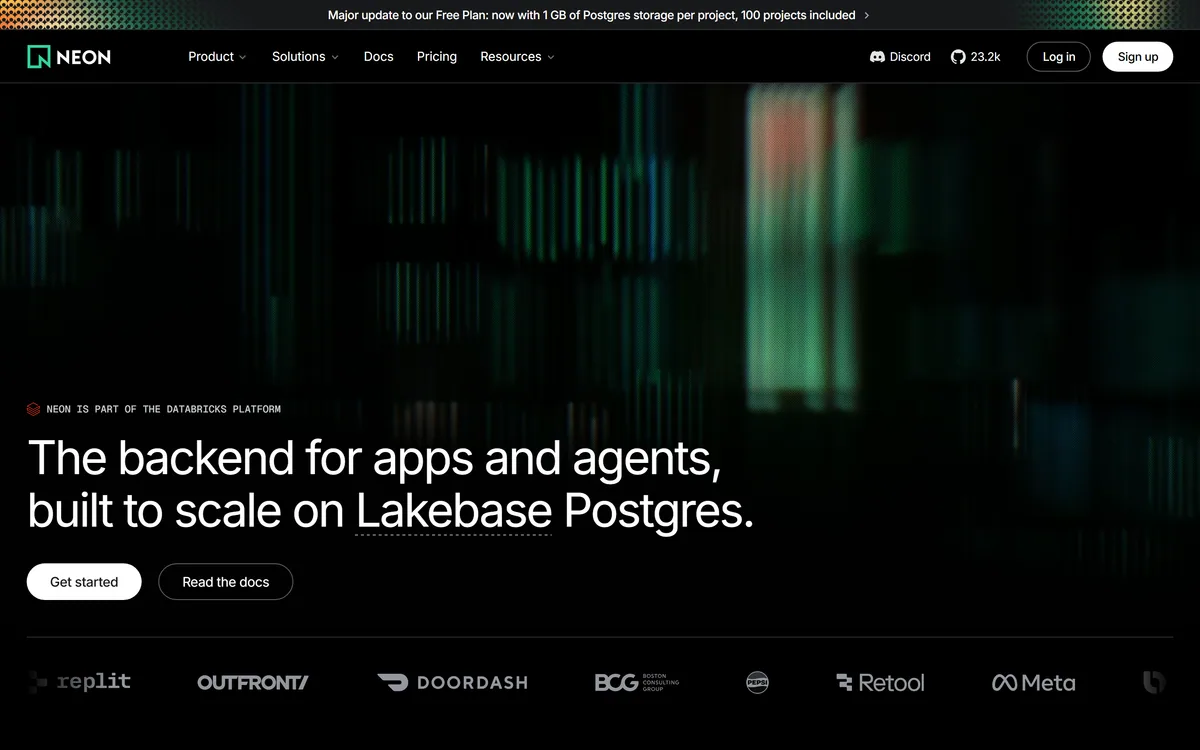
Last checked . Read from neon.com during this check, with the screenshot above captured at the same time.
A serverless Postgres and backend platform
Storage-compute separation with autoscaling
Instant restore after mistakes
Managed auth, S3-compatible storage, functions and an AI gateway
Vector, keyword and hybrid search
Positioned as infrastructure for app-generation agents
Stated to be part of the Databricks platform
A free plan with paid usage-based plans
No prices reproduced here, in line with this site's pricing policy
Neon is Postgres underneath, with Postgres's strengths and limits; serverless behaviour (cold starts, usage billing) is a trade-off to model for your workload. Plan quotas change, so check current limits.
Other Backend And Developer Tools
An IaC governance tool, a model platform and a spec-driven IDE to weigh alongside Neon.
Neon earns 4.2 as serverless Postgres with a genuinely better development workflow: autoscaling with scale to zero, instant copy-on-write branching for previews and tests, and instant restore after mistakes, now wrapped in a backend platform with auth, storage, functions and an AI gateway. It suits Postgres app builders, bursty workloads and platforms that need many databases. The trade-offs are serverless ones, cold starts and usage billing that heavy steady workloads should model, plus vendor direction now tied to Databricks, but for most modern app and agent backends it is an excellent choice. AInexfinder Editor Score: 4.2/5.
Neon pricing
AInexfinder does not list plan prices or billing details. For current pricing, plans, and trials, visit the official Neon website.
Vendor pricing, credits, and billing policies change over time. Always confirm on the official site before you buy.
Frequently asked questions
What is Neon?
Neon is a serverless Postgres platform, now part of Databricks. It separates storage from compute so databases autoscale and can scale to zero, offers instant database branching and restore, and adds auth, S3-compatible storage, functions and an AI gateway as a backend for apps and agents.
What is database branching in Neon?
A branch is an instant, copy-on-write copy of a database, so a feature, preview deployment or test run gets realistic data without duplicating all the storage or waiting for a dump-and-restore. It lets teams work with data the way they work with code branches.
Is Neon real Postgres?
Yes. Neon runs Postgres, so standard drivers, tools and SQL work. What changes is the architecture around it, separated storage and compute, autoscaling and branching, which gives it a different operational and cost profile from an always-on instance.
Does Neon have cold starts?
When compute scales to zero on an idle database, the next query triggers a brief cold start as compute resumes. That is the trade-off for not paying for idle time; latency-critical paths can keep compute warm or accept the occasional delay.
Is Neon owned by Databricks?
Neon states that it is part of the Databricks platform, built around what it calls Lakebase Postgres. That brings resources and enterprise backing; teams weighing long-term vendor direction should factor it into their decision.
How much does Neon cost?
Neon has a free plan and paid plans billed on compute and storage usage. We do not publish prices, which change; check the site. Run a real project and its branches for a few weeks and compare against an always-on managed Postgres.
Who is Neon best for?
Teams building on Postgres who want branch-based preview workflows, apps with bursty or idle-heavy traffic, and platforms or agents that need many isolated databases. It is less suited to steady, very heavy, always-on workloads that need fixed, predictable costs.
How does Neon compare to Supabase?
Both are Postgres-based. Supabase is a backend-as-a-service centred on a database plus auth, storage and realtime; Neon's emphasis is serverless Postgres with autoscaling and branching, and it has added auth, storage and functions too. Your choice often comes down to workflow and cost shape.
Can AI agents use Neon?
Yes. Neon positions itself as infrastructure for app-generating agents and platforms that create isolated backends for end users, and it includes vector search and an AI gateway, which suit AI applications that store embeddings and state in Postgres.
Can I recover from a bad migration on Neon?
Yes. Neon supports instant restore to an earlier point in time, and you can test migrations on a branch first so production is never at risk. Those two features address one of the most stressful parts of running Postgres.
Daniel reviews AI tools the slow way — by actually using them on real projects. His reviews cover what works, what breaks, and who each tool is genuinely a good fit for.
Daniel and the AInexfinder editorial team research Neon using public product information, listing evidence, and (when available) hands-on checks. Scores reflect listing completeness and transparency — not paid placement.
Listings may include affiliate or sponsored placements, which are labeled when present. Editorial scores and cons are not sold. See our affiliate disclosure and review methodology.
GitHub Copilot is an AI coding assistant that spans completion, chat, agent mode, automated code review, and a cloud agent that opens pull requests, working across VS Code, Visual Studio, JetBrains, Xcode, Neovim, Eclipse, the CLI, and github.com.
Replit AI turns a written description into a working application — the Agent writes the code, and Replit supplies the database, authentication, hosting, and monitoring, so a prototype goes live without a local setup or a deployment pipeline.
CodeScene measures code with CodeHealth, a validated metric predicting defects and delivery performance. It states the average enterprise codebase scores 5.15 out of 10 while AI needs 9.5 to work reliably, and offers an MCP server, automated reviews and IDE feedback. Operated by CodeScene AB.
Momentic is an agentic end-to-end testing platform where AI writes tests as plain-English YAML, runs them across web, iOS and Android, and self-heals them when the UI changes, with an autonomous bug-bashing agent, an MCP server and CI integration.
Tabnine is an enterprise AI coding assistant offering context-aware code completion, chat and agents with private deployment and a codebase-wide context engine. In July 2026 it was acquired by Tricentis, and tabnine.com now routes to the Tricentis agentic quality engineering platform.
Zencoder is an AI orchestration platform for engineering work: agents plan with one model, build with another and review with a third, across multi-repo indexing and full dependency mapping, inside VS Code and JetBrains. It adds scheduled automation and a work layer spanning Jira, Slack and Notion.