StudyFetch turns course material — PDFs, slides, lecture recordings, YouTube videos, photographed notes — into flashcards, quizzes, summaries and an AI tutor called Spark.E that answers only from your uploaded content.
studyfetch.com8 viewsAdded December 17, 2025164K visitors
Every AI study tool promises to explain things. The problem is which explanation. Ask a general chatbot about the Krebs cycle and you get a good, standard answer — which may use different notation, emphasise different steps and skip the specific detail your lecturer spent twenty minutes on and will examine you on.
StudyFetch's answer is to ground the tutor. Spark.E answers questions from the material you uploaded rather than from the open web, so what it tells you is what your course says.
This review covers why grounding matters more than model quality for a student, which of the many input types actually change how you study, where generated study material still needs checking, and how it compares with Mindomax and QuizRise.
"Learning that adapts to you" — the adaptation that matters is to your professor's material, not to you.
StudyFetch, Summarised
StudyFetch is an AI study platform that turns your own course material into flashcards, quizzes, notes and a tutor called Spark.E.
Spark.E answers from your uploads, not the open internet — so explanations follow what your lecturer actually taught rather than the general consensus.
It accepts what students really have: PDFs, PowerPoint, lecture recordings, YouTube links and photos of handwritten notes.
Beyond the basics: LiveLecture notes from recorded classes, an image analyser for diagrams, an essay grader, a study calendar and podcast-style audio summaries.
Backed by Owl Ventures with College Board participating in an $11.5 million Series A, which is unusual weight for a student study app.
Why A Grounded Tutor Beats A Better Model
This is the design decision that matters, and it is easy to undervalue because it sounds like a limitation.
A general-purpose chatbot like ChatGPT knows more than your lecturer. That is precisely the problem. Exams do not test the field, they test the course — a specific selection of material, with a particular emphasis, particular notation and particular boundaries about what is in scope.
A tutor answering from your uploaded slides stays inside those boundaries. When it explains something, it explains it the way your module explains it. When you ask about something the course does not cover, that absence is itself information.
There is a second benefit that students notice faster: it does not confidently invent things. A model constrained to a document set has far less room to hallucinate a plausible-sounding fact than one drawing on everything it has ever read, which matters when you are learning material you cannot yet fact-check.
The limit is the obvious one. If your lecture notes are wrong, incomplete or badly explained, a grounded tutor faithfully reproduces that. Grounding gives you fidelity to the course, not correctness.
A general chatbot knows more than your lecturer. Unfortunately, your lecturer is the one setting the exam.
The Input Types That Change How You Study
The accepted formats are broad, and two of them genuinely alter behaviour rather than just adding convenience.
Lecture Recordings And LiveLecture
The single biggest gap in student note-taking is that you cannot listen properly and write properly at the same time. Everyone has sat through a lecture transcribing slides and absorbing nothing.
LiveLecture producing notes from a recorded class removes that trade-off — you listen, and the notes exist afterwards. That is a change in how the hour is spent, not just a time saving.
Photographed Handwriting And Diagrams
A great deal of course material exists only as a photograph of a whiteboard or a page of someone's handwriting. Most study tools cannot read either.
The AI Image Analyzer extends this to diagrams specifically — explaining a figure rather than only the text around it. For anatomy, circuits, chemical structures and process flows, the diagram is the content, and a tool that only reads prose misses the subject entirely.
The Wider Toolset, Ranked By Usefulness
There is a lot here. Not all of it earns its place equally, and knowing which is which saves time.
Spark.E and generated flashcards — the core, and the reason to use it
LiveLecture — the feature most likely to change your week rather than your evening
Practice tests — retrieval practice is the best-evidenced study technique there is, and generating it from your own material is the hard part solved
Study calendar — genuinely useful, because spaced practice needs scheduling and students schedule badly
Essay grader — treat with care. Useful for structure and clarity; not a predictor of what your marker will think
Podcast-style audio summaries — good for revision on a commute, weak as a primary learning method
What Still Needs Your Eyes
Generated study material carries one specific risk, and it is not the one students expect.
The danger is not an obviously wrong flashcard — you would spot that. It is a card that is subtly wrong or ambiguously worded, drilled twenty times, and confidently recalled in an exam. Generated content is fluent, and fluency reads as correctness.
The same applies to practice questions. A question with two defensible answers teaches you to distrust your own reasoning; a question whose phrasing gives away the answer teaches you to recognise the card rather than know the fact.
The fix is cheap: review a generated set once before you start drilling it. Editing takes a fraction of the time writing would have, and it is the step that decides whether the hours you spend afterwards are worth anything.
Note-focused alternatives such as Coconote stop at capture and leave the drilling to you. One institutional note worth adding: check your university's policy on AI study tools. Using one to generate revision material is uncontroversial nearly everywhere; using an essay grader on a piece of assessed work may not be, and the rules differ by institution.
Getting Through A Term With It
The tool rewards being used weekly rather than in a panic the week before exams.
Upload the module material at the start of term, not the night before the test. A grounded tutor is only as good as what you have given it.
Record lectures where your institution permits it, and let LiveLecture take the notes so you can actually listen.
Review generated flashcards once before drilling — delete the ambiguous ones and fix any where the phrasing leaks the answer.
Use Spark.E at the moment you get stuck, not at the end of a session. The explanation lands while you still remember what confused you.
Photograph the whiteboard diagrams and run them through the image analyser rather than trying to describe them in text.
Let the study calendar schedule spaced review, and follow it even when it feels unnecessary — that feeling is what spacing is for.
Check your institution's AI policy before using the essay grader on anything assessed.
Inputs, Tools And Backing
Category
AI study platform with a course-grounded tutor
AI tutor
Spark.E — answers from your uploaded content rather than the open internet
Accepted inputs
PDF, PowerPoint, lecture recordings, YouTube videos, photos of handwritten notes
Generated material
Flashcards, quizzes, practice tests, notes, summaries
Lecture capture
LiveLecture — notes from recorded classes
Diagram support
AI Image Analyzer for figures and diagrams
Writing feedback
Essay Grader
Planning
Study Calendar with AI-scheduled sessions
Audio
Podcast-style audio summaries and live voice conversation with the tutor
Funding
$11.5 million Series A led by Owl Ventures, with College Board participating
Institutional offering
Educators and Enterprise section on the site
Reported users
Over 6 million students, per published coverage
Key features of StudyFetch
Spark.E — an AI tutor grounded in your own uploaded course material
Flashcard, quiz and practice test generation
LiveLecture notes produced from recorded classes
AI Image Analyzer for diagrams and figures
Input from PDFs, PowerPoint, recordings, YouTube and photographed handwriting
Essay Grader for structural and clarity feedback
Study Calendar with AI-scheduled revision sessions
Podcast-style audio summaries of study material
Live voice conversation with the tutor
An educators and enterprise offering for institutions
Pros & cons
Pros
5
Grounding the tutor in your own material is the right design for exam preparation
A constrained tutor has far less room to invent plausible-sounding facts
LiveLecture removes the listen-or-write trade-off that ruins lectures
Reads photographed handwriting and diagrams, which most study tools cannot
Owl Ventures backing with College Board participation is unusual weight for a study app
Cons
5
Grounding reproduces bad or incomplete course material faithfully
Generated flashcards need reviewing — fluent phrasing reads as correctness
The essay grader judges structure, not what your specific marker values
Audio summaries suit revision but are weak as a primary learning method
The site blocks automated checking, so published detail is harder to verify
Best For
University students preparing for exams on a specific syllabus
Anyone whose course lives in slides, PDFs and lecture recordings
Students in diagram-heavy subjects — anatomy, engineering, chemistry
People who lose the lecture to note-taking
Learners who need revision scheduled for them rather than by them
Three Different Ideas Of A Study Tool
These overlap on flashcards and diverge sharply on what else they are for.
Your exams test a specific syllabus rather than general knowledge
Your material is slides, PDFs and recordings rather than a textbook
You lose the lecture to note-taking and absorb little of it
Diagrams carry real content in your subject
You struggle to schedule revision and would follow a calendar that did it for you
Less Useful If
You want to learn a subject broadly rather than pass a specific module
Your course material is thin or badly explained — grounding reproduces that faithfully
You would drill generated flashcards without reviewing them first
Your institution restricts AI tools on assessed work and you would use the grader anyway
You already have a tuned spaced-repetition setup that works
Other Study And Revision Tools
Grounded tutoring, spaced repetition and assessment building are three different problems.
Mindomax — deeper spaced repetition for high-volume professional exams
QuizRise — the teacher's side — generating questions that export into an LMS
TurboLearn AI — another route from lecture recordings to study material
Khanmigo — tutoring on an established curriculum rather than your own uploads
Coconote — note generation from audio if that is the only gap you have
How This Was Checked
Last checked . studyfetch.com returns 403 to automated fetches, so the site was read from the browser capture above, with feature and funding detail taken from StudyFetch's own published pages and press coverage.
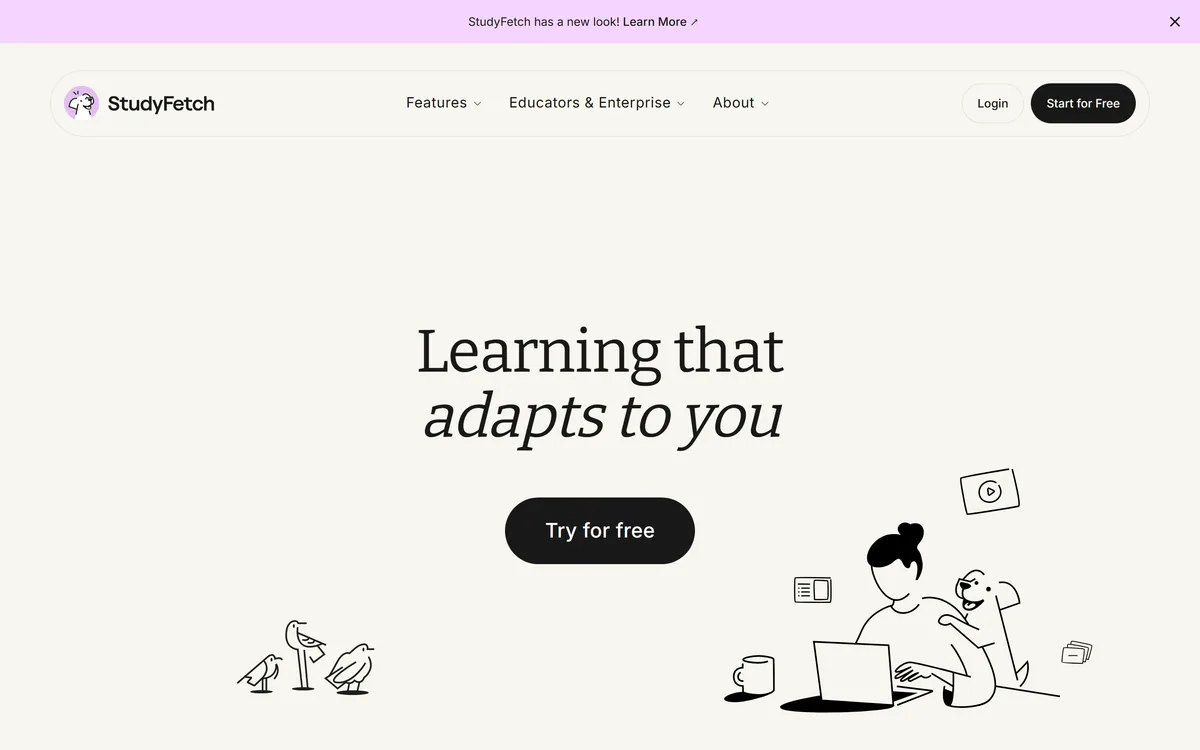
The site's own positioning line "Learning that adapts to you", and navigation covering Features, Educators & Enterprise and About, read from the capture
Spark.E named as the AI tutor, described as answering from your uploaded course content rather than the open internet
Accepted inputs of PDF, PowerPoint, lecture recordings, YouTube videos and photographs of handwritten notes
LiveLecture, AI Image Analyzer, Essay Grader and Study Calendar named as features
Podcast-style audio summaries and live voice conversation with the tutor
$11.5 million Series A led by Owl Ventures with College Board participating, from published coverage rather than a live company page
The figure of over 6 million students is reported in coverage and is not treated here as verified
No plan prices published here, in line with this site's pricing policy
Because the site blocks automated fetching, feature detail is thinner than we would normally verify line by line — confirm current features on the site before relying on any single one. The user and funding figures come from third-party coverage. Cautions about generated study material apply to the category generally.
Editor's Verdict
4.3/5
StudyFetch has an AInexfinder Editor Score of 4.3/5.
StudyFetch pricing
AInexfinder does not list plan prices or billing details. For current pricing, plans, and trials, visit the official StudyFetch website.
Vendor pricing, credits, and billing policies change over time. Always confirm on the official site before you buy.
Frequently asked questions
What is Spark.E?
StudyFetch's AI tutor. The important detail is that it answers from the course material you upload rather than the open internet, so explanations follow your lecturer's notation and emphasis instead of the general consensus.
Why does a grounded tutor matter more than a smarter one?
Because exams test the course, not the field. A general chatbot knows more than your lecturer, which is exactly the problem — it may use different notation, emphasise different steps and skip the detail your module will actually examine you on.
What file types does StudyFetch accept?
PDFs, PowerPoint slides, lecture recordings, YouTube videos and photographs of handwritten notes. That last one is unusual and genuinely useful, since a lot of course material only exists as a picture of a whiteboard.
Can it read diagrams?
The AI Image Analyzer is built for exactly that. In anatomy, engineering and chemistry the diagram is the content, and a study tool that only reads prose misses the subject.
Do I need to check the flashcards it makes?
Yes, once, before you start drilling. The risk is not an obviously wrong card — it is a subtly ambiguous one, drilled twenty times and confidently recalled in an exam. Reviewing a set takes a fraction of the time writing it would have.
StudyFetch vs Mindomax — which is better?
Different jobs. StudyFetch grounds a tutor in your specific course material, which suits university modules. <a href="/ai-tools/mindomax">Mindomax</a> goes deeper on spaced repetition, which suits high-volume professional exams like USMLE or MCAT.
Is it allowed by my university?
Generating revision material from your own notes is uncontroversial almost everywhere. Running assessed work through the essay grader may not be, and the rules differ by institution — check the policy before you use that particular feature.
Daniel reviews AI tools the slow way — by actually using them on real projects. His reviews cover what works, what breaks, and who each tool is genuinely a good fit for.
Daniel and the AInexfinder editorial team research StudyFetch using public product information, listing evidence, and (when available) hands-on checks. Scores reflect listing completeness and transparency — not paid placement.
Listings may include affiliate or sponsored placements, which are labeled when present. Editorial scores and cons are not sold. See our affiliate disclosure and review methodology.
LUCA is a K-12 reading intervention platform that analyses student reading at the phoneme level rather than the word level, identifying skill gaps in real time. It reports a 17.4 words-per-minute average fluency gain and 763,000+ grapheme-phoneme mappings, delivered through SoundScout, StoryGen and Assessment Intelligence.
Question AI is a homework-helper app that scans a question and returns step-by-step answers across school subjects, plus AI writing, search, translation and summarizing. Its study uses are legitimate; using it to hand in answers or graded work crosses academic-integrity lines, which we weigh honestly.
RemNote combines outlining, handwriting, PDF annotation and spaced-repetition flashcards in one document, generating cards, quizzes and summaries from PDFs, slides, lecture transcripts and video, with an exam scheduler that works backwards from a date you set.
Gizmo is a mobile-first study app that turns your notes, PDFs, slides and YouTube videos into AI-generated quizzes and flashcards, built around active recall so revision becomes a habit rather than a chore.
ThetaWise is a STEM study tool covering maths, science and engineering with step-by-step solutions, a Tutor Mode that guides through hints, generated animated video lessons, practice quizzes, flashcards and Desmos graphing, stating 765,781 students.
Wolfram|Alpha is a computational knowledge engine that computes verified, expert-level answers across maths, science, data and everyday topics using Wolfram's algorithms and curated knowledgebase, with step-by-step solutions, Pro features and an API.