
FinalBit is an AI film production platform organised around fourteen named agents, each handling one stage of production — screenwriting, coverage, storyboarding, video generation, script breakdown, budgeting, scheduling and pitch decks — rather than presenting a single general assistant.
TubeMagic
Verified
TubeMagic generates YouTube scripts matched to a channel's existing voice, letting creators choose the model, set script length by video duration and feed in top-performing reference videos, alongside tools for titles, tags, descriptions, ideas and keyword research in 95-plus languages.
3.4Editor Score
tubemagic.com7 viewsAdded July 6, 20253K visitors
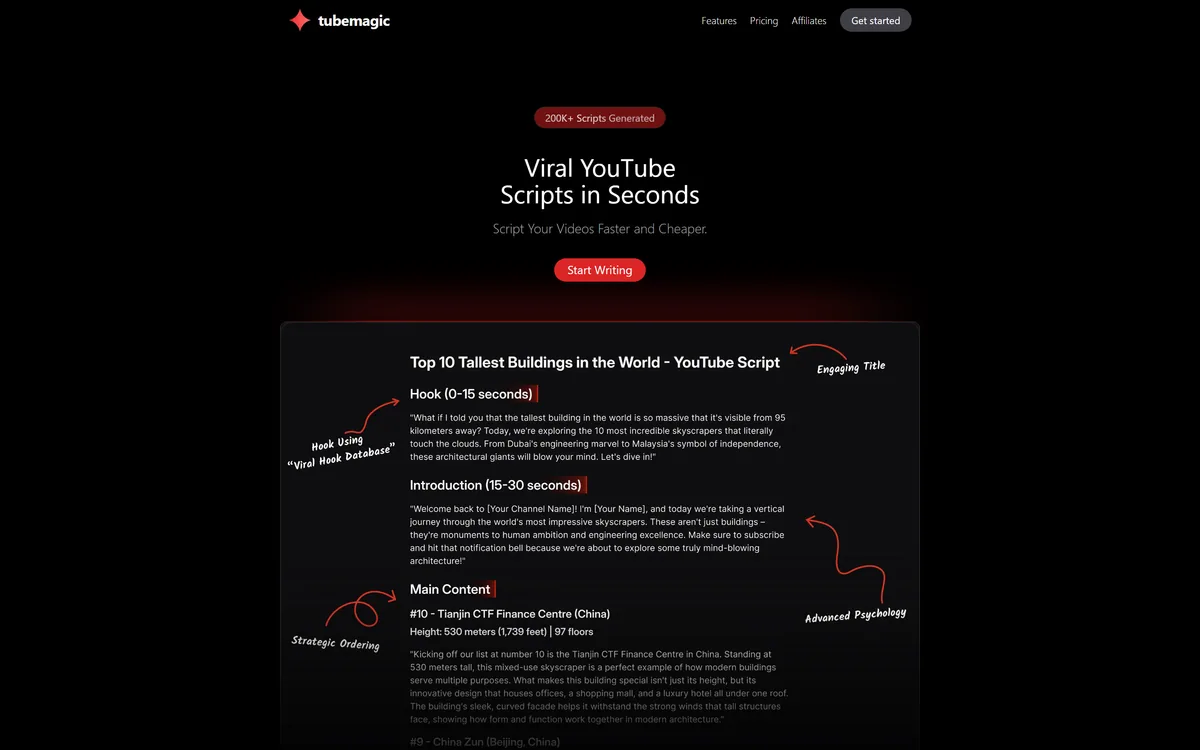
TubeMagic: Scripts Matched To Your Own Channel
The first step in the described workflow is the one that matters: paste your channel link and the tool automatically matches your brand voice and tone.
Reading before writing is the correct order, and most script generators skip it entirely.
The failure of generic AI scripts is not that they are badly written. It is that they are written in nobody's voice — a smooth, agreeable register that any channel could have produced, which means it belongs to none of them. A returning viewer notices immediately, because voice is most of what they came back for.
A channel's voice is a specific and identifiable thing: sentence length, how much digression is tolerated, whether jokes are signposted, how quickly the point arrives.
Extracting that from existing videos is a tractable problem, and it is the only version of this tool that could be useful to an established creator. For a new channel with nothing to learn from, the feature has nothing to work with — which is worth knowing before subscribing.
Generic AI scripts are not badly written. They are written in nobody's voice — a register any channel could have produced, which means it belongs to none of them.
Inspiration Videos And Where Voice Comes From
The second input is described as adding inspiration videos: top-performing videos whose best information is extracted and merged with your training data.
This is the feature that needs the most care, and the site's own wording invites the question.
Learning structural patterns from successful videos in a niche is ordinary craft. Every creator studies what works — how a good explainer opens, when it restates the premise, where it places the payoff — and nobody objects to that.
Extracting the best information from a specific video and merging it into your script is a different activity, and the distance between them is the distance between influence and appropriation.
The practical test is simple: could the creator whose video you referenced watch yours and feel it was research rather than a rewrite? Structure, pacing and format are shared property. Original reporting, a specific analysis and a distinctive framing belong to whoever did the work. Tools like StoryLab.ai face the same question from the copywriting side, and the answer is the same in both cases: attribution and independent work are what separate the two.
Can A Script Tool Learn Your Style?
Partly, and it is worth being precise about which part, because the answer determines how much editing you should expect.
Surface style transfers well. Sentence rhythm, vocabulary level, whether you use contractions, how you open and close — these are statistical properties of text and a model trained on your transcripts picks them up convincingly.
What does not transfer is judgement. Your voice is not only how you say things; it is what you choose to say, what you refuse to claim, which caveat you always add, and what you find genuinely interesting. Those are decisions, not patterns.
The result is a draft that sounds like you and occasionally says something you would not.
That is manageable as long as you read it, and dangerous if you do not, because a script in your own voice is much harder to review sceptically than an obviously generic one. The uncanny quality works against you: you agree with it because it sounds like agreeing with yourself. The model choice on offer is relevant here — different models produce noticeably different registers, and the site's note that one gives the most natural human-like flow is a real observation rather than a marketing line.
- Paste the channel link before generating anything.
- Read every script for claims you would not actually make.
- Use reference videos for structure, not for content.
- Match script length to your real video duration.
- Check keyword suggestions against your own analytics.
Titles, Tags And What Still Moves Rankings
The wider toolkit covers video ideas, video research, keyword research, a niche explorer, thumbnails, transcripts, article-to-script conversion, titles, descriptions and tags.
It is worth separating which of these still matter, because the platform has changed and the tooling has not always kept up.
Titles matter enormously and always will. A title is half of the click decision alongside the thumbnail, and it is the single highest-leverage line of text in a video.
Descriptions matter moderately — they provide context and hold links, and the first sentences do real work in search results.
Tags are the interesting case. They were once significant and their weight has been reduced substantially over the years, to the point where their main honest use is disambiguating a genuinely confusable term. Tools in this category tend to keep promoting them because they are easy to generate, and creators keep optimising them because they are visible. Neither is a good reason. Keyword research and the niche explorer are the more valuable half, since choosing a topic nobody has covered well beats optimising metadata for a topic that was saturated before you started. ViralBrain concentrates on that idea stage specifically.
A Plagiarism Claim Worth Reading Twice
One FAQ answer deserves quoting because a reader should not accept it uncritically. Asked whether AI-generated content is good for SEO and plagiarism-free, the site answers that it absolutely is, citing a combination of AI and human curation plus a built-in plagiarism checker.
Both halves overstate what can be known.
On search: platforms have repeatedly stated that they reward useful content regardless of how it was produced, while also acting against mass-produced material that adds nothing. Generated content is therefore neither good nor bad for search inherently — it depends entirely on whether the result is useful, and no tool can promise that on your behalf.
On plagiarism: a checker compares text against indexed sources and catches verbatim overlap. It does not detect a rewritten argument, a borrowed structure or an uncredited analysis, which is what most plagiarism actually looks like.
Neither point suggests the tool produces plagiarised work. The problem is the certainty: absolutely is not available for either claim, and a creator relying on it may not verify things they should. The footer notes the company was previously known by another name and a well-known creator's testimonial describes acquiring and investing in it, which together explain a product that has changed hands. Thumbnail tooling like Thumbmagic covers the visual half of the same upload.
Writing A Script You Would Still Publish
A generated script in your own voice is the hardest kind to review, because it sounds like you already agreed with it.
This order keeps the channel yours.
- Connect the channel so the voice model has something real to learn from.
- Set the script length from your actual video duration, not an ideal one.
- Use reference videos for structure and pacing only.
- Read the draft aloud and cut anything you would not say.
- Verify every factual claim yourself before recording it.
- Write the title and thumbnail as a pair, not separately.
TubeMagic: What The Toolkit Includes
- Voice matching from your channel link, before a single line is written.
- Model choice — you pick which model writes, with a stated difference in register.
- Length matched to video duration, from one minute up to twenty.
- Reference video input, merging patterns from top performers with your own material.
- 95-plus languages for titles, descriptions, tags, community posts and ideas.
TubeMagic: The Suite And Its Reach
| Category | AI script writing and channel optimisation for YouTube |
|---|---|
| Voice matching | Brand voice and tone learned from a pasted channel link |
| Model selection | Creator chooses the model, with a stated difference in output flow |
| Script length | Matched to target video duration, from one to twenty minutes |
| Reference input | Top-performing videos merged with your own training data |
| Idea tools | Video idea generator, video research, keyword research, niche explorer |
| Content tools | Thumbnail generator, transcript formatter, article-to-script conversion |
| Metadata tools | Titles, descriptions, tags and a tags organiser |
| Languages | Stated as 95-plus for metadata, community posts and ideas |
| Scale claim | Stated as 200,000-plus scripts generated |
| Trial policy | Free trials disabled due to spam; a 30-day money-back guarantee offered instead |
| Company | Tube Magic LLC, stated in the footer as previously operating under another name |
Should Your Scripts Be Generated?
Generate the draft when
- You have an existing channel with a voice worth learning from.
- Scripting is the bottleneck between idea and upload.
- You publish across several languages.
- You want metadata and research in the same place.
- You will read and rewrite every draft before recording.
Draft the script yourself when
- Your channel's value is your specific analysis or reporting.
- You have no back catalogue for voice matching to use.
- You would record a generated script without editing it.
- Your topic requires expertise you would have to verify line by line.
- The writing is the part you actually enjoy.
Key features of TubeMagic
Script generation matched to channel voice
Creator-selected model choice
Script length matched to video duration
Reference video input for structure
Video idea generation and niche research
Keyword research and tag organisation
Title, description and thumbnail generation
Article-to-script and transcript formatting
Pros & cons
Pros
7- Reads the channel before writing, which is the correct order
- Matching script length to video duration reflects the real job
- Model choice is unusually transparent for this category
- Keyword research and niche exploration are the genuinely valuable tools here
- Ninety-five-plus languages for metadata is broad coverage
- Named creator testimonials with follower counts rather than anonymous praise
- A single suite covering ideas, script and metadata for one upload
Cons
7- Asserts generated content is good for search and plagiarism-free with unwarranted certainty
- A plagiarism checker catches verbatim overlap, not borrowed structure or argument
- Extracting the best information from reference videos invites a real question
- A script in your own voice is the hardest kind to review sceptically
- Free trials are disabled, so evaluation requires paying first
- Tag tooling promotes a signal whose weight has been substantially reduced
- New channels have no back catalogue for voice matching to learn from
Best For
- Established channels with a voice worth learning from
- Creators running several channels at once
- Publishers producing metadata across many languages
- Channels where scripting is the bottleneck to publishing
- Creators who want research and writing in one place
TubeMagic Against Other Channel Tools
Creator tools differ by which part of the upload they handle.
| Tool | Handles | Voice | Best for |
|---|---|---|---|
| TubeMagic | Scripts, metadata and research | Learned from your channel | Established channels scripting faster |
| ViralBrain | Ideas and hooks | Prompted | Deciding what to make |
| StoryLab.ai | Copy and marketing text | Prompted | Written content beyond video |
| Thumbmagic | Thumbnails | Your own footage | The visual half of the upload |
| Writing it yourself | Everything | Actually yours | Channels where the thinking is the product |
More YouTube Growth Tools
Other tools across ideas, scripts and channel optimisation.
- ViralBrain — idea and hook generation before scripting
- StoryLab.ai — marketing copy alongside video scripts
- Thumbmagic — thumbnails for the same uploads
- SendShort — clipping the finished video into shorts
- Syllaby — planning a content calendar around keywords
TubeMagic: Read From The Channel Pages
Last checked . Read from tubemagic.com in a browser session on the date above, with the screenshot captured at the same time.
- Positioned as generating viral YouTube scripts in seconds
- Scale stated as 200,000-plus scripts generated
- Step one described as pasting a channel link to match brand voice and tone
- Model selection offered to the creator, with a stated difference in natural flow
- Script length described as matched to video duration, from twenty minutes down to one
- Inspiration videos described as having their best information extracted and merged with your training data
- A wider toolkit listing ideas, research, keyword tools, thumbnails, titles, descriptions and tags
- Language support stated as over 95 for descriptions, titles, tags, community posts and ideas
- Free trials stated as disabled due to spam, with a 30-day money-back guarantee offered instead
- Payments stated as processed by a third party with no card details stored
- An FAQ answer asserting generated content is good for search and plagiarism-free, citing a built-in checker
- Footer showing Tube Magic LLC with a 2025 copyright, a note of a previous company name, plus privacy policy and terms
What we could not confirm: how voice matching works or how much material it requires; what the built-in plagiarism checker compares against; how the 200,000-script figure is counted; which models are currently available; what reference-video extraction actually copies; and pricing. Testimonials are vendor-selected. We did not generate a script.
Editor's Verdict
3.4/5Pasting your channel link so the tool learns your voice before writing anything is the right sequence, and matching script length to video duration is a small detail that shows someone understood the actual job. Letting creators pick the model is unusually honest about what is under the hood. Two things hold the score down: a flat assertion that generated content is good for search and plagiarism-free, which is stated more confidently than either claim can support, and free trials disabled with a money-back guarantee in their place. AInexfinder Editor Score: 3.4/5.
TubeMagic pricing
AInexfinder does not list plan prices or billing details. For current pricing, plans, and trials, visit the official TubeMagic website.
Visit official website for pricingVendor pricing, credits, and billing policies change over time. Always confirm on the official site before you buy.
Frequently asked questions
What does TubeMagic do?
It generates YouTube scripts matched to your channel's existing voice, with model choice and length set by video duration, alongside tools for ideas, keyword research, titles, descriptions, tags and thumbnails.
Why does reading the channel first matter?
Because generic AI scripts fail on voice rather than quality. A smooth register any channel could have produced belongs to none of them, and voice is most of why a returning viewer came back.
How much of my style can it actually learn?
Surface style transfers well — rhythm, vocabulary, how you open and close. Judgement does not. What you refuse to claim and which caveat you always add are decisions rather than patterns.
What is the risk with a script in my own voice?
It is much harder to review sceptically. You agree with it because it sounds like agreeing with yourself, which is exactly when a claim you would not have made slips through unchecked.
Is using reference videos acceptable?
Learning structure and pacing is ordinary craft that every creator does. Extracting the substance of a specific video is different. The test is whether that creator would see research or a rewrite.
Is generated content good for SEO?
Neither inherently good nor bad. Platforms say they reward useful content regardless of how it was made, while acting against mass-produced material that adds nothing — so it depends on the result, not the method.
Does a plagiarism checker make it safe?
Only against verbatim overlap with indexed sources. It does not detect a rewritten argument, a borrowed structure or an uncredited analysis, which is what most plagiarism actually consists of.
Do tags still matter?
Much less than they once did. Their remaining honest use is disambiguating a genuinely confusable term. Keyword research and niche exploration are the more valuable half of the same toolkit.
Is there a free trial?
No — the FAQ states trials were disabled due to spam, with a 30-day money-back guarantee offered instead. That means evaluation requires paying first and requesting a refund if it does not suit.
Who should not use it?
Channels whose value is specific analysis or original reporting, new channels with no back catalogue to learn from, and anyone who would record a generated script without editing it.
Reviews
Log in to write a review.
User Reviews
No reviews yet. Be the first to share your experience with TubeMagic.
Reviewed by Daniel Reed
Assigned reviewer
Daniel ReedSenior AI Tools Reviewer
Daniel reviews AI tools the slow way — by actually using them on real projects. His reviews cover what works, what breaks, and who each tool is genuinely a good fit for.
Hands-on reviewsProduct testingAI software
Daniel and the AInexfinder editorial team research TubeMagic using public product information, listing evidence, and (when available) hands-on checks. Scores reflect listing completeness and transparency — not paid placement.
- Last verified
- Methodology
- How we review AI tools
- Sources used
- tubemagic.com
- AInexfinder listing fields (features, pros/cons, description)
- Public vendor pages when available
- Editorial policy
- Listings may include affiliate or sponsored placements, which are labeled when present. Editorial scores and cons are not sold. See our affiliate disclosure and review methodology.
Related tools

Copy.ai has become an AI-native go-to-market platform: workflows and agents that run prospecting, lead processing, deal coaching, ABM, and CRM enrichment across Salesforce, HubSpot, Gong, Outreach, and 2,000+ integrations.
FreemiumWriting & Content

Writesonic has become an AI search growth platform — tracking whether your brand appears across 10 AI platforms, running optimisation and citation work through an Action Center, and reporting results against traffic and revenue.
FreemiumWriting & Content
Talefy, from AIcberg Labs, is an interactive AI storytelling platform. Readers make choices that change the plot, and creators build characters, worlds and branching narratives across fantasy, sci-fi, romance, horror and comedy.
FreemiumWriting & Content
MailMaestro is an AI email assistant from Maestro Labs that drafts replies, summarizes threads and triages your inbox directly inside Outlook and Gmail, offering three drafts per request in your tone across 20+ languages, with enterprise-grade security.
FreemiumWriting & Content
Postiv packages LinkedIn strategy, drafting, carousel design, scheduling, analytics and comment replies into a single weekly ritual run by an assistant called Bob, working through the official LinkedIn API rather than a browser extension.
FreemiumWriting & Content
Explore More
Embed this listing on your site
Featured on AInexfinder