Banani is an AI UI design tool that turns a text description into editable, multi-screen prototypes, can generate designs from screenshots, images or Figma links, lets you restyle with AI or manual design tokens, and exports to Figma, HTML/CSS or images.
banani.co6 viewsAdded December 26, 202556K visitors
Turning a product idea into screens usually requires a designer or hours in a design tool. Banani lets product managers, founders and students generate interactive UI prototypes from a plain-language description.
It generates editable, multi-screen prototypes, can extract style and layout from screenshots or Figma links, lets you adjust the look with AI or design tokens, and exports to Figma, HTML/CSS or images. It sits among design tools like Mew Design, focused specifically on product UI.
This review covers how Banani turns a prompt into screens, which product people it suits, how its plans are structured, and when its generated UI needs a designer.
Banani generates editable UI prototypes from a text description.
Text-To-UI Prototypes For Non-Designers
Banani's job is to compress the gap between an idea and a clickable prototype. You describe your product in plain language and it generates multi-screen designs you can edit, which makes early product thinking visual far faster than sketching from scratch.
It is designed for people who are not full-time designers, product managers wireframing ideas, founders exploring a concept, students and indie hackers, though designers can use it for rapid exploration too.
Users highlight one interaction in particular: click an element and Banani generates the screen a user would see next, which helps flesh out flows rather than isolated screens.
The honest framing is that Banani produces strong first drafts, not finished products. Good UX depends on research, accessibility and the details of your users, and generated designs need a designer's eye before they ship.
That speed changes how teams discuss ideas. Instead of debating a feature in a document, a product manager can bring three generated variations to a meeting, gather reactions and iterate the same afternoon, which shortens the loop between an idea and useful feedback.
Banani produces strong first drafts of UI, not finished products; good UX still depends on research, accessibility and judgement.
How Does Banani Turn A Prompt Into Screens?
Banani works from text or references and hands designs off to the tools teams already use.
Multi-Screen Prototypes From A Description
You describe the product, and Banani generates editable, multi-screen prototypes that you can refine by prompting or by editing directly, including generating the next screen in a flow from an element you click.
For full-stack mobile apps rather than design prototypes, a builder like RapidNative generates working code; Banani stays on the design and prototyping side.
References, Style Tweaks And Figma Export
You can drop in images, screenshots or Figma links and Banani extracts visual style and layout to generate fresh ideas or recreate a UI closely, then adjust the style with AI or fine-tune colours, typography and other tokens manually. Designs export to Figma, HTML/CSS or images.
Recreating another product's interface 'one to one' should be limited to your own products or inspiration you transform, since copying a competitor's distinctive design can raise intellectual-property concerns. For pitch decks and visual storytelling, Gamma covers different ground.
Which Product People Banani Suits
Banani suits product managers who need quick wireframes to communicate ideas, founders validating concepts before hiring a designer, and students and indie hackers building portfolios or side projects.
It suits designers who want to explore many directions quickly before investing time in detailed work, and teams that want to share interactive prototypes for feedback early.
It suits less well complex enterprise applications with intricate states and data, accessibility-critical products that need careful compliance work, and teams that need a full design system maintained over time.
It also does not replace user research: a polished prototype can still solve the wrong problem, so test generated flows with real users.
A sensible approach is to use Banani for the first ten per cent of design work, getting an idea onto screens, and then bring in design judgement for the remaining refinement.
Students and career-switchers can also use it to learn interface patterns quickly, studying how common screens are structured before practising the same layouts by hand in a professional design tool.
How Banani's Plans Are Structured
Banani is free to start, with paid plans that typically add more generations, projects and export options. We do not publish prices, which change; check the site.
The value question is speed: if it turns days of wireframing into hours for your team, a subscription can easily pay for itself.
Check which export formats sit on which tier, since Figma and code export are often what makes a prototype useful downstream.
The sensible approach is to prototype one real feature on the free tier, export it to your design tool, and see how much rework a designer needs before deciding.
Teams should also decide who owns and maintains prototypes over time, since a pile of generated projects can drift away from the real product unless someone keeps them current.
Prototyping One Flow In Banani
Because prototypes are only useful if they survive handoff, test Banani on a real feature end to end.
Describe one real feature or flow you are planning.
Generate screens and refine them by prompting and direct edits.
Click elements to generate next screens and complete the flow.
Adjust style tokens to match your brand.
Export to Figma or HTML/CSS and have a designer review the result.
Pass/fail: Banani is worth it if drafts save real time and survive handoff.
Use references for inspiration, not to copy others' distinctive designs.
Banani UI-Design Facts
What it is
An AI UI design and prototyping tool
Input
Text descriptions, screenshots, images or Figma links
Output
Editable, multi-screen interactive prototypes
Styling
AI restyling plus manual colour and type tokens
Interactions
Generates the next screen from a clicked element
Sharing
Links to projects or screens for feedback
Export
Figma, HTML/CSS or images
Access
Free to start, with paid plans
Banani, The UI-Prototype Brief
Banani generates UI prototypes from text: describe a product and get editable, multi-screen designs in seconds.
It can start from references: screenshots, images or Figma links to borrow a style or layout.
It hands off cleanly: share links for feedback and export to Figma, HTML/CSS or images.
It drafts, designers finish: generated UI needs UX judgement, accessibility checks and respect for others' designs.
Key features of Banani
Text-to-UI generation
Multi-screen prototypes
Click-to-generate next screen
Reference-based design
AI restyling
Design-token controls
Shareable prototypes
Figma and HTML/CSS export
Pros & cons
Pros
5
Ideas to clickable screens in minutes
Built for non-designers
Generates whole flows, not just screens
Exports to Figma and code
Free to start
Cons
5
Drafts need design refinement
Accessibility needs separate checking
Less suited to complex enterprise UI
IP caution with recreating references
Advanced exports may need a paid plan
Best For
Rapid wireframing
Concept validation
Early prototypes
Design exploration
Side projects
Banani Compared With Figma-Style Design Tools
The useful comparison is with other ways to design and prototype products.
Accessibility-critical products without expert review
Teams needing a maintained design system
Anyone skipping user research
Copying competitors' distinctive designs
What Banani's Site Demonstrates
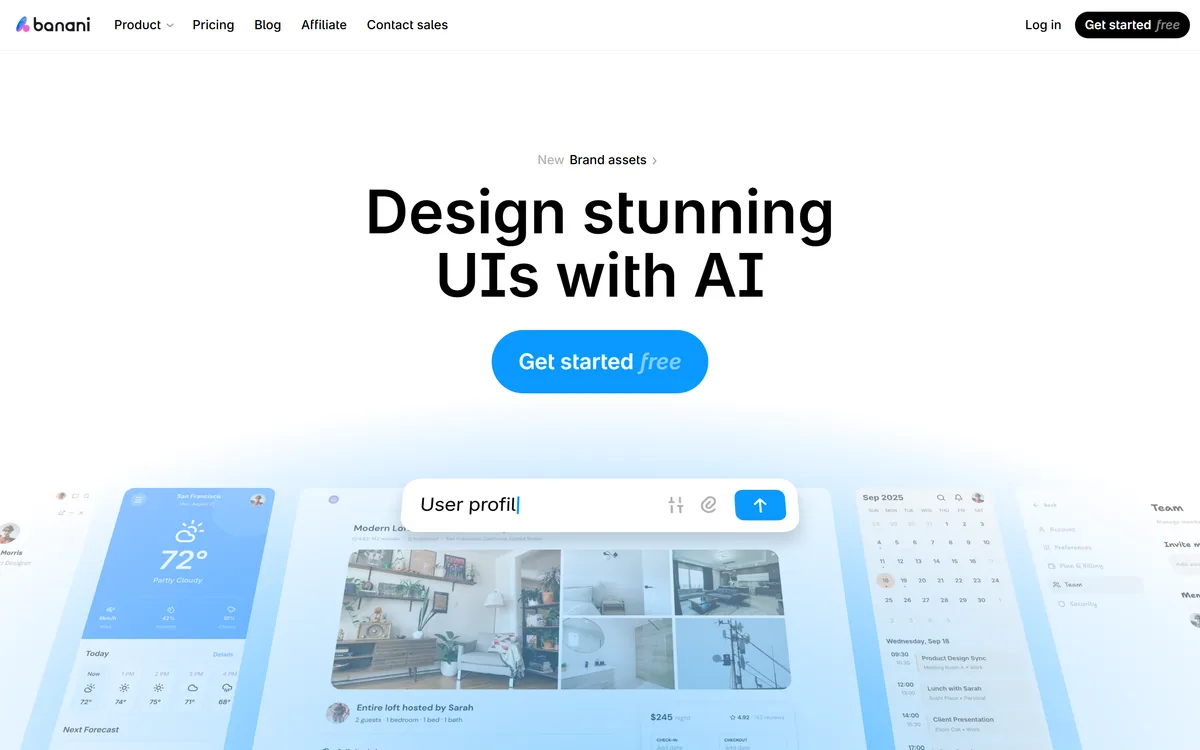
Last checked . Read from banani.co during this check, with the screenshot above captured at the same time.
An AI UI design and prototyping tool
Editable, multi-screen prototypes generated from text
Designs generated from images, screenshots or Figma links
Style extraction and close UI recreation from references
AI restyling and manual design-token controls
Shareable links for feedback
Export to Figma, HTML/CSS or images
Vendor-stated 100K+ users and testimonials
Free to start, with paid plans
No prices reproduced here, in line with this site's pricing policy
Banani's prototypes are drafts that need design and accessibility review. Use reference-based recreation for your own products or transformed inspiration, not to copy others' distinctive designs. User figures are vendor-stated.
Design Tools To Compare With Banani
A design tool, a presentation maker and a mobile app builder to compare with Banani.
Banani earns 3.9 as a fast, approachable way to turn product ideas into editable, multi-screen UI prototypes from text or references, with useful touches like generating the next screen from a clicked element, style tokens and Figma and HTML/CSS export. It suits product managers, founders and designers exploring ideas. Generated UI is a draft that needs design, accessibility and user-research input, and reference-based recreation should never become copying others' designs. AInexfinder Editor Score: 3.9/5.
Banani pricing
AInexfinder does not list plan prices or billing details. For current pricing, plans, and trials, visit the official Banani website.
Vendor pricing, credits, and billing policies change over time. Always confirm on the official site before you buy.
Frequently asked questions
What is Banani?
Banani is an AI UI design tool that generates editable, multi-screen prototypes from text descriptions or references like screenshots and Figma links, and exports to Figma, HTML/CSS or images.
Who is Banani for?
Product managers, founders, students, indie hackers and designers who want to turn ideas into interactive prototypes quickly, especially without a full design background.
Can Banani export to Figma?
Yes. Designs can be exported to Figma, HTML/CSS or images, which helps hand off prototypes to designers or developers.
Can Banani design from a screenshot?
Yes. You can drop in images, screenshots or Figma links and it extracts style and layout to generate new ideas or recreate a UI closely.
Is it okay to copy another app's design with Banani?
Use references for inspiration or your own products. Recreating a competitor's distinctive interface too closely can raise intellectual-property concerns.
Is Banani free?
Banani is free to start, with paid plans for more generations and features. We do not publish prices, which change; check the site.
Does Banani replace a designer?
No. It produces strong first drafts quickly, but UX, accessibility and design-system work still need a designer's judgement.
Can Banani create whole user flows?
Yes. Beyond single screens, you can click an element and have Banani generate the screen a user would see next, building out flows.
Can I customise Banani's styles?
Yes. You can ask the AI to change the style, for example more playful or minimal, and fine-tune colours, typography and other tokens manually.
How does Banani differ from an app builder?
Banani focuses on design prototypes you hand off; app builders generate working code. Use Banani to shape the UI, then build it with your preferred stack.
Daniel reviews AI tools the slow way — by actually using them on real projects. His reviews cover what works, what breaks, and who each tool is genuinely a good fit for.
Daniel and the AInexfinder editorial team research Banani using public product information, listing evidence, and (when available) hands-on checks. Scores reflect listing completeness and transparency — not paid placement.
Listings may include affiliate or sponsored placements, which are labeled when present. Editorial scores and cons are not sold. See our affiliate disclosure and review methodology.
Canva AI is the Magic Studio suite built into Canva — Magic Write for copy, Dream Lab for images, Magic Edit, Expand and Eraser for photos, Magic Switch for reformatting, Magic Charts for data, and Canva Code for interactive widgets.
Magic Patterns is an AI design tool for product teams that turns prompts, requirements and ideas into high-fidelity UI, matching your existing design system so teams can prototype and test directions before committing engineering resources.
UXMagic turns text prompts, sketches or screenshots into Figma-ready UI designs, generating wireframes, sitemaps and multiple screens, importing your design system, and exporting to Figma, HTML, React or Webflow.
Flowstep generates editable user interface designs from a text description on an infinite canvas. It produces multiple screens in one pass, accepts PRDs and reference images as input, supports real-time collaboration, and exports both to Figma by ordinary copy-paste and to React, TypeScript and Tailwind code.
krea2.org is a browser image-generation workspace that runs several third-party models side by side, including Krea 2 tiers, FLUX.2, GPT Image 2, Nano Banana and Seedream 5.0, with reference uploads, six aspect ratios and live model switching.