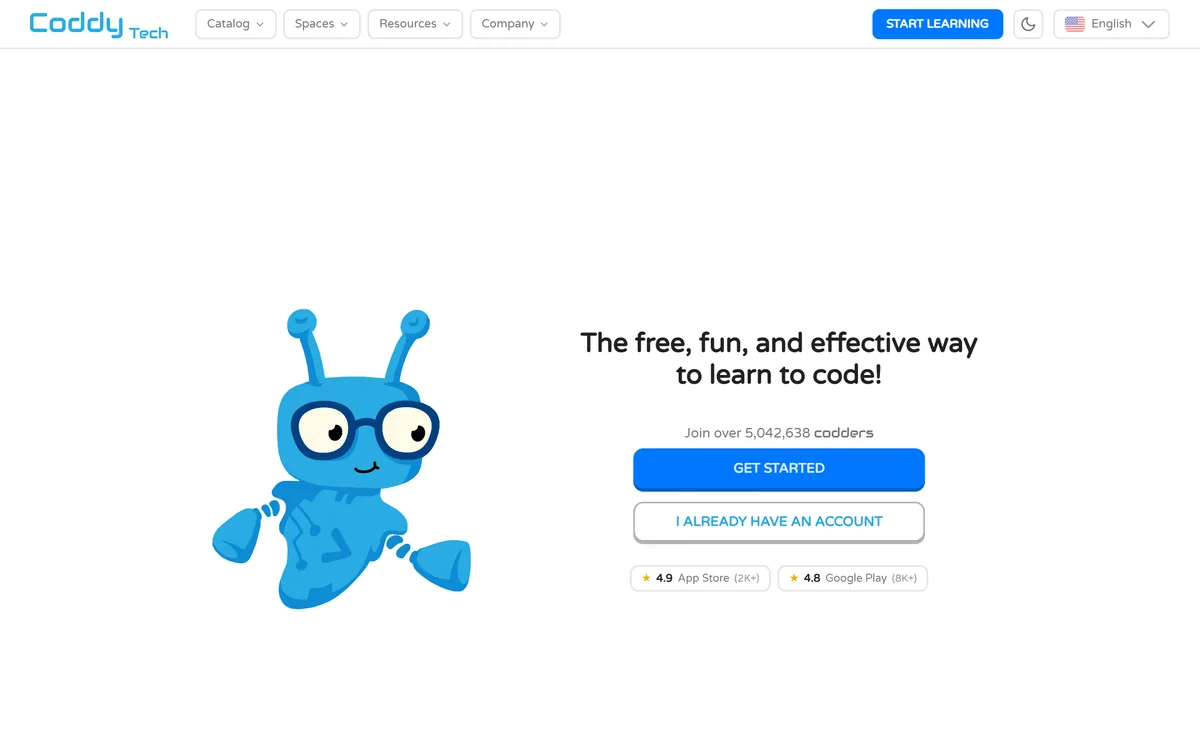
Coddy teaches programming through interactive browser lessons across 20+ languages including Python, JavaScript, SQL, Rust and Go, plus Git, Docker, Excel and AI prompting. It uses streaks, leaderboards and certificates, and states over 5,042,638 registered learners.
Most people who try to learn programming quit in the first week, and not because the concepts are hard. They quit because two hours disappeared into installing something, setting a path variable and reading an error message about a version.
Browser-based lessons exist to delete that hour. You open a page, there is a code editor, you type, it runs. Whatever else is true about this format, that part is a real contribution.
Coddy does this across more than twenty languages and adds the mechanics that keep people returning — streaks, leaderboards, certificates. The question is how far the format takes you before you have to leave it.
Coddy: Learn To Code In The Browser
Nothing to install — lessons run in the browser, removing the setup step that stops most beginners.
20+ languages and tools, from Python and JavaScript through SQL, Rust and Go to Git, Docker and Excel.
Streaks, freeze days and leaderboards, borrowed from language learning and effective for the same reasons.
5,042,638 learners claimed, with displayed ratings of 4.9 on the App Store and 4.8 on Google Play.
Certificates on completion, which are worth something as evidence of effort and very little as a credential.
Coddy's homepage, captured 9 September 2026, showing the learner count and course catalogue.
Do Streaks And Leaderboards Actually Help?
Coddy's homepage foregrounds a streak counter, freeze days, a Double or Nothing challenge and a Challenger League leaderboard where the top seven advance.
The instinct is to dismiss this as manipulation, and the instinct is half right. These mechanics are borrowed directly from consumer language apps, and they are designed to produce habit rather than understanding.
But the honest observation is that habit is the binding constraint. Almost nobody fails to learn programming because they could not grasp a loop; they fail because they stopped opening the tab after eleven days, and eleven days is not enough for anything to stick.
A streak is a commitment device. It gives you a reason to do fifteen minutes on the evening you do not feel like it, and fifteen minutes on that evening is worth more than two hours on a Saturday you were going to do anyway.
Freeze days are the well-designed part, because they acknowledge that real life interrupts. A streak system with no forgiveness punishes one missed day with total loss, and the usual response to losing a 40-day streak is to stop entirely.
Almost nobody fails to learn programming because they could not grasp a loop. They fail because they stopped opening the tab after eleven days.
Where Gamified Learning Breaks Down
The ceiling arrives at a predictable place, and it is worth knowing where before you get there.
Interactive lessons work by having one right answer and a test that checks for it. That structure is what makes instant feedback possible, and it is also what makes the exercise unlike programming.
Real work has no test waiting. The task is ambiguous, the requirements are wrong, the data is malformed, and the hardest part is deciding what to build rather than making a function return the expected string.
Debugging is the specific casualty. In a lesson, a failing test tells you which line and often why. In practice, something is wrong three files away for a reason nobody wrote down, and the skill is the search — which cannot be taught by a system that already knows the answer.
So the honest arc is: use a platform like this to get fluent with syntax and basic constructs, then leave for projects where nothing tells you whether you are right. Tools that help with the messy part — the study assistants like Coconote, or code review products such as cubic that critique work you actually wrote — belong to that second phase.
Twenty-Plus Languages And What That Means
Coddy's catalogue spans Python, JavaScript, TypeScript, React, Next.js, HTML, CSS, Java, C++, SQL, C, C#, PHP, Dart, Go, R, Rust, Lua, Luau, Ruby, Swift, Verilog and Assembly, plus AI Prompts, Terminal, Excel, Git and Docker.
Breadth of catalogue is the most misread signal in learning platforms. It looks like value and it is mostly a marketing surface, because nobody learns twenty-three languages and the ones you would learn second are easier than the first by a wide margin.
What breadth actually buys you is not having to switch platforms when your interest moves, and not being told that the thing you need is unavailable. That is worth something, but it is a convenience rather than a differentiator.
The more interesting entries are the non-languages. Terminal, Git, Docker and Excel are the skills that working developers use daily and that almost no curriculum teaches, because they are unglamorous and hard to make into a lesson.
Git in particular is worth more than a fourth language. The site lists guides on rebase, worktree, stash, merge, reset, cherry-pick and undoing commits — which is precisely the material people search for in a panic, and precisely what is missing from most beginner paths.
Pick one language and finish it before touching the catalogue's other twenty-two.
Do the Git, Terminal and Docker material — it is worth more than a second language.
Use streaks deliberately as a commitment device, not as a score.
Leave for real projects once syntax stops being the thing slowing you down.
Treat certificates as evidence of effort, not as a credential employers weigh.
Certificates And What They Are Worth
Coddy offers a certificate for each completed course and suggests adding them to a LinkedIn profile and résumé.
The honest assessment is that a completion certificate from any learning platform carries close to zero weight with a technical hiring manager, and it is better to know that before you optimise for collecting them.
The reason is not snobbery. A certificate certifies that you finished a course, and finishing a course is not evidence you can build something — which is the only question a hiring process is actually asking.
What does carry weight is work that exists: a repository somebody can open, a small thing that runs, a bug you fixed in something public. Those demonstrate exactly what a certificate asserts.
The useful reframe is to treat certificates as personal milestones rather than professional signals. Finishing a course is worth marking, and the mistake is only in expecting somebody else to be impressed by the marker.
How Coddy Compares With Learning By Doing
The alternative to a structured platform is the one most working developers actually took: pick a project you want to exist, and learn whatever it requires as you hit it.
That approach is more effective and much less pleasant. Progress is invisible, you spend your first week on configuration, and the feedback loop is measured in days rather than seconds.
Structured lessons invert both. Progress is legible, feedback is instant, and the environment works — which is why they are better at the beginning and worse later.
The transition point is when you stop being blocked by syntax and start being blocked by design. At that stage, more lessons produce diminishing returns and a project produces most of the learning.
A reasonable pattern is to use both at once from about week three: lessons for the language you are learning, and one small self-directed project where nothing tells you the answer. The friction of the second is the point, and pairing it with reference material — a place to keep notes, something like NoteGPT — makes the frustration survivable.
Getting Real Value From Coddy
The failure pattern with learning platforms is breadth: three languages started, none finished, a long streak and no ability to build anything.
This order fixes the sequence so the habit mechanics work for you rather than on you.
Choose one language based on what you want to build, not on which is trending.
Set a floor of fifteen minutes daily rather than an ambitious weekly target.
Use freeze days when life interrupts, since a lost streak is where most people quit.
Do the Git and Terminal material early, not as an afterthought.
Start a small project of your own by week three, in parallel with lessons.
Stop taking lessons when syntax is no longer what is slowing you down.
Coddy: Catalogue And Ratings
Site
coddy.tech
Product type
Interactive coding lessons in the browser
Positioning
The free, fun, and effective way to learn to code
Learners claimed
Over 5,042,638
Displayed ratings
4.9 on the App Store (2K+) and 4.8 on Google Play (8K+)
Languages
20+ including Python, JavaScript, TypeScript, Java, C++, SQL, Rust, Go, Swift, Ruby, Verilog and Assembly
Beyond languages
Git, Docker, Terminal, Excel and AI Prompts
Mechanics
Streaks, freeze days, Double or Nothing, leaderboards
Learning modes
Interactive editor, audio, quizzes, an AI assistant and references
What we could not confirm: the operating company behind Coddy, which the footer gives only as a name rather than a registered entity; pricing and what the free tier actually includes, since we did not read the pricing page; whether the 5,042,638 figure counts registered accounts or active learners; how the displayed app-store ratings correspond to current store listings, since we read them as printed on the vendor's page; how deep individual courses go; and who writes and reviews the curriculum. We did not complete a course, so nothing here reflects tested teaching quality.
More Learning And Coding Tools
Products for the stages either side of an interactive lesson.
NoteGPT — keeping notes across everything you are learning
Editor's Verdict
3.9/5
Coddy is a well-built version of a format that has a known ceiling. Interactive lessons that run in the browser with no setup remove the single biggest barrier to starting — the two hours of environment configuration that kills more beginners than any concept does. The streak mechanics and leaderboards genuinely help with the other big barrier, which is showing up on day nine. What it cannot do is take you past the stage where problems have one right answer and a test suite waiting. That is where learning to code actually begins, and no lesson platform crosses it. Use it to start, expect to leave. AInexfinder Editor Score: 3.9/5.
Coddy pricing
AInexfinder does not list plan prices or billing details. For current pricing, plans, and trials, visit the official Coddy website.
Vendor pricing, credits, and billing policies change over time. Always confirm on the official site before you buy.
Frequently asked questions
What is Coddy?
Coddy is an interactive coding platform at coddy.tech that teaches 20+ languages in the browser, including Python, JavaScript, SQL, Rust and Go, plus Git, Docker, Terminal, Excel and AI prompting. It uses streaks, leaderboards and certificates, and states over 5,042,638 learners.
Do streaks actually help you learn?
More than they should. Almost nobody fails to learn programming because they could not grasp a loop — they fail because they stopped opening the tab after eleven days. A streak is a commitment device that buys you fifteen minutes on the evening you did not feel like it.
Why do freeze days matter?
Because a streak system with no forgiveness punishes one missed day with total loss, and the usual response to losing a 40-day streak is to stop entirely. Freeze days acknowledge that life interrupts, which keeps the mechanic motivating rather than fragile.
Where does this style of learning stop working?
At the point where problems stop having one right answer. Interactive lessons work because a test knows what you should produce, and that structure is exactly what makes them unlike real work — where the task is ambiguous and nothing tells you whether you are right.
Why can't lessons teach debugging?
Because the system already knows the answer. In a lesson a failing test names the line and often the reason. In practice something is wrong three files away for a reason nobody wrote down, and the skill is the search — which cannot be simulated by a platform holding the solution.
Are Coddy certificates worth anything?
Close to nothing with a technical hiring manager, and it is better to know that early. A certificate proves you finished a course; hiring asks whether you can build something. A small repository somebody can open demonstrates exactly what the certificate asserts.
Should I learn several languages here?
No. Pick one based on what you want to build and finish it. Catalogue breadth is mostly a marketing surface — nobody learns twenty-three languages, and the second one is far easier than the first. What breadth buys is not having to switch platforms later.
What is the most underrated material here?
Git, Terminal and Docker. Working developers use them daily, almost no beginner curriculum teaches them, and the site lists guides on rebase, worktree, stash, cherry-pick and undoing commits — which is exactly what people search for in a panic.
When should I stop using Coddy?
When syntax is no longer the thing slowing you down. At that point lessons produce diminishing returns and a self-directed project produces most of the learning. A reasonable pattern is to run both in parallel from about week three.
Is Coddy free?
It is positioned as free and we did not read the pricing page, so what the free tier includes and where a paid tier begins is not something we can state. Worth checking before assuming a full course path is available at no cost.
Daniel reviews AI tools the slow way — by actually using them on real projects. His reviews cover what works, what breaks, and who each tool is genuinely a good fit for.
Daniel and the AInexfinder editorial team research Coddy using public product information, listing evidence, and (when available) hands-on checks. Scores reflect listing completeness and transparency — not paid placement.
Listings may include affiliate or sponsored placements, which are labeled when present. Editorial scores and cons are not sold. See our affiliate disclosure and review methodology.
LUCA is a K-12 reading intervention platform that analyses student reading at the phoneme level rather than the word level, identifying skill gaps in real time. It reports a 17.4 words-per-minute average fluency gain and 763,000+ grapheme-phoneme mappings, delivered through SoundScout, StoryGen and Assessment Intelligence.
Question AI is a homework-helper app that scans a question and returns step-by-step answers across school subjects, plus AI writing, search, translation and summarizing. Its study uses are legitimate; using it to hand in answers or graded work crosses academic-integrity lines, which we weigh honestly.
RemNote combines outlining, handwriting, PDF annotation and spaced-repetition flashcards in one document, generating cards, quizzes and summaries from PDFs, slides, lecture transcripts and video, with an exam scheduler that works backwards from a date you set.
Gizmo is a mobile-first study app that turns your notes, PDFs, slides and YouTube videos into AI-generated quizzes and flashcards, built around active recall so revision becomes a habit rather than a chore.
StudyFetch turns course material — PDFs, slides, lecture recordings, YouTube videos, photographed notes — into flashcards, quizzes, summaries and an AI tutor called Spark.E that answers only from your uploaded content.
ThetaWise is a STEM study tool covering maths, science and engineering with step-by-step solutions, a Tutor Mode that guides through hints, generated animated video lessons, practice quizzes, flashcards and Desmos graphing, stating 765,781 students.