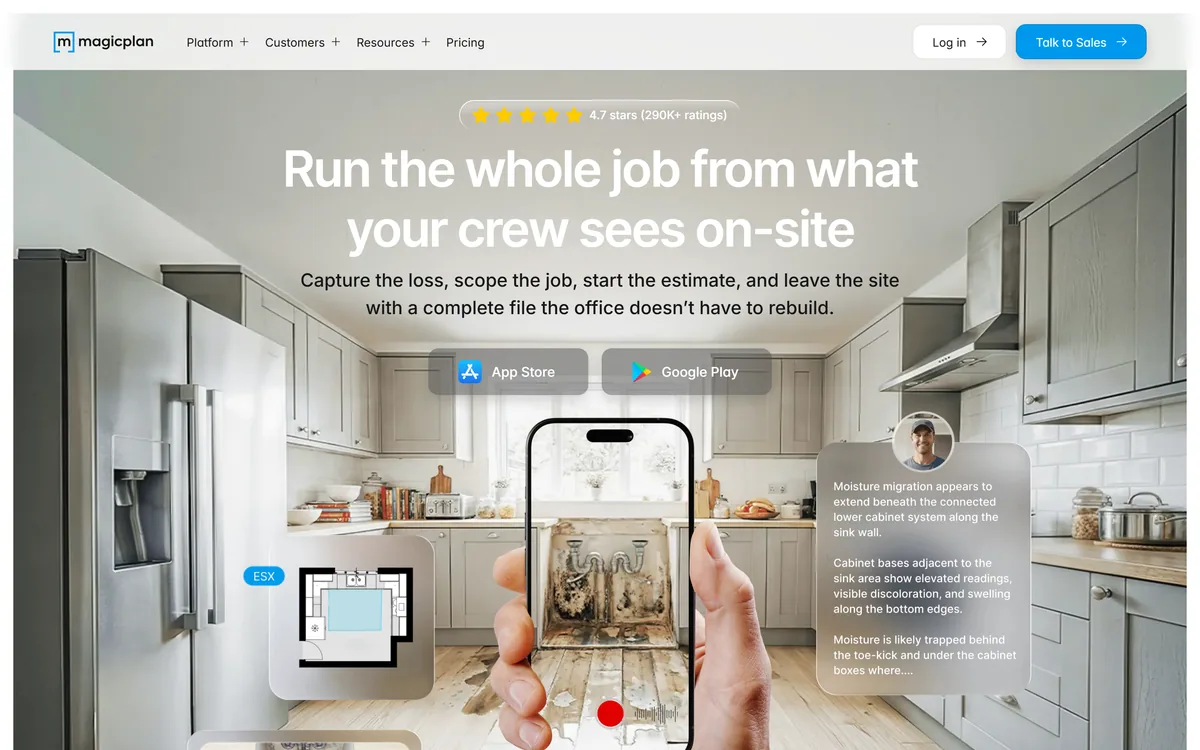
Magicplan is a mobile app for field documentation and floor plans, aimed at restoration and trade teams. It captures sketches, conditions, checklists, moisture readings, photos, video and 360° imagery on site, with Xactimate export and a scope of work feature listed as coming soon.
magicplan.app5 viewsAdded April 29, 202613K visitors
The expensive part of a site visit is not the visit. It is what happens afterwards, when somebody in an office tries to build an estimate from four photos, a rough sketch and a memory of a phone call.
That reconstruction produces errors, questions that require a second visit, and estimates that get revised after work has started. Everyone in field services knows the pattern and most tolerate it as unavoidable.
Magicplan's position is that it is avoidable, and the fix is capturing enough on site that nothing has to be rebuilt later.
Magicplan: Floor Plans From A Walkthrough
One walkthrough, fully documented — sketch, conditions, checklists, moisture readings and notes captured together.
Photos, video and 360° capture, so the office sees the site rather than interpreting five photographs.
Xactimate export with line items and room breakdowns, which tells you exactly which industry it is built for.
Scope of Work is marked coming soon, so do not buy on that feature yet.
4.7 stars from 290K+ ratings displayed, with named customer stories from restoration and flooring businesses.
What Does Capturing On Site Actually Save?
Magicplan's positioning is running the whole job from what the crew sees on site — capturing the loss, scoping the job, starting the estimate, and leaving with a complete file the office does not have to rebuild.
A customer quoted on the site describes not having to revisit a site after being there once, and saving roughly 70% of their time on measuring and drawing.
The saving that matters most is not the measuring though — it is the return visit. A second trip costs a half-day of a technician's time, delays the estimate, and often happens because of one question nobody thought to answer while standing in the room.
Capturing comprehensively is insurance against unknown future questions. You do not know which detail the estimator will need, so the answer is to record more than seems necessary while it is free to do so.
That reframes what the app is for. It is not a measuring tool with extras; it is a completeness tool, and its value is proportional to how often your office currently phones the field to ask something.
You do not know which detail the estimator will need. That is exactly why you record more than seems necessary while you are still standing in the room.
Photos, Video And 360 Documentation
The site describes capturing photos, videos and 360s on site so the office knows exactly what they are looking at, and states that documentation does not get lost, mislabelled or misunderstood.
Those three failure modes are precisely right, and 360° capture addresses all of them in a way ordinary photography cannot.
A photograph answers a question you knew to ask. A 360° capture answers questions you did not — what was behind the technician, what the adjacent wall looked like, whether there was staining in the corner nobody photographed.
Mislabelling is the quieter problem. Forty photos from four rooms arrive as a folder, and a fortnight later nobody can say which room the water damage photograph came from. Capture tied to a floor plan solves that structurally rather than through naming discipline.
For insurance and restoration work this matters beyond convenience. Documentation is evidence, disputes arrive months later, and a 360° record of the site as found is a far stronger position than a set of photographs whose context is somebody's recollection.
Xactimate Export And The Claims Workflow
The site describes building a scope of work on site, with everything captured becoming a complete ESX file — line items, quantities and room breakdown, with no retyping or re-measuring — and lists Xactimate export.
Supporting that format is a strong signal about who this is for. Xactimate is the estimating standard across much of property insurance restoration, and integrating with it rather than around it is what makes a field tool adoptable in that industry.
The workflow it removes is genuinely painful. Measuring on site, writing it down, then re-entering everything into estimating software is duplicated work with a transcription error at every step.
Room breakdown and quantities flowing straight through is where the time saving compounds, because those are exactly the figures that get mistyped and then argued about with an adjuster.
The important caveat is that the site marks Scope of Work as coming soon. That is disclosed honestly and it means the full claims workflow is not something to buy on today — check its status directly before making it part of a purchasing decision.
Capture more than seems necessary — you cannot know what the office will ask.
Use 360s for every room, not just the damaged one.
Check the current status of Scope of Work before buying on it.
Verify that exports match what your estimating software expects.
Train the crew on capture order, since consistency is what makes files readable.
Field To Office And Where Jobs Break
Magicplan frames the core problem as the office not having to recreate what the crew already saw, because the job is built where the damage is.
That handoff is where field service businesses lose the most money, and the losses are diffuse enough that they rarely appear as a line item.
The pattern repeats across trades. A technician understands the job completely while standing in the property, transmits perhaps a third of that understanding into notes and photos, and the office reconstructs the rest by inference.
Every subsequent error traces back to that gap: an estimate that misses a room, a materials order that is short, a schedule that assumed access which does not exist.
Fixing it requires capture to be fast enough to happen while the technician is still there, which is the actual product problem. A comprehensive system nobody uses because it adds twenty minutes to every visit is worse than the photographs it replaced — the same adoption constraint that decides whether documentation tools like Clueso get used in office settings.
Ratings, Customers And Who This Suits
The site displays 4.7 stars from 290K+ ratings and names customers including a pest control firm and a flooring business, alongside restoration teams described as the primary audience.
290,000 ratings is a large number for a professional tool and tells you something specific: this is not a niche product bought by a handful of enterprises, it has broad adoption among individual tradespeople.
The named quotes are unusually concrete for marketing. Not revisiting a site after one trip, and saving 70% of measuring and drawing time, are claims a reader can test against their own week rather than vague satisfaction statements.
The customer mix also indicates breadth beyond restoration. Pest control and flooring have entirely different documentation needs from water damage restoration, and a tool serving all three is doing something general well rather than one thing perfectly.
The audience it clearly does not serve is anyone needing construction-grade accuracy for structural work. Phone-based measurement is good enough for estimates and materials, and it is not a survey.
It is worth distinguishing this from visualisation tools that also work from rooms. Products such as Decory and Collov AI restyle a space to help somebody decide what it should look like; Magicplan records what a space actually is, so somebody can price the work.
Those are opposite jobs sharing a superficial resemblance. One is deliberately imaginative and one has to be accurate, and buying the wrong one produces either an estimate built on a render or a decision made from a floor plan.
Running A Job Through Magicplan
Field tools fail on adoption rather than capability. If capture is slower than photographs, crews revert to photographs and the office keeps rebuilding jobs.
This sequence establishes a repeatable capture routine before rolling anything out.
Define a standard capture order and use it on every job, so files are comparable.
Sketch the plan first, then attach photos and readings to rooms rather than to a folder.
Take a 360 in every room, including the ones that look fine.
Record conditions and readings on site — none of it can be reconstructed later.
Export one completed job into your estimating software before committing the team.
Time a capture against your current process; if it is slower, the crew will not adopt it.
Magicplan's homepage, captured 9 September 2026, showing the on-site capture positioning.
Field Documentation Terms
Terms used in restoration and field service documentation.
undefined
undefined
undefined
undefined
undefined
undefined
Magicplan: App And Ratings
Product type
Field documentation and floor plan app
Positioning
Run the whole job from what your crew sees on site
Site assessment
Job basics and conditions, checklists and forms, sketch, moisture readings, initial logs, notes
Visual documentation
Photos, videos and 360° capture tied to the job
Scope of Work
Marked coming soon on the site
Estimating export
Xactimate export with line items, quantities and room breakdown
Primary audience
Restoration teams, with pest control and flooring customers also named
What we could not confirm: pricing, which routes through Talk to Sales; measurement accuracy and what tolerance the plans achieve, which decides suitability for anything beyond estimating; which devices support 360° capture and whether extra hardware is needed; when Scope of Work is expected to ship; how job data is stored and retained, which matters because it may be evidence in a dispute; and the operating company, which the Imprint would name and we did not open.
Editor's Verdict
4.2/5
The insight here is operational rather than technical, and it is the correct one: the expensive failure in field work is not measuring badly, it is the office reconstructing a job from a handful of photos and a phone call after the truck has left. Magicplan attacks that by capturing everything at once — plan, conditions, readings, photos and 360s — in a single walkthrough. The 360° capture in particular answers the question nobody thought to photograph. Xactimate export shows it understands its market. The scope of work feature being marked coming soon is worth noting before buying on that basis. AInexfinder Editor Score: 4.2/5.
Magicplan pricing
AInexfinder does not list plan prices or billing details. For current pricing, plans, and trials, visit the official Magicplan website.
Vendor pricing, credits, and billing policies change over time. Always confirm on the official site before you buy.
Frequently asked questions
What is Magicplan?
Magicplan is a mobile field documentation and floor plan app aimed at restoration and trade teams. It captures sketches, conditions, checklists, moisture readings, photos, video and 360° imagery on site, and exports to Xactimate with line items and room breakdowns.
What does capturing on site actually save?
Return visits, more than measuring time. A second trip costs a half-day, delays the estimate, and usually happens because of one question nobody thought to answer while standing in the room. Comprehensive capture is insurance against questions you cannot predict.
Why does 360° capture matter?
Because a photograph answers a question you knew to ask, and a 360 answers the ones you did not — what was behind the technician, what the adjacent wall looked like, whether there was staining in a corner nobody photographed.
What is the mislabelling problem?
Forty photos from four rooms arrive as a folder, and a fortnight later nobody can say which room the water damage photograph came from. Capture tied to a floor plan solves that structurally rather than relying on someone's naming discipline in the field.
Why does Xactimate export matter?
Because Xactimate is the estimating standard across much of property insurance restoration, and integrating with it rather than around it is what makes a field tool adoptable there. It removes measuring, writing down, then re-entering — with a transcription error possible at each step.
Is Scope of Work available?
The site marks it Coming Soon, which is disclosed honestly. It means the full on-site scoping workflow is not something to buy on today, so check its current status directly if it is central to your purchasing decision.
Is it accurate enough for construction?
It is estimate-grade rather than survey-grade. Phone-based measurement is good enough for estimates and materials ordering, and it is not a substitute for a proper survey where structural work or legal boundaries are involved.
What decides whether a crew adopts it?
Speed. If capture takes longer than photographs, crews revert to photographs and the office keeps rebuilding jobs. Time a real capture against your current process before rolling it out — a comprehensive system nobody uses is worse than the photos it replaced.
How should we standardise capture?
Define a capture order and use it on every job, so files are comparable across technicians. Sketch the plan first, attach photos and readings to rooms rather than to a folder, and take a 360 in every room including the ones that look fine.
Does documentation help in disputes?
Considerably, in restoration and insurance work where disputes arrive months later. A 360° record of the site as found is a much stronger position than a set of photographs whose context depends on somebody's recollection of the visit.
Daniel reviews AI tools the slow way — by actually using them on real projects. His reviews cover what works, what breaks, and who each tool is genuinely a good fit for.
Daniel and the AInexfinder editorial team research Magicplan using public product information, listing evidence, and (when available) hands-on checks. Scores reflect listing completeness and transparency — not paid placement.
Listings may include affiliate or sponsored placements, which are labeled when present. Editorial scores and cons are not sold. See our affiliate disclosure and review methodology.
Rodin (Hyper3D) is an AI 3D model generator that turns text prompts or a single image into detailed 3D assets, with 21 styles, generation controls, plugins for Blender, Unity and Unreal, an API and MCP, aimed at game, print, product and avatar creators.
Skybox AI by Blockade Labs generates 360-degree equirectangular panoramas and skyboxes with stated generation times as fast as 15 seconds, 32-bit HDRI export for scene lighting, a Unity plugin, MCP support and direct export to Blender and Unreal.
FPVTune analyses Betaflight blackbox logs with a neural network and returns PID and filter settings as one-click CLI commands. It also offers free crash analysis, motor health checks and a flight time calculator, and charges only when you accept the tuning result.
Instead is an AI agent platform for tax work spanning research across 1,500+ authoritative sources, document extraction from K-1s, W-2s and 1099s, multi-entity planning, and e-filing with the IRS, 48 states and cities across all five entity types. The platform is free, with agent work charged per credit.
Layla builds day-by-day itineraries from your dates, budget and travel style using live pricing and availability for flights, hotels, trains and activities. Human travel experts can take over at any stage to plan, book and manage the trip end to end. Layla AI GmbH is based in Berlin.
Decory is a free mobile AI interior design app that redesigns a room from a photo in about 30 seconds across 15+ styles. It also replaces and removes objects, previews flooring and wall colours, and searches furniture. Operated by The AI Journey Inc., with 500,000+ downloads claimed.