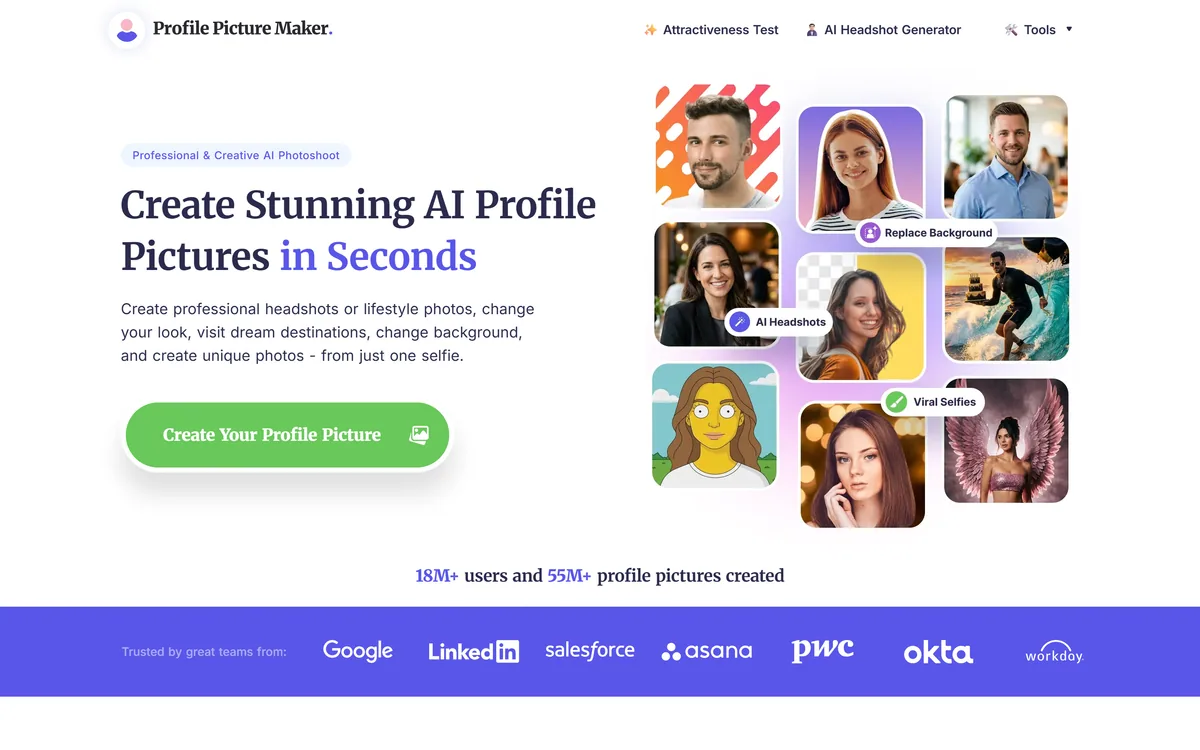
PFPMaker turns a single selfie into profile pictures, with a free tier covering template-based generation, background removal and replacement, and a premium tier adding AI headshots, an AI photoshoot, a chat-based portrait editor and appearance tools.
pfpmaker.com7 viewsAdded April 13, 2026291K visitors
PFPMaker's homepage, captured 9 September 2026.
PFPMaker: One Selfie Into A Profile Picture
A free forever tier covering template generation, background removal and background replacement.
One selfie in, with hundreds of generated options out across styles and backgrounds.
A premium studio adding AI headshots, an AI photoshoot and a chat-based portrait editor.
18 million users and 55 million pictures claimed, which are reach figures rather than active use.
Engagement statistics with no source, and an attractiveness test in the main navigation.
Why Does A Profile Picture Need Its Own Tool?
PFPMaker's argument is that a profile picture creates the first impression of you online, and that a good one makes it easier to connect for networking or job opportunities.
The framing is right even if the numbers around it are not, and the reason is about constraints rather than importance.
A profile picture is a specific format with specific requirements: square or circular, legible at forty pixels, one face, no distracting background, and consistent across a dozen platforms that all crop differently. Almost no photograph you own satisfies those.
General photo editors treat that as a cropping exercise. A dedicated tool treats it as the whole problem, which means background replacement, framing for a circular crop, and generating variations rather than editing one image.
The free tier is what makes that reasoning land. Getting a usable profile picture without paying is genuinely useful, and it is the difference between this and the paid headshot services it sits beside — which do the professional version better and charge accordingly, as HeadshotPro does.
A profile picture must be legible at forty pixels, in a circle, on a dozen platforms that crop differently. Almost no photograph you own qualifies.
What A Free Tool Funds Itself With
The free tier covers a profile picture generator producing hundreds of options from templates, background removal, background replacement, and six further tools, described as free forever.
That is a substantial giveaway, and it is worth asking how it is sustained — not suspiciously, but because the answer determines what you should expect.
The visible model here is a free-to-premium funnel: the free tools produce something usable, and the paid tier offers AI headshots, a photoshoot and appearance editing for anyone who wants more. That is a normal and honest arrangement.
The thing worth checking for any free image tool is what happens to your uploads — whether they are retained, used for training, or displayed anywhere. The site does not address this on the pages we read, and it is the standard question for a service you hand a photograph of your own face to.
It matters more here than for most free tools, because the input is always a picture of a person. A free background remover processes objects; this one processes faces, and the two are not equivalent.
Backgrounds, Crops And Platform Shapes
The core free capabilities are background removal for a clean professional look, background replacement with simple backgrounds aimed at professional networks, and generation of many options from templates.
Background work is the highest-value part of profile picture editing and it is rarely explained why.
The background is what makes a casual photograph unusable professionally. A holiday snap with a good expression fails because there is a beach behind you, and the face itself is fine. Removing the context converts a photograph you already like into one you can use.
It also solves the consistency problem. A dozen platforms showing the same face against the same plain background reads as deliberate; the same face against twelve different holiday backgrounds reads as whatever photograph was nearest.
Generating hundreds of variations is the part to use sparingly. More options past about twenty makes choosing harder rather than better, and the most common outcome of a large batch is picking something less good than the third one you saw.
Try the free tier fully before considering premium.
Use one background everywhere for consistency.
Check the result at the size it will actually display.
Choose from the first twenty options rather than all of them.
Ask what happens to your uploaded photograph.
Reading The Engagement Statistics
Two figures appear prominently: that a professional profile picture gets thirty-six times more interactions, and that it produces 146 percent more engagement and drives more leads.
Neither carries a source, a study, a definition or a comparison group, and both are the kind of number that deserves resistance.
Thirty-six times is an extraordinary multiple. For it to be meaningful you would need to know what counted as a professional picture, what it was compared against — no picture at all, a poor one, an average one — on which platform, and measured how.
The likeliest explanation for a figure of that size is a comparison against having no profile picture, which is a different claim entirely and one nobody needs convincing of.
The 146 percent figure has the same problem in a smaller package. Both are almost certainly borrowed from a platform's own marketing material rather than generated by this company, which is common practice and does not make them evidence. The underlying advice — have a decent profile picture — is sound and requires no statistic at all.
An Attractiveness Test In The Navigation
The first item in the main navigation is an attractiveness test, sitting alongside the headshot generator and the tools menu.
It is worth being direct about this rather than skipping past it.
A tool that scores a person's face on attractiveness is doing something categorically different from removing a background. It applies a numerical judgement to appearance, derived from training data reflecting whatever aesthetic conventions that data encoded, and returns it as though it were a measurement.
The harms are not hypothetical. Appearance scoring interacts badly with body image and self-esteem, disproportionately affects young users, and encodes narrow and culturally specific standards while presenting them as objective.
None of that is a claim about the company's intent, and such tools are common because they drive traffic. It is a reason to note the feature plainly, to suggest not using it, and to weigh it when deciding whether to hand a service a photograph of yourself or of anyone else. Training a model on your own face is a further step again, offered by Photo AI, and background work at catalogue scale is Photoroom's business.
Getting A Profile Picture That Works Everywhere
The common mistake is optimising a profile picture for how it looks full size, when nobody ever sees it that way.
This sequence produces something that works at the size it is actually displayed.
Start with a selfie where your expression is right — everything else is fixable.
Remove or replace the background before anything else.
Check the crop as a circle, not just a square.
Shrink it to forty pixels and see whether you are still recognisable.
Use the same image everywhere for consistency.
Exhaust the free tools before paying for the studio.
Is PFPMaker Enough For Your Profile?
Use the free tool when
You have a selfie with a good expression and a bad background.
You need the same picture consistent across a dozen platforms.
A free result would be a clear improvement on what you have now.
You want to try before committing money to a headshot service.
A creative or stylised picture suits the platform you are on.
Pay for a headshot when
The photograph represents you professionally at a senior level.
A whole team needs consistent, coordinated portraits.
You need explicit terms about how your photograph is handled.
Print resolution or a specific format is required.
You would be tempted by the appearance scoring feature.
PFPMaker: Output And Access
Input
A single selfie
Free tier
Profile picture generator, background removal and replacement, plus six further tools
Free tier framing
Described as free forever
Premium tier
AI headshots, AI photoshoot, a chat-based AI editor and sixteen further tools
Appearance tools
Hair, makeup, clothing and cartoonising, on the premium tier
Editor
Described as chat-based, taking a written description of the change
Claimed users
18 million-plus
Claimed output
55 million-plus profile pictures created
Stated uses
Social media, teams, business cards, CV and resume, email signature
Displayed statistics
Thirty-six times more interactions and 146 percent more engagement, both unsourced
Navigation
An attractiveness test listed as the first main navigation item
Style range
Described as thousands of styles, prompts, filters and assets
Key features of PFPMaker
Profile picture generation from one selfie
Background removal to transparent
Background replacement with plain options
Template-based variation generation
AI headshots on the premium tier
AI photoshoot across styles and settings
Chat-based portrait editor
Borders, gradients, text and creative backgrounds
Pros & cons
Pros
7
A genuinely substantial free tier, stated as permanent
Background work is the highest-value part of profile picture editing
One selfie is a lower barrier than the several a headshot service needs
Solves the consistency problem across a dozen platforms
Free tools cover most people's actual need without payment
A chat-based editor is a lower-friction way to describe a change
Creative and stylised options alongside professional ones
Cons
7
Both engagement statistics are prominent and entirely unsourced
An attractiveness test in the main navigation is a feature we would avoid
No stated policy on what happens to uploaded photographs of faces
User and picture counts measure lifetime reach rather than active use
Dedicated headshot services do the professional version better
Hundreds of options makes choosing harder past about twenty
Our capture found no footer, so the operating company went unread
Best For
Anyone whose current profile picture is a cropped holiday photo
People wanting one consistent image across many platforms
Users who want a free option before paying for a headshot
Creative profiles where a stylised picture suits the platform
Job seekers needing something presentable quickly
PFPMaker Against Other Avatar Makers
Portrait tools differ by whether they edit a photograph or generate one.
Krikey AI — animated avatars rather than photographic ones
PFPMaker: Read From The Tool Pages
Last checked . Read from pfpmaker.com in a browser session on the date above, with the screenshot captured at the same time.
Positioned as a free AI profile picture maker producing professional photos from one selfie
Free tier described as free forever, covering a profile picture generator, background removal and replacement
Six further free tools referenced beyond the three named
Premium tier described with AI headshots, AI photoshoot and a chat-based AI editor
Sixteen further premium tools referenced, including hair, makeup, clothing and cartoonising
The AI editor described as taking a written description of the change
18 million-plus users and 55 million-plus profile pictures created displayed
Uses listed as social media, teams, business cards, CV and resume, and email signature
A claim of thirty-six times more interactions with a professional profile picture, unsourced
A claim of 146 percent more engagement, unsourced
An attractiveness test displayed as the first item in the main navigation
Described as offering thousands of styles, prompts, filters and assets
What we could not confirm: our capture did not reach a site footer, so we make no claim about what is published there, including the operating company or its policies. We also could not confirm what happens to uploaded photographs — whether they are retained, used for training or displayed — which is the standard question for a free service processing images of faces; the source of either engagement statistic; what the user and picture counts measure; and pricing for the premium tier. We did not upload a photograph.
Editor's Verdict
3.6/5
The free tier here is the point, and it is substantial enough to matter — template generation, background removal and replacement will get most people a usable profile picture without paying anything, which is more than the category usually offers. The premium studio is competent and competes with dedicated headshot services that do it better. Two things deserve scepticism: the engagement statistics are specific, prominent and sourced nowhere, and an attractiveness test sitting in the main navigation is a feature we would not have built. AInexfinder Editor Score: 3.6/5.
PFPMaker pricing
AInexfinder does not list plan prices or billing details. For current pricing, plans, and trials, visit the official PFPMaker website.
Vendor pricing, credits, and billing policies change over time. Always confirm on the official site before you buy.
Frequently asked questions
What is PFPMaker?
A profile picture generator that works from a single selfie, with a free tier covering template generation, background removal and replacement, and a premium tier adding AI headshots, a photoshoot and a chat-based editor.
Is the free tier actually usable?
Yes, and it is the reason to be here. Template generation plus background removal and replacement will get most people a usable profile picture without paying, which is more than this category typically offers.
Why is background work the important part?
Because the background is usually what makes a photograph unusable professionally. A holiday snap with a good expression fails because of the beach behind you — the face is fine, and removing the context is what converts it.
Should I believe the engagement statistics?
No. Neither the thirty-six times nor the 146 percent figure carries a source, a definition or a comparison group. A multiple that large most likely compares against having no profile picture at all, which is a different claim entirely.
What about the attractiveness test?
It applies a numerical score to a person's face, derived from training data encoding particular aesthetic conventions, and returns it as though it were a measurement. We would suggest not using it, particularly for younger users.
What happens to my photo?
The pages we read do not say — whether uploads are retained, used for training or displayed anywhere. That is the standard question for any free service processing images of faces, and it matters more here than for a tool that processes objects.
How does it compare to a paid headshot service?
It is free and it is less good. Dedicated services work from several selfies, produce dozens of professional variations and publish policies about your photographs. Use this first, and pay when the image genuinely represents you professionally.
How many options should I look at?
About twenty. More than that makes choosing harder rather than better, and the most common outcome of a large batch is picking something less good than the third one you saw and forgot.
What size should I check it at?
Forty pixels, in a circle. That is roughly how your profile picture is actually displayed in a feed or a comment thread, and an image that works full size can be unrecognisable there.
Should I use the same picture everywhere?
Yes. The same face against the same background across a dozen platforms reads as deliberate; twelve different holiday backgrounds reads as whatever photograph was nearest at the time.
Daniel reviews AI tools the slow way — by actually using them on real projects. His reviews cover what works, what breaks, and who each tool is genuinely a good fit for.
Daniel and the AInexfinder editorial team research PFPMaker using public product information, listing evidence, and (when available) hands-on checks. Scores reflect listing completeness and transparency — not paid placement.
Listings may include affiliate or sponsored placements, which are labeled when present. Editorial scores and cons are not sold. See our affiliate disclosure and review methodology.
Aragon AI generates professional headshots from user-submitted selfies. You upload photos, pick outfits and backgrounds, and receive up to 100 images within about 30 minutes, at resolutions up to 1792 x 2176. It is SOC 2 Type II certified and lets users delete their data at any time.
Photo AI creates an AI model from your uploaded selfies and generates photographs of you in any pose, place or setting, with themed photo packs, multi-person support, upscaling, zoom-out and video generation. It also offers product photography with AI models and the creation of entirely synthetic personas.
krea2.org is a browser image-generation workspace that runs several third-party models side by side, including Krea 2 tiers, FLUX.2, GPT Image 2, Nano Banana and Seedream 5.0, with reference uploads, six aspect ratios and live model switching.
Pet Pic Portraits turns a pet photo into styled artwork — Royal King, Pop Art, Watercolour, Viking, Wizard and more — with an instant preview before ordering. Output is a digital download, a canvas print or framed wall art, and it includes a pet memorial option.
RetypeWords is a browser tool that replaces text that has been flattened into a PNG, JPG or WebP image. It reads the words with OCR, lets you correct what it read, then regenerates the selected area so the new wording sits in the picture rather than on top of it.
Canva AI is the Magic Studio suite built into Canva — Magic Write for copy, Dream Lab for images, Magic Edit, Expand and Eraser for photos, Magic Switch for reformatting, Magic Charts for data, and Canva Code for interactive widgets.