HeadshotPro turns a handful of selfies into 30 to 70 professional headshots in under thirty minutes, across thousands of backdrop and outfit combinations. It offers a profile picture editor, optional 4K upscaling, edit credits for swapping backdrops and outfits, team deployment with admin-set styles, and states that photos are used once then deleted.
headshotpro.com8 viewsAdded January 6, 202624K visitors
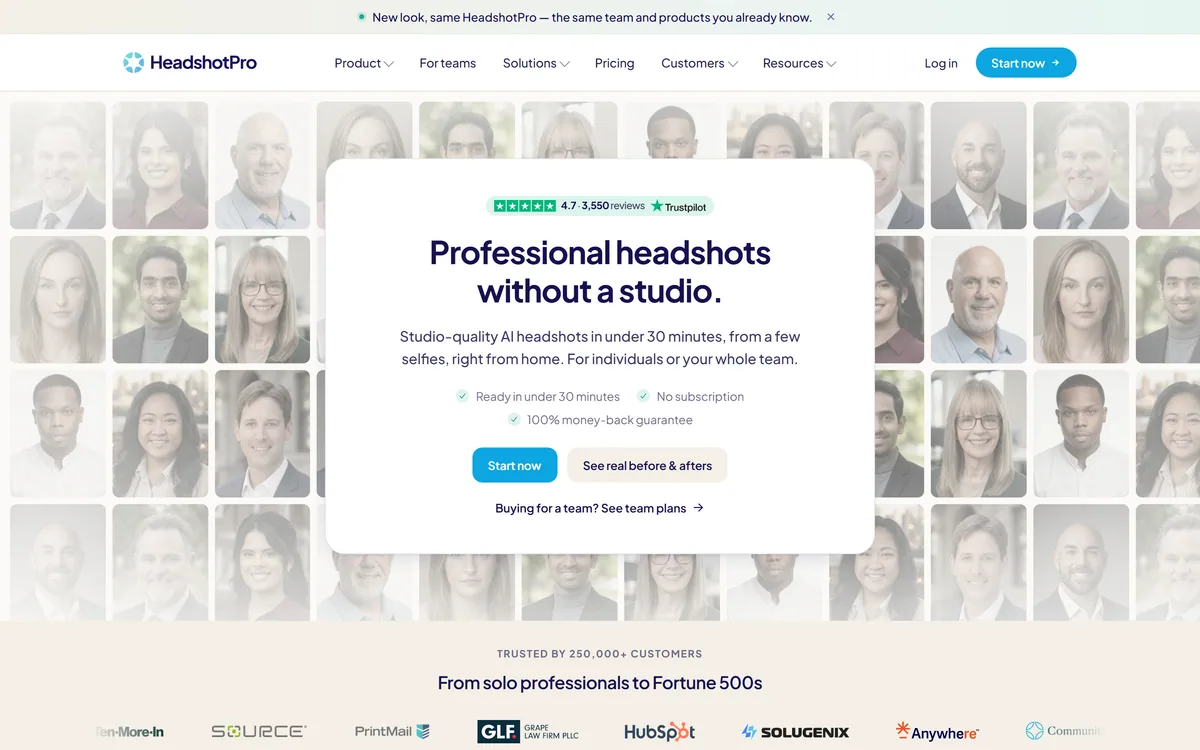
HeadshotPro's homepage, captured 9 September 2026.
What Does A Generated Headshot Change?
HeadshotPro's framing of the problem is sharper than its description of the solution: every recruiter, client and new hire forms a first impression from your photo, and it is probably not one you would have chosen — too old, or taken for something else entirely.
That is accurate, and the reason is economic rather than aesthetic.
A professional headshot has always required booking a photographer, travelling, and paying for a session. The result is good and then it ages, and nobody repeats the exercise for a new role, a haircut or a rebrand. So most professional photos are somewhere between two and ten years old.
Removing the session removes the reason not to update it. That is the genuine change here — not better photographs than a photographer takes, but current ones.
For teams the arithmetic is starker. Coordinating one photographer across fifty employees in three offices is a project, and the directory is out of date the day someone new starts. A link each person completes themselves is a different kind of task entirely.
The change is not better photos than a photographer takes. It is current ones, because nobody rebooks a studio for a haircut.
Where Generated Portraits Stop Being Fine
A generated headshot is an image of you that was never photographed, and it is worth being clear about where that is unremarkable and where it is not.
For a professional profile it is unremarkable. The norm on LinkedIn is already a flattering, lit, retouched photograph selected from dozens — nobody believes a headshot is candid, and the genre has always been a constructed impression rather than documentary evidence.
Where it stops being fine is anywhere the image functions as identification or as a claim about your appearance to someone deciding something personal. Identity documents obviously. Dating profiles arguably, since the implicit promise is what you look like rather than how you present professionally.
The other line is degree. A headshot that makes you look rested is the same service a photographer provides; one that changes your face is a different image of a different person, and colleagues meeting you will notice.
The tool gives you that control — edit credits cover swapping outfits and removing blemishes — so the judgement sits with you, which is where it belongs and worth exercising deliberately. Editing a photograph you actually took is the conservative alternative, and what Photoleap is for.
Photos Used Once, Then Deleted
Beside the speed claims sits the most important line on the page: we never train AI on your photos, used once, then deleted.
For this product category that is the material commitment, and it is worth understanding why.
You are uploading a set of photographs of your own face to a service you have not used before. Face data is biometric, permanent in a way a password is not, and a company that retains it holds something you cannot change if it leaks.
Training on it is a second question again. Photos absorbed into a model cannot meaningfully be withdrawn later, whatever a subsequent deletion request says.
Stating both commitments plainly, on the homepage rather than in a policy page, is the right behaviour. The footer supports it with a data processing addendum and a security and compliance page — the artefacts of a company that has been asked these questions by procurement, which is a better signal than the claim alone. Product imagery raises the same processing questions at far greater volume, which is Photoroom's domain.
Upload the selfies they ask for, not your best ten — variety beats quality.
Use the choose-for-me option first, then refine.
Check the result against a mirror, not against how you would like to look.
Use the editor to produce every platform's crop from one image.
Keep the 4K upscale for print; it is unnecessary for a profile.
Teams, Admins And Consistent Directories
The team flow inverts the usual arrangement: admins set the styles, members upload their own selfies, and built-in rules keep everyone consistent and on brand.
That division of labour is the whole product for a company buyer, and it solves a specific coordination failure.
The reason company directories look incoherent is not indifference. It is that photos were taken at different times by different people under different instructions, and the person who cares about consistency has no way to enforce it retroactively.
Setting the backdrop and outfit rules centrally while letting each person supply their own input means consistency is a property of the system rather than of everyone remembering. New starters join the same way, so the directory stays coherent rather than degrading from day one.
The remaining question is social rather than technical. Asking employees to upload selfies of their own faces to a third-party service is a request some will decline, and a policy that makes it optional — with a real alternative — is the humane way to run it.
No Subscription, And A Refund Without An Expiry
Two commercial details sit alongside the feature list: no subscription, and a hundred percent money-back guarantee with no expiry, plus free retries on the higher packages and edit credits per person.
Both are unusual enough to be worth reading as signals.
A one-off purchase in a category that could easily be a subscription means the company is confident about repeat purchase on merit — people come back for a new role or a rebrand rather than being billed monthly for something they used once.
A refund with no expiry is the stronger signal. Most guarantees are bounded at fourteen or thirty days precisely because dissatisfaction surfaces later; removing the boundary is a commitment that is expensive if the output disappoints.
Edit credits and free retries address the actual failure mode, which is not a bad batch but one specific thing being wrong — the wrong outfit, an odd background, too little headroom. Being able to fix that without repurchasing is the difference between a usable service and a lottery. Generating clothing rather than people is an adjacent problem with its own licensing questions, as Refabric shows.
Getting A Headshot You Would Actually Use
The most common disappointment with generated headshots is not quality. It is that the person does not quite look like the user, and that is usually a function of what was uploaded.
This sequence produces a set you will actually pick from.
Upload varied selfies — different lighting, angles and days, not one good session.
Follow the photo guidelines rather than assuming better photos are better inputs.
Let it choose styles first, then narrow once you see what works.
Judge the results against a mirror rather than against an aspiration.
Spend the edit credits on the one thing that is wrong, not on regenerating.
Crop for each platform in the editor rather than uploading the same file everywhere.
HeadshotPro: Output And Guarantees
Input
A few selfies, uploaded from phone or laptop, with auto-validation of bad photos
Output
30 to 70 headshots, with ready times stated from as little as 15 minutes
Turnaround
Under 30 minutes stated as standard
Styles
Thousands of backdrop and outfit combinations, with per-gender outfit options
Automatic option
A choose-for-me setting that pairs backdrops and outfits
Formats
High-resolution JPEG, downloadable individually or as a ZIP, with optional 4K upscale
Editor
Profile picture editor with crop, shape, border, logo and text overlay
Editing
Edit credits per person for backdrops, outfits, blemishes and headroom
Privacy
States photos are used once then deleted, with no AI training on them
Commercial model
No subscription, with a 100 percent money-back guarantee and no expiry
Teams
Admins set styles; members upload their own selfies under shared rules
Displayed figures
4.7 from 3,550 reviews, and 250,000-plus customers
HeadshotPro: Selfies Into Studio Portraits
30 to 70 headshots in under 30 minutes from a few selfies, on phone or laptop.
Photos used once, then deleted, with a stated policy of never training AI on them.
Thousands of backdrop and outfit combinations, or a choose-for-me option that pairs them automatically.
No subscription, with a full money-back guarantee that carries no expiry.
Team deployment where admins set styles and each employee uploads their own selfies.
Key features of HeadshotPro
Headshot generation from a handful of selfies
30 to 70 results per session, in under 30 minutes
Thousands of backdrop and outfit combinations
Automatic style pairing with a choose-for-me option
Profile picture editor with logo and text overlay
Optional 4K upscaling for print
Edit credits for outfits, backdrops, blemishes and headroom
Team deployment with admin-set styles and shared rules
Pros & cons
Pros
7
States photos are used once then deleted, with no AI training on them
A data processing addendum and security page back the privacy claim
No subscription, so you buy when you need it rather than monthly
A money-back guarantee with no expiry is an unusually strong commitment
Edit credits fix the one thing that is wrong instead of forcing a regeneration
The editor turns one headshot into every platform's crop
Team flow makes consistency a property of the system, not of memory
Cons
7
The customer count is unqualified as to period or definition
No stated retention window to accompany the deletion claim
The generating model is not named
Consistency across skin tones and ages is untestable from the site
Asking employees to upload their faces is a request some will decline
Wrong tool anywhere an image functions as identification
No pricing on the pages we read
Best For
Professionals whose current photo is years out of date
Job seekers who need a headshot before an application closes
Distributed teams that cannot coordinate one photographer
Companies keeping a directory consistent as people join
Anyone who wants their uploaded photos deleted after processing
HeadshotPro Against Other Portrait Tools
Image tools differ by whether they generate a person, edit a photo, or replace a background.
Last checked . Read from headshotpro.com in a browser session on the date above, including the full footer. The screenshot was captured at the same time.
Positioned as professional headshots without a studio, from a few selfies
Turnaround stated as under 30 minutes, with some results ready in as little as 15
Output stated as 30 to 70 headshots, downloadable as JPEG or ZIP with optional 4K upscale
A banner states a new look with the same team and products
Thousands of backdrop and outfit combinations stated, with a choose-for-me option
Auto-validation described as catching bad photos before they affect a shoot
Stated plainly that photos are never used to train AI, and are used once then deleted
A profile picture editor described with crop, shape, border, logo and text overlay
Edit credits described per person for backdrops, outfits, blemishes and headroom
No subscription stated, with a 100 percent money-back guarantee and no expiry
Team flow described as admins setting styles and members uploading their own selfies
What we could not confirm: what the 250,000-plus customer figure counts or over what period; how quickly deletion happens after processing, since the listing states used once then deleted without a retention window; which model generates the images; how many edit credits each package includes; whether results are consistent across skin tones and ages, which we could not test; and pricing, which sits on a separate page we did not reproduce. We did not upload photos or generate a headshot.
Editor's Verdict
4.2/5
The problem HeadshotPro solves is real and badly served: your professional photo is either a decade old, cropped from a holiday, or does not exist, and a studio shoot fixes it until the next role or rebrand. Doing it for a whole company is worse again — one photographer, fifty people, three offices. The privacy position is what lifts this above the category: photos used once then deleted, with no training on them. A no-subscription model with an unexpiring refund is unusually confident, and the editor turning one headshot into every platform's crop is the practical detail. AInexfinder Editor Score: 4.2/5.
HeadshotPro pricing
AInexfinder does not list plan prices or billing details. For current pricing, plans, and trials, visit the official HeadshotPro website.
Vendor pricing, credits, and billing policies change over time. Always confirm on the official site before you buy.
Frequently asked questions
What is HeadshotPro?
A service that turns a few selfies into 30 to 70 professional headshots in under thirty minutes, across thousands of backdrop and outfit combinations, with an editor, optional 4K upscaling and a team deployment flow.
What actually changes versus a studio shoot?
Not quality — currency. A professional photo has always required booking, travelling and paying, so nobody repeats it for a new role or a haircut. Removing the session removes the reason your photo is four years old.
What happens to my photos?
The site states they are never used to train AI, and are used once then deleted. That is the material commitment for this category, because face data is biometric and cannot be changed the way a password can if it leaks.
Is using a generated headshot honest?
For a professional profile, yes — the genre was always a constructed impression, and nobody believes a LinkedIn headshot is candid. It stops being fine where the image functions as identification, or where it changes your face rather than lighting it.
How do I get results that look like me?
Upload varied selfies rather than your ten best from one session — different lighting, angles and days. The most common disappointment is a result that does not quite look like you, and that is usually an input problem.
How does the team version work?
Admins set the styles and rules; each employee uploads their own selfies. That makes directory consistency a property of the system rather than of everyone remembering, and new starters join the same way.
Is there a subscription?
No — it is a one-off purchase, with a full money-back guarantee that carries no expiry. Most guarantees are bounded at thirty days precisely because dissatisfaction surfaces later, so removing the boundary is a real commitment.
What if one photo is nearly right?
Edit credits cover swapping the backdrop or outfit, removing blemishes and adding headroom, with free retries on the higher packages. That addresses the actual failure mode, which is one specific thing being wrong rather than a bad batch.
Do I need the 4K upscale?
Only for print. A profile picture is displayed at a few hundred pixels on every platform that matters, so the upscale is worth paying attention to if the image will appear on a conference banner or a printed document.
Should employees be required to use it?
Asking people to upload photographs of their own faces to a third-party service is a request some will reasonably decline. Making it optional with a real alternative is the humane way to run a team rollout.
Daniel reviews AI tools the slow way — by actually using them on real projects. His reviews cover what works, what breaks, and who each tool is genuinely a good fit for.
Daniel and the AInexfinder editorial team research HeadshotPro using public product information, listing evidence, and (when available) hands-on checks. Scores reflect listing completeness and transparency — not paid placement.
Listings may include affiliate or sponsored placements, which are labeled when present. Editorial scores and cons are not sold. See our affiliate disclosure and review methodology.
Aragon AI generates professional headshots from user-submitted selfies. You upload photos, pick outfits and backgrounds, and receive up to 100 images within about 30 minutes, at resolutions up to 1792 x 2176. It is SOC 2 Type II certified and lets users delete their data at any time.
Photo AI creates an AI model from your uploaded selfies and generates photographs of you in any pose, place or setting, with themed photo packs, multi-person support, upscaling, zoom-out and video generation. It also offers product photography with AI models and the creation of entirely synthetic personas.
krea2.org is a browser image-generation workspace that runs several third-party models side by side, including Krea 2 tiers, FLUX.2, GPT Image 2, Nano Banana and Seedream 5.0, with reference uploads, six aspect ratios and live model switching.
Pet Pic Portraits turns a pet photo into styled artwork — Royal King, Pop Art, Watercolour, Viking, Wizard and more — with an instant preview before ordering. Output is a digital download, a canvas print or framed wall art, and it includes a pet memorial option.
Canva AI is the Magic Studio suite built into Canva — Magic Write for copy, Dream Lab for images, Magic Edit, Expand and Eraser for photos, Magic Switch for reformatting, Magic Charts for data, and Canva Code for interactive widgets.
Pixlr is a browser-based photo editor from Pixlr Pte Ltd with two editors and a generative AI layer — Generative Fill, Expand and Transform, background and object removal, Super Scale upscaling, face swap, plus image, video, and audio generation.