Plus AI is a presentation assistant from Plus Docs, Inc. that runs as a native add-on in Google Slides and a native add-in in PowerPoint. It converts documents into decks, edits and reformats slides with AI, and ships a Presentation Agent API and MCP server.
plusai.com7 viewsAdded November 20, 2025103K visitors
Every AI deck tool solves the same first problem — producing slides quickly — and almost all of them create the same second problem.
The deck exists somewhere else. It arrives in Google Slides or PowerPoint as an export, which means the master template is wrong, the brand theme is absent, the text boxes are positioned rather than placed, and every edit from then on is a small fight with a file that was never native.
Plus AI's answer is to skip the export. It runs as an add-on inside Google Slides and an add-in inside PowerPoint, so the slides it makes are ordinary slides from the moment they appear.
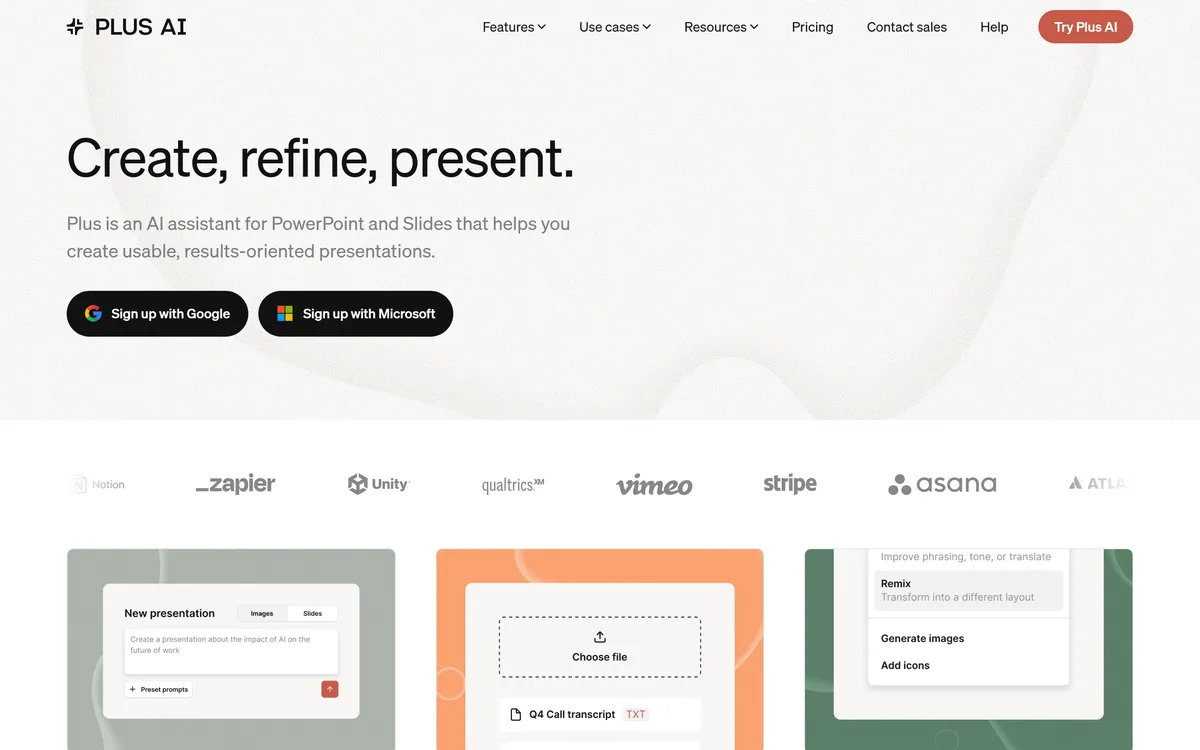
Plus AI's homepage, captured 9 September 2026, showing the presentation assistant positioning inside existing slide tools.
Why Does Living Inside Google Slides Matter?
Plus AI installs as a native add-on in Google Slides and a native add-in in PowerPoint, which sounds like a distribution detail and is actually the product's whole argument.
Think about what happens after a deck is generated. Almost nobody presents a first draft. Somebody moves a chart, someone else objects to slide four, a colleague adds two slides from another deck, and the whole thing is reviewed by three people who will each change something.
All of that happens in Google Slides or PowerPoint, because that is where the collaboration, comments, version history and sharing live. A generated deck that arrives as an export has to survive that process as a second-class citizen.
Working natively means it never becomes an export. The slides use your existing theme and master, your colleagues can edit them without knowing a tool was involved, and comment threads and version history work exactly as they always did.
The corresponding constraint is real: you inherit the limits of the host application. Anything Google Slides cannot do, Plus AI cannot do inside it, and a tool with its own rendering engine can produce layouts neither host supports. That is a genuine trade, and for most business decks it favours being native.
The opposite bet is a tool that owns the whole artefact. Gamma keeps the deck in its own editor and exports as a secondary path, which suits a deck that lives on the web rather than in a shared drive.
Nobody presents a first draft. The question is what happens to the deck during the four rounds of edits that follow, and that all happens in Slides or PowerPoint.
Remix, Insert And Rewrite Are Three Different Jobs
Plus AI separates its editing actions into Insert, Rewrite and Remix, and that separation is better product design than a single "improve this slide" button.
Insert adds a new slide that fits what is already there — the deck is missing a section, and the tool writes one consistent with the surrounding argument. This is the action people use most, because decks grow by accretion rather than by planning.
Rewrite changes what a slide says while leaving its structure alone. Too wordy, wrong tone for the audience, needs to be blunter — the layout is fine and the words are not.
Remix does the inverse: same content, different arrangement. A slide with five bullet points might work far better as a two-column comparison or a simple diagram, and reformatting is a design decision most people cannot make quickly.
Keeping these apart matters because it lets you say what you actually want. A single general command has to infer whether you meant the words or the layout, and it will sometimes change both when you wanted one — which is how a slide you were happy with becomes one you have to fix.
An MCP Server Is An Unusual Thing To Ship
Plus AI lists a Presentation Agent API and an MCP Server alongside its ordinary features, and both signal something about where the product thinks it is going.
MCP is the protocol that lets an AI agent call external tools in a standard way. Shipping an MCP server means an agent — one you are using in a different application entirely — can create and edit presentations through Plus AI without a human opening the add-on.
The use that follows is worth thinking about. A weekly report that currently requires someone to read a dashboard and build a deck could instead be produced by an agent that pulls the data, writes the narrative and generates the slides on a schedule.
That is a genuinely different product from an assistant you open when you need help. It moves decks from something a person makes to something a process produces, and the person's job becomes reviewing rather than building.
It also has an obvious failure mode. Automatically generated decks nobody asked for are worse than no decks, and a weekly presentation produced by a schedule rather than a need is a meeting that should have been an email with extra steps.
For the diagrams inside those slides, a specialist like Napkin AI generates from prose and exports SVG, which is a different job from arranging a slide.
Prefer native add-ons over exporters for anything a colleague will edit.
Use Insert for gaps, Rewrite for words, Remix for layout — saying which saves a fix.
Start from a document you already wrote rather than from a blank prompt.
Set up brand and custom instructions once, since they apply to everything after.
Automate a recurring deck only where someone actually reads it.
Document To Presentation Beats Prompt To Presentation
Plus AI converts documents into presentations, and this is a better starting point than a prompt for a reason that applies to every deck tool.
A prompt asks the model to invent both the content and the structure. It will produce something plausible, generically organised, and containing nothing you know — because you did not tell it anything.
A document contains your actual argument, your data and your conclusions. Converting it is a structural task rather than a creative one: identify the sections, decide what deserves a slide, condense the prose, keep the order that made sense in writing.
That is exactly the sort of transformation a model does well, and it is also the task humans do badly under time pressure — most bad decks are bad because someone pasted paragraphs onto slides rather than rethinking them for the format.
The practical consequence is that the best input is a document you have already written and edited. If the source is thin, the deck will be too, and no amount of reformatting fixes an argument that was not there in the first place.
If the source document does not exist yet, the research step comes first — an answer engine such as Felo is solving that half rather than this one.
Building A Deck That Survives Review
A generated deck that gets rebuilt by hand in review has cost you time rather than saved it.
The sequence below front-loads the decisions that reviewers otherwise force you to redo.
Set up custom branding and custom instructions before generating anything, so the first draft already looks like your organisation's decks.
Start from a written document rather than a prompt, and edit that document first.
Generate, then immediately delete the slides that exist only because the source had a section — decks are shorter than documents.
Use Remix on the two or three slides carrying the most information, since dense slides are where layout matters most.
Share it in Slides or PowerPoint for comments rather than exporting a PDF, so edits happen in the file rather than in an email thread.
Keep the generated speaker notes only if you will actually use them, since unused notes make a deck harder to maintain.
Plus AI Without The Pitch
It runs inside your slide tool — a native Google Slides add-on and a native PowerPoint add-in, not an exporter.
Three distinct actions: Insert adds new slides, Rewrite changes what a slide says, Remix reformats how it looks.
Document to presentation turns an existing report or brief into a deck rather than starting from a prompt.
Operated by Plus Docs, Inc., with SOC 2 Type II compliance stated.
A Presentation Agent API and MCP server, which is unusual for a deck tool and points at programmatic use.
Plus AI: Platforms And Compliance
Operating company
Plus Docs, Inc
Product type
AI presentation assistant
Google Slides
Native add-on
PowerPoint
Native add-in
Core actions
Insert, Rewrite, Remix
Document conversion
Turns existing documents into presentations
Branding
Custom branding, custom instructions and a preset library
The deck problem is attacked from inside the slide tool, from a separate app, or from the research that precedes it.
Gamma — when the deck can live on the web rather than as a file
Napkin AI — for diagrams generated from prose, with SVG export
Felo — if the research and the presentation are the same task
Narakeet — turning a finished deck into a narrated video
marimo — when the presentation should be a running notebook instead
Is Plus AI Your Presentation Assistant?
Install it when
Your organisation runs on Google Slides or PowerPoint and always will.
Decks go through several rounds of review by people who are not you.
You have a brand template that generated decks keep failing to respect.
Your starting point is usually a document rather than a blank page.
Procurement requires SOC 2 Type II before a tool touches company content.
Choose a standalone when
You want layouts neither Google Slides nor PowerPoint can produce.
Your decks live on the web rather than as files.
Nobody else will ever edit the deck, where portability matters less.
You need a diagram tool more than a slide tool.
Your organisation blocks third-party add-ons in its workspace.
Verifying What Plus AI Publishes
Last checked . Read from plusai.com and its footer navigation, with the screenshot above captured in the same session.
Operating company confirmed as Plus Docs, Inc
Positioned as an AI assistant for creating, refining and editing presentations within existing presentation software
Native Google Slides add-on confirmed
Native PowerPoint add-in confirmed
Insert, Rewrite and Remix confirmed as named capabilities
Document to presentation conversion confirmed
Custom branding, custom instructions and a preset library confirmed
AI image generation, icons, charts and tables confirmed
Multi-language AI support confirmed
Presentation Agent API confirmed
MCP Server confirmed as a listed feature
SOC 2 Type II compliance stated
Company logos displayed on the site including Notion, Zapier, Unity, Qualtrics, Vimeo, Stripe, Asana, Atlassian, Canva, Deloitte, Salesforce, Google, Flexport, Uber, 1Password, Houzz, Shipium, Airtable and Nvidia
Footer sections confirmed for Product, Resources and Company, including pricing, careers, security and legal pages, plus LinkedIn, Twitter and YouTube links
What we could not confirm: whether the displayed logos are customers, integrations or both, since the page presents them without a stated relationship; which underlying models power generation; pricing and plan structure; how many languages are supported; what the Presentation Agent API costs or rate-limits; data handling for documents you convert; and whether any capability differs between the Slides and PowerPoint versions. We did not use the product, so nothing here reflects tested output.
Editor's Verdict
4.3/5
Plus AI's advantage is positional and larger than it sounds. Every other deck generator produces a presentation somewhere else and exports it, which means the file arrives in your real tool as a foreign object — templates broken, brand theme missing, and every subsequent edit fighting the export. Running as a native add-on in Google Slides and an add-in in PowerPoint means the output is a normal deck from the first second. Remix, Insert and Rewrite are correctly separated as three different jobs. It stops short of the top only because working inside those tools means inheriting their constraints too. AInexfinder Editor Score: 4.3/5.
Plus AI pricing
AInexfinder does not list plan prices or billing details. For current pricing, plans, and trials, visit the official Plus AI website.
Vendor pricing, credits, and billing policies change over time. Always confirm on the official site before you buy.
Frequently asked questions
What is Plus AI?
Plus AI is an AI presentation assistant from Plus Docs, Inc. It runs as a native add-on in Google Slides and a native add-in in PowerPoint, converts documents into decks, and offers Insert, Rewrite and Remix for editing slides, plus custom branding, a Presentation Agent API and an MCP server.
Why does running natively inside Slides matter?
Because nobody presents a first draft. Four rounds of edits follow, and they all happen in Google Slides or PowerPoint where the comments, version history and sharing live. A generated deck that arrives as an export has to survive that as a second-class citizen, with a broken master and a missing brand theme.
What is the difference between Insert, Rewrite and Remix?
Insert adds a new slide consistent with what is already there. Rewrite changes what a slide says while leaving its structure alone. Remix keeps the content and changes the arrangement. Keeping them separate lets you specify what you want changed, rather than hoping a general command infers it correctly.
Is it better to start from a document or a prompt?
A document, almost always. A prompt asks the model to invent both content and structure, producing something plausible that contains nothing you know. A document contains your actual argument and data, so conversion becomes a structural task — which models do well and people do badly under time pressure.
What is the MCP server for?
MCP lets an AI agent call external tools in a standard way, so an agent working in another application can create and edit presentations through Plus AI without anyone opening the add-on. The obvious use is a recurring report deck produced on a schedule, with the person's job becoming review rather than assembly.
What are the downsides of working inside PowerPoint?
You inherit its limits. Anything the host application cannot do, Plus AI cannot do inside it, and a tool with its own rendering engine can produce layouts neither Slides nor PowerPoint supports. That is a genuine trade — and for most business decks that will be edited by colleagues, being native wins comfortably.
Does Plus AI have security certifications?
SOC 2 Type II is stated on the site. That matters more than usual for this category, because a presentation assistant reads the documents you convert — which are frequently strategy, financial or customer material rather than public content.
Are the logos on the site customers?
The page displays logos including Notion, Zapier, Stripe, Salesforce, Deloitte and Nvidia without stating whether they are customers, integrations or both. That ambiguity is worth noting rather than assuming — a logo wall on an AI product page is a marketing element until the relationship is described.
How does Plus AI compare to Gamma?
Gamma builds decks and documents that live on the web in its own editor, with export as a secondary path. Plus AI never leaves your existing slide tool. If your organisation runs on Google Slides or PowerPoint and decks get edited by others, Plus AI wins; if the deck is a web artefact, Gamma does.
Can I automate deck creation with Plus AI?
The Presentation Agent API and MCP server both point that way, which turns decks from something a person makes into something a process produces. Worth noting the failure mode: an automatically generated weekly deck nobody asked for is a meeting that should have been an email, with extra steps.
Daniel reviews AI tools the slow way — by actually using them on real projects. His reviews cover what works, what breaks, and who each tool is genuinely a good fit for.
Daniel and the AInexfinder editorial team research Plus AI using public product information, listing evidence, and (when available) hands-on checks. Scores reflect listing completeness and transparency — not paid placement.
Listings may include affiliate or sponsored placements, which are labeled when present. Editorial scores and cons are not sold. See our affiliate disclosure and review methodology.
Pitch is a cloud presentation workspace built around collaboration rather than authorship: live co-editing, slide assignments, a shared brand library, bulk personalised decks from imported customer data, custom deal rooms and viewer analytics, used by a stated 4 million-plus teams.
Alai is an AI presentation maker that generates on-brand decks, social posts and infographics from a design system built on your own brand assets, with an API, analytics and manual or instruction-based editing.
Gamma is a visual communication platform with an AI agent that turns an idea into presentations, documents or websites. It brainstorms an outline, designs a look from a prompt or inspiration, refines freeform, and imports and exports PowerPoint and PDF with 25+ connectors.
axess is a free AI job-search tool that scans LinkedIn, Indeed and Glassdoor daily, scores each role against your profile on both relevance and likelihood, researches the employer, and prepares a tailored CV and cover letter for the matches worth pursuing.
Otter.ai transcribes meetings live, writes summaries and action items, and organises everything into searchable Channels — with OtterPilot joining Zoom, Teams, and Google Meet, plus role-specific agents for sales, recruiting, and SDR work.