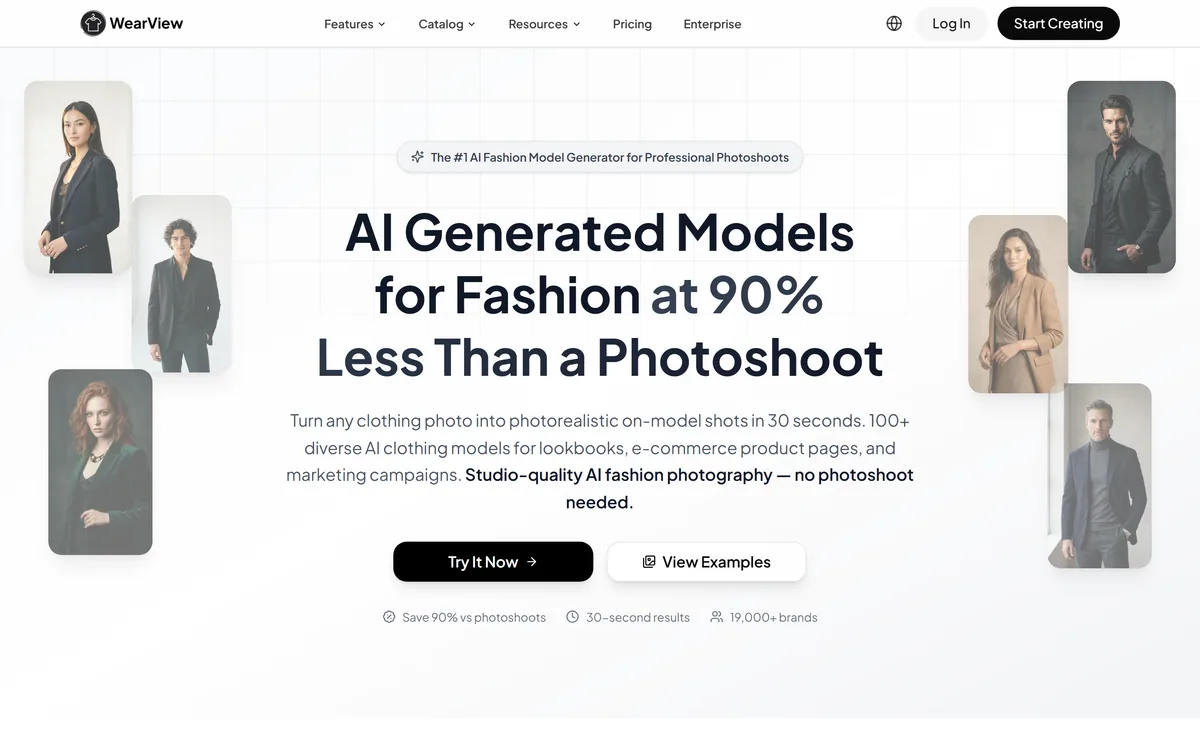
WearView generates on-model fashion photography from a single garment image, offering 100-plus AI models with control over ethnicity, age and pose, plus virtual try-on, ghost mannequin removal, model swapping and fashion video, serving a stated 19,000-plus brands.
WearView's homepage, captured 9 September 2026, showing its AI fashion photography positioning.
WearView: What Replaces The Photoshoot
Garment photo to on-model shot in a stated 30 seconds, from flat-lay, hanger or worn.
100-plus AI models with control over ethnicity, age, pose, background and style.
Consistent models across a catalogue, so product pages look like one shoot.
Ghost mannequin removal — the genuinely uncontroversial half of the toolkit.
19,000-plus brands stated, with claimed cost reductions around 90 percent.
WearView: A Garment Photo Becomes A Model Shot
The proposition is stated without ambiguity: AI generated models for fashion, turning any clothing photo into photorealistic on-model shots in 30 seconds, with studio-quality results and no photoshoot needed.
The three-step flow is upload a garment photo, pick a model, download the images.
The economic pressure behind this is real and worth acknowledging before anything else. Photographing a clothing range properly means a studio, a photographer, a stylist, models, hair and makeup, and a day of everyone's time — repeated every season. For a small brand with two hundred items, that cost is genuinely prohibitive, and the alternative has historically been flat-lay photography that converts poorly.
A shopper cannot tell how a garment hangs from a picture of it lying on a floor.
So the demand is not manufactured. Small brands were priced out of the imagery that sells clothes, and this closes that gap. The nine listed features range from the completely unobjectionable to the questions this review has to raise, and separating them is the useful thing to do.
Small brands were priced out of the imagery that sells clothes. A shopper cannot tell how a garment hangs from a picture of it lying on a floor.
Ghost Mannequins And The Uncontroversial Half
Several features here are ordinary image editing that has been done by retouchers for decades, and it is worth naming them clearly so the criticism that follows lands only where it should.
Ghost mannequin removal is the clearest example. A garment is photographed on a mannequin to hold its shape, and the mannequin is then edited out so the clothing appears to float with its structure intact. It is a standard ecommerce technique, it depicts the actual garment, and automating it displaces outsourced retouching rather than anything else.
Background replacement, resizing for different platforms and consistency editing sit in the same category.
The virtual try-on feature is more interesting and arguably the most genuinely useful thing on the list, because a shopper who can see a garment on a body closer to their own has better information than one looking at a flat-lay.
Where the questions begin is the generated person: a photorealistic human who does not exist, wearing a garment that was never physically on them, presented as a photograph. That is a different claim about reality, and it deserves its own treatment rather than being bundled with retouching. Product photography tools like Pebblely stay entirely on the object side of that line.
Choosing A Model's Ethnicity From A Menu
The site states it plainly, twice: choose from 100-plus diverse AI fashion models with full control over ethnicity, age and look, and generate unique models from text descriptions with the same controls.
This deserves to be discussed rather than passed over, and it can be discussed without accusing anyone of anything.
The fashion industry has been pressed for years to represent a wider range of bodies, ages and ethnicities in its imagery, and that pressure produced a real outcome: more diverse models being booked, paid and credited. The representation and the employment moved together, which was the point.
A control that generates a model of any ethnicity separates those two things completely. A brand can display a fully diverse cast on its product pages while booking nobody, paying nobody and crediting nobody — and the imagery is indistinguishable from the version that involved real people.
We are not suggesting the company intends that outcome or that customers use it that way. But it is the predictable consequence of the feature, it has been widely discussed in the industry press, and a brand that markets itself on inclusive representation should decide consciously whether generated diversity is representation or the appearance of it. Portrait tools like Aragon AI raise a milder version of the same question, since there the person depicted is the customer.
Use ghost mannequin and background tools freely — they show the real garment.
Photograph at least one real fit reference per size range.
Decide deliberately whether generated diversity is representation for your brand.
Check your market's rules on disclosing synthetic imagery in advertising.
Watch return rates, which is where fit misrepresentation shows up.
Fit, Drape And What A Shopper Is Promised
This is the commercial risk rather than the ethical one, and it is the reason to be careful even if none of the preceding section concerns you.
An on-model photograph makes an implicit promise: this is how the garment sits on a body. That is the information a shopper is actually buying with their click — how the shoulder falls, where the hem lands, whether the fabric drapes or holds structure, how it behaves at the waist.
A generated image depicts a plausible version of that, inferred from the garment photo rather than observed. When the inference is right, nothing is lost. When it is wrong — a fabric rendered as heavier than it is, a fit shown as flattering that in reality pulls — the shopper discovers it on arrival.
Fashion already has the highest return rate in retail, and fit is the dominant reason.
So the interest here is aligned rather than opposed: a brand that misrepresents drape pays for it in returns, refunds and reviews within one season. The site's own claims of higher conversion and order value are plausible against flat-lays; the number to watch alongside them is returns, and nothing on the page mentions it. Photographing one real fit reference per size range is cheap insurance, and it also gives you the ground truth to check generated images against. Photoroom covers the product-image side without making claims about bodies.
Who Is Not Booked When Nobody Is Photographed?
It would be evasive to review this product without stating plainly what it replaces, and the site is direct about it: replace expensive photoshoots, with no studios, no model agencies and no crew.
That sentence names four groups of working people.
A fashion shoot employs a photographer, an assistant, a stylist, hair and makeup artists, and models, most of them freelance and many early in their careers. Ecommerce shoots have been the reliable, unglamorous work that made those careers viable between more prestigious jobs.
This is not an argument that the technology should not exist, and technological displacement of skilled work is neither new nor avoidable by disapproving of it.
It is an argument for being honest in the accounting. A brand saving substantially on visual production is spending less because someone else is earning less, and stating that plainly is better than describing it purely as efficiency. Some brands will decide the trade is right for them, particularly the small ones who were never able to book a shoot at all — that is a genuinely different case from a brand replacing an existing crew. Both are real, and the second deserves to be named rather than folded into the first.
The rest of the toolkit is competent and specific: consistent models across a catalogue, pose control, model swapping, fashion video for short-form platforms, and multilingual support across nine languages.
Using Generated Imagery Responsibly
Generated fashion imagery is fine where it depicts the garment truthfully and disclosed where it might mislead.
This order keeps both sides right.
Use ghost mannequin, background and resizing tools without hesitation.
Photograph one real fit reference per size range as ground truth.
Compare generated drape against that reference before publishing.
Check advertising rules in your markets on synthetic imagery disclosure.
Decide consciously what generated diversity means for your brand.
Track return rates by product, not just conversion.
Should Your Store Use Generated Models?
Generate the image when
You could never afford a photoshoot in the first place.
You need ghost mannequin or background work, not a person.
Your catalogue turns over faster than shoots can keep up.
You have real fit references to check generated drape against.
You will disclose synthetic imagery where your market requires it.
Book the shoot when
Fit accuracy is central to what you sell.
Your brand markets itself on inclusive representation.
You would be replacing a crew rather than affording imagery at all.
Your market requires disclosure you are unwilling to make.
Return rates are already your biggest cost.
WearView: What The Numbers Claim
Category
AI fashion photography and on-model imagery for ecommerce
Input
Any clothing photo — flat-lay, on a hanger or worn
Coverage
Garments, accessories, bags and footwear
Speed
Stated as 30 seconds per result
Model library
Stated as 100-plus, with control over ethnicity, age and style
Consistency
The same model reusable across an entire catalogue
Pose control
Unlimited pose variations from a single garment upload
Nine features
Virtual try-on, product to model, video, model creation, consistent models, pose control, ghost mannequin, mannequin service, model swap
Video
Static product photos turned into model video for short-form platforms
Stated results
90 percent lower production cost, ten times faster, 10 percent higher conversion, 12 percent higher order value
Adoption
Stated as 19,000-plus brands
Languages
Nine, with a published DPA, privacy policy and cookie policy
Key features of WearView
On-model photography from a single garment image
100-plus AI models with demographic controls
Virtual try-on for fit visualisation
Consistent models across a full catalogue
Pose control with unlimited variations
Ghost mannequin removal
Model swapping on existing photos
Fashion video for short-form platforms
Pros & cons
Pros
7
Closes a real gap for brands priced out of photography entirely
Ghost mannequin, background and resizing work is straightforwardly legitimate
Virtual try-on can give shoppers better fit information than a flat-lay
Catalogue consistency makes small brands look established
Last checked . Read from wearview.co in a browser session on the date above, with the screenshot captured at the same time.
Positioned as an AI fashion model generator producing on-model shots in 30 seconds
Input described as any clothing photo — flat-lay, hanger or worn — covering garments, accessories, bags and footwear
Model library stated as 100-plus diverse AI fashion models
Full control stated over ethnicity, age and look, in two separate places
Nine features listed including virtual try-on, ghost mannequin, model swap and pose control
Consistent models offered across an entire catalogue for cohesive product pages
Fashion video generation offered for short-form social platforms
Stated results of 90 percent lower production cost, ten times faster time to market, 10 percent higher conversion and 12 percent higher order value
A separate claim of conversion improvement up to 35 percent on product pages
Adoption stated as 19,000-plus brands and businesses worldwide
Positioning stated as replacing photoshoots with no studios, model agencies or crew
Footer showing a 2026 copyright with privacy policy, terms of use, a data processing agreement and cookie policy, across nine languages
What we could not confirm: how any of the conversion, order value or cost percentages were measured; how accurately generated images represent fabric drape and fit; whether return rates change, which the site does not mention; how the AI model likenesses were created or whether any real people were involved; what disclosure the platform recommends; and pricing. We did not upload a garment or generate an image.
Editor's Verdict
3.2/5
Half of what WearView does is uncontroversial image editing that no one would object to: ghost mannequin removal, background work, resizing for platforms. The other half generates a photorealistic person wearing a garment nobody physically wore, with the model's ethnicity, age and look selected from controls — and that raises two questions the site does not. The first is what a shopper is being shown about fit and drape. The second is what it means to display diversity you did not hire. Neither makes the product illegitimate; both belong in the decision. AInexfinder Editor Score: 3.2/5.
WearView pricing
AInexfinder does not list plan prices or billing details. For current pricing, plans, and trials, visit the official WearView website.
Vendor pricing, credits, and billing policies change over time. Always confirm on the official site before you buy.
Frequently asked questions
What does WearView do?
You upload a clothing photo — flat-lay, hanger or worn — and it generates photorealistic on-model images in a stated 30 seconds, choosing from 100-plus AI models with control over pose, background and style.
Which features are uncontroversial?
Ghost mannequin removal, background replacement and platform resizing. These are standard retouching techniques that depict the actual garment, and automating them displaces outsourced editing rather than anything else.
What is the concern with generated models?
The image makes an implicit promise about how a garment sits on a body, and a generated version infers that rather than observing it. When the inference is wrong, the shopper finds out on arrival.
Why does that matter commercially?
Because fashion has the highest return rate in retail and fit is the dominant reason. A brand that misrepresents drape pays for it in returns, refunds and reviews within a single season.
What about choosing a model's ethnicity?
It separates representation from employment. A brand can display a fully diverse cast while booking, paying and crediting nobody — and the imagery is indistinguishable from the version that involved real people.
Is that an accusation against the company?
No. It is the predictable consequence of the feature, widely discussed in the industry, and something a brand marketing itself on inclusive representation should decide about consciously rather than by default.
Should I disclose that imagery is generated?
Check your markets. Advertising rules on synthetic media vary and are tightening, and the obligation sits with the advertiser rather than the tool. The site offers no guidance on this.
What does it replace?
The site says it directly: no studios, no model agencies, no crew. That names photographers, assistants, stylists, hair and makeup artists and models — mostly freelance, and often early in their careers.
Is there a case where the trade is clearly reasonable?
Yes. A small brand that could never afford a shoot at all is not displacing anyone — it is gaining imagery it never had. That is a genuinely different situation from replacing an existing crew.
How should I use it carefully?
Photograph one real fit reference per size range as ground truth, compare generated drape against it before publishing, and track return rates by product rather than watching conversion alone.
Daniel reviews AI tools the slow way — by actually using them on real projects. His reviews cover what works, what breaks, and who each tool is genuinely a good fit for.
Daniel and the AInexfinder editorial team research WearView using public product information, listing evidence, and (when available) hands-on checks. Scores reflect listing completeness and transparency — not paid placement.
Listings may include affiliate or sponsored placements, which are labeled when present. Editorial scores and cons are not sold. See our affiliate disclosure and review methodology.
Imglarger is a set of focused AI image tools covering enlargement up to eight times, resolution upscaling, generative uncropping, photo enhancement, sharpening and background removal, alongside browser-based editors and format converters. Uploaded and processed images are stated as deleted within six hours.
Remini is a photo and video enhancement app from Bending Spoons offering unblurring, denoising, old-photo restoration, face enhancement, colour correction and upscaling, plus AI-generated professional headshots. It runs on iOS, Android and the web, and states 100 million monthly active users.
Topaz Labs makes professional AI image and video enhancement software, upscaling, sharpening, denoising, restoring, stabilizing and frame interpolation, across desktop, web and mobile, with Emmy-winning technology and a long track record, used by photographers, videographers and finishing pros.
Aiarty Image Enhancer is desktop software from Digiarty that upscales, denoises, deblurs and restores images using several purpose-built AI models. It runs entirely on your own machine with no upload, handles large batches, and reaches 32K output on Windows.
Pet Pic Portraits turns a pet photo into styled artwork — Royal King, Pop Art, Watercolour, Viking, Wizard and more — with an instant preview before ordering. Output is a digital download, a canvas print or framed wall art, and it includes a pet memorial option.