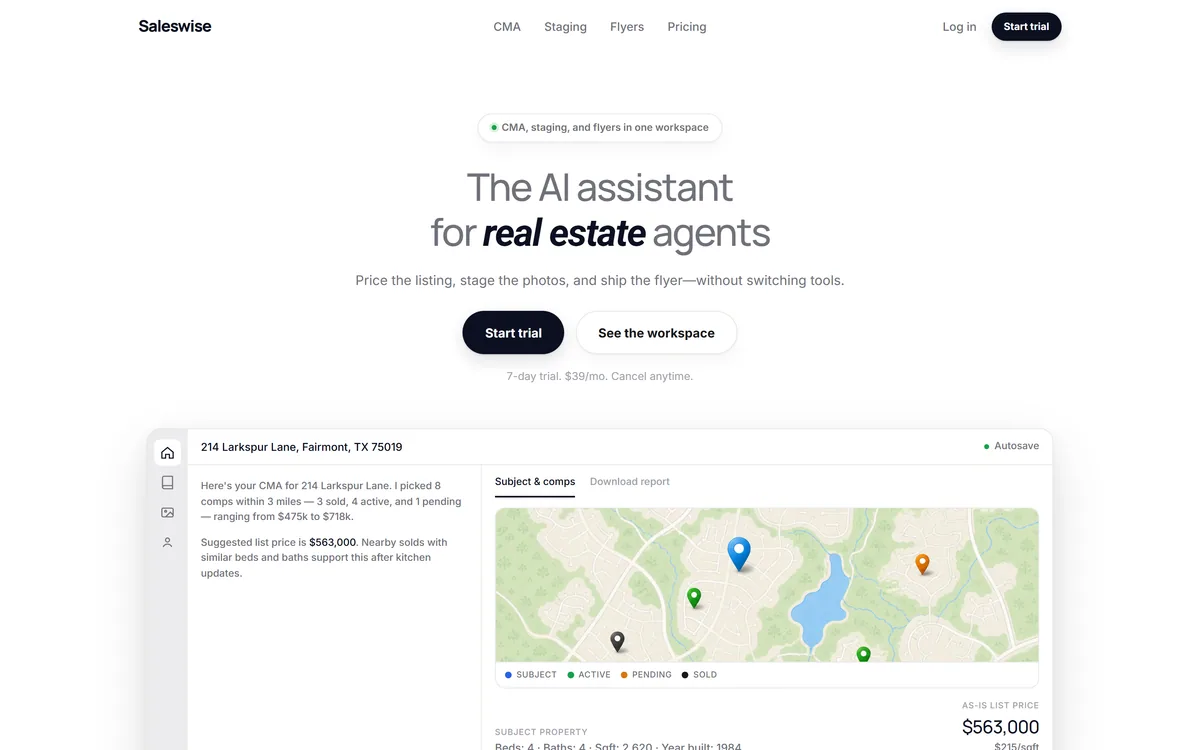
Saleswise is an AI toolkit for real estate agents. It builds comparative market analyses with active and sold comps on an interactive map, virtually stages listing photos, generates marketing flyers, and writes listing descriptions, emails and blog posts — all on a single plan with unlimited usage.
saleswise.ai8 viewsAdded April 26, 202615K visitors
Unlimited usage sounds like a pricing detail. For a tool an agent uses per listing, it is the whole design.
The Agent's Toolkit
Saleswise is a set of AI tools built specifically for real estate agents — comparative market analysis, virtual staging, marketing flyers and listing copy — rather than a general tool an agent adapts.
AI CMA is the anchor feature, pulling active and sold comps onto an interactive map with pricing suggestions and a client-ready report.
Staging and flyers cover the marketing half, with style selection for photos and formats for just-listed, open house, price-reduced and coming-soon.
Pricing is deliberately flat: one plan, unlimited usage, and explicitly no per-report, per-image or per-flyer charges.
A seven-day free trial, cancellable at any time with no long-term contract.
Tools, Terms And Gaps
Category
AI toolkit for real estate agents
Target user
Estate and real estate agents
Named features
AI CMA, Staging, Flyer maker
CMA capability
Active and sold comps on an interactive map, pricing suggestions, client-ready reports
Staging
Virtual staging of listing photos with style selection
Flyer formats
Just-listed, open house, price-reduced and coming-soon
Writing
Listing descriptions, emails and blog posts
Usage policy
Vendor states no per-report, per-image or per-flyer charges
Not published
Comp data sources, CRM integrations, named customers, user counts, or company background
Charging model
A single plan at a monthly recurring rate with unlimited usage, a seven-day free trial, and cancellation at any time with no long-term contract. No prices published here
Is This Worth An Agent's Subscription?
An Agent Should Try It If
You run listing appointments often enough that CMA preparation is real time
Your brokerage does not already supply CMA software you are happy with
You list empty properties where staging would change how they photograph
You would use these tools more if you were not counting per-item costs
You want month-to-month rather than an annual commitment
Not Your Toolkit If
Your brokerage already provides CMA tools included in your fees
You cannot confirm the comp data covers your market properly
Staging is your main need, where specialist tools go deeper
You would present an automated CMA without reviewing the comps it chose
You need it inside your CRM rather than as standalone documents
Unlimited Usage Is A Behavioural Decision, Not A Pricing One
The most interesting thing about Saleswise is the explicit promise of no per-report, no per-image and no per-flyer charges, and it is worth explaining why that matters more than it sounds.
Metered creative tools change how people use them, and rarely for the better. An agent paying per staged image stages the two photos most likely to sell rather than the eight that would present the property properly. An agent paying per CMA runs one for the listing they expect to win, not for the three prospects they are unsure about.
That rationing is invisible and costly, and it is why credit-metered image tools like GoStudio change behaviour too. The whole point of a listing presentation tool is to use it on every prospect, including the ones you might lose, because the marginal cost of trying should be near zero.
Flat pricing removes the calculation entirely. The agent stops thinking about cost per item and starts using the tool as a default part of the workflow, which is the only way this class of software actually produces value.
It is also a commercially confident position. Unlimited AI image generation and unlimited report building carry real compute cost, and a vendor offering it either has efficient infrastructure or expects average usage well below what the promise implies. Both are normal; neither is a problem for the buyer.
For an agent comparing tools, this is the axis that most affects whether you actually get value, and it is usually buried under feature comparisons.
An agent paying per staged image stages two photos instead of eight. The rationing is invisible, and it is exactly what stops these tools from working.
The CMA Is The Feature That Wins Listings
Of the four tools here, the comparative market analysis is the one attached to money, and it deserves the most attention.
A CMA is what an agent brings to a listing appointment. It sets the recommended price, justifies it with comparable sales, and is frequently the document that decides whether the seller signs with you or the agent who came yesterday. Producing one well takes real time — pulling comps, filtering out the ones that are not genuinely comparable, and assembling something a homeowner can follow.
Automating the assembly is a clear win. Pulling active and sold comps onto an interactive map is both faster and more persuasive than a table, because a seller understands their own neighbourhood visually in a way they do not understand a spreadsheet.
The part that needs judgement is comp selection, and this is where any automated CMA needs supervision. Two houses with the same bedroom count on the same street can differ enormously — one backs onto a railway, one was renovated last year, one sold to a family member below market. An algorithm sees square footage; an agent knows the street.
So the honest workflow is that the tool assembles and the agent curates. Presenting an automated CMA to a seller without reviewing which comps it chose is how an agent ends up defending a price they cannot justify when questioned.
The pricing suggestion should be treated the same way — as an input to your recommendation, never as your recommendation.
Virtual Staging Has Rules The Site Does Not Mention
Staging listing photos with selected styles is offered as a straightforward feature, and there is a compliance dimension worth knowing that the product material does not raise.
Virtual staging alters a photograph of a property a buyer may travel to see and may make an offer on. Because of that, disclosure requirements exist in many places — several US state real estate commissions, MLS rules and advertising standards bodies require virtually staged images to be labelled as such, and rules differ by jurisdiction.
The reasoning is obvious once stated. A buyer scrolling listings should not believe a room contains furniture that is not there, and more seriously should not be misled about the condition of a space. Adding furniture to an empty room is generally accepted with disclosure; removing damage, hiding a stain or altering a fitted feature is a different matter and can cross into misrepresentation.
The practical rules are simple enough: label staged images, stage empty rooms rather than editing occupied ones, never alter anything structural or condition-related, and check what your own MLS and state or national body requires.
None of this is a criticism of the feature, which is genuinely useful — an empty room photographs badly and sells slowly, and staging it physically costs a great deal. It is a criticism of a product page that offers the capability without mentioning the obligation.
Check your MLS and state or national body's rules on virtually staged imagery before publishing any.
Label staged photos clearly, even where you are not certain it is required.
Stage empty rooms rather than editing rooms that contain someone's belongings.
Never alter condition — damage, stains, damp, structural features stay as photographed.
Review which comps the CMA selected before you take it to a listing appointment.
One Plan, Unlimited Usage
This site does not publish plan prices. Saleswise's structure is unusually simple and the simplicity is itself the notable part.
There is one plan at a monthly recurring rate, covering all features with unlimited usage, a seven-day free trial, and cancellation at any time with no long-term contract. Explicitly no per-report, per-image or per-flyer charges.
A single tier is a deliberate choice and a good one for this market. Estate agents are individual operators buying their own tools between commissions, and a pricing page requiring them to work out which tier includes staging is friction at exactly the wrong moment.
Month-to-month with no contract also fits how agents actually work. Income is irregular and tied to closings, so an annual commitment is a genuine barrier in a way it is not for a salaried marketing team.
The seven-day trial is short for a tool whose value depends on using it on a real listing appointment. If you take it, line up a genuine prospect first — testing it on a hypothetical property tells you about the interface rather than about the CMA.
The comparison worth running is against your brokerage's existing tools. Many provide CMA software already, and the question is whether Saleswise's version plus staging and flyers justifies a second subscription rather than whether it beats nothing.
What The Site Leaves Unanswered
The public material is thin in several places that matter for a purchase decision, and being direct about them is more useful than assuming.
Where the comp data comes from is not stated. This is the most important gap. A CMA is only as good as its underlying data, and whether that is MLS-sourced, public records, or an aggregator determines both accuracy and coverage in your market. Ask before subscribing.
No CRM integrations are named. Agents live in a CRM, and whether Saleswise pushes into it or produces standalone documents changes the workflow considerably.
No named customers or user counts. The site shows logos suggesting trust by agents at major firms without naming anyone or stating numbers.
No company background. Founding, team and location are not published on the pages reviewed.
For a low-commitment monthly subscription with a trial, none of these are blocking — you can simply try it. But the comp data question is worth asking before the trial rather than after, because it determines whether the CMA is usable in your specific market at all.
Comp data source not stated — ask before subscribing, it determines CMA accuracy
No CRM integrations named, so workflow fit is unknown
Firm logos shown without named customers or user counts
No founding, team or location details published
No stated position on virtual staging disclosure requirements
Key features of Saleswise
AI comparative market analysis with active and sold comps
Interactive map view of comparable properties
Pricing suggestions within the CMA
Client-ready CMA reports
Virtual staging of listing photos with style selection
Flyer maker for just-listed, open house, price-reduced and coming-soon
Listing description generation
Email and blog post writing
Unlimited usage with no per-item charges
Pros & cons
Pros
6
Flat unlimited pricing removes the rationing that stops agents using tools they have paid for
A single plan avoids the tier-comparison friction that suits individual agents badly
Month-to-month with no contract fits how agent income actually works
Interactive comp mapping is more persuasive to a seller than a table of figures
Covering CMA, staging, flyers and copy addresses the listing workflow rather than one task
A free trial with no long-term commitment makes it low risk to test
Cons
6
Comp data sources are not disclosed, which is the most important thing about a CMA tool
No CRM integrations named, so it may produce standalone documents rather than fitting your workflow
No named customers, user counts or company background published
The site says nothing about virtual staging disclosure obligations
Staging is less capable than specialist tools built only for it
A seven-day trial is short for something whose value shows at a real listing appointment
Best For
Individual estate agents buying their own tools
Agents running frequent listing appointments
Small brokerages without an in-house marketing function
Agents listing empty properties that photograph poorly
Anyone who has rationed a metered tool and stopped getting value from it
Saleswise Against Specialist Alternatives
The trade is breadth across an agent's whole workflow against depth in any single part of it.
Most of this category is either agent tooling or the imagery layer underneath it.
Virtual Staging AI — specialist staging if that is your main requirement
REimagine Home — interior restyling with more control over the result
Restb.ai — the property image intelligence platforms and portals license
PhotoRoom — general listing photo cleanup outside property-specific tools
Aiarty Image Enhancer — rescuing poorly shot listing photographs before staging them
Saleswise's Published Detail
Last checked . Read from saleswise.ai during this check, with the screenshot above captured at the same time.
Target audience stated as real estate agents
Named features confirmed on site: AI CMA, Staging and Flyer maker
CMA described as identifying comps with pricing suggestions and client-ready reports, with active and sold comps on an interactive map
Virtual staging of listing photos with style selection stated on site
Flyer formats stated as just-listed, open house, price-reduced and coming-soon
Listing descriptions, emails and blog post generation stated on site
Charging stated as a single monthly subscription with unlimited usage and explicitly no per-report, per-image or per-flyer charges
A seven-day free trial stated, cancellable at any time with no long-term contract
Logos displayed suggesting use by agents at major firms, without named customers or user counts
Comp data sources, CRM integrations and company background were not specified on the pages reviewed
No plan prices published here, in line with this site's pricing policy
The site does not state where comp data is sourced, which is the single most important question for a CMA tool — ask before subscribing, since it determines accuracy and coverage in your market. Virtual staging is subject to disclosure requirements from many MLSs and real estate regulators, and the product material does not address this; label staged images and check your own jurisdiction's rules. Firm logos are displayed without named customers.
Editor's Verdict
3.6/5
The pricing decision is what distinguishes it — a single plan with unlimited CMAs, staging and flyers removes the per-item calculation that makes agents ration tools they have already bought, which changes behaviour more than any feature. It is held back because the site names no comp data source, no CRM integrations and no customers, and because virtual staging carries disclosure rules the product does not address. AInexfinder Editor Score: 3.6/5.
Saleswise pricing
AInexfinder does not list plan prices or billing details. For current pricing, plans, and trials, visit the official Saleswise website.
Vendor pricing, credits, and billing policies change over time. Always confirm on the official site before you buy.
Frequently asked questions
What does Saleswise do for estate agents?
Four things: builds comparative market analyses with active and sold comps on a map, virtually stages listing photos, generates marketing flyers in standard formats, and writes listing descriptions, emails and blog posts.
How much does Saleswise cost?
It is a single monthly plan covering all features with unlimited usage, with a seven-day free trial and cancellation at any time. The vendor states explicitly that there are no per-report, per-image or per-flyer charges.
Where does Saleswise get its comparable sales data?
The site does not say, and it is the first thing to ask. A CMA is only as good as its underlying data, and whether it draws on MLS feeds, public records or an aggregator determines accuracy and coverage in your specific market.
Can I present an AI-generated CMA to a seller?
Review the comps first. An algorithm sees square footage and bedroom counts; it does not know which house backs onto a railway or which sale was to a family member below market. The tool should assemble and you should curate.
Do I have to disclose virtually staged photos?
In many jurisdictions, yes. Several MLSs and real estate regulators require staged images to be labelled, and rules differ by location. Stage empty rooms rather than editing occupied ones, never alter anything condition-related, and check your own body's requirements.
Is Saleswise better than a dedicated staging tool?
For staging alone, no — specialist tools like Virtual Staging AI go deeper. Saleswise's argument is that staging is one of four things you need per listing, and having them on one unlimited plan beats assembling three subscriptions.
Does Saleswise work with my CRM?
No integrations are named on the site, which suggests it may produce standalone documents rather than pushing into your existing system. Since agents work inside a CRM, that is worth confirming during the trial rather than after.
Daniel reviews AI tools the slow way — by actually using them on real projects. His reviews cover what works, what breaks, and who each tool is genuinely a good fit for.
Daniel and the AInexfinder editorial team research Saleswise using public product information, listing evidence, and (when available) hands-on checks. Scores reflect listing completeness and transparency — not paid placement.
Listings may include affiliate or sponsored placements, which are labeled when present. Editorial scores and cons are not sold. See our affiliate disclosure and review methodology.
Decory is a free mobile AI interior design app that redesigns a room from a photo in about 30 seconds across 15+ styles. It also replaces and removes objects, previews flooring and wall colours, and searches furniture. Operated by The AI Journey Inc., with 500,000+ downloads claimed.
Snaptrude is an AI-native workspace for architecture covering site analysis, programming, massing, BIM and presentation in one connected model, converting massing into full BIM in a click and exporting to Revit and Rhino, with SOC 2 compliance and ring-fenced AI queries.
Ark Design AI automates floor plan generation and feasibility studies for multi-family and mixed-use development. It optimises unit mix for density, profitability and living standards, checks against local building code and ordinances for US projects, and produces area tables and feasibility reports. It holds a US patent.
Rodin (Hyper3D) is an AI 3D model generator that turns text prompts or a single image into detailed 3D assets, with 21 styles, generation controls, plugins for Blender, Unity and Unreal, an API and MCP, aimed at game, print, product and avatar creators.
Skybox AI by Blockade Labs generates 360-degree equirectangular panoramas and skyboxes with stated generation times as fast as 15 seconds, 32-bit HDRI export for scene lighting, a Unity plugin, MCP support and direct export to Blender and Unreal.