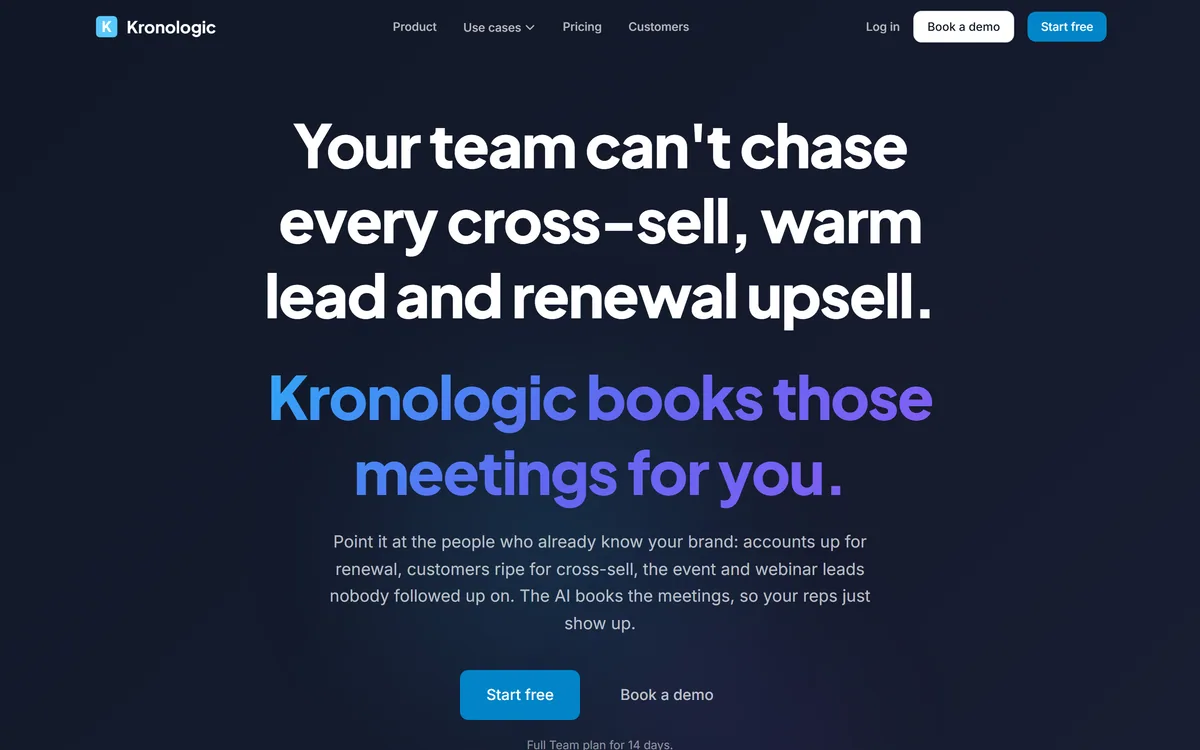
Kronologic books meetings automatically from a list of contacts or a live Salesforce or HubSpot segment. Its AI engages each person, reads replies, negotiates a time in plain language with awareness of your team's calendars, and puts the meeting on the right one.
kronologic.com7 viewsAdded September 4, 20251K visitors
Every revenue team knows where its easiest money is, and every revenue team leaves it on the table. Renewals slipping past, obvious cross-sells nobody followed up, event leads from a conference three months ago.
The reason is not laziness. A rep with a quota chases the deals most likely to close this quarter, and a cross-sell conversation with an existing customer is always less urgent than a live opportunity.
Kronologic's premise is that this work does not need a rep at all until the meeting starts — only the scheduling does, and scheduling is mechanical.
Kronologic: Meetings Booked Automatically
Aimed at people who already know you — renewals, cross-sells, event leads and accounts that went dark.
It negotiates the time, reading replies and landing on a slot with awareness of your team's calendars and preferences.
Live segments from Salesforce or HubSpot, so the target list stays current rather than being a static export.
One admin sets it up and reps just take the meetings, which is the operational argument.
Seven named use cases including account reactivation, website visitors, onboardings and support escalations.
Kronologic's homepage, captured 9 September 2026, showing meetings booked automatically across a week.
Why Do Renewals And Cross-Sells Get Missed?
Kronologic states the problem directly: renewals quietly slipping past, obvious cross-sells nobody followed up on, accounts that went dark, and event leads left untouched.
That diagnosis is accurate and the cause is structural rather than cultural. Reps are measured on new bookings within a period, and existing-customer expansion has a longer, vaguer path to that number.
It also requires a different motion. Cold outbound is a volume game with an accepted failure rate; talking to an existing customer is a relationship conversation where a clumsy approach costs something real.
The result is that expansion work gets scheduled for when things are quiet, and things are never quiet. It is not that anyone decided against it — nobody ever got to it.
Automating the first step is therefore well targeted. The value is not that AI has a better conversation than a rep; it is that a rep was never going to have the conversation at all, and a booked meeting puts a human back in the loop where they add value.
Nobody decided against the cross-sell. Nobody ever got to it, because things are never quiet.
Negotiating A Time In Plain Language
Kronologic describes AI that engages each person, reads the replies, negotiates a time in plain language while aware of your team's availability and preferences, and puts the meeting on the right calendar.
The specific work being automated is worth naming, because it is more annoying than it is difficult: the four-message exchange where two people fail to find a slot.
Scheduling links solved part of this and introduced their own friction. Sending a customer a booking link puts the work on them, and there is a status dimension to it that many people quietly resent.
Negotiating in prose sidesteps that. The exchange reads like a person proposing times, and the recipient replies in a sentence rather than opening a calendar interface.
Reading replies is the harder half, because real responses are messy — not that week, ask me after the board meeting, talk to my colleague instead. Handling those correctly is what separates this from a mail merge, and it is exactly what to test before pointing it at customers.
The Risk Of Automated Outreach At Scale
Kronologic describes working every account in a segment at once, with one admin setting it up and reps taking the meetings that land.
That is the operational benefit and the operational risk in the same sentence, and the risk is different from cold outbound.
A poor cold email costs you a prospect who never knew you. A poor message to an existing customer lands on a relationship that took years to build, arrives in an inbox where your brand has standing, and is read as coming from your company rather than from a tool.
The failure modes are specific and predictable: contacting an account with an open support escalation, proposing an upsell to someone mid-renewal-dispute, or messaging a contact who left the company eight months ago.
All of those are segment problems rather than AI problems. The system does what the list tells it to, which means the quality of the segment — and the exclusions applied to it — is the entire safety mechanism, and it depends on CRM hygiene that most organisations do not have.
Build the exclusion list before the target list — that is the safety mechanism.
Exclude accounts with open support escalations or billing disputes automatically.
Test how the AI handles messy replies before pointing it at customers.
Start with one low-risk segment such as event leads, not renewals.
Check that a rep knows the account context before the meeting starts.
Live Segments Instead Of Static Lists
The site describes pulling a live segment from Salesforce or HubSpot rather than uploading a fixed list of contacts.
That distinction matters more than it sounds, and it is where most automated outreach quietly goes wrong.
A static export begins decaying immediately. People change jobs, accounts change status, deals close, disputes open — and a list exported on Monday is describing a world that no longer exists by the time the third message goes out.
Live segments mean the exclusions keep working. An account that opens a support ticket after the campaign started drops out of it, which is precisely the case that damages relationships when it does not happen.
It also makes the CRM the control surface, which is the right place for it. Rules about who should never be contacted belong where the customer record lives rather than duplicated inside a separate outreach tool — the same architectural argument that applies to attribution platforms like Cometly reading from the same systems.
The same logic applies to the inbound side. Questions arriving from customers should be answered where they land rather than routed into a meeting, which is what support agents such as Chatling handle — and a booking system pointed at people who only wanted a simple answer is friction rather than revenue.
What Booking A Meeting Does Not Fix
A booked meeting is an input, not an outcome, and it is worth being clear about what still has to happen.
The rep still has to be prepared. A meeting that arrives on a calendar without context produces a conversation that starts with the customer explaining their own account back to you, which is worse than no meeting.
The offer still has to make sense. An efficiently booked cross-sell conversation about a product the customer has no use for is an efficiently wasted half hour on both sides.
The conversation itself still needs to be good, which is a skill problem rather than a scheduling one — the space tools like Hyperbound occupy.
And volume is not the goal. Sixteen booked meetings is only better than four if the reps can prepare for sixteen, which is a capacity question worth answering before turning the system on rather than after.
Running Kronologic Without Damaging Accounts
The way automated outreach to customers goes wrong is fast and public: one badly targeted sequence and an account manager is apologising for a week.
This sequence puts the guardrails in before the volume.
Write the exclusion rules first — open escalations, active disputes, recent churn conversations.
Start with event or webinar leads, where the relationship risk is lowest.
Test the AI against messy replies, including deferrals and referrals to colleagues.
Confirm the segment is live from the CRM rather than a static export.
Check rep capacity before scaling, since unprepared meetings are worse than none.
Review the first fifty booked meetings by hand before widening the segments.
Key features of Kronologic
Automated outreach to a contact list or CRM segment
Reply reading and plain-language time negotiation
Calendar-aware booking across a team
Live segments from Salesforce and HubSpot
A plain-language request interface
Coverage of seven named revenue use cases
Parallel working across a whole segment
A team trial period
Pros & cons
Pros
7
Targets the revenue reps structurally never get to, which is a real and recurring gap
Negotiating in prose avoids the friction and status problem of a booking link
Live CRM segments keep exclusions working as account status changes
One admin operating for a whole team is a genuinely low-overhead model
Seven named use cases rather than a vague automation promise
Puts a human back in the loop at the point where humans add value
A trial period stated openly
Cons
7
Automated messages land on relationships you already have, so mistakes cost more
Safety depends entirely on segment quality and CRM hygiene
How ambiguous or negative replies are handled is undescribed
Whether messages appear to come from a rep or a system is unstated
A booked meeting with no rep preparation is worse than no meeting
Volume is only useful up to your team's actual capacity
Pricing and data handling are not covered on the pages we read
Best For
Customer success and account management teams with renewal books
Revenue operations leads with clean CRM segments
Companies sitting on unworked event and webinar leads
Teams whose reps have capacity but not pipeline
Organisations wanting expansion worked without adding headcount
Kronologic Against Other Scheduling Tools
Revenue tools differ by whether they book the meeting, improve it, or measure what it produced.
Chatling — handling inbound questions before they need a meeting
Kronologic: Verified Against The Product Page
Last checked . Read from kronologic.com in a browser session on the date above, with the screenshot captured alongside.
Positioned as AI that books your expansion meetings
Targets described as renewals, cross-sells, accounts that went dark, and event and webinar leads
A three-step flow described: give it contacts, the AI engages and negotiates, the meeting lands on the right calendar
Live segments from Salesforce or HubSpot stated as an alternative to a contact list
The AI described as reading replies and negotiating a time in plain language, aware of team availability and preferences
One admin sets it up and reps take the meetings, per the site
A plain-language request interface shown in the interface mock-up
Use cases listed for renewal upsells, cross-sell, account reactivation, event and webinar leads, website visitors, customer onboardings and support escalations
What we could not confirm: pricing beyond the stated trial; how the AI handles ambiguous or negative replies, which is the capability that matters most; whether messages are sent from a rep's address or a system address, which changes how recipients read them; what exclusion and suppression controls exist; which models generate the outreach; and where contact data is processed and retained. Every figure in the interface shown on the site is illustrative, and we did not connect a CRM.
Editor's Verdict
3.9/5
The insight behind Kronologic is correct and slightly uncomfortable: your easiest revenue is sitting in renewals, cross-sells and event leads that nobody has time to chase, and reps will always prioritise new logos over that work. Automating the outreach and the back-and-forth of finding a time is a well-chosen target, because scheduling is genuinely mechanical. The risk is equally clear — automated messages going to existing customers land on relationships you already have, and a clumsy sequence damages something that took years to build. Segment selection matters more here than in any cold outbound tool. AInexfinder Editor Score: 3.9/5.
Kronologic pricing
AInexfinder does not list plan prices or billing details. For current pricing, plans, and trials, visit the official Kronologic website.
Vendor pricing, credits, and billing policies change over time. Always confirm on the official site before you buy.
Frequently asked questions
What is Kronologic?
Kronologic books meetings automatically from a contact list or a live Salesforce or HubSpot segment. Its AI engages each person, reads the replies, negotiates a time in plain language with awareness of your team's calendars, and places the meeting on the right one.
Why do renewals and cross-sells get missed?
Structurally rather than culturally. Reps are measured on new bookings within a period, and existing-customer expansion has a longer, vaguer path to that number. So it gets scheduled for when things are quiet, and things are never quiet.
What exactly is being automated?
The four-message exchange where two people fail to find a slot — more annoying than difficult. Negotiating in prose also avoids sending a customer a booking link, which puts the work on them and carries a status dimension many people quietly resent.
What is the main risk?
That automated messages land on relationships you already have. A poor cold email costs you a prospect who never knew you; a poor message to an existing customer arrives where your brand has standing and reads as coming from your company rather than a tool.
How do I make it safe?
Build the exclusion list before the target list. Accounts with open support escalations, active billing disputes or recent churn conversations should never receive an expansion message, and those are segment problems rather than AI problems.
Why do live CRM segments matter?
Because a static export decays immediately. People change jobs, deals close, disputes open — a list exported on Monday describes a world that has moved by the third message. Live segments mean an account that opens a ticket mid-campaign drops out of it.
Where should I start?
Event or webinar leads, where the relationship risk is lowest and the leads were already going unworked. Renewals are the highest-value and highest-risk segment, and they are the wrong place to learn how the system handles a tricky reply.
What should I test before going live?
How the AI handles messy replies — not that week, ask me after the board meeting, talk to my colleague instead. Handling those correctly is what separates this from a mail merge, and it is the capability the site describes least.
Is more meetings always better?
Only up to your team's capacity. Sixteen booked meetings beat four if reps can prepare for sixteen; a meeting arriving without context produces a conversation that starts with the customer explaining their own account back to you, which is worse than no meeting.
What does a booked meeting not fix?
Rep preparation, offer relevance and conversation quality. An efficiently booked cross-sell about a product the customer has no use for is an efficiently wasted half hour on both sides — the scheduling was never the reason those conversations failed.
Daniel reviews AI tools the slow way — by actually using them on real projects. His reviews cover what works, what breaks, and who each tool is genuinely a good fit for.
Daniel and the AInexfinder editorial team research Kronologic using public product information, listing evidence, and (when available) hands-on checks. Scores reflect listing completeness and transparency — not paid placement.
Listings may include affiliate or sponsored placements, which are labeled when present. Editorial scores and cons are not sold. See our affiliate disclosure and review methodology.
CrewAI is an enterprise platform to build and run AI agents: a Discovery layer that finds automation opportunities, a no-code canvas and code-first Python API for building role-based multi-agent workflows, and a control plane that adds tracing, RBAC, audit and human-in-the-loop approvals.
Kuse is an AI workspace from Kuse Inc. built around scheduled workflows: describe a recurring task in plain language, connect the apps it touches, and let it run. It also generates websites, documents, presentations and spreadsheets, with several model families available.
Axiom is a browser-automation and web-scraping platform you can build no-code in a Chrome extension, script in your IDE, or drive agentically through Claude and MCP, running on cloud browsers or your own machine for scrapers, form-fillers, monitors and scheduled workflows.
Formless by Typeform is a conversational AI form builder. Trained on your own data, it asks questions in natural language and answers the respondent's questions back, adapts its path without branching logic, and supports over 120 languages.
Browser Use is an open-source project (117k GitHub stars, MIT) offering AI agents that complete web tasks and a simple remote browser infrastructure for your own agents, benchmark-led, pay-as-you-go, with MCP, form-filling and login automation, usable in the cloud or self-hosted.
Zapier's AI layer adds agents and MCP tool access on top of its automation platform, connecting more than 9,000 apps with governed access so teams can mix AI decisions with deterministic rules under central oversight.